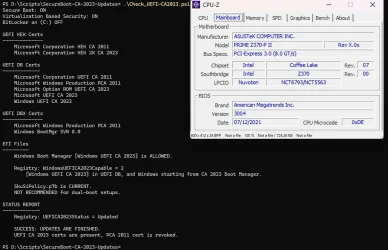
Why won't the May 2026 MCT media boot after clearing and reinstalling default secure boot keys on the Z390 motherboard? When I try to boot from this USB it goes back to the UEFI BIOS screen and won't boot. I had to switch Secure Boot mode to Other OS instead of Windows UEFI before I can clean install Windows. Also if I clear and reinstall the default Secure Boot keys from the BIOS I can no longer boot into Windows due to red Secure Boot Violation error unless I switch Secure Boot mode to Other OS and by doing this it also asks for the Bitlocker Recovery Key which is only stored in the Microsoft Account which is protected by two step verification which requires another device. The motherboard was made in 2018 and doesn't include the CA 2023 keys and ASUS still has not receive a BIOS update with the CA 2023 keys preinstalled.
- Windows Build/Version
- 26200.8457
My Computer
At a glance
Windows 11 ProIntel Core i9 9900K 3.8GHz16GB DDR4 2666MHzNVIDIA RTX 2060
- OS
- Windows 11 Pro
- Computer type
- PC/Desktop
- Manufacturer/Model
- Custom Built
- CPU
- Intel Core i9 9900K 3.8GHz
- Motherboard
- ASUS Z390 Maximus XI Hero Wi-Fi
- Memory
- 16GB DDR4 2666MHz
- Graphics Card(s)
- NVIDIA RTX 2060
- Sound Card
- Realtek Onboard
- Monitor(s) Displays
- Acer XF243Y M3
- Screen Resolution
- 1920x1080
- Hard Drives
- Samsung 970 EVO Plus 2TB
- PSU
- 850W
- Case
- Cooler Master HAF-932
- Cooling
- Air
- Keyboard
- Razer DeathStalker V2 Pro
- Mouse
- Razer Cobra Pro
- Internet Speed
- Gigabit
- Browser
- Microsoft Edge
- Antivirus
- Windows Security