Solved Media Player does not show preview on seek bar


idahosurge

Well-known member
Member
Local time
1:36 PM
Posts
53
OS
Windows 11
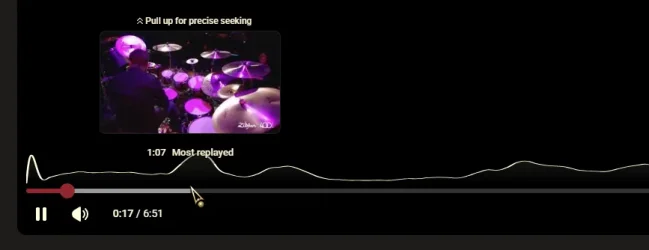
You know how you hover your mouse along the bottom of the seek bar and as you move along the seek bar you get a preview of the content at that location. Youtube videos have the same thing.

Well Window 11 Media Player does not show the preview as you move the cursor along the seek bar. I see no way to enable this through some setting. The settings menu in Media Player has no setting for this.

I am pretty sure this worked at some point in time, I know it worked on my old Windows 10 7820X system that I retired in March.

How do I get Windows 11 Media Player to show a preview of the content as I move the cursor along the seek bar?
 

My Computer

System One

  • OS
    Windows 11
    Computer type
    PC/Desktop
    Manufacturer/Model
    Custom
    CPU
    9800X3D
    Motherboard
    Asus Crosshair X870E Hero
    Memory
    GSkill Flare DDR5 64GB @ 30-40-40-96 @ 6000 MHz
    Graphics Card(s)
    Asus TUF OC Edition RTX 5080
    Monitor(s) Displays
    Samsung Odyessy G9 49" DQHD (VA Panel)
    Screen Resolution
    5120 * 1440
    Hard Drives
    Samsung 990Pro M.2 2280
    PSU
    Corsair HX 1000i
    Case
    Fractal Design Meshify 2XL
    Cooling
    Thermalright Peerless Assassin 140 Black
    Keyboard
    Corsair K100RGB
    Mouse
    Logitech G703
    Internet Speed
    1 GB
    Browser
    Firefox
    Antivirus
    ESET NOD32

My Computers

System One System Two

  • OS
    Windows 11 Enterprise 25H2 26200 7462
    Computer type
    PC/Desktop
    Manufacturer/Model
    Custom Build
    CPU
    Intel XEON E5-2699 v3
    Motherboard
    ASUS X99-A
    Memory
    64GB Teamgroup UD4-3600
    Graphics Card(s)
    NVIDIA GeForce GTX 1080 Ti
    Sound Card
    Integrated
    Monitor(s) Displays
    ACER X34 Predator
    Screen Resolution
    3440 x 1440
    Hard Drives
    Crucial CT1000P 3P SSD8 1TB
    Crucial CT1000 BX500 SSD 1TB
    PSU
    GameMax Pro
    Case
    Fractal Design
    Cooling
    Corsair H110iGT + 6 140mm Fans
    Keyboard
    Corsair K4
    Mouse
    G-Skill G502
    Internet Speed
    300MBs
    Browser
    Chrome
    Antivirus
    OEM
    Other Info
    ASUS RT-AC87U Router
  • Operating System
    25H2 26200.5074
    Computer type
    Laptop
    Manufacturer/Model
    ASUS X555LA
    Memory
    8GB
    Browser
    Chrome
    Antivirus
    OEM

My Computer

System One

  • OS
    Windows 11
    Computer type
    PC/Desktop
    Manufacturer/Model
    Custom
    CPU
    9800X3D
    Motherboard
    Asus Crosshair X870E Hero
    Memory
    GSkill Flare DDR5 64GB @ 30-40-40-96 @ 6000 MHz
    Graphics Card(s)
    Asus TUF OC Edition RTX 5080
    Monitor(s) Displays
    Samsung Odyessy G9 49" DQHD (VA Panel)
    Screen Resolution
    5120 * 1440
    Hard Drives
    Samsung 990Pro M.2 2280
    PSU
    Corsair HX 1000i
    Case
    Fractal Design Meshify 2XL
    Cooling
    Thermalright Peerless Assassin 140 Black
    Keyboard
    Corsair K100RGB
    Mouse
    Logitech G703
    Internet Speed
    1 GB
    Browser
    Firefox
    Antivirus
    ESET NOD32
How do I get Windows 11 Media Player to show a preview of the content as I move the cursor along the seek bar?
Which Media Player are you referring to? What type of playing content? Can you post a screenshot?
 

My Computers

System One System Two

  • OS
    Windows 11 Pro
    Computer type
    PC/Desktop
    Manufacturer/Model
    ASUS ROG Strix
  • Operating System
    Windows 11 Pro
    Computer type
    Laptop
    Manufacturer/Model
    ASUS VivoBook
Window 11 Media Player does not show the preview as you move the cursor along the seek bar. I am pretty sure this worked at some point in time...
I've never seen any Windows Media Player function in that manner!
 

My Computers

System One System Two

  • OS
    Windows 11 Pro
    Computer type
    PC/Desktop
    Manufacturer/Model
    ASUS ROG Strix
  • Operating System
    Windows 11 Pro
    Computer type
    Laptop
    Manufacturer/Model
    ASUS VivoBook

My Computers

System One System Two

  • OS
    Windows 11 Pro 25H2
    Computer type
    PC/Desktop
    Manufacturer/Model
    Dell Optiplex 7080
    CPU
    i9-10900 10 core 20 threads
    Motherboard
    DELL 0J37VM
    Memory
    32 gb
    Graphics Card(s)
    none-Intel UHD Graphics 630
    Sound Card
    Integrated Realtek
    Monitor(s) Displays
    Benq 27
    Screen Resolution
    2560x1440
    Hard Drives
    2x1tb Solidigm m.2 nvme /External drives 512gb Samsung m.2 sata+2tb Kingston m2.nvme
    PSU
    500w
    Case
    MT
    Cooling
    Dell Premium
    Keyboard
    Logitech wired
    Mouse
    Logitech wireless
    Internet Speed
    so slow I'm too embarrassed to tell
    Browser
    #1 Edge #2 Firefox
    Antivirus
    Defender+MWB Premium
  • Operating System
    Windows 11 Pro 24H2 26200.8457
    Computer type
    PC/Desktop
    Manufacturer/Model
    Beelink Mini PC SER5
    CPU
    AMD Ryzen 7 6800U
    Memory
    32 gb
    Graphics card(s)
    integrated
    Sound Card
    integrated
    Monitor(s) Displays
    Benq 27
    Screen Resolution
    2560x1440
    Hard Drives
    1TB Crucial nvme
    Keyboard
    Logitech wired
    Mouse
    Logitech wireless
    Internet Speed
    still too embarrassed to tell
    Browser
    Firefox
    Antivirus
    Defender
    Other Info
    System 3 is non compliant Dell 9020 i7-4770/24gb ram Win11 PRO 26200.8457
I don't think I've ever seen any app based player show a seek preview, the way the OP is describing!

11684.webp
 

My Computers

System One System Two

  • OS
    Windows 11 Pro
    Computer type
    PC/Desktop
    Manufacturer/Model
    ASUS ROG Strix
  • Operating System
    Windows 11 Pro
    Computer type
    Laptop
    Manufacturer/Model
    ASUS VivoBook
I don't think I've ever seen any app based player show a seek preview, the way the OP is describing!

View attachment 158033

I do believe you are absolutely 100% correct. I had PotPlayer installed on my old system and installed on this new one, but have not used it. Just tried it and the preview is there.
 

My Computer

System One

  • OS
    Windows 11
    Computer type
    PC/Desktop
    Manufacturer/Model
    Custom
    CPU
    9800X3D
    Motherboard
    Asus Crosshair X870E Hero
    Memory
    GSkill Flare DDR5 64GB @ 30-40-40-96 @ 6000 MHz
    Graphics Card(s)
    Asus TUF OC Edition RTX 5080
    Monitor(s) Displays
    Samsung Odyessy G9 49" DQHD (VA Panel)
    Screen Resolution
    5120 * 1440
    Hard Drives
    Samsung 990Pro M.2 2280
    PSU
    Corsair HX 1000i
    Case
    Fractal Design Meshify 2XL
    Cooling
    Thermalright Peerless Assassin 140 Black
    Keyboard
    Corsair K100RGB
    Mouse
    Logitech G703
    Internet Speed
    1 GB
    Browser
    Firefox
    Antivirus
    ESET NOD32

Latest Support Threads

Back
Top Bottom