- Local time
- 7:16 AM
- Posts
- 58
- OS
- Windows 11
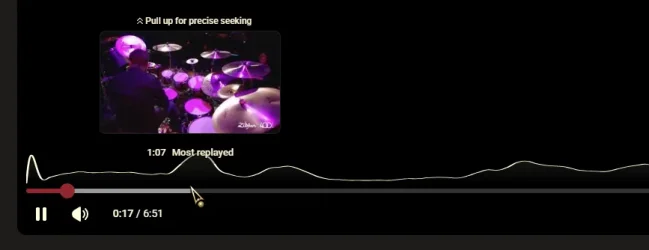
You know how you hover your mouse along the bottom of the seek bar and as you move along the seek bar you get a preview of the content at that location. Youtube videos have the same thing.
Well Window 11 Media Player does not show the preview as you move the cursor along the seek bar. I see no way to enable this through some setting. The settings menu in Media Player has no setting for this.
I am pretty sure this worked at some point in time, I know it worked on my old Windows 10 7820X system that I retired in March.
How do I get Windows 11 Media Player to show a preview of the content as I move the cursor along the seek bar?
Well Window 11 Media Player does not show the preview as you move the cursor along the seek bar. I see no way to enable this through some setting. The settings menu in Media Player has no setting for this.
I am pretty sure this worked at some point in time, I know it worked on my old Windows 10 7820X system that I retired in March.
How do I get Windows 11 Media Player to show a preview of the content as I move the cursor along the seek bar?
My Computer
At a glance
Windows 119800X3DGSkill Flare DDR5 64GB @ 30-40-40-96 @ 6000 MHzAsus TUF OC Edition RTX 5080
- OS
- Windows 11
- Computer type
- PC/Desktop
- Manufacturer/Model
- Custom
- CPU
- 9800X3D
- Motherboard
- Asus Crosshair X870E Hero
- Memory
- GSkill Flare DDR5 64GB @ 30-40-40-96 @ 6000 MHz
- Graphics Card(s)
- Asus TUF OC Edition RTX 5080
- Monitor(s) Displays
- Samsung Odyessy G9 49" DQHD (VA Panel)
- Screen Resolution
- 5120 * 1440
- Hard Drives
- Samsung 990Pro M.2 2280
- PSU
- Corsair HX 1000i
- Case
- Fractal Design Meshify 2XL
- Cooling
- Thermalright Peerless Assassin 140 Black
- Keyboard
- Corsair K100RGB
- Mouse
- Logitech G703
- Internet Speed
- 1 GB
- Browser
- Firefox
- Antivirus
- ESET NOD32