Media Player Malfunction


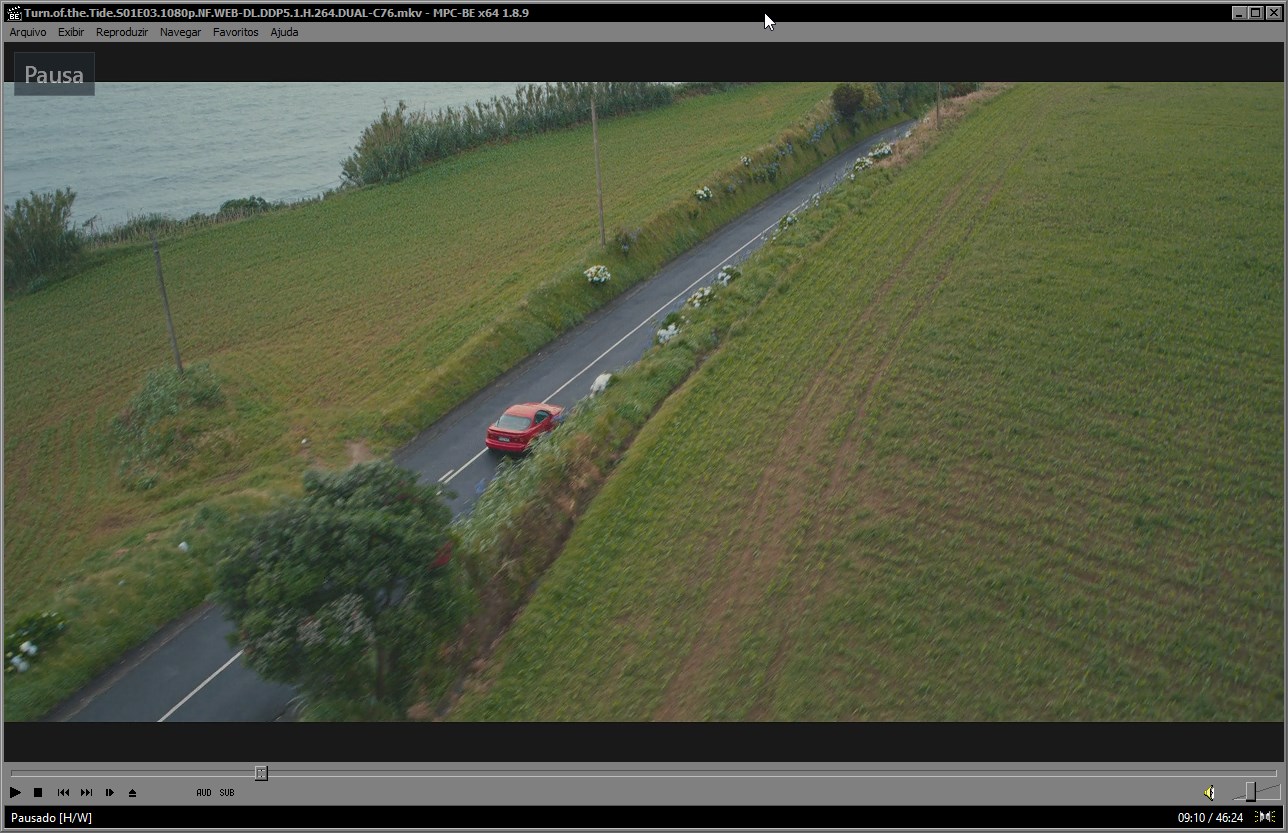
I'll stick with MPC, where all capabilities are resident within the program!!! Far less p-i-t-a!!!
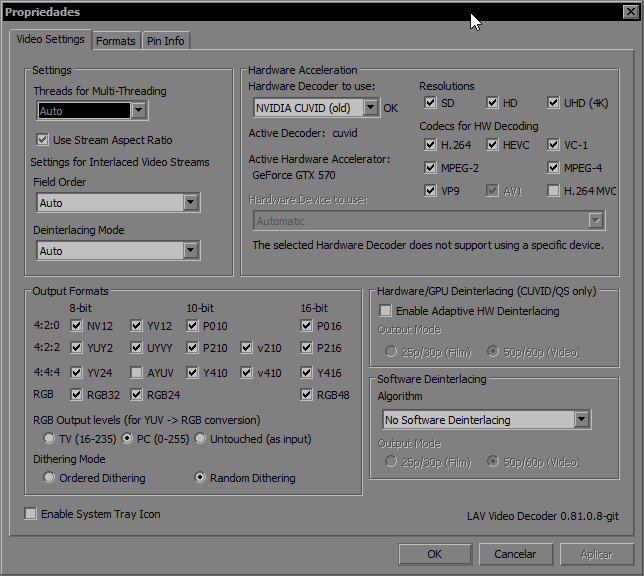
or mpc-be is good too, im using lav filter for decoding with gpu cuvid very low power usage

N9i0z6.png


0DwyyZ.jpg
 

My Computer

System One

  • OS
    Windows 11 Iot Enterprise 21h2 22000.3260
    Computer type
    PC/Desktop
    Manufacturer/Model
    Asus
    CPU
    xeon E5-2697v2
    Motherboard
    rampage iv extreme
    Memory
    32gb 8x4gb ddr3 1333 mhz
    Graphics Card(s)
    gtx 570 poit of view
    Sound Card
    realtek HD (ALC898)
    Monitor(s) Displays
    samsung b2030
    Screen Resolution
    1600x900
    Hard Drives
    2tb hd 5400 rpm
    3tb hd 5400 rpm
    1tb nvme pcie 3.0
    PSU
    hx850w
    Keyboard
    mtek
    Internet Speed
    500/250 gpon
    Browser
    r3dfox 146.0
    Antivirus
    none
If you use an Nvidia graphics card and use LavFilter with CUDAvid, it uses even less GPU usage to run things, and with that, the GPU heats up a little less and consumes a few watts less too compared to DXVA
 

My Computer

System One

  • OS
    Windows 11 Iot Enterprise 21h2 22000.3260
    Computer type
    PC/Desktop
    Manufacturer/Model
    Asus
    CPU
    xeon E5-2697v2
    Motherboard
    rampage iv extreme
    Memory
    32gb 8x4gb ddr3 1333 mhz
    Graphics Card(s)
    gtx 570 poit of view
    Sound Card
    realtek HD (ALC898)
    Monitor(s) Displays
    samsung b2030
    Screen Resolution
    1600x900
    Hard Drives
    2tb hd 5400 rpm
    3tb hd 5400 rpm
    1tb nvme pcie 3.0
    PSU
    hx850w
    Keyboard
    mtek
    Internet Speed
    500/250 gpon
    Browser
    r3dfox 146.0
    Antivirus
    none
CUVID if for old nVidia cards. For modern cards use DVXA2 either native or copy-back. Also I have a bug that some MP4 videos with AVC video compression look washed out when playing using MadVR, so I switched to MPC Video Rendered which is fine.

PS: If DVXA2 fails to properly detect your nVidia card and LAV video decoder uses software decoding instead, replace your Windows Update graphics drivers with official nVidia graphics drivers and it will work properly again. I have seen that before when WU updated my perfectly working graphics drivers without asking. CUVID should also work, but it cannot decode newer formats like HEVC and AV1 (if supported by your card).
 

My Computers

System One System Two

  • OS
    Windows 11 Pro 23H2 (5699), 25H2 (8655)
    Computer type
    Laptop
    Manufacturer/Model
    Acer Extensa 5630EZ
    CPU
    Mobile DualCore Intel Core 2 Duo T7250, 2000 MHz
    Motherboard
    Acer Extensa 5630
    Memory
    4GB
    Graphics Card(s)
    Mobile Intel(R) GMA 4500M (Mobile 4 series)
    Sound Card
    Realtek ALC268 @ Intel 82801IB ICH9 - High Definition Audio Controller
    Monitor(s) Displays
    1
    Screen Resolution
    1280x800
    Hard Drives
    Samsung SSD 850 EVO 250GB SATA Device (250 GB, SATA-III)
    Internet Speed
    VDSL 50 Mbps
    Browser
    MICROSOFT EDGE
    Antivirus
    WINDOWS DEFENDER
    Other Info
    Legacy MBR installation, no TPM, no Secure Boot, no WDDM 2.0 graphics drivers, no SSE4.2, cannot get more unsupported ;) This is only my test laptop. I had installed Windows 11 here before upgrading my main PC. For my main PC I use everyday see my 2nd system specs.
  • Operating System
    Windows 11 Pro v25H2 (build 26200.8655)
    Computer type
    PC/Desktop
    Manufacturer/Model
    Custom-built PC
    CPU
    Intel Core-i7 3770 3.40GHz s1155 (3rd generation)
    Motherboard
    Asus P8H61 s1155 ATX
    Memory
    2x Kingston Hyper-X Blu 8GB DDR3-1600
    Graphics card(s)
    GIGABYTE GeForce RTX 3050 WINDFORCE OC V2 6GB (GV-N3050WF2OCV2-6GD)
    Sound Card
    Realtek HD audio (ALC887)
    Monitor(s) Displays
    Sony Bravia KDL-19L4000 19" LCD TV via VGA
    Screen Resolution
    1440x900 32-bit 60Hz
    Hard Drives
    WD Blue SA510 2.5 1000GB SSD as system disk, Western Digital Caviar Purple 4TB SATA III (WD40PURZ) as second
    PSU
    Thermaltake Litepower RGB 550W Full Wired
    Case
    SUPERCASE MIDI-TOWER
    Cooling
    Deepcool Gamma Archer CPU cooler, 1x 8cm fan at the back
    Keyboard
    Mitsumi 101-key PS/2
    Mouse
    Sunnyline OptiEye PS/2
    Internet Speed
    100Mbps
    Browser
    Microsoft Edge, Mozilla Firefox
    Antivirus
    Microsoft Windows Defender
    Other Info
    Legacy BIOS (MBR) installation, no TPM, no Secure Boot, WDDM 3.0 graphics drivers, WEI score 7.4
I tried just now to download the K-Lite codec package -- from the "Codecs Guide" website which is supposed to be their creator -- and my antivirus program removed it, saying it contained something dangerous!
 

My Computer

System One

  • OS
    Windows 11

My Computer

System One

  • OS
    Windows 11 Iot Enterprise 21h2 22000.3260
    Computer type
    PC/Desktop
    Manufacturer/Model
    Asus
    CPU
    xeon E5-2697v2
    Motherboard
    rampage iv extreme
    Memory
    32gb 8x4gb ddr3 1333 mhz
    Graphics Card(s)
    gtx 570 poit of view
    Sound Card
    realtek HD (ALC898)
    Monitor(s) Displays
    samsung b2030
    Screen Resolution
    1600x900
    Hard Drives
    2tb hd 5400 rpm
    3tb hd 5400 rpm
    1tb nvme pcie 3.0
    PSU
    hx850w
    Keyboard
    mtek
    Internet Speed
    500/250 gpon
    Browser
    r3dfox 146.0
    Antivirus
    none

My Computer

System One

  • OS
    Windows11 Pro 25H2
    Computer type
    PC/Desktop
    Manufacturer/Model
    Asus
    CPU
    i7
    Motherboard
    z97k
    Memory
    32GB
    Graphics Card(s)
    nVidia
    Sound Card
    Realtek
    Hard Drives
    3
    Cooling
    air
    Browser
    Edge
    Antivirus
    ESET
Yes, it contains most codecs. After installing that Microsoft Media Player and other players should play almost everything. K-Lite Codecs is a package containing LAV filters, MPC-HC player and many more.
 

My Computers

System One System Two

  • OS
    Windows 11 Pro 23H2 (5699), 25H2 (8655)
    Computer type
    Laptop
    Manufacturer/Model
    Acer Extensa 5630EZ
    CPU
    Mobile DualCore Intel Core 2 Duo T7250, 2000 MHz
    Motherboard
    Acer Extensa 5630
    Memory
    4GB
    Graphics Card(s)
    Mobile Intel(R) GMA 4500M (Mobile 4 series)
    Sound Card
    Realtek ALC268 @ Intel 82801IB ICH9 - High Definition Audio Controller
    Monitor(s) Displays
    1
    Screen Resolution
    1280x800
    Hard Drives
    Samsung SSD 850 EVO 250GB SATA Device (250 GB, SATA-III)
    Internet Speed
    VDSL 50 Mbps
    Browser
    MICROSOFT EDGE
    Antivirus
    WINDOWS DEFENDER
    Other Info
    Legacy MBR installation, no TPM, no Secure Boot, no WDDM 2.0 graphics drivers, no SSE4.2, cannot get more unsupported ;) This is only my test laptop. I had installed Windows 11 here before upgrading my main PC. For my main PC I use everyday see my 2nd system specs.
  • Operating System
    Windows 11 Pro v25H2 (build 26200.8655)
    Computer type
    PC/Desktop
    Manufacturer/Model
    Custom-built PC
    CPU
    Intel Core-i7 3770 3.40GHz s1155 (3rd generation)
    Motherboard
    Asus P8H61 s1155 ATX
    Memory
    2x Kingston Hyper-X Blu 8GB DDR3-1600
    Graphics card(s)
    GIGABYTE GeForce RTX 3050 WINDFORCE OC V2 6GB (GV-N3050WF2OCV2-6GD)
    Sound Card
    Realtek HD audio (ALC887)
    Monitor(s) Displays
    Sony Bravia KDL-19L4000 19" LCD TV via VGA
    Screen Resolution
    1440x900 32-bit 60Hz
    Hard Drives
    WD Blue SA510 2.5 1000GB SSD as system disk, Western Digital Caviar Purple 4TB SATA III (WD40PURZ) as second
    PSU
    Thermaltake Litepower RGB 550W Full Wired
    Case
    SUPERCASE MIDI-TOWER
    Cooling
    Deepcool Gamma Archer CPU cooler, 1x 8cm fan at the back
    Keyboard
    Mitsumi 101-key PS/2
    Mouse
    Sunnyline OptiEye PS/2
    Internet Speed
    100Mbps
    Browser
    Microsoft Edge, Mozilla Firefox
    Antivirus
    Microsoft Windows Defender
    Other Info
    Legacy BIOS (MBR) installation, no TPM, no Secure Boot, WDDM 3.0 graphics drivers, WEI score 7.4
i wouldnt be using the wmp, but if you're set on that being your media player... klite is safe. not sure why the site is flagged but i have always gotten it from majorgeek when i did get it..


My Computer

System One

  • OS
    Windows 11 Pro
I downloaded and installed the K-Lite Mega from Major Geeks. But my Media Player is still giving the same message -- "the mp4 file can't be opened because it uses unsupported encoding settings". Is there something else that I still have to do?
 

My Computer

System One

  • OS
    Windows 11
shouldnt be. i've never used klite on the new wmp so if there is a specific setting in the new wmp that needs changed, i dont know offhand... someone in this thread may be able to tell you.
 

My Computer

System One

  • OS
    Windows 11 Pro
the mp4 file can't be opened because it uses unsupported encoding settings
What's the origin of the file? What are the encoding settings/tool? Can you view the metadata?
 

My Computers

System One System Two

  • OS
    Windows 11 Pro
    Computer type
    PC/Desktop
    Manufacturer/Model
    ASUS ROG Strix
  • Operating System
    Windows 11 Pro
    Computer type
    Laptop
    Manufacturer/Model
    ASUS VivoBook
They're videos downloaded from YouTube, using the "4K Video Downloader Plus" software, and saved in mp4 format. I tried saving one in "MKV" format and the same thing happens.

I can't find anything about encoding settings or metadata. Should that be on their "properties" tabs, or should I look somewhere else?
 

My Computer

System One

  • OS
    Windows 11

My Computers

System One System Two

  • OS
    Windows 11 Pro
    Computer type
    PC/Desktop
    Manufacturer/Model
    ASUS ROG Strix
  • Operating System
    Windows 11 Pro
    Computer type
    Laptop
    Manufacturer/Model
    ASUS VivoBook
If I were you, I'd install MPC or VLC and see if the files play..., if they do, ditch WMP!
vlc will. vlc will play just about anything. if on macos, i'd recommend elmedia (yes, over iina too)
 

My Computer

System One

  • OS
    Windows 11 Pro

My Computers

System One System Two

  • OS
    Windows 11 2xH2 (latest update ... forever anal)
    Computer type
    PC/Desktop
    Manufacturer/Model
    HP Slim S01
    CPU
    Intel i5-12400
    Memory
    8GB
    Graphics Card(s)
    NVIDIA GeForce GT730
    Sound Card
    OOBE
    Monitor(s) Displays
    Acer 32"
    Screen Resolution
    1920x1080
    Hard Drives
    512GB KIOXIA NVMe
    1TB SATA SSD
    PSU
    OOBE
    Case
    OOBE
    Cooling
    OOBE
    Keyboard
    BT
    Mouse
    BT
    Browser
    Brave FFox Chrome Opera
    Antivirus
    KIS
  • Operating System
    Windows 11 Pro 2xH2 (latest update ... 4ever anal)
    Computer type
    Laptop
    Manufacturer/Model
    HP Pavillion 15
    CPU
    i7-1165G7 @ 2.80GHz
    Graphics card(s)
    Intel Iris Xe Graphics
    Hard Drives
    Samsung NVMe 512GB
    + numerous/multiple SSD Type C USB enclosures
    Internet Speed
    NBN FTTN 50
    Browser
    Brave
    Antivirus
    KIS
vlc will play just about anything

As will Daum PotPlayer
potplayer lags WAY more with network feeds.

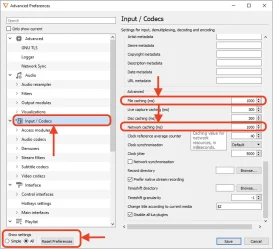
@idgat to reference what i'm referring to, if playing network feeds.. change vlc > tools > preferences > all

1779675157954.webp

set them both between 1500-2000 and you shouldnt encounter any buffer/lag. tried numerous setting configs with pot and it would still lag/buffer at times
 
Last edited:

My Computer

System One

  • OS
    Windows 11 Pro
Hell..., even foobar will play a 'non-playable' MKV with the mpv component!!!

13254.webp
 

My Computers

System One System Two

  • OS
    Windows 11 Pro
    Computer type
    PC/Desktop
    Manufacturer/Model
    ASUS ROG Strix
  • Operating System
    Windows 11 Pro
    Computer type
    Laptop
    Manufacturer/Model
    ASUS VivoBook
If you extracted the LAV filters in a folder, there are three files to register with regsvr32 utility, see text file with instructions. One registers the video codecs, one the audio and the third LAV splitter which identifies the file format and invokes the appropriate codecs.

If you install the K-Lite Codecs it includes Media Info utility. Right-click on the .mp4 file and select Media Info to see its meta data (video codec, audio codec etc). You can save them to a text file which you can copy-paste here for us to diagnose what's going on with it and can't play. It could have the wrong extension, such as .mp4 instead of .mkv MPC-HC player can play it even with wrong extension because it reads the meta data.
 

My Computers

System One System Two

  • OS
    Windows 11 Pro 23H2 (5699), 25H2 (8655)
    Computer type
    Laptop
    Manufacturer/Model
    Acer Extensa 5630EZ
    CPU
    Mobile DualCore Intel Core 2 Duo T7250, 2000 MHz
    Motherboard
    Acer Extensa 5630
    Memory
    4GB
    Graphics Card(s)
    Mobile Intel(R) GMA 4500M (Mobile 4 series)
    Sound Card
    Realtek ALC268 @ Intel 82801IB ICH9 - High Definition Audio Controller
    Monitor(s) Displays
    1
    Screen Resolution
    1280x800
    Hard Drives
    Samsung SSD 850 EVO 250GB SATA Device (250 GB, SATA-III)
    Internet Speed
    VDSL 50 Mbps
    Browser
    MICROSOFT EDGE
    Antivirus
    WINDOWS DEFENDER
    Other Info
    Legacy MBR installation, no TPM, no Secure Boot, no WDDM 2.0 graphics drivers, no SSE4.2, cannot get more unsupported ;) This is only my test laptop. I had installed Windows 11 here before upgrading my main PC. For my main PC I use everyday see my 2nd system specs.
  • Operating System
    Windows 11 Pro v25H2 (build 26200.8655)
    Computer type
    PC/Desktop
    Manufacturer/Model
    Custom-built PC
    CPU
    Intel Core-i7 3770 3.40GHz s1155 (3rd generation)
    Motherboard
    Asus P8H61 s1155 ATX
    Memory
    2x Kingston Hyper-X Blu 8GB DDR3-1600
    Graphics card(s)
    GIGABYTE GeForce RTX 3050 WINDFORCE OC V2 6GB (GV-N3050WF2OCV2-6GD)
    Sound Card
    Realtek HD audio (ALC887)
    Monitor(s) Displays
    Sony Bravia KDL-19L4000 19" LCD TV via VGA
    Screen Resolution
    1440x900 32-bit 60Hz
    Hard Drives
    WD Blue SA510 2.5 1000GB SSD as system disk, Western Digital Caviar Purple 4TB SATA III (WD40PURZ) as second
    PSU
    Thermaltake Litepower RGB 550W Full Wired
    Case
    SUPERCASE MIDI-TOWER
    Cooling
    Deepcool Gamma Archer CPU cooler, 1x 8cm fan at the back
    Keyboard
    Mitsumi 101-key PS/2
    Mouse
    Sunnyline OptiEye PS/2
    Internet Speed
    100Mbps
    Browser
    Microsoft Edge, Mozilla Firefox
    Antivirus
    Microsoft Windows Defender
    Other Info
    Legacy BIOS (MBR) installation, no TPM, no Secure Boot, WDDM 3.0 graphics drivers, WEI score 7.4

Latest Support Threads

Back
Top Bottom