

- Local time
- 4:32 AM
- Posts
- 4,564
- OS
- Windows 11 Pro 24H2 (Build 26100.4770)
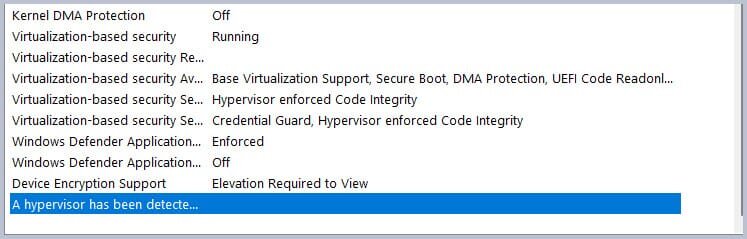
Thanks again neves. The last line in SystemInfo reads:
> "Hyper-V Requirements: A hypervisor has been detected. Features required for Hyper-V will not be displayed."
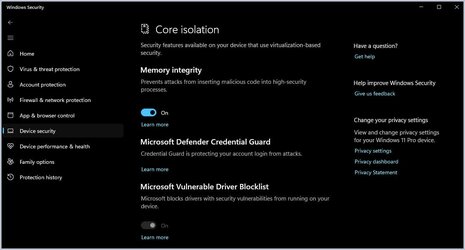
As anything is possible in PCs, please be aware Hyper V should not be affecting the ability to enable Memory Integrity. I have the exact same reading as the OP, and yet Memory Integrity is enabled on my machine.That line is misleading - as in - it can mean a lot of things, such as:
- you have multiple virtualization apps installed - which is kinda like having multiple antivirus solutions installed (it can create conflicts - and thus as a preventive measure - one solution is disabled by default). Which is actually an official statement. ...
As to this...
- Hyper-V and all its features could actually be Missing/Disabled. Which easy to find out - by simply using Windows Search and opening the Windows Features tab - while typing the following: Turn Windows feature Then look for Hyper-V. Both features should be ticked. If Disabled from the BIOS/UEFI Hyper-V Platform feature - should be greyed out. If missing or disabled - you can also use the folowing comands to enabled them - while using windows CMD/Terminal ( with Admin privileges)
You would only need Hyper V if running any Virtual Machines. I myself run no Virtual Machines requiring Hyper V to be enabled, but simply enable it in the BIOS by default. Point... I have the same readings as the OP, yet my Memory Integrity is enabled.
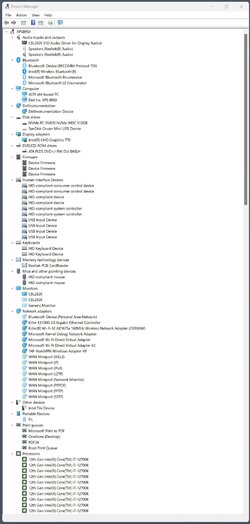
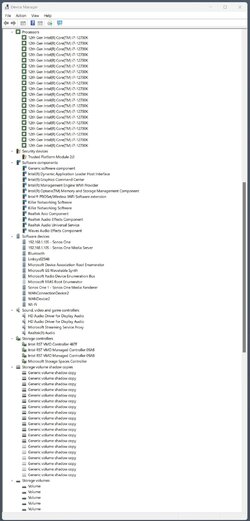
All that said, what I find interesting is the missing faulty driver info (and why I asked to see Device Manager). There should be something there listing the affected driver. The fact that there is nothing there suggests (simply "my guess") the issue may actually be a "missing" driver, and why, I asked to see Device Manager.
Not saying Hyper V isn't the issue - It can be tested by simply disabling Hyper V (Virtualization) in the BIOS. If no change (still can't enable Memory Integrity), I'd move on from that train of thought. On the other hand, if the OP IS running VM software, they might check there.
My two cents.
My Computers
-
At a glance
Windows 11 Pro 24H2 (Build 26100.4770)Intel Core 9 Ultra 285K64G (4x16) DDR5 Corsair RGB Dominator Platinu...Radeon (XFX Mercury) RX 9070XT OC (with Magne...- OS
- Windows 11 Pro 24H2 (Build 26100.4770)
- Computer type
- PC/Desktop
- Manufacturer/Model
- Custom built
- CPU
- Intel Core 9 Ultra 285K
- Motherboard
- Gigabyte Aorus Z890 Xtreme AI Top
- Memory
- 64G (4x16) DDR5 Corsair RGB Dominator Platinum (6400Mhz)
- Graphics Card(s)
- Radeon (XFX Mercury) RX 9070XT OC (with Magnetic Fans)
- Sound Card
- Onboard (DTS:X® Ultra Audio: ESS ES9280A DAC)
- Monitor(s) Displays
- 27-inch Eizo Color Edge - CG2700X
- Screen Resolution
- 3840 x 2160
- Hard Drives
- 4 Samsung NVM 990 Pro drives: 1TB (OS), 2TB, 2 X 4TB.
- PSU
- Seasonic TX-1300 (1300 Watts)
- Case
- Cooler Master H500M
- Cooling
- Corsair Link Titan 280 RX RGB
- Keyboard
- Logitech Craft
- Mouse
- Logitech MX Master 3S
- Internet Speed
- 1TB Download. 512mb Upload
- Browser
- Microsoft Edge Chromium
- Antivirus
- Windows Security
- Other Info
- System used for gaming, photography, music, school.
-
At a glance
Windows 11 Pro 24H2 (Build 26100.4061)Intel Core i9-9900K32gig (4 x 8) Corsair Dominator Platinum DDR4...Radeon XFX Merc 7900XT (20gig)- Operating System
- Windows 11 Pro 24H2 (Build 26100.4061)
- Computer type
- PC/Desktop
- Manufacturer/Model
- Custom built
- CPU
- Intel Core i9-9900K
- Motherboard
- Gigabyte Z390 Aorus Xtreme
- Memory
- 32gig (4 x 8) Corsair Dominator Platinum DDR4 3600Mhz (B-Die)
- Graphics card(s)
- Radeon XFX Merc 7900XT (20gig)
- Sound Card
- Onboard
- Monitor(s) Displays
- 24-Inch NEC PA242W
- Screen Resolution
- 2880 x 1800
- Hard Drives
- 2 X NVME, 1 X SATA SSD
- PSU
- EVGA Super Nova 1000 P2 (1000 Watt)
- Case
- Phantek Enthoo Luxe
- Cooling
- Corsair H115i Elite AIO Cooler
- Keyboard
- Logitech Keys
- Mouse
- Logitech MX Master 3
- Internet Speed
- 1TB Download. 512mb Upload
- Browser
- Microsoft Edge Chromium
- Antivirus
- Windows Security
- Other Info
- Backup System


 on the pile: As reported
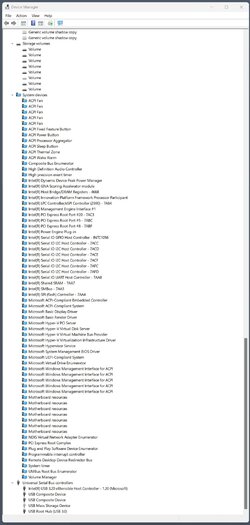


 Stay tuned.






