Microsoft 365 Blog:
As organizations create, collaborate, and retain more content in Microsoft 365, storage needs rarely grow in a perfectly predictable way. IT leaders and admins need a practical way to respond to demand without overprovisioning capacity, disrupting users, or adding unnecessary licensing complexity.
To help you with this, Microsoft 365 SharePoint Storage and Microsoft 365 OneDrive Storage are now in public preview. Based on a pay-as-you-go pricing model, these services make it easier to add additional storage for active SharePoint content and OneDrive accounts when they grow beyond the storage included with your Microsoft 365 subscription.
Scale storage with the needs of your organization
Microsoft 365 SharePoint Storage and OneDrive Storage give your organization more options when your organization exceeds a SharePoint Online tenant’s included quota or a OneDrive account’s licensed quota. Instead of purchasing additional storage through a fixed subscription, these services can help you align storage spending more closely with your organization’s actual demand without changing the end-user experience.Microsoft 365 SharePoint Storage and OneDrive Storage use the Microsoft 365 pay-as-you-go framework. Administrators can connect usage to a Microsoft Azure subscription, monitor consumption, and create budgets and alerts as costs approach defined thresholds. Learn more in the pay-as-you-go services overview and see how to create a budget for pay-as-you-go billing in Microsoft 365.
For Microsoft 365 OneDrive Storage admins can set a limit on how much additional storage individual users can have outside of the SKU entitlement. For example, with an F3 SKU, the entitlement is 2GB. If an admin sets a user to a cap of 20GB, only usage above 2GB is billed, but won’t exceed the 20GB cap. You can learn more about how Admins can set a user-specific limit above licensed quota when PAYG is on in the overview: Change a specific user's OneDrive storage space.
While the tenant is enrolled in Microsoft 365 SharePoint Storage, quota-related email and SharePoint admin center banner notifications are suppressed because the tenant is treated as within quota. Cost-management controls therefore become an important part of your operating model.
Flexible billing across active and archived content
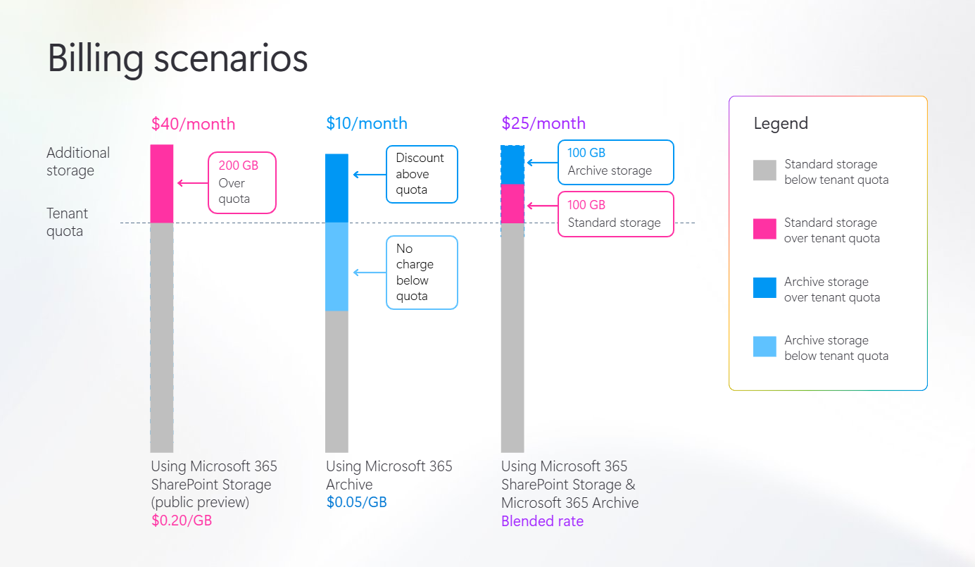
You can combine Microsoft 365 SharePoint Storage with Microsoft 365 Archive to manage your storage and control costs. Microsoft 365 Archive provides long-term, compliant storage for your inactive content, all inside of SharePoint, for up to 75% less than standard storage at list price. (See the Pricing model for Microsoft 365 Archive for more details.) It can also help you improve Copilot results because archiving content removes outdated and redundant content from the Copilot Search index.When SharePoint storage above the tenant quota includes both active SharePoint storage and content managed through Microsoft 365 Archive, billing reflects the lower blended cost across those storage types. This helps organizations combine active collaboration and archive strategies without paying the active-storage rate for archived capacity.
For example, consider a tenant using 200 GB above its quota, with 100 GB in archived storage and 100 GB in active storage. At listed rates of $0.05 per GB for archived storage and $0.20 per GB for active storage, the estimated monthly charge would be $25. This compares to an extra $40 per month for this active storage. Pricing is shown in USD for illustration; review current pay-as-you-go pricing and availability before making purchasing decisions.
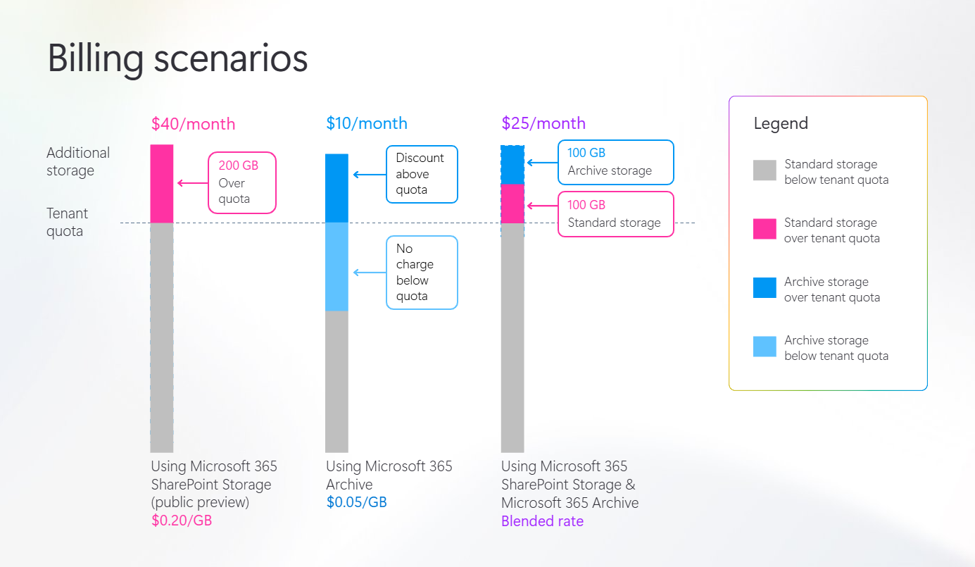
Furthermore, with Microsoft 365 Archive, you only pay for storage when usage exceeds your SharePoint Online license quota. So you can proactively archive files and sites now to prepare for your future growth and to get ready for Copilot for no cost - as long as you stay under your SharePoint Online tenant quota.
Get started with the public preview
Microsoft 365 SharePoint Storage and OneDrive Storage are available in public preview for eligible Microsoft 365 commercial customers. Evaluate your current SharePoint and OneDrive storage trends, identify where flexible capacity can support your organization, and begin planning for pay-as-you-go billing.Learn more about these services and setting them up:
- Microsoft 365 SharePoint Storage
- Microsoft 365 OneDrive Storage
- Microsoft 365 Archive
- Microsoft 365 pay-as-you-go services overview
- Create a budget for pay-as-you-go billing in Microsoft 365
- Pay-as-you-go pricing for document processing for Microsoft 365
Source:
Now in public preview: Microsoft 365 SharePoint Storage and OneDrive Storage | Microsoft Community Hub
Add active SharePoint and OneDrive storage with flexible, pay-as-you-go billing.
 techcommunity.microsoft.com