MICROSOFT CAN'T HELP


Devware3

New member
Local time
3:41 AM
Posts
11
OS
Windows 11 pro
Hello
So I can't create recovery drive. Windows11 pro 25H2.
Ihave had Microsoft on my machine for many hours today trying to fix my problem.
The scary part is that they say they have tried everything and can't assist any further. They suggested I reach out to a windows 11 forum.
They tried everything should of a fresh install which won't work for me as the only problem I have is creating a recovery disk. Windows works otherwise fairly well. Any comments will be appreciated.
 

My Computer

System One

  • OS
    Windows 11 pro
    Computer type
    PC/Desktop
    Manufacturer/Model
    Na
You say Windows is working "fairly well".

Wondering how severe your current problems are?

If you had a recovery USB drive right now, would you use it?
 

My Computer

System One

  • OS
    Windows 11 Pro
    Computer type
    PC/Desktop
    Manufacturer/Model
    Fishmill Special
    CPU
    Intel 265K
    Motherboard
    MSI Pro Z890-A
    Memory
    G Skill DDR5 2 x 16 kit 6000/36
    Graphics Card(s)
    none
    Sound Card
    none
    Monitor(s) Displays
    Dell 2316H
    Screen Resolution
    1600 x 900
    Hard Drives
    WD SN770 NVME 500 GB boot; Intel 660p NVME 2 TB and WD Green 3 TB storage
    PSU
    Be Quiet 13M 750 ATX 3.1
    Case
    Lancool PC-K65
    Cooling
    Noctua U12S
    Keyboard
    Logitech K120 Wired
    Mouse
    Dell MS-116
    Browser
    Chrome
    Antivirus
    Microsoft Defender and Malwarebytes
You say Windows is working "fairly well".

Wondering how severe your current problems are?

If you had a recovery USB drive right now, would you use it?
Thanks for your reply. I guess the answer would be no. I have a few computers running design software so I am creating recovery disks for all machines in the event of any problems which may occur in the future.
 

My Computer

System One

  • OS
    Windows 11 pro
    Computer type
    PC/Desktop
    Manufacturer/Model
    Na
Thanks for your reply. I guess the answer would be no. I have a few computers running design software so I am creating recovery disks for all machines in the event of any problems which may occur in the future.

Have you deliberately rejected all other means of recovery from such problems?
 

My Computer

System One

  • OS
    Windows 11 Pro
    Computer type
    PC/Desktop
    Manufacturer/Model
    Fishmill Special
    CPU
    Intel 265K
    Motherboard
    MSI Pro Z890-A
    Memory
    G Skill DDR5 2 x 16 kit 6000/36
    Graphics Card(s)
    none
    Sound Card
    none
    Monitor(s) Displays
    Dell 2316H
    Screen Resolution
    1600 x 900
    Hard Drives
    WD SN770 NVME 500 GB boot; Intel 660p NVME 2 TB and WD Green 3 TB storage
    PSU
    Be Quiet 13M 750 ATX 3.1
    Case
    Lancool PC-K65
    Cooling
    Noctua U12S
    Keyboard
    Logitech K120 Wired
    Mouse
    Dell MS-116
    Browser
    Chrome
    Antivirus
    Microsoft Defender and Malwarebytes

My Computer

System One

  • OS
    W11
    Computer type
    PC/Desktop
    Manufacturer/Model
    2 HP Desktops, 1 Dell Desktop, 2 Dell XPS Laptops, 1 HP Laptop
    Keyboard
    Logitech
    Mouse
    Logitech MX Master 4 & 3
    Internet Speed
    500 mps
    Browser
    Firefox
    Antivirus
    Bitdefender
So I can't create recovery drive.

What error message do you get when you try to create a recovery drive?


My Computers

System One System Two

  • OS
    Windows 11 Pro
    Computer type
    PC/Desktop
    CPU
    AMD Ryzen 9 9950X3D
    Motherboard
    ASRock B650E Taichi Lite
    Memory
    Kingston FURY Beast 64GB (2x32GB) DDR5 6000MT/s
    Graphics Card(s)
    ASUS TUF Gaming Radeon RX 9070 OC Edition 16GB GDDR6
    Hard Drives
    Solidigm P44 Pro 2TB M.2 NVMe SSD
  • Operating System
    Windows 11 Home
    Computer type
    Laptop
    Manufacturer/Model
    Lenovo Legion Pro 7i Gen 10 16"
    CPU
    Intel Core Ultra 9 275HX
    Memory
    64GB (2x 32GB) DDR5-6400
    Graphics card(s)
    NVIDIA GeForce RTX 5080 16GB GDDR7 Laptop GPU
    Hard Drives
    2x 1TB M.2 NVMe SSD (SK Hynix)
What error message do you get when you try to create a recovery drive?

Thank you. Problems like cannot create disk, fatal error encountered, can't confirm my system can run on win 11.
Have copied all versions of Install. Wim and Install. From both iso versions English us + English international. Hope to helps.
 

My Computer

System One

  • OS
    Windows 11 pro
    Computer type
    PC/Desktop
    Manufacturer/Model
    Na
What error message do you get when you try to create a recovery drive?

Windows will not allow me to create a recover drive. Microsoft support tried everything they could to fix the problem without anh result.
 

My Computer

System One

  • OS
    Windows 11 pro
    Computer type
    PC/Desktop
    Manufacturer/Model
    Na
If your goal is to safely protect your software, files, OS...everything on your PC, a recovery drive is not the answer. Only imaging software can do that. If you are unable to create a recovery drive, you have a problem. You can try a Repair Install Windows 11 with an In-place Upgrade but this fixes windows OS problems only.
 

My Computers

System One System Two

  • OS
    Windows 11 Pro 25H2 26200.8655
    Computer type
    PC/Desktop
    Manufacturer/Model
    Dell Optiplex 7080
    CPU
    i9-10900 10 core 20 threads
    Motherboard
    DELL 0J37VM
    Memory
    32 gb
    Graphics Card(s)
    none-Intel UHD Graphics 630
    Sound Card
    Integrated Realtek
    Monitor(s) Displays
    Benq 27
    Screen Resolution
    2560x1440
    Hard Drives
    2x1tb Solidigm m.2 nvme /External drives 512gb Samsung m.2 sata+2tb Kingston m2.nvme
    PSU
    500w
    Case
    MT
    Cooling
    Dell Premium
    Keyboard
    Logitech wired
    Mouse
    Logitech wireless
    Internet Speed
    so slow I'm too embarrassed to tell
    Browser
    #1 Edge #2 Firefox
    Antivirus
    Defender+MWB Premium
  • Operating System
    Windows 11 Pro 24H2 26200.8457
    Computer type
    PC/Desktop
    Manufacturer/Model
    Beelink Mini PC SER5
    CPU
    AMD Ryzen 7 6800U
    Memory
    32 gb
    Graphics card(s)
    integrated
    Sound Card
    integrated
    Monitor(s) Displays
    Benq 27
    Screen Resolution
    2560x1440
    Hard Drives
    1TB Crucial nvme
    Keyboard
    Logitech wired
    Mouse
    Logitech wireless
    Internet Speed
    still too embarrassed to tell
    Browser
    Firefox
    Antivirus
    Defender
    Other Info
    System 3 is non compliant Dell 9020 i7-4770/24gb ram Win11 PRO 26200.8457
Have copied all versions of Install. Wim and Install. From both iso versions English us + English international.

I'm puzzled. Have a look at the tutorial for creating a recovery drive. Please point to where it mentions needing any of the above.

Please state point by point exactly what you are doing when you try to do this, in the hope it might be clearer. Thanks.

And as said, please look into the routine and regular use of 3rd party disk imaging to create a set of image files on external storage.
A normal disk image file basically contains a compressed copy of the used parts of the partitions imaged.
 

My Computer

System One

  • OS
    Windows 11 Pro
    Computer type
    Laptop
    Manufacturer/Model
    Lenovo t480s
    CPU
    i7-8650U
    Memory
    16GB
    Graphics Card(s)
    Intel UHD 620
    Screen Resolution
    1920x1080
    Hard Drives
    C SN810 SDCPNRY-512G-1006
    Browser
    Edge, Firefox
    Antivirus
    Defender
Problems like cannot create disk, fatal error encountered, can't confirm my system can run on win 11.

That information isn’t very helpful. Could you provide the exact error message or a screenshot of it?

Have copied all versions of Install. Wim and Install. From both iso versions English us + English international. Hope to helps.

What exactly are you trying to do?
 

My Computers

System One System Two

  • OS
    Windows 11 Pro
    Computer type
    PC/Desktop
    CPU
    AMD Ryzen 9 9950X3D
    Motherboard
    ASRock B650E Taichi Lite
    Memory
    Kingston FURY Beast 64GB (2x32GB) DDR5 6000MT/s
    Graphics Card(s)
    ASUS TUF Gaming Radeon RX 9070 OC Edition 16GB GDDR6
    Hard Drives
    Solidigm P44 Pro 2TB M.2 NVMe SSD
  • Operating System
    Windows 11 Home
    Computer type
    Laptop
    Manufacturer/Model
    Lenovo Legion Pro 7i Gen 10 16"
    CPU
    Intel Core Ultra 9 275HX
    Memory
    64GB (2x 32GB) DDR5-6400
    Graphics card(s)
    NVIDIA GeForce RTX 5080 16GB GDDR7 Laptop GPU
    Hard Drives
    2x 1TB M.2 NVMe SSD (SK Hynix)
That information isn’t very helpful. Could you provide the exact error message or a screenshot of it?


What exactly are you trying to do?
Create a recover disk for future security against crashes or other problems.
 

My Computer

System One

  • OS
    Windows 11 pro
    Computer type
    PC/Desktop
    Manufacturer/Model
    Na
I'm puzzled. Have a look at the tutorial for creating a recovery drive. Please point to where it mentions needing any of the above.

Please state point by point exactly what you are doing when you try to do this, in the hope it might be clearer. Thanks.

And as said, please look into the routine and regular use of 3rd party disk imaging to create a set of image files on external storage.
A normal disk image file basically contains a compressed copy of the used parts of the partitions imaged.
The main problem is the wire is missing and we can't replace /restore the image or enable it in order to create the recovery disk. Thanks
 

My Computer

System One

  • OS
    Windows 11 pro
    Computer type
    PC/Desktop
    Manufacturer/Model
    Na
The main problem is the wire is missing and we can't replace /restore the image or enable it in order to create the recovery disk. Thanks
Not wire. WINre
 

My Computer

System One

  • OS
    Windows 11 pro
    Computer type
    PC/Desktop
    Manufacturer/Model
    Na
One can access WINRE from a Windows installation usb drive. The iso file used for the drive should be of the same Windows version as what is installed. This same drive can be used to access WINRE on any computer running that version of windows.
 

My Computers

System One System Two

  • OS
    Windows 11 Pro 25H2 26200.8655
    Computer type
    PC/Desktop
    Manufacturer/Model
    Dell Optiplex 7080
    CPU
    i9-10900 10 core 20 threads
    Motherboard
    DELL 0J37VM
    Memory
    32 gb
    Graphics Card(s)
    none-Intel UHD Graphics 630
    Sound Card
    Integrated Realtek
    Monitor(s) Displays
    Benq 27
    Screen Resolution
    2560x1440
    Hard Drives
    2x1tb Solidigm m.2 nvme /External drives 512gb Samsung m.2 sata+2tb Kingston m2.nvme
    PSU
    500w
    Case
    MT
    Cooling
    Dell Premium
    Keyboard
    Logitech wired
    Mouse
    Logitech wireless
    Internet Speed
    so slow I'm too embarrassed to tell
    Browser
    #1 Edge #2 Firefox
    Antivirus
    Defender+MWB Premium
  • Operating System
    Windows 11 Pro 24H2 26200.8457
    Computer type
    PC/Desktop
    Manufacturer/Model
    Beelink Mini PC SER5
    CPU
    AMD Ryzen 7 6800U
    Memory
    32 gb
    Graphics card(s)
    integrated
    Sound Card
    integrated
    Monitor(s) Displays
    Benq 27
    Screen Resolution
    2560x1440
    Hard Drives
    1TB Crucial nvme
    Keyboard
    Logitech wired
    Mouse
    Logitech wireless
    Internet Speed
    still too embarrassed to tell
    Browser
    Firefox
    Antivirus
    Defender
    Other Info
    System 3 is non compliant Dell 9020 i7-4770/24gb ram Win11 PRO 26200.8457
The main problem is the WinRE is missing and we can't replace /restore the image or enable it in order to create the recovery disk

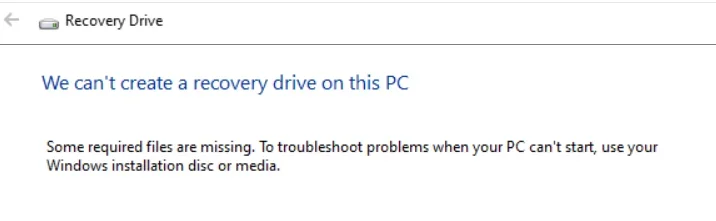
Do you mean the following error message?

"We can’t create a recovery drive on this PC. Some required files are missing."

cant-create-a-recovery-drive-some-required-files-are-missing.webp

If so, try the following:

Run the following commands as administrator:

reagentc /disable
reagentc /enable
reagentc /info

If reagentc /info shows "Windows RE status: Enabled", then your WinRE configuration is likely OK.
 

My Computers

System One System Two

  • OS
    Windows 11 Pro
    Computer type
    PC/Desktop
    CPU
    AMD Ryzen 9 9950X3D
    Motherboard
    ASRock B650E Taichi Lite
    Memory
    Kingston FURY Beast 64GB (2x32GB) DDR5 6000MT/s
    Graphics Card(s)
    ASUS TUF Gaming Radeon RX 9070 OC Edition 16GB GDDR6
    Hard Drives
    Solidigm P44 Pro 2TB M.2 NVMe SSD
  • Operating System
    Windows 11 Home
    Computer type
    Laptop
    Manufacturer/Model
    Lenovo Legion Pro 7i Gen 10 16"
    CPU
    Intel Core Ultra 9 275HX
    Memory
    64GB (2x 32GB) DDR5-6400
    Graphics card(s)
    NVIDIA GeForce RTX 5080 16GB GDDR7 Laptop GPU
    Hard Drives
    2x 1TB M.2 NVMe SSD (SK Hynix)
Do you mean the following error message?

"We can’t create a recovery drive on this PC. Some required files are missing."

View attachment 168108

If so, try the following:

Run the following commands as administrator:

reagentc /disable
reagentc /enable
reagentc /info

If reagentc /info shows "Windows RE status: Enabled", then your WinRE configuration is likely OK.
Both I and the support agrnt from windows tried it all. reagentc cannot find the file. Even after creating new recover folder extracting the install file to new folder it still can't find it. Very strange. Especially once the windows agent said he has tried everything and can't fix it!!
 

My Computer

System One

  • OS
    Windows 11 pro
    Computer type
    PC/Desktop
    Manufacturer/Model
    Na
Thank you for your -er - reply.


You also haven't shown what actual response you get to the reagentc commands. I hate guessing.

Post a screenshot of your partitions using Minitool Partition Wizard.
 

My Computer

System One

  • OS
    Windows 11 Pro
    Computer type
    Laptop
    Manufacturer/Model
    Lenovo t480s
    CPU
    i7-8650U
    Memory
    16GB
    Graphics Card(s)
    Intel UHD 620
    Screen Resolution
    1920x1080
    Hard Drives
    C SN810 SDCPNRY-512G-1006
    Browser
    Edge, Firefox
    Antivirus
    Defender

Latest Support Threads

Back
Top Bottom