I get a pop-up box on the bottom left that say's: Microsoft Defender has scanned your computer six times and found No Threats. The laptop is Off
Anyway to make an adjustment on the scanning feature? I do a manual scan before I shut down. 23H2 thank for any comments. I have Malwearbytes inside. Which I also scan before I shut down. Thanks for any comments 23H2 (OS 22631.4541)
My Computer
At a glance
Windows 11 26H2 (OS Build 26300.9550)Processor: 11th Gen Intel(R) Core(TM) i5-1135...12GBIntel R Iris R XE Graphics family
OS
Windows 11 26H2 (OS Build 26300.9550)
Computer type
Laptop
Manufacturer/Model
Dell
CPU
Processor: 11th Gen Intel(R) Core(TM) i5-1135G7 @ 2.40G
Motherboard
64-bit operating system Dell 0XMF7W
Memory
12GB
Graphics Card(s)
Intel R Iris R XE Graphics family
Sound Card
Cirrus Speakers High Definition Audio
Monitor(s) Displays
Generic PnP monitor
Screen Resolution
1920 x 1080
Hard Drives
NVMe 670p SSDPEKNU512GZ NVMe I NTEL 512GB
Case
cheap
Mouse
Logitech wireless mouse
Internet Speed
16 Mps download
Browser
Google Chrome
Antivirus
Security: Microsoft Defender & Malwarebytes Premium (with browser guard)
Windows defender does an automatic quick scan every once in a while. The support post here says:
Microsoft Defender Antivirus regularly scans your device to help keep it safe. We try to do this while you’re not using your device so it doesn’t interfere with your work.
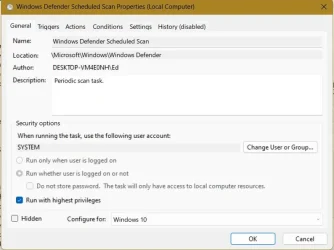
If you look at the schedule (also mentioned in the above link) that you can set to schedule your own quick scan, you can also see that it gets run approximately once a day regardless if you have configured a trigger for that schedule or not.
I don't know the rhythm of the notifications, even though I do get it every once in a while, as it pops up very irregularly.
Another behavior I have noticed is that, on my regularly used computer, I never get prompted to do a quick scan, but on a computer that is very irregularly turned on, I do get prompted to initiate a quick scan. I suspect because of the "forced" scheduled quick scan above on the regularly used computer.
I think all in all, MS does whatever it thinks would be safer for the mass. Being able to control exactly how Windows Defender works may not be its strong suit.
"rhythm of the notifications" well put. Someone else said its a ghost image Will just keep an eye it for now. It runs great when I do a manual scan (quick or Full) & I do that after I clean up the system. Thank you all for the replies!
Attachments
task scheule.webp
34.9 KB
· Views: 2
My Computer
At a glance
Windows 11 26H2 (OS Build 26300.9550)Processor: 11th Gen Intel(R) Core(TM) i5-1135...12GBIntel R Iris R XE Graphics family
OS
Windows 11 26H2 (OS Build 26300.9550)
Computer type
Laptop
Manufacturer/Model
Dell
CPU
Processor: 11th Gen Intel(R) Core(TM) i5-1135G7 @ 2.40G
Motherboard
64-bit operating system Dell 0XMF7W
Memory
12GB
Graphics Card(s)
Intel R Iris R XE Graphics family
Sound Card
Cirrus Speakers High Definition Audio
Monitor(s) Displays
Generic PnP monitor
Screen Resolution
1920 x 1080
Hard Drives
NVMe 670p SSDPEKNU512GZ NVMe I NTEL 512GB
Case
cheap
Mouse
Logitech wireless mouse
Internet Speed
16 Mps download
Browser
Google Chrome
Antivirus
Security: Microsoft Defender & Malwarebytes Premium (with browser guard)