Solved Microsoft Defender "Disabled"


BamaInArk

Well-known member
Power User
VIP
Local time
3:05 AM
Posts
923
Location
Arkansas
OS
Win 7/10/11
Been several topics about Defender lately. I happened to notice under Task Manager - Startup Apps that is showing Microsoft Defender as Disabled. Also listed under normal Apps > Startup as "Off"
Is this a normal setting of Off/Disabled? I certainly didn't turn it off. Also my Windows Security shows everything in the Green. So I'm not exactly sure what is going on in my specific case.
 

My Computer My Computer

At a glance

Win 7/10/11
OS
Win 7/10/11
Computer type
PC/Desktop
Other Info
I'm a computer enthusiast so have quite a few systems that I run. More like an advanced hobby.
Do you use another security product? If yes, when installed those products will register with WSC (Windows Security Center) which triggers Defender to disable.
 

My Computer My Computer

At a glance

Linux Mint
OS
Linux Mint
Computer type
Laptop
Manufacturer/Model
System76 Lemur Pro
Do you use another security product? If yes, when installed those products will register with WSC (Windows Security Center) which triggers Defender to disable.
No, no other security software. Just using the supplied Win11 OS stuff.

Okay comparing this to other Win11 systems in my control and so far it seems my daily driver is the only one showing this. Curious now.
 
Last edited:

My Computer My Computer

At a glance

Win 7/10/11
OS
Win 7/10/11
Computer type
PC/Desktop
Other Info
I'm a computer enthusiast so have quite a few systems that I run. More like an advanced hobby.
The only app related to MS Defender that I have in Startup
Been several topics about Defender lately. I happened to notice under Task Manager - Startup Apps that is showing Microsoft Defender as Disabled. Also listed under normal Apps > Startup as "Off"
What specifically are the app names that you're seeing?

The only startup item in Task Manager is SecurityHealthSystray.exe, and the only one in Apps>Startup is Windows Security notification icon.

Do you see Antimalware Core Service and Antimalware Service Executable running In Task Manger > Processes > Background processes?
 

My Computer My Computer

At a glance

Windows 11 Pro 25H2 26200.7840Intel Core i3-8145U16GB
OS
Windows 11 Pro 25H2 26200.7840
Computer type
Laptop
Manufacturer/Model
Lenovo IdeaPad L340
CPU
Intel Core i3-8145U
Memory
16GB
Hard Drives
500 GB M2 1 TB HDD
Internet Speed
400 MB
Browser
Chrome | Edge
Antivirus
Microsoft Defender | Block unknown executables | Various ASR rules enabled | Smart App Control
As I power up other systems to check I do NOT see Microsoft Defender listed in Startup Apps. It's only listed on this one system but listed as a Startup App but showing as disabled/Off. I'm going to Enable it again and see if it disappears from the Startup Apps menu.

@oldschool it's only showing Microsoft Defender. All else seems to be showing up and working fine.
 

My Computer My Computer

At a glance

Win 7/10/11
OS
Win 7/10/11
Computer type
PC/Desktop
Other Info
I'm a computer enthusiast so have quite a few systems that I run. More like an advanced hobby.
Check your start menu for a separate Microsoft Defender app available with Microsoft 365.

(I have mine disabled in startup apps too.)
 

My Computer My Computer

At a glance

Windows 11
OS
Windows 11
Computer type
Laptop
Check your start menu for a separate Microsoft Defender app available with Microsoft 365.

(I have mine disabled in startup apps too.)
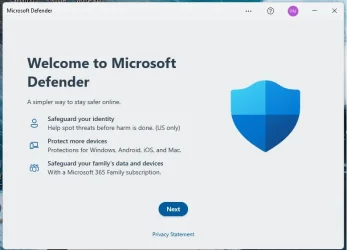
This must be what I am seeing. Assume it installed via a 365 update then Disabled itself from starting up normally. After I enabled it and rebooted then Boom....now I have 2 icons in the System Tray. One for Windows Security and now a new one for Microsoft Defender. When I click on the MS Defender icon up pops up this:

Defender.webp

Never seen this before in all my Win11 installs.
 

My Computer My Computer

At a glance

Win 7/10/11
OS
Win 7/10/11
Computer type
PC/Desktop
Other Info
I'm a computer enthusiast so have quite a few systems that I run. More like an advanced hobby.
When I click on the MS Defender icon up pops up this:

Defender.webp


Never seen this before in all my Win11 installs.
It's useless bloatware. Just uninstall it.
 

My Computer My Computer

At a glance

Windows 11 Pro 25H2 26200.7840Intel Core i3-8145U16GB
OS
Windows 11 Pro 25H2 26200.7840
Computer type
Laptop
Manufacturer/Model
Lenovo IdeaPad L340
CPU
Intel Core i3-8145U
Memory
16GB
Hard Drives
500 GB M2 1 TB HDD
Internet Speed
400 MB
Browser
Chrome | Edge
Antivirus
Microsoft Defender | Block unknown executables | Various ASR rules enabled | Smart App Control
Thanks for the inputs. I was kinda scratching my head on this one until I realized this was more than likely installed recently when I installed Office 365. Must be a newer sneak install as a few other systems with Office 365 installed don't have MS Defender installed AFAICT.
 

My Computer My Computer

At a glance

Win 7/10/11
OS
Win 7/10/11
Computer type
PC/Desktop
Other Info
I'm a computer enthusiast so have quite a few systems that I run. More like an advanced hobby.

Latest Support Threads

Back
Top Bottom