Microsoft new commitment to Windows 11 quality


 Windows Insider Blog:

Hello Windows Insiders,

I want to speak to you directly, as an engineer who has spent his career building technology that people depend on every day. Windows touches more people’s lives than almost any technology on Earth. Every day, we hear from the community about how you experience Windows. And over the past several months, the team and I have spent a great deal of time analyzing your feedback. What came through was the voice of people who care deeply about Windows and want it to be better.

Today, I’m sharing what we are doing in response. Here are some of the initial changes we will preview in builds with Windows Insiders this month and throughout April.
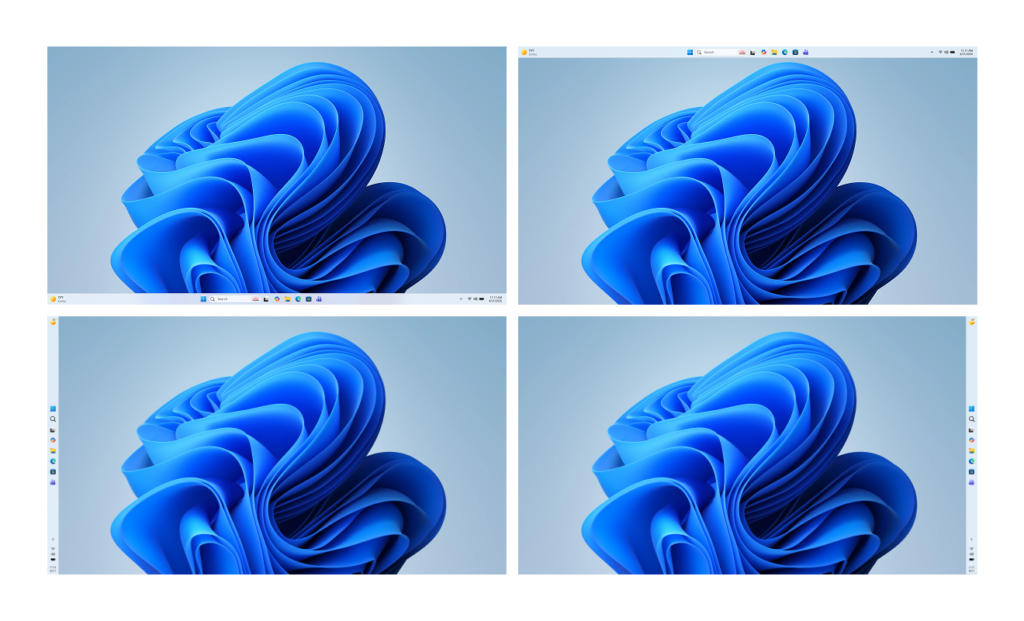
Windows 11 desktops with the taskbar positioned vertically on the bottom, top, left and right side of the screen.

Desktops showing the taskbar positioned on the bottom, top, left and right side of the screen
  • More taskbar customization, including vertical and top positions: Repositioning the taskbar is one of the top asks we’ve heard from you. We are introducing the ability to reposition it to the top or sides of your screen, making it easier to personalize your workspace.
  • Integrating AI where it’s most meaningful, with craft and focus: You will see us be more intentional about how and where Copilot integrates across Windows, focusing on experiences that are genuinely useful and well‑crafted. As part of this, we are reducing unnecessary Copilot entry points, starting with apps like Snipping Tool, Photos, Widgets and Notepad.
  • Reducing disruption from Windows Updates: Receiving updates should be predictable and easy to plan around, so we’re giving you more control. This includes the ability to skip updates during device setup to get to the desktop faster, restart or shut down without installing updates and pause updates for longer when needed, all while reducing update noise with fewer automatic restarts and notifications.

  • Faster and more dependable File Explorer: File Explorer is one of the most used surfaces in Windows. Our first round of improvements will focus on a quicker launch experience, reduced flicker, smoother navigation and more reliable performance for everyday file tasks.
  • More control over widgets and feed experiences: Widgets should feel helpful and relevant, not distracting or overwhelming. We’re introducing quieter defaults, more control over when and how widgets appear, and improved personalization for the Discover feed.
  • A simpler, more transparent Windows Insider Program: The Windows Insider Program is how you help shape the future of Windows, and it should be easy to understand what to expect and how to participate. We are implementing changes to make it easier for you to navigate with clearer channel definitions, easier access to new features, higher quality builds, better visibility into how your feedback shapes Windows, and more opportunities to engage directly with us.
  • Improved Feedback Hub, available starting today: Your feedback is essential to improving Windows, and it should be easy to share and see what others are saying. Today, we’re rolling out the largest update to Feedback Hub yet to our Insiders, with a redesigned experience that makes it faster and easier to submit feedback and engage with the community.
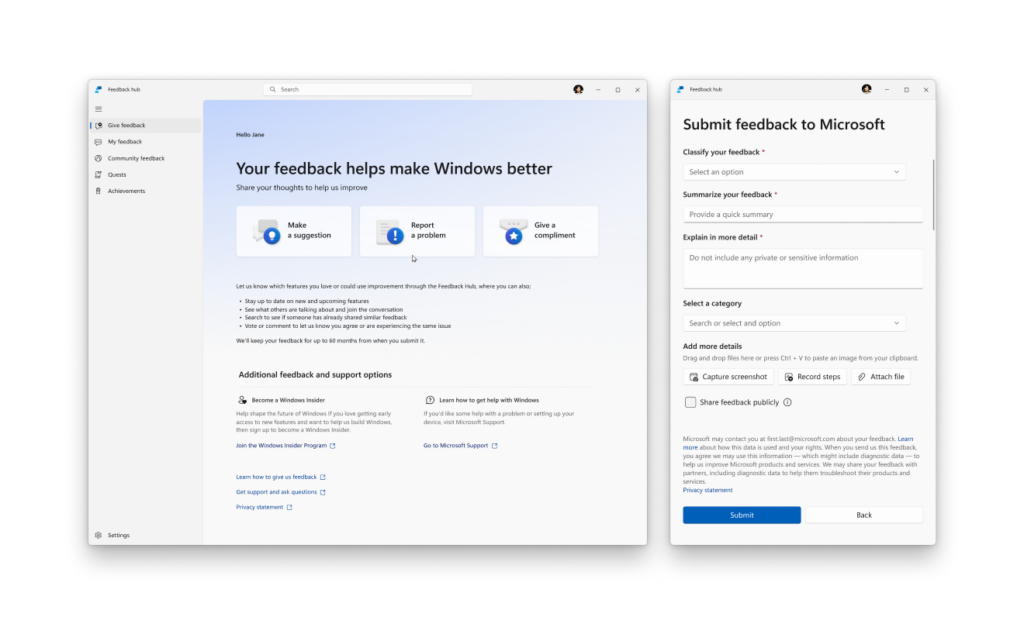
Feedback Hub app in Windows 11 showing the redesigned home screen and new feedback form.

The new Feedback Hub app showing the redesigned home screen and feedback form

Building on these changes, what follows below is our broader plan and areas of focus for the year to raise the bar on Windows 11 quality. The work is underway. You can expect to see tangible progress that you’ll be able to feel as you preview builds from us throughout the rest of the year.

Last night I had the chance to sit down with a small group of Windows Insiders here in Seattle to listen, to answer questions, and to share more about where we’re headed. The Seattle meetup was the first of several stops our team will be making to engage in person, in more cities around the world, to connect with the Windows community.

Thank you for holding us to a high standard. Windows is as much yours as it is ours. We’re committed to strengthening its foundation and delivering innovation where it matters, for you.

Please keep the feedback coming, to help us shape the future of Windows together.

Best,

PBS4-1024x175.png

Pavan

EVP, Windows + Devices

_______

Delivering on Performance, Reliability and Craft

What follows is our plan to raise the bar on Windows 11 quality this year, with a focus on performance, reliability and well-crafted experiences. These areas have meaningful impact on how you experience Windows: how fast it starts and responds, how stable it is under real workloads, and how consistent and thoughtful the experience feels.
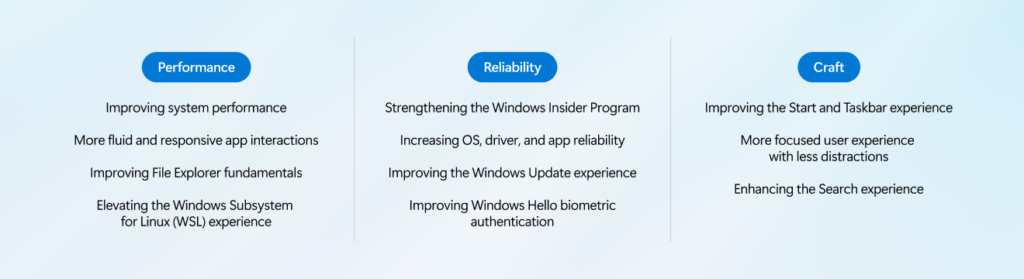
Graphic of Windows improvement areas across performance, reliability, and craft.

[Performance]

We are focusing on making Windows 11 more responsive and consistent, so performance feels smooth and reliable.

Over the course of the year, we’re improving system performance, app responsiveness, File Explorer, and the Windows Subsystem for Linux, helping Windows stay fast as you move between apps and workloads.

Improving system performance: Reducing resource usage by Windows to free up more performance for what you’re doing.
  • Faster and more responsive Windows experiences, with early improvements already delivering launch time reductions in apps like File Explorer
  • Improved memory efficiency, lowering the baseline memory footprint for Windows, freeing up more capacity for the apps you run
  • More consistent performance, even under load, so apps stay responsive throughout the day
More fluid and responsive app interactions: Reducing interaction latency by moving core Windows experiences to the WinUI3 framework.
  • Improving the shared UI infrastructure that Windows experiences rely on, reducing interaction latency and overhead at the platform level
  • Faster responsiveness in core Windows experiences like the Start menu, by moving more experiences to WinUI3
Improving File Explorer fundamentals: Reducing latency and improving reliability across search, navigation and file operations.
  • Substantially lower latency for search, navigation and context menus
  • Copying and moving large files will be faster and more reliable
  • Faster launch and responsiveness for common file tasks
Elevating the Windows Subsystem for Linux (WSL) experience: Improving performance, reliability and integration for developers using Linux tools and environments on Windows.
  • Faster file performance between Linux and Windows
  • Improved network compatibility and throughput
  • More streamlined first-time setup and onboarding experience
  • Better enterprise management with stronger policy control, security and governance

[Reliability]

Reliability is the bedrock of trust. You should trust that your PC is going to be there and function when you need it most.

Across the operating system, we will focus on improving the baseline reliability of areas such as the Windows Insider Program, drivers and apps, updates and Windows Hello.

Strengthening reliability and quality of the Windows Insider Program: Making it clearer what to expect from each Insider channel, raising the quality bar for builds and strengthening feedback signals to improve build quality before broad release.
  • Clearer visibility into what features are included in each Insider build, so you know what to expect
  • More control over which new features you try, with easier switching between Insider channels to match your desired level of stability or early access
  • Higher quality builds entering each channel, with more rigorous validation and feedback signals before release
  • Stronger feedback loops across Windows so issues are identified, prioritized and addressed faster
Increasing OS, driver and app reliability: Delivering a smoother, more dependable Windows 11 experience by strengthening system stability, driver quality and app reliability across our vibrant ecosystem of silicon, ISV and OEM partners. Our priorities include:
  • Strengthening the Windows foundation by reducing OS level crashes, improving driver quality and app stability across our ecosystem so PCs run smoothly and reliably every day
  • Creating easier, faster and stable connections with Bluetooth accessories, fewer USB related crashes and connection loss, and improved printer discoverability and connections
  • More reliable camera and audio connections to increase your productivity at work and play
  • More consistent device wake (including further wake consistency improvements for docking scenarios) so you can get back to your work faster
Improving the Windows Update experience: Faster, more predictable updates with clearer control over restarts and timing.
  • Less disruption from Windows Update, moving devices to a single monthly reboot, while organizations and users who wish to get new features and fixes faster remain able to do so
  • More direct control over updates, including the ability to pause updates for as long as you need and restart or shut down without being forced to install them
  • Faster, more reliable update experiences, with clearer progress during updates and built‑in recovery to help keep devices stable if something goes wrong
Improving Windows Hello biometric authentication: We’re strengthening Windows Hello so sign‑in so it feels reliable, effortless and secure, reducing friction while increasing confidence that your device recognizes you correctly.
  • More reliable facial recognition, so you can trust sign‑in to work when you need it
  • Faster and more dependable fingerprint sign‑in, with fewer retries
  • Easier secure sign‑in on gaming handhelds like the ROG Xbox Ally X, with full gamepad support for creating a PIN during setup and in Settings.

[Craft]

To us, craft is the discipline that turns functional products into loved ones through usability, polish, coherence and refinement.

This year, you will see us invest in raising the bar on the overall usability of the experience, with more opportunities for personalization, less noise, less distraction and more control across the OS. That includes being thoughtful about how and where we bring AI into Windows, leading with transparency, choice and control, so that new capabilities enhance the experience rather than complicate it.

Improving the Start and Taskbar experience: Making these core Windows surfaces more reliable, flexible and personalized so you can navigate your PC in the way that works best for you.
  • Start and Taskbar deliver even more consistent, dependable access to apps and files, so moving between your content feels fluid throughout the day
  • Expanded taskbar personalization options, including alternate taskbar positions and a smaller taskbar, giving you greater control over how this core surface fits your workflow
  • A more relevant Recommended section in Start will surface apps and content you care about most, with clear controls to customize the experience or turn it off
More focused user experience with less distractions: Making the Windows experience quieter, to help you stay focused, minimize distractions and stay in your flow.
  • Device setup on new Windows PCs is quieter and more streamlined, with fewer pages and reboots so getting started is simpler
  • Widgets surface information more intentionally by default, keeping content glanceable and reducing unnecessary interruptions
  • Simpler settings make it easier to personalize, opt into or turn off Widgets and feed content based on your preferences
  • Reduced notifications so you can stay focused throughout the day
Enhancing Search: Delivering faster, more accurate results with consistent search experience across Windows surfaces.
  • Find what matters faster, with search that surfaces apps, files and settings clearly so you can get to the right result quickly
  • Clearer and more trustworthy results, with results from content on your device easy to understand and clearly distinct from web results
  • A more consistent search experience across the Taskbar, Start, File Explorer and Settings
As part of this effort, we are evolving how Windows is built behind the scenes to raise the quality bar and deliver innovation where it matters most, shaped by the feedback we are hearing from you.

This includes deeper validation and broader testing across real-world hardware and usage scenarios before new experiences reach Windows Insiders, and a more intentional approach to where and how new capabilities are introduced. The result will be higher quality builds, more meaningful innovation and greater flexibility in choosing what you want to try. This is how we will continue to build and ship Windows 11, so we can deliver better experiences with greater confidence, month after month.

In line with Microsoft’s Secure Future Initiative, we will continue to make Windows more secure with every release, building in new capabilities and strengthening security by default to help protect users, devices and data.

As we improve and innovate, we look forward to your continued feedback on where we can keep making Windows better.


 Source:

 
Implementing effective software engineering practices and software QA to reduce the number of obvious bugs would be good first start.
I don't think that would ever happen
 

My Computers

System One System Two

  • OS
    Windows 11 25H2
    Computer type
    PC/Desktop
    Manufacturer/Model
    Custom Built
    CPU
    Intel i9 14900KF
    Motherboard
    ASUS Z790 ProArt Creator WiFi
    Memory
    64GB Corsair Vengeance RGB
    Graphics Card(s)
    MSI 4090 Suprim X
    Sound Card
    Onboard
    Monitor(s) Displays
    1 x Asus 24". 1 x Asus 32"
    Screen Resolution
    1920 x 1080 & 2560 x 1440
    Hard Drives
    Multiple
    PSU
    Corsair 1200HX
    Case
    Corsair 7000D RGB
    Cooling
    Corsair H150I Capellix XT
    Keyboard
    Corsair K70 RGB PRO
    Mouse
    Corsair M55 RGB Pro
    Internet Speed
    1000Mbps
    Browser
    Edge
    Antivirus
    Windows Default
  • Operating System
    Windows 11 25H2
    Computer type
    PC/Desktop
    Manufacturer/Model
    Custom Built
    CPU
    Intel i7 6800K
    Motherboard
    ASUS Z99 Deluxe
    Memory
    32GB DDR4 (Corsair)
    Graphics card(s)
    ASUS GTX 1080ti
    Sound Card
    Onboard
    Monitor(s) Displays
    1x Viewsonic 24" 1x LG 19"
    Screen Resolution
    1920 x 1080 & 1600 x 900
    Hard Drives
    3 x SATA SSD
    PSU
    650W Gigabyte Bronze
    Case
    Coolermaster HAF-X
    Cooling
    Noctua NH-15 Chroma black
    Keyboard
    Generic RGB
    Mouse
    Microsoft Basic
    Internet Speed
    1000Mbps
    Browser
    Edge
    Antivirus
    Windows Default
They should probably rethink the wisdom of letting AI write its own code.
 

My Computer

System One

  • OS
    Windows 11 22H2 Pro (X-lite Micro 11 version)
    Computer type
    Laptop
    Manufacturer/Model
    Dell/ Precision 7680
    CPU
    i7 13850HX (20 cores, 28 threads)
    Motherboard
    Dell
    Memory
    32GB DDR5
    Graphics Card(s)
    Intel UHD/ RTX 1000 ADA
    Sound Card
    Realtek
    Monitor(s) Displays
    4K UHD Touchscreen
    Screen Resolution
    3840 x 2400
    Hard Drives
    Samsung 512GB system drive
    WD Blue 1TB game drive
    PSU
    240W AC adapter, 1800W when docked
    Internet Speed
    1 gigabit symmetrical
    Browser
    Firefox, Librewolf
    Antivirus
    None. Manully configured so nobody except me can change any critical system files. (Don't ask how, it's probably against some rule somewhere)

My Computers

System One System Two

  • OS
    Windows 11 25H2
    Computer type
    PC/Desktop
    Manufacturer/Model
    Custom Built
    CPU
    Intel i9 14900KF
    Motherboard
    ASUS Z790 ProArt Creator WiFi
    Memory
    64GB Corsair Vengeance RGB
    Graphics Card(s)
    MSI 4090 Suprim X
    Sound Card
    Onboard
    Monitor(s) Displays
    1 x Asus 24". 1 x Asus 32"
    Screen Resolution
    1920 x 1080 & 2560 x 1440
    Hard Drives
    Multiple
    PSU
    Corsair 1200HX
    Case
    Corsair 7000D RGB
    Cooling
    Corsair H150I Capellix XT
    Keyboard
    Corsair K70 RGB PRO
    Mouse
    Corsair M55 RGB Pro
    Internet Speed
    1000Mbps
    Browser
    Edge
    Antivirus
    Windows Default
  • Operating System
    Windows 11 25H2
    Computer type
    PC/Desktop
    Manufacturer/Model
    Custom Built
    CPU
    Intel i7 6800K
    Motherboard
    ASUS Z99 Deluxe
    Memory
    32GB DDR4 (Corsair)
    Graphics card(s)
    ASUS GTX 1080ti
    Sound Card
    Onboard
    Monitor(s) Displays
    1x Viewsonic 24" 1x LG 19"
    Screen Resolution
    1920 x 1080 & 1600 x 900
    Hard Drives
    3 x SATA SSD
    PSU
    650W Gigabyte Bronze
    Case
    Coolermaster HAF-X
    Cooling
    Noctua NH-15 Chroma black
    Keyboard
    Generic RGB
    Mouse
    Microsoft Basic
    Internet Speed
    1000Mbps
    Browser
    Edge
    Antivirus
    Windows Default
That's another corporate box ticked - means sfa of course.
 

My Computer

System One

  • OS
    Windows 11 Pro + Win11 Canary VM.
    Computer type
    Laptop
    Manufacturer/Model
    ASUS Zenbook 14
    CPU
    I9 13th gen i9-13900H 2.60 GHZ
    Motherboard
    Yep, Laptop has one.
    Memory
    16 GB soldered
    Graphics Card(s)
    Integrated Intel Iris XE
    Sound Card
    Realtek built in
    Monitor(s) Displays
    laptop OLED screen
    Screen Resolution
    2880x1800 touchscreen
    Hard Drives
    1 TB NVME SSD (only weakness is only one slot)
    PSU
    Internal + 65W thunderbolt USB4 charger
    Case
    Yep, got one
    Cooling
    Stella Artois (UK pint cans - 568 ml) - extra cost.
    Keyboard
    Built in UK keybd
    Mouse
    Bluetooth , wireless dongled, wired
    Internet Speed
    900 mbs (ethernet), wifi 6 typical 350-450 mb/s both up and down
    Browser
    Edge
    Antivirus
    Defender
    Other Info
    TPM 2.0, 2xUSB4 thunderbolt, 1xUsb3 (usb a), 1xUsb-c, hdmi out, 3.5 mm audio out/in combo, ASUS backlit trackpad (inc. switchable number pad)

    Macrium Reflect Home V8
    Office 365 Family (6 users each 1TB onedrive space)
    Hyper-V (a vm runs almost as fast as my older laptop)
They should probably rethink the wisdom of letting AI write its own code.
Why when they can sack dozens of real programmers. Corporate greed at its finest.
 

My Computer

System One

  • OS
    Windows 11 Pro + Win11 Canary VM.
    Computer type
    Laptop
    Manufacturer/Model
    ASUS Zenbook 14
    CPU
    I9 13th gen i9-13900H 2.60 GHZ
    Motherboard
    Yep, Laptop has one.
    Memory
    16 GB soldered
    Graphics Card(s)
    Integrated Intel Iris XE
    Sound Card
    Realtek built in
    Monitor(s) Displays
    laptop OLED screen
    Screen Resolution
    2880x1800 touchscreen
    Hard Drives
    1 TB NVME SSD (only weakness is only one slot)
    PSU
    Internal + 65W thunderbolt USB4 charger
    Case
    Yep, got one
    Cooling
    Stella Artois (UK pint cans - 568 ml) - extra cost.
    Keyboard
    Built in UK keybd
    Mouse
    Bluetooth , wireless dongled, wired
    Internet Speed
    900 mbs (ethernet), wifi 6 typical 350-450 mb/s both up and down
    Browser
    Edge
    Antivirus
    Defender
    Other Info
    TPM 2.0, 2xUSB4 thunderbolt, 1xUsb3 (usb a), 1xUsb-c, hdmi out, 3.5 mm audio out/in combo, ASUS backlit trackpad (inc. switchable number pad)

    Macrium Reflect Home V8
    Office 365 Family (6 users each 1TB onedrive space)
    Hyper-V (a vm runs almost as fast as my older laptop)
Why when they can sack dozens of real programmers. Corporate greed at its finest.
Kinda makes you wonder if some people watched Terminator and were inspired by it..
 

My Computer

System One

  • OS
    Windows 11 22H2 Pro (X-lite Micro 11 version)
    Computer type
    Laptop
    Manufacturer/Model
    Dell/ Precision 7680
    CPU
    i7 13850HX (20 cores, 28 threads)
    Motherboard
    Dell
    Memory
    32GB DDR5
    Graphics Card(s)
    Intel UHD/ RTX 1000 ADA
    Sound Card
    Realtek
    Monitor(s) Displays
    4K UHD Touchscreen
    Screen Resolution
    3840 x 2400
    Hard Drives
    Samsung 512GB system drive
    WD Blue 1TB game drive
    PSU
    240W AC adapter, 1800W when docked
    Internet Speed
    1 gigabit symmetrical
    Browser
    Firefox, Librewolf
    Antivirus
    None. Manully configured so nobody except me can change any critical system files. (Don't ask how, it's probably against some rule somewhere)
I have received this email... I have only one questions: i'm totally fine with how Windows works today. I literally have no complaints except a few:

1) Please remove that regional restrictions on Highlights image so that I don't have to tweak Integtrated Policies JSON file each time after DISM

2) Make HDR color profile automatically applied when switching to HDR without the need to re-open display settings one more time.

3) Remove that bright white flash when adding new tab to Explorer.

That's it. The point of my comment is - why overcomplicate things? Like.... just remove those few bugs that really annoy and I don't need your promises. I'm okay with how Explorer works, i'm in Europe so i don't have any integration of copilot in my system. I don't mind updates and I also check them manually sometimes cause I like testing and exploring some new features.

I think the point of this letter is completely irrelevant to real situation. Like "oh we shall improve feedback center". Yeah like.. will it help? My numerous feedbacks on HDR color profile issues been ignored for 2 years...
 

My Computer

System One

  • OS
    Windows 11 24H2
    Computer type
    PC/Desktop
    Manufacturer/Model
    Zotac ZBOX-ECM73070C
    CPU
    i7-10700
    Memory
    32 GB
    Graphics Card(s)
    NVIDIA RTX 3070
    PSU
    500W
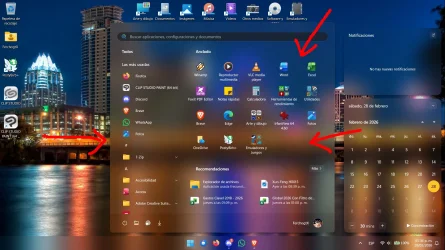
start menu .. the ability to resize it small, medium, large
as the default size is to large for most.
Agree. It takes up over a third of screen real estate on 1920x1080!
Why does the shortcut placeholder need to be so damn wide!?!?!? 🤷‍♂️

12855.webp
 

My Computers

System One System Two

  • OS
    Windows 11 Pro
    Computer type
    PC/Desktop
    Manufacturer/Model
    ASUS ROG Strix
  • Operating System
    Windows 11 Pro
    Computer type
    Laptop
    Manufacturer/Model
    ASUS VivoBook
Why does the shortcut placeholder need to be so damn wide!?!?!? 🤷‍♂️
Oh..., I figured it out! They need the room to load your Start Menu with MSN cruft when you search for something!!! (y)
 

My Computers

System One System Two

  • OS
    Windows 11 Pro
    Computer type
    PC/Desktop
    Manufacturer/Model
    ASUS ROG Strix
  • Operating System
    Windows 11 Pro
    Computer type
    Laptop
    Manufacturer/Model
    ASUS VivoBook
Oh..., I figured it out! They need the room to load your Start Menu with MSN cruft when you search for something!!! (y)

Now you're catching on. That's for all the ads and other junk they need to push down on you. Too narrow a menu and it wouldn't fit.
 

My Computers

System One System Two

  • OS
    Windows 11 Pro 25H2 build: (26200.7623)
    Computer type
    Laptop
    Manufacturer/Model
    Microsoft Surface Pro
    Memory
    32GB
  • Operating System
    Microsoft 25H2 Pro
    Computer type
    Laptop
    Manufacturer/Model
    Dell Pro 14 - PC14250
    CPU
    Intel Core Ultra 7
    Memory
    64GB
    Graphics card(s)
    Intel Integrated Graphics
    Hard Drives
    Micron 1TB SSD
A lot of happy people over the Taskbar repositioning I'm sure. Mine will probably still remain on the bottom lol, but I would enjoy a faster more reliable File Explorer.
Wouldn't it be nice if they fixed the memory leak in Explorer that has existed for at least 10-12 years?
 

My Computers

System One System Two

  • OS
    Win 11 Pro 25H2, Build 26200.8524
    Computer type
    PC/Desktop
    Manufacturer/Model
    Home Brew
    CPU
    Intel Core i5 14500
    Motherboard
    Gigabyte B760M G P WIFI
    Memory
    64GB DDR4
    Graphics Card(s)
    GeForce RTX 4060
    Sound Card
    Chipset Realtek
    Monitor(s) Displays
    LG 45" Ultragear, Acer 24" 1080p
    Screen Resolution
    5120x1440, 1920x1080
    Hard Drives
    Crucial P310 2TB 2280 PCIe Gen4 3D NAND NVMe M.2 SSD (O/S)
    Silicon Power 2TB US75 NVMe PCIe Gen4 M.2 2280 SSD (backup)
    Crucial BX500 2TB 3D NAND (2nd backup)
    Seagate 4TB Ironwolf, rotating HDD archive files
    External off-line backup Drives: 2 NVMe 4TB drives in external enclosures
    PSU
    Thermaltake Toughpower GF3 750W
    Case
    LIAN LI LANCOOL 216 E-ATX PC Case
    Cooling
    Lots of fans!
    Keyboard
    Microsoft Comfort Curve 2000
    Mouse
    Logitech G305
    Internet Speed
    Verizon FiOS 1GB
    Browser
    Firefox
    Antivirus
    Malware Bytes & Windows Defender Security
  • Operating System
    Win 11 Pro 25H2, Build 26200.8524
    Computer type
    PC/Desktop
    Manufacturer/Model
    Home Brew
    CPU
    Intel Core i5 14400
    Motherboard
    Gigabyte B760M DS3H AX
    Memory
    32GB DDR5
    Graphics card(s)
    Intel 700 Embedded GPU
    Sound Card
    Realtek Embedded
    Monitor(s) Displays
    27" HP 1080p
    Screen Resolution
    1920x1080
    Hard Drives
    Crucial P310 2TB 2280 PCIe Gen4 eD NAND PCIe SSD
    Samsung EVO 990 2TB NVMe Gen4 SSD
    Samsung 2TB SATA SSD
    PSU
    Thermaltake Smart BM3 650W
    Case
    Okinos Micro ATX Case
    Cooling
    Fans
    Keyboard
    Microsoft Comfort Curve 2000
    Mouse
    Logitech G305
    Internet Speed
    Verizon FiOS 1GB
    Browser
    Firefox
    Antivirus
    Malware Bytes & Windows Defender Security
For me Windows is like an old 1990's car, its done good service, it has a very high mileage and it's getting harder and harder to keep it on the road and serviceable.

OR

Windows 11 is like a city built on the same street plan laid down in 1993—but almost every building has been rebuilt multiple times.
 

My Computers

System One System Two

  • OS
    Windows 11 Pro 25H2
    Computer type
    PC/Desktop
    Manufacturer/Model
    Homebuilt
    CPU
    Intel Core i9 13900K
    Motherboard
    Asus ProArt Z790 Creator WiFi - Bios 3107
    Memory
    Corsair Dominator Platinum 64gb 5600MT/s DDR5 Dual Channel
    Graphics Card(s)
    Sapphire NITRO+ AMD Radeon RX 7900 XTX Vapor-X 24GB
    Sound Card
    External DAC: Cambridge Audio DACMagic200M - Headphone Amp: Topping L50
    Monitor(s) Displays
    Panasonic MX950 Mini LED 55" TV 120hz
    Screen Resolution
    3840 x 2160 120hz
    Hard Drives
    Samsung 980 Pro 2TB (OS)
    Samsung 980 Pro 1TB (Files)
    Lexar NZ790 4TB
    LaCie d2 Professional 6TB external - USB 3.1
    Seagate Expansion 16TB external - USB 3.2
    Seagate One Touch 18TB external HD - USB 3.0
    PSU
    Corsair RM1200x Shift
    Case
    Corsair RGB Smart Case 5000x (white)
    Cooling
    Corsair iCue H150i Elite Capellix XT
    Keyboard
    Incase Ergonomic USB (Microsoft clone)
    Mouse
    Logitech MX Master 3S
    Internet Speed
    Fibre 900/500 Mbps
    Browser
    Microsoft Edge Chromium
    Antivirus
    Bitdefender Total Security
    Other Info
    AMD Radeon Software & Drivers 26.1.1
    Hasleo Backup Suite
    Dashlane password manager
    Kensington Verimark fingerprint reader
    Logitech Brio 4K webcam
    Orico 10-port powered USB 3.0 hub
  • Operating System
    Windows 11 Pro 25H2
    Computer type
    Laptop
    Manufacturer/Model
    Asus Vivobook X1605VA
    CPU
    Intel® Core™ i9-13900H
    Motherboard
    Asus X1605VA bios 309
    Memory
    32GB DDR4-3200 Dual channel
    Graphics card(s)
    *Intel Iris Xᵉ Graphics G7
    Sound Card
    Realtek | Intel SST Bluetooth & USB
    Monitor(s) Displays
    16.0-inch, WUXGA 16:10 aspect ratio, IPS-level Panel
    Screen Resolution
    1920 x 1200 60hz
    Hard Drives
    512GB M.2 NVMe™ PCIe® 3.0 SSD
    Mouse
    Logitech MX Ergo Trackball
    Antivirus
    Bitdefender Total Security
    Other Info
    720p Webcam
    WiFi & USB to ethernet
March 21, 2026—KB5085516 (OS Builds 26200.8039 and 26100.8039) Out-of-band
Release Date: 3/21/2026
Version: OS Builds 26200.8039 and 26100.8039

Installed, DISM and SFC no issues.
 

My Computer

System One

  • OS
    Windows 11
    Computer type
    PC/Desktop
    Manufacturer/Model
    Generic
    CPU
    AMD Ryzen 8700G
    Motherboard
    Gigabyte B650 UD AC
    Memory
    64 GB
    Graphics Card(s)
    Onboard
    Sound Card
    Onboard
    Monitor(s) Displays
    Del U2723QE
    Screen Resolution
    3840 x 2160
    Hard Drives
    Corsiar MP600 1TB
    PSU
    Silverstone 750 GOLD
    Case
    Silverstone FARA 513
Oh..., I figured it out! They need the room to load your Start Menu with MSN cruft when you search for something!!! (y)
Here's some good news, Microsoft has now confirmed it’s scaling back “upsells” (or ads/recommendations) in Windows 11 as part of its efforts to make the operating system a bit “calmer” and win back users. I know I for one was sick of OneDrive and MS 365 nags everywhere when I don't use either one.


My Computers

System One System Two

  • OS
    Windows 11 25H2
    Computer type
    Laptop
    Manufacturer/Model
    Alienware 18 Area-51
    CPU
    Intel Core Ultra 9 275HX (24-Core)
    Motherboard
    Alienware
    Memory
    64GB DDR5 6400MT/s
    Graphics Card(s)
    NVIDIA GeForce RTX 5080 and Intel UHD Graphics
    Sound Card
    Onboard, Realtek high-performance Audio chips (ALC3329 & ALC1708))
    Monitor(s) Displays
    300HZ 18-inch QHD 500 nit Comfort View+
    Screen Resolution
    2560 x 1600
    Hard Drives
    2TB NVMe M.2 PCIe Gen 5 SSD
    Case
    Magnesium Alloy
    Cooling
    Advanced Cryo-Tech Quad-Fan Cooling system & large vapor chamber
    Keyboard
    Cherry MX ultra low profile mechanical keyboard with per key AlienFX RGB lighting
    Mouse
    Logitech MX Master 4
    Browser
    Vivaldi (main), Firefox, Chrome, Edge
    Antivirus
    MS Defender and Malwarebytes Free
  • Operating System
    Windows 11 25H2
    Computer type
    Laptop
    Manufacturer/Model
    Microsoft Surface Laptop 7
    CPU
    Qualcomm Snapdragon X Elite (12 Core) ARM based CPU
    Motherboard
    Microsoft Corp.
    Memory
    16GB LPDDR5
    Graphics card(s)
    Qualcomm Adreno X1-85
    Sound Card
    Omnisonic speakers with Dolby Atmos spatial sound
    Monitor(s) Displays
    120 Hz 13.8-inch 600 nit PixelSense Flow touchscreen
    Screen Resolution
    2304x1536
    Hard Drives
    1TB NVMe Gen 4 SSD
    Case
    Anodized Aluminum
    Cooling
    Traditional active cooling fan system
    Keyboard
    Mechanical QWERTY, backlit when in use
    Mouse
    Logitech MX Master 4 and Surface Arc Mouse
    Browser
    Vivaldi (main), Firefox, Chrome, Edge
    Antivirus
    MS Defender and Malwarebytes Free
This has been bothering me for a while, in the Settings App, Power

1774151901190.webp

These are the recommended settings 10mins Sleep, 3mins Screen Off, but then there is the following:

1774151964046.webp

Why are these different?
 

My Computers

System One System Two

  • OS
    Windows 11 25H2
    Computer type
    PC/Desktop
    Manufacturer/Model
    Custom Built
    CPU
    Intel i9 14900KF
    Motherboard
    ASUS Z790 ProArt Creator WiFi
    Memory
    64GB Corsair Vengeance RGB
    Graphics Card(s)
    MSI 4090 Suprim X
    Sound Card
    Onboard
    Monitor(s) Displays
    1 x Asus 24". 1 x Asus 32"
    Screen Resolution
    1920 x 1080 & 2560 x 1440
    Hard Drives
    Multiple
    PSU
    Corsair 1200HX
    Case
    Corsair 7000D RGB
    Cooling
    Corsair H150I Capellix XT
    Keyboard
    Corsair K70 RGB PRO
    Mouse
    Corsair M55 RGB Pro
    Internet Speed
    1000Mbps
    Browser
    Edge
    Antivirus
    Windows Default
  • Operating System
    Windows 11 25H2
    Computer type
    PC/Desktop
    Manufacturer/Model
    Custom Built
    CPU
    Intel i7 6800K
    Motherboard
    ASUS Z99 Deluxe
    Memory
    32GB DDR4 (Corsair)
    Graphics card(s)
    ASUS GTX 1080ti
    Sound Card
    Onboard
    Monitor(s) Displays
    1x Viewsonic 24" 1x LG 19"
    Screen Resolution
    1920 x 1080 & 1600 x 900
    Hard Drives
    3 x SATA SSD
    PSU
    650W Gigabyte Bronze
    Case
    Coolermaster HAF-X
    Cooling
    Noctua NH-15 Chroma black
    Keyboard
    Generic RGB
    Mouse
    Microsoft Basic
    Internet Speed
    1000Mbps
    Browser
    Edge
    Antivirus
    Windows Default
Here's some good news, Microsoft has now confirmed it’s scaling back “upsells” (or ads/recommendations) in Windows 11 as part of its efforts to make the operating system a bit “calmer” and win back users. I know I for one was sick of OneDrive and MS 365 nags everywhere when I don't use either one.

I think once the horse has bolted it will be very hard to get them back especially if the users have gone to Linux.
In current times when the hip pocket is under stress for some people paying for an OS will be low on the priority list.
 

My Computer

System One

  • OS
    Windows 11
    Computer type
    PC/Desktop
    Manufacturer/Model
    Generic
    CPU
    AMD Ryzen 8700G
    Motherboard
    Gigabyte B650 UD AC
    Memory
    64 GB
    Graphics Card(s)
    Onboard
    Sound Card
    Onboard
    Monitor(s) Displays
    Del U2723QE
    Screen Resolution
    3840 x 2160
    Hard Drives
    Corsiar MP600 1TB
    PSU
    Silverstone 750 GOLD
    Case
    Silverstone FARA 513
Why can't we have a start menu like this Microsoft?
Why?
This is useful! Not the oversized promontory of useless wasted space you released recently!

Clipboard01.webp
Why a 3rd party app can do better than you?

Add this and my soul is yours.

Other than that... they'll have to earn my trust back, only one thing keeps me captive in this OS lol
 

My Computers

System One System Two

  • OS
    Windows 11 Pro 25H2
    Computer type
    PC/Desktop
    Manufacturer/Model
    Built PC
    CPU
    AMD Ryzen 5 5600G @ 3.9/4.4Ghz
    Motherboard
    MSI B550M-PRO-WiFi Ver. 1.4
    Memory
    2 x 16 GB DDR4 Kingston Fury Beast 3200 Mhz
    Graphics Card(s)
    AMD Radeon RX 6600 XT MSI Mech 2X OC Edition 8 GB
    Sound Card
    Realtek High Definition Audio (Integrated)
    Monitor(s) Displays
    Samsung C50Rx 27" LED / HP S2031 20" LCD
    Screen Resolution
    1920 x 1080 px / 1600 x 900 px
    Hard Drives
    WD Blue SN570 NVME M.2 SSD [1 TB] -- External Drives: - WD Scorpion Blue 250 GB 5400 RPM (Data Backup) - Hitachi 500 GB 5400 RPM (Software / ISOs Backup) - Toshiba MQ01ABD100 1 TB 5400 RPM (OS Images) - HGST TravelStar 7K1000 1 TB, 7200 RPM USB 3.0 - ADATA SU800 2TB SSD USB 3.0
    PSU
    Corsair RM750e 750W Fully Modular
    Case
    Naceb Hydra NA-1602
    Cooling
    Naceb Orpheus x 3 (Front) + Naceb Cepheus 1200 RPM Max (Rear) + ThemalRight Assasin X 90 SE (CPU)
    Keyboard
    Logitech MK470 Wireless
    Mouse
    Logitech MK470 Wireless
    Internet Speed
    120 MB Symetrical
    Browser
    Firefox / Brave / Edge
    Antivirus
    Windows Defender
    Other Info
    - VMs: WMware Player - Windows 8.1 Pro x64 / Windows 11 Pro
    - Wacom Intuos Pro Small Tablet PTH-460
  • Operating System
    Windows 11 Pro 25H2
    Computer type
    Laptop
    Manufacturer/Model
    HP Pavilion 15-eh3000la (80M53LA)
    CPU
    AMD Ryzen 7 7730U @ 2.0/4.5 Ghz
    Motherboard
    HP 8BC7
    Memory
    2 x 16 GB Kingston Fury Impact DDR4 3200 Mhz
    Graphics card(s)
    Radeon (tm) Graphics Vega 8 (512 MB)
    Sound Card
    Realtek High Definition Audio (Integrated)
    Monitor(s) Displays
    AU Optronics
    Screen Resolution
    1920 x 1080 px (125% size)
    Hard Drives
    WD Blue SN570 1TB NVME M.2 Drive
    PSU
    45 Watt Charger
    Cooling
    Laptop Cooling Pad
    Keyboard
    Free Wolf Foldable Portable Keyboard
    Mouse
    Free Wolf Wireless Mouse
    Internet Speed
    120 MB Symetrical
    Browser
    Firefox / Brave / Edge
    Antivirus
    Windows Defender
    Other Info
    - 41mWh battery.
    - Wacom Intuos Pro Small Tablet PTH-460
Microsoft's news of change for improvement of Windows 11 seems very late in the game. I deal with many businesses all the time and all these Microsoft problems are making businesses try Linux/Mac alternatives. Some clients have already started their transitions away from Microsoft, including servers, and moving to more cloud services where they do not need Windows. Lots of end users have dropped Windows in favor of MacBooks/iPad or the somewhat technical users to Linux. This is all in the past 2 to 3 years. Some businesses are hit hard with these Windows problems causing profit loss due to much down time.

I support Microsoft and Windows for the past 40 years and the past 2 to 3 years has been the worst. I hope Microsoft is not just providing false hope of words to blindly implement more AI-slop on everyone. These forced Microsoft accounts has been causing major problems and data loss for many, especially when OneDrive sync's their data without them knowing about and end up losing their data. On Windows servers, about every client we have deployed GPO's for blocking OneDrive. End-Users and average users do not understand OneDrive causing much data loss. Especially when Microsoft somehow closes or suspends their Microsoft accounts for no apparent reason and due to proper security setup in the account, they lose their account. Microsoft Support does not really help anyone to get their accounts back. These users avoid OneDrive and usually end up using iCloud. This makes them want to use Apple eco-system more, meaning they will buy a Mac eventually.

If Microsoft does not back-off on these mandatory Microsoft accounts, there will be a continued flow of users switching to Mac or Linux. I support them all, but lately converting users data from Windows to Mac is easy. I can get someone switched over to a Mac much faster than Windows to Mac.

I have scripts set up to disable majority of AI/Copilot in Windows 11 that we even use through a RMM software to make sure when the next update comes through, that these features and changes remain that way. Windows is a high-maintenance OS that is way too costly for users to maintain.
 

My Computer

System One

  • OS
    Windows 11 Pro
    Computer type
    Laptop
    Manufacturer/Model
    Dell 16 Plus DB16255
    CPU
    AMD Ryzen AI 7 350 w/ Radeon 860M 50 TOPS
    Motherboard
    Dell 0PKMHG
    Memory
    32GB LPDDR5X 7500 MT/s
    Graphics Card(s)
    AMD Radeon 860M integrated (shared memory)
    Sound Card
    Stereo speakers (2.5 W x 2 = 5 W total peak)/Realtek SounzReal/Dolby Atmos
    Monitor(s) Displays
    Displays: 16" 1920 x 1200 (Full HD+/WUXGA) 300 nits 60Hz *** Samsung - 27” Odyssey FHD IPS 240Hz G-Sync Gaming Monitor
    Screen Resolution
    1920x1080 @ 60Hz
    Hard Drives
    EG6 KIOXIA 1TB NVME
    Case
    Ice Blue
    Cooling
    "dual-fan" or "enhanced" air-cooling system
    Mouse
    Logitech M650 Wireless/Bluetooth
    Internet Speed
    800/600 Fiber
Windows is a high-maintenance OS that is way too costly for users to maintain.
Isn't it funny how Windows can be turned into an OS that requires almost no maintenance just by removing nonessential functions...
 

My Computer

System One

  • OS
    Windows 11 22H2 Pro (X-lite Micro 11 version)
    Computer type
    Laptop
    Manufacturer/Model
    Dell/ Precision 7680
    CPU
    i7 13850HX (20 cores, 28 threads)
    Motherboard
    Dell
    Memory
    32GB DDR5
    Graphics Card(s)
    Intel UHD/ RTX 1000 ADA
    Sound Card
    Realtek
    Monitor(s) Displays
    4K UHD Touchscreen
    Screen Resolution
    3840 x 2400
    Hard Drives
    Samsung 512GB system drive
    WD Blue 1TB game drive
    PSU
    240W AC adapter, 1800W when docked
    Internet Speed
    1 gigabit symmetrical
    Browser
    Firefox, Librewolf
    Antivirus
    None. Manully configured so nobody except me can change any critical system files. (Don't ask how, it's probably against some rule somewhere)
Guud Lurd!!!
That shi, stuff takes up over 5/8 of your screen real estate!!!

A 'Launch Menu' needs to be nothing more than this...

12809.webp
 

My Computers

System One System Two

  • OS
    Windows 11 Pro
    Computer type
    PC/Desktop
    Manufacturer/Model
    ASUS ROG Strix
  • Operating System
    Windows 11 Pro
    Computer type
    Laptop
    Manufacturer/Model
    ASUS VivoBook
Back
Top Bottom