Solved Microsoft product updates not staying in the OFF position


Rison51

Member
Local time
2:58 PM
Posts
8
OS
Windows 11
I have turned off "receive updates for other Microsoft products" in Windows Update, under the Advanced Options using the slider and setting it to OFF. However, after a few hours it automatically turns this option back ON. How do I ensure this setting stays off until I turn it back ON?
 

My Computer My Computer

At a glance

Windows 11Intel(R) Celeron(R) N4020 CPU @ 1.10GHz 1.10 GHz8.00 GBIntel(R) UHD Graphics 600
OS
Windows 11
Computer type
Laptop
Manufacturer/Model
HP/2C8Q1UA#ABA
CPU
Intel(R) Celeron(R) N4020 CPU @ 1.10GHz 1.10 GHz
Motherboard
(unknown)
Memory
8.00 GB
Graphics Card(s)
Intel(R) UHD Graphics 600
Sound Card
Realtek(R) Audio
Monitor(s) Displays
Built-In 15" LCD
Screen Resolution
1366 x 768
Hard Drives
1 TB
Cooling
Built-In
Keyboard
Built-In
Mouse
track pad & USB
Internet Speed
200MB
Browser
Chrome
Antivirus
BitDefender
@Rison51 ,

Welcome to ElevenForum. You can try Method 2 in this ElevenForum tutorial:


If that doesn't work, then try this:


Good luck, and let us know how it goes. Welcome again to Eleven Forum.

Have a great day.

Regards,
Phil
 

My Computers My Computers

  • At a glance

    Windows 11 Pro Version 25H2 (Build 26200.8655Intel i7-9700K 4700 MHz32 GB (4 x 8GB SK Hynix DDR4 @1333 MHz) (2666...NVIDIA GeForce RTX 2060 (6 GB) GDDR6 300 MHz
    OS
    Windows 11 Pro Version 25H2 (Build 26200.8655
    Computer type
    PC/Desktop
    Manufacturer/Model
    Dell XPS8930 SE
    CPU
    Intel i7-9700K 4700 MHz
    Motherboard
    Dell XPS 8930
    Memory
    32 GB (4 x 8GB SK Hynix DDR4 @1333 MHz) (2666 MHz)
    Graphics Card(s)
    NVIDIA GeForce RTX 2060 (6 GB) GDDR6 300 MHz
    Sound Card
    None
    Monitor(s) Displays
    Dell UltraSharp U2518D 25"
    Screen Resolution
    2560 x 1440
    Hard Drives
    NVMe Intel 1024 TB
    Seagate 2 TB, SATA-III
    Western Digital Black 4TB
    PSU
    850 W Gold Standard
    Case
    Dell XPS 8930 Base (Special Edition)
    Cooling
    Air
    Keyboard
    Dell 0G4D2W
    Mouse
    Dell MOCZUL
    Internet Speed
    Download 553 Mbps, Upload 686 Mbps
    Browser
    Google Chrome
    Antivirus
    ESET Smart Security Premium, plus Malwarebytes Premium
    Other Info
    BIOS Version 1.1.31
  • At a glance

    Windows 11 Pro Version 25H2 (Build 26200.8655)i7-9750H 4.5 GHz16 GB (2 x 8GB @ 1333 MHz) DDR4-2666 MHzNVIDIA GeForce 1650 4 GB GDDR5
    Operating System
    Windows 11 Pro Version 25H2 (Build 26200.8655)
    Computer type
    Laptop
    Manufacturer/Model
    Dell XPS 15 7590
    CPU
    i7-9750H 4.5 GHz
    Motherboard
    Dell XPS 15 7590
    Memory
    16 GB (2 x 8GB @ 1333 MHz) DDR4-2666 MHz
    Graphics card(s)
    NVIDIA GeForce 1650 4 GB GDDR5
    Sound Card
    None
    Monitor(s) Displays
    Dell XPS 15 7590, 15.6" InfinityEdge Anti-Glare, Non-Touch
    Screen Resolution
    1920 x 1080
    Hard Drives
    512 GB M.2 PCle NVMe SK Hynix
    PSU
    130W Power Adapter
    Case
    Dell XPS 15 7590
    Cooling
    Air
    Keyboard
    Laptop
    Mouse
    Logitech M510
    Internet Speed
    Download: 400 Mbps, Upload: 203 Mbps
    Browser
    Google Chrome
    Antivirus
    ESET Smart Security Premium, plus Malwarebytes Premium
    Other Info
    BIOS Version 1.35.0
@Rison51 ,

Welcome to ElevenForum. You can try Method 2 in this ElevenForum tutorial:


If that doesn't work, then try this:


Good luck, and let us know how it goes. Welcome again to Eleven Forum.

Have a great day.

Regards,
Phil
Thank you Phil.

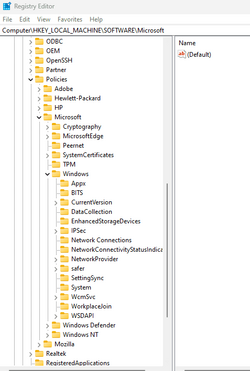
I am admittedly not well versed when it comes to editing the registry. I do not see WindowsUpdate under "Computer\HKEY_LOCAL_MACHINE\SOFTWARE\Microsoft". Am I looking in the wrong place?

Screenshot 2023-11-29 153606.png

Thanks again,
Randy
 

My Computer My Computer

At a glance

Windows 11Intel(R) Celeron(R) N4020 CPU @ 1.10GHz 1.10 GHz8.00 GBIntel(R) UHD Graphics 600
OS
Windows 11
Computer type
Laptop
Manufacturer/Model
HP/2C8Q1UA#ABA
CPU
Intel(R) Celeron(R) N4020 CPU @ 1.10GHz 1.10 GHz
Motherboard
(unknown)
Memory
8.00 GB
Graphics Card(s)
Intel(R) UHD Graphics 600
Sound Card
Realtek(R) Audio
Monitor(s) Displays
Built-In 15" LCD
Screen Resolution
1366 x 768
Hard Drives
1 TB
Cooling
Built-In
Keyboard
Built-In
Mouse
track pad & USB
Internet Speed
200MB
Browser
Chrome
Antivirus
BitDefender

Rison51

. . and another warm welcome to Elevenforum!

In future, it would help potential responders to better answer your questions if you can complete, as much as possible, the 'My Computer(s)' section of your profile - please see mine below and that completed by garioch7

Garioch7


My Computer My Computer

At a glance

Windows 11 Pro 25H2 (Build 26200.8728)Intel Core Ultra 9 285 5.6 GHz32.00 GBIntel Integrated Graphics (128 MB)
OS
Windows 11 Pro 25H2 (Build 26200.8728)
Computer type
PC/Desktop
Manufacturer/Model
Dell Pro Max Tower T2 FCT2250
CPU
Intel Core Ultra 9 285 5.6 GHz
Motherboard
64-bit operating system, x64-based processor
Memory
32.00 GB
Graphics Card(s)
Intel Integrated Graphics (128 MB)
Sound Card
Realtek Audio
Monitor(s) Displays
Dell P2714H Monitor
Screen Resolution
1920 x 1080
Hard Drives
1 x 512GB M.2 XG10d SED KIOXIA PCIe solid state drive (Internal)
1 x 2TB Seagate ST2000DM008-2UB102 HDD (Internal)
1 x 1TB Seagate STGX4000400 External HDD
1 x 4TB Seagate STGX4000400 External HDD
1 x 6TB WD Elements AE 2689 External HDD
PSU
500 Watts
Cooling
Air
Keyboard
Microsoft Wired Keyboard 600
Mouse
Microsoft USB Basic Optical Mouse v2.0
Browser
Firefox
Antivirus
Windows Defender + Malwarebytes Premium
Other Info
BaseBoard Manufacturer Dell Inc.
BaseBoard Product 022RY57
BaseBoard Version A01

Rison51

. . and another warm welcome to Elevenforum!

In future, it would help potential responders to better answer your questions if you can complete, as much as possible, the 'My Computer(s)' section of your profile - please see mine below and that completed by garioch7

Garioch7

Absolutely, will do. Thanks!
 

My Computer My Computer

At a glance

Windows 11Intel(R) Celeron(R) N4020 CPU @ 1.10GHz 1.10 GHz8.00 GBIntel(R) UHD Graphics 600
OS
Windows 11
Computer type
Laptop
Manufacturer/Model
HP/2C8Q1UA#ABA
CPU
Intel(R) Celeron(R) N4020 CPU @ 1.10GHz 1.10 GHz
Motherboard
(unknown)
Memory
8.00 GB
Graphics Card(s)
Intel(R) UHD Graphics 600
Sound Card
Realtek(R) Audio
Monitor(s) Displays
Built-In 15" LCD
Screen Resolution
1366 x 768
Hard Drives
1 TB
Cooling
Built-In
Keyboard
Built-In
Mouse
track pad & USB
Internet Speed
200MB
Browser
Chrome
Antivirus
BitDefender
@Rison51 ,

Did you try Method 2 using PowerShell in my first link to the ElevenForum tutorial? I would do that first before modifying my registry.

That registry subkey does not exist in my Windows 11 Pro registry either, but I have not disabled that option.

This link, in conjunction with the second one I provided in my first response to you, might help.


Back up your registry first, create a System Restore Point, or image your computer. Tweaking.com has a great free utility that I use weekly called Registry Backup. You always want to have a backup of your registry before modifying it in case things go south.

Edit the registry at your own risk. I have not personally tested this recommended solution, so I can't vouch for it. I can't see how it would bork your computer if it doesn't work. You would just remove the subkey in the event it does not solve your problem.

That registry subkey is not one that is critical to booting your computer, unlike the CurrentControlSet subkey. Nevertheless, an overabundance of caution is always wise when modifying the registry.

Good luck, and have a great day. Let us know how it goes.

Regards,
Phil
 

My Computers My Computers

  • At a glance

    Windows 11 Pro Version 25H2 (Build 26200.8655Intel i7-9700K 4700 MHz32 GB (4 x 8GB SK Hynix DDR4 @1333 MHz) (2666...NVIDIA GeForce RTX 2060 (6 GB) GDDR6 300 MHz
    OS
    Windows 11 Pro Version 25H2 (Build 26200.8655
    Computer type
    PC/Desktop
    Manufacturer/Model
    Dell XPS8930 SE
    CPU
    Intel i7-9700K 4700 MHz
    Motherboard
    Dell XPS 8930
    Memory
    32 GB (4 x 8GB SK Hynix DDR4 @1333 MHz) (2666 MHz)
    Graphics Card(s)
    NVIDIA GeForce RTX 2060 (6 GB) GDDR6 300 MHz
    Sound Card
    None
    Monitor(s) Displays
    Dell UltraSharp U2518D 25"
    Screen Resolution
    2560 x 1440
    Hard Drives
    NVMe Intel 1024 TB
    Seagate 2 TB, SATA-III
    Western Digital Black 4TB
    PSU
    850 W Gold Standard
    Case
    Dell XPS 8930 Base (Special Edition)
    Cooling
    Air
    Keyboard
    Dell 0G4D2W
    Mouse
    Dell MOCZUL
    Internet Speed
    Download 553 Mbps, Upload 686 Mbps
    Browser
    Google Chrome
    Antivirus
    ESET Smart Security Premium, plus Malwarebytes Premium
    Other Info
    BIOS Version 1.1.31
  • At a glance

    Windows 11 Pro Version 25H2 (Build 26200.8655)i7-9750H 4.5 GHz16 GB (2 x 8GB @ 1333 MHz) DDR4-2666 MHzNVIDIA GeForce 1650 4 GB GDDR5
    Operating System
    Windows 11 Pro Version 25H2 (Build 26200.8655)
    Computer type
    Laptop
    Manufacturer/Model
    Dell XPS 15 7590
    CPU
    i7-9750H 4.5 GHz
    Motherboard
    Dell XPS 15 7590
    Memory
    16 GB (2 x 8GB @ 1333 MHz) DDR4-2666 MHz
    Graphics card(s)
    NVIDIA GeForce 1650 4 GB GDDR5
    Sound Card
    None
    Monitor(s) Displays
    Dell XPS 15 7590, 15.6" InfinityEdge Anti-Glare, Non-Touch
    Screen Resolution
    1920 x 1080
    Hard Drives
    512 GB M.2 PCle NVMe SK Hynix
    PSU
    130W Power Adapter
    Case
    Dell XPS 15 7590
    Cooling
    Air
    Keyboard
    Laptop
    Mouse
    Logitech M510
    Internet Speed
    Download: 400 Mbps, Upload: 203 Mbps
    Browser
    Google Chrome
    Antivirus
    ESET Smart Security Premium, plus Malwarebytes Premium
    Other Info
    BIOS Version 1.35.0
@Rison51 ,

Did you try Method 2 using PowerShell in my first link to the ElevenForum tutorial? I would do that first before modifying my registry.

That registry subkey does not exist in my Windows 11 Pro registry either, but I have not disabled that option.

This link, in conjunction with the second one I provided in my first response to you, might help.


Back up your registry first, create a System Restore Point, or image your computer. Tweaking.com has a great free utility that I use weekly called Registry Backup. You always want to have a backup of your registry before modifying it in case things go south.

Edit the registry at your own risk. I have not personally tested this recommended solution, so I can't vouch for it. I can't see how it would bork your computer if it doesn't work. You would just remove the subkey in the event it does not solve your problem.

That registry subkey is not one that is critical to booting your computer, unlike the CurrentControlSet subkey. Nevertheless, an overabundance of caution is always wise when modifying the registry.

Good luck, and have a great day. Let us know how it goes.

Regards,
Phil
Phil,

I tried the PowerShell tip and, so far, it seems to have worked. Thank you so much!

Randy
 

My Computer My Computer

At a glance

Windows 11Intel(R) Celeron(R) N4020 CPU @ 1.10GHz 1.10 GHz8.00 GBIntel(R) UHD Graphics 600
OS
Windows 11
Computer type
Laptop
Manufacturer/Model
HP/2C8Q1UA#ABA
CPU
Intel(R) Celeron(R) N4020 CPU @ 1.10GHz 1.10 GHz
Motherboard
(unknown)
Memory
8.00 GB
Graphics Card(s)
Intel(R) UHD Graphics 600
Sound Card
Realtek(R) Audio
Monitor(s) Displays
Built-In 15" LCD
Screen Resolution
1366 x 768
Hard Drives
1 TB
Cooling
Built-In
Keyboard
Built-In
Mouse
track pad & USB
Internet Speed
200MB
Browser
Chrome
Antivirus
BitDefender
@Rison51 ,

I am really glad to hear that. The Tutorials here are a tremendous resource.

ElevenForum also has an abundance of highly knowledgeable experts here, yours truly not included in that august group! 😢

Please keep us posted. Have a great day.

Regards,
Phil
 

My Computers My Computers

  • At a glance

    Windows 11 Pro Version 25H2 (Build 26200.8655Intel i7-9700K 4700 MHz32 GB (4 x 8GB SK Hynix DDR4 @1333 MHz) (2666...NVIDIA GeForce RTX 2060 (6 GB) GDDR6 300 MHz
    OS
    Windows 11 Pro Version 25H2 (Build 26200.8655
    Computer type
    PC/Desktop
    Manufacturer/Model
    Dell XPS8930 SE
    CPU
    Intel i7-9700K 4700 MHz
    Motherboard
    Dell XPS 8930
    Memory
    32 GB (4 x 8GB SK Hynix DDR4 @1333 MHz) (2666 MHz)
    Graphics Card(s)
    NVIDIA GeForce RTX 2060 (6 GB) GDDR6 300 MHz
    Sound Card
    None
    Monitor(s) Displays
    Dell UltraSharp U2518D 25"
    Screen Resolution
    2560 x 1440
    Hard Drives
    NVMe Intel 1024 TB
    Seagate 2 TB, SATA-III
    Western Digital Black 4TB
    PSU
    850 W Gold Standard
    Case
    Dell XPS 8930 Base (Special Edition)
    Cooling
    Air
    Keyboard
    Dell 0G4D2W
    Mouse
    Dell MOCZUL
    Internet Speed
    Download 553 Mbps, Upload 686 Mbps
    Browser
    Google Chrome
    Antivirus
    ESET Smart Security Premium, plus Malwarebytes Premium
    Other Info
    BIOS Version 1.1.31
  • At a glance

    Windows 11 Pro Version 25H2 (Build 26200.8655)i7-9750H 4.5 GHz16 GB (2 x 8GB @ 1333 MHz) DDR4-2666 MHzNVIDIA GeForce 1650 4 GB GDDR5
    Operating System
    Windows 11 Pro Version 25H2 (Build 26200.8655)
    Computer type
    Laptop
    Manufacturer/Model
    Dell XPS 15 7590
    CPU
    i7-9750H 4.5 GHz
    Motherboard
    Dell XPS 15 7590
    Memory
    16 GB (2 x 8GB @ 1333 MHz) DDR4-2666 MHz
    Graphics card(s)
    NVIDIA GeForce 1650 4 GB GDDR5
    Sound Card
    None
    Monitor(s) Displays
    Dell XPS 15 7590, 15.6" InfinityEdge Anti-Glare, Non-Touch
    Screen Resolution
    1920 x 1080
    Hard Drives
    512 GB M.2 PCle NVMe SK Hynix
    PSU
    130W Power Adapter
    Case
    Dell XPS 15 7590
    Cooling
    Air
    Keyboard
    Laptop
    Mouse
    Logitech M510
    Internet Speed
    Download: 400 Mbps, Upload: 203 Mbps
    Browser
    Google Chrome
    Antivirus
    ESET Smart Security Premium, plus Malwarebytes Premium
    Other Info
    BIOS Version 1.35.0
@Rison51 ,

I am really glad to hear that. The Tutorials here are a tremendous resource.

ElevenForum also has an abundance of highly knowledgeable experts here, yours truly not included in that august group! 😢

Please keep us posted. Have a great day.

Regards,
Phil
Phil,

I really thought I had this issue corrected but recently have started getting it again. I have turned this toggle off numerous times, only to have it return. Close to giving up on it honestly.

Thanks,
Randy

WU_Advanced Options.png
 

My Computer My Computer

At a glance

Windows 11Intel(R) Celeron(R) N4020 CPU @ 1.10GHz 1.10 GHz8.00 GBIntel(R) UHD Graphics 600
OS
Windows 11
Computer type
Laptop
Manufacturer/Model
HP/2C8Q1UA#ABA
CPU
Intel(R) Celeron(R) N4020 CPU @ 1.10GHz 1.10 GHz
Motherboard
(unknown)
Memory
8.00 GB
Graphics Card(s)
Intel(R) UHD Graphics 600
Sound Card
Realtek(R) Audio
Monitor(s) Displays
Built-In 15" LCD
Screen Resolution
1366 x 768
Hard Drives
1 TB
Cooling
Built-In
Keyboard
Built-In
Mouse
track pad & USB
Internet Speed
200MB
Browser
Chrome
Antivirus
BitDefender
@Rison51 ,

The only other thing that I can think of is that something is turning that setting back on.

I note that you have an HP laptop from your specs. Is there any HP "bloatware" on the laptop that might be re-enabling that setting?

Have you tried going to the HP Forums to see if others are having this issue?

Two final ideas: Have you run a System File Checker scan? If you have, and it came back clean, have you tried running the Windows Update troubleshooter?

If none of that helps, I am out of ideas, but fear not; there are many knowledgeable experts here who know far more than I do. In fact, they have forgotten more than I will ever know! 😢

Good luck, and have a great day. Please keep us posted.

Regards,
Phil
 

My Computers My Computers

  • At a glance

    Windows 11 Pro Version 25H2 (Build 26200.8655Intel i7-9700K 4700 MHz32 GB (4 x 8GB SK Hynix DDR4 @1333 MHz) (2666...NVIDIA GeForce RTX 2060 (6 GB) GDDR6 300 MHz
    OS
    Windows 11 Pro Version 25H2 (Build 26200.8655
    Computer type
    PC/Desktop
    Manufacturer/Model
    Dell XPS8930 SE
    CPU
    Intel i7-9700K 4700 MHz
    Motherboard
    Dell XPS 8930
    Memory
    32 GB (4 x 8GB SK Hynix DDR4 @1333 MHz) (2666 MHz)
    Graphics Card(s)
    NVIDIA GeForce RTX 2060 (6 GB) GDDR6 300 MHz
    Sound Card
    None
    Monitor(s) Displays
    Dell UltraSharp U2518D 25"
    Screen Resolution
    2560 x 1440
    Hard Drives
    NVMe Intel 1024 TB
    Seagate 2 TB, SATA-III
    Western Digital Black 4TB
    PSU
    850 W Gold Standard
    Case
    Dell XPS 8930 Base (Special Edition)
    Cooling
    Air
    Keyboard
    Dell 0G4D2W
    Mouse
    Dell MOCZUL
    Internet Speed
    Download 553 Mbps, Upload 686 Mbps
    Browser
    Google Chrome
    Antivirus
    ESET Smart Security Premium, plus Malwarebytes Premium
    Other Info
    BIOS Version 1.1.31
  • At a glance

    Windows 11 Pro Version 25H2 (Build 26200.8655)i7-9750H 4.5 GHz16 GB (2 x 8GB @ 1333 MHz) DDR4-2666 MHzNVIDIA GeForce 1650 4 GB GDDR5
    Operating System
    Windows 11 Pro Version 25H2 (Build 26200.8655)
    Computer type
    Laptop
    Manufacturer/Model
    Dell XPS 15 7590
    CPU
    i7-9750H 4.5 GHz
    Motherboard
    Dell XPS 15 7590
    Memory
    16 GB (2 x 8GB @ 1333 MHz) DDR4-2666 MHz
    Graphics card(s)
    NVIDIA GeForce 1650 4 GB GDDR5
    Sound Card
    None
    Monitor(s) Displays
    Dell XPS 15 7590, 15.6" InfinityEdge Anti-Glare, Non-Touch
    Screen Resolution
    1920 x 1080
    Hard Drives
    512 GB M.2 PCle NVMe SK Hynix
    PSU
    130W Power Adapter
    Case
    Dell XPS 15 7590
    Cooling
    Air
    Keyboard
    Laptop
    Mouse
    Logitech M510
    Internet Speed
    Download: 400 Mbps, Upload: 203 Mbps
    Browser
    Google Chrome
    Antivirus
    ESET Smart Security Premium, plus Malwarebytes Premium
    Other Info
    BIOS Version 1.35.0
Thank you Phil! I'll try the HP forum(s).

Regards,
Randy
 

My Computer My Computer

At a glance

Windows 11Intel(R) Celeron(R) N4020 CPU @ 1.10GHz 1.10 GHz8.00 GBIntel(R) UHD Graphics 600
OS
Windows 11
Computer type
Laptop
Manufacturer/Model
HP/2C8Q1UA#ABA
CPU
Intel(R) Celeron(R) N4020 CPU @ 1.10GHz 1.10 GHz
Motherboard
(unknown)
Memory
8.00 GB
Graphics Card(s)
Intel(R) UHD Graphics 600
Sound Card
Realtek(R) Audio
Monitor(s) Displays
Built-In 15" LCD
Screen Resolution
1366 x 768
Hard Drives
1 TB
Cooling
Built-In
Keyboard
Built-In
Mouse
track pad & USB
Internet Speed
200MB
Browser
Chrome
Antivirus
BitDefender
@Rison51 ,

Good luck, and please keep us posted.

Have a great day.

Regards,
Phil
 

My Computers My Computers

  • At a glance

    Windows 11 Pro Version 25H2 (Build 26200.8655Intel i7-9700K 4700 MHz32 GB (4 x 8GB SK Hynix DDR4 @1333 MHz) (2666...NVIDIA GeForce RTX 2060 (6 GB) GDDR6 300 MHz
    OS
    Windows 11 Pro Version 25H2 (Build 26200.8655
    Computer type
    PC/Desktop
    Manufacturer/Model
    Dell XPS8930 SE
    CPU
    Intel i7-9700K 4700 MHz
    Motherboard
    Dell XPS 8930
    Memory
    32 GB (4 x 8GB SK Hynix DDR4 @1333 MHz) (2666 MHz)
    Graphics Card(s)
    NVIDIA GeForce RTX 2060 (6 GB) GDDR6 300 MHz
    Sound Card
    None
    Monitor(s) Displays
    Dell UltraSharp U2518D 25"
    Screen Resolution
    2560 x 1440
    Hard Drives
    NVMe Intel 1024 TB
    Seagate 2 TB, SATA-III
    Western Digital Black 4TB
    PSU
    850 W Gold Standard
    Case
    Dell XPS 8930 Base (Special Edition)
    Cooling
    Air
    Keyboard
    Dell 0G4D2W
    Mouse
    Dell MOCZUL
    Internet Speed
    Download 553 Mbps, Upload 686 Mbps
    Browser
    Google Chrome
    Antivirus
    ESET Smart Security Premium, plus Malwarebytes Premium
    Other Info
    BIOS Version 1.1.31
  • At a glance

    Windows 11 Pro Version 25H2 (Build 26200.8655)i7-9750H 4.5 GHz16 GB (2 x 8GB @ 1333 MHz) DDR4-2666 MHzNVIDIA GeForce 1650 4 GB GDDR5
    Operating System
    Windows 11 Pro Version 25H2 (Build 26200.8655)
    Computer type
    Laptop
    Manufacturer/Model
    Dell XPS 15 7590
    CPU
    i7-9750H 4.5 GHz
    Motherboard
    Dell XPS 15 7590
    Memory
    16 GB (2 x 8GB @ 1333 MHz) DDR4-2666 MHz
    Graphics card(s)
    NVIDIA GeForce 1650 4 GB GDDR5
    Sound Card
    None
    Monitor(s) Displays
    Dell XPS 15 7590, 15.6" InfinityEdge Anti-Glare, Non-Touch
    Screen Resolution
    1920 x 1080
    Hard Drives
    512 GB M.2 PCle NVMe SK Hynix
    PSU
    130W Power Adapter
    Case
    Dell XPS 15 7590
    Cooling
    Air
    Keyboard
    Laptop
    Mouse
    Logitech M510
    Internet Speed
    Download: 400 Mbps, Upload: 203 Mbps
    Browser
    Google Chrome
    Antivirus
    ESET Smart Security Premium, plus Malwarebytes Premium
    Other Info
    BIOS Version 1.35.0

Latest Support Threads

Back
Top Bottom