Microsoft Store icon not appearing.


psikofunkster

Member
Local time
10:39 AM
Posts
10
OS
Windows 11
Hi guys, im going crazy here, this week i needed to clean install windows 11, but each time i try to theres no microsoft store icon on the tool bar.

I know i can drag the icon and put it on the tool bar but why this keeps happening after many clean installs?

Things i have tried:

1) Performed a clean windows 11 installation like 6 times.
2) downloaded the latest installer released this week.

Also when doing the setup and ask me to login via my password always tells me i have no internet although i do. Only once yesterday accepted it.
 

My Computer My Computer

At a glance

Windows 11
OS
Windows 11
When you're doing a clean install, do you follow any steps to prepare the ISO? The Store app is always pinned to the taskbar unless a Group Policy is enabled, which explicitly blocks pinning it there.
 

My Computer My Computer

At a glance

Windows 7
OS
Windows 7
I download the official creation tool and create a usb nothing else.
 

My Computer My Computer

At a glance

Windows 11
OS
Windows 11
Rather than dragging to pin store to taskbar, right click on it in start menu and select "pin to taskbar".

I have not encountered this myself, but there have been instances across the web where if one is using a local account and not signed in to MS that the store icon will not stay pinned.
 

My Computers My Computers

  • At a glance

    Windows 11 Pro 25H2 26200.8875i9-10900 10 core 20 threads32 gbnone-Intel UHD Graphics 630
    OS
    Windows 11 Pro 25H2 26200.8875
    Computer type
    PC/Desktop
    Manufacturer/Model
    Dell Optiplex 7080
    CPU
    i9-10900 10 core 20 threads
    Motherboard
    DELL 0J37VM
    Memory
    32 gb
    Graphics Card(s)
    none-Intel UHD Graphics 630
    Sound Card
    Integrated Realtek
    Monitor(s) Displays
    Benq 27
    Screen Resolution
    2560x1440
    Hard Drives
    2x1tb Solidigm m.2 nvme /External drives 512gb Samsung m.2 sata+2tb Kingston m2.nvme
    PSU
    500w
    Case
    MT
    Cooling
    Dell Premium
    Keyboard
    Logitech wired
    Mouse
    Logitech wireless
    Internet Speed
    so slow I'm too embarrassed to tell
    Browser
    #1 Edge #2 Firefox
    Antivirus
    Defender+MWB Premium
  • At a glance

    Windows 11 Pro 24H2 26200.8875AMD Ryzen 7 6800U32 gbintegrated
    Operating System
    Windows 11 Pro 24H2 26200.8875
    Computer type
    PC/Desktop
    Manufacturer/Model
    Beelink Mini PC SER5
    CPU
    AMD Ryzen 7 6800U
    Memory
    32 gb
    Graphics card(s)
    integrated
    Sound Card
    integrated
    Monitor(s) Displays
    Benq 27
    Screen Resolution
    2560x1440
    Hard Drives
    1TB Crucial nvme
    Keyboard
    Logitech wired
    Mouse
    Logitech wireless
    Internet Speed
    still too embarrassed to tell
    Browser
    Firefox
    Antivirus
    Defender
    Other Info
    System 3 is non compliant Dell 9020 i7-4770/24gb ram Win11 PRO 26200.8875
Interesting. Which edition are you installing (Home, Pro, EDU, Enterprise)?

Can you try a simple experiment? Under Settings, create a new Local User account. Logon to that test account and see if this profile is also missing the Store from the taskbar. When you say "login via my password", is your primary logon a Microsoft Account?

Wondering if Windows is trying to sync a profile setting from somewhere else.
 

My Computer My Computer

At a glance

Windows 7
OS
Windows 7
Rather than dragging to pin store to taskbar, right click on it in start menu and select "pin to taskbar".

I have not encountered this myself, but there have been instances across the web where if one is using a local account and not signed in to MS that the store icon will not stay pinned.
Most of the times the setup doesnt allow me to login via my microsoft email, tells me theres no internet (although there is) so im using the microsoft authentificator app and my face to log in perhaps thats the issue?
 

My Computer My Computer

At a glance

Windows 11
OS
Windows 11
Interesting. Which edition are you installing (Home, Pro, EDU, Enterprise)?

Can you try a simple experiment? Under Settings, create a new Local User account. Logon to that test account and see if this profile is also missing the Store from the taskbar. When you say "login via my password", is your primary logon a Microsoft Account?

Wondering if Windows is trying to sync a profile setting from somewhere else.
Yes im using a microsoft email.
Pro version
 
Last edited:

My Computer My Computer

At a glance

Windows 11
OS
Windows 11
AFAIK you can't use the Authenticator during the OOBE account creation step. It's still an old-school password, because MS hasn't updated that code in forever. After you're successfully logged on, some of the online services can take advantage of the Authenticator codes (but not before then).
 

My Computer My Computer

At a glance

Windows 7
OS
Windows 7
AFAIK you can't use the Authenticator during the OOBE account creation step. It's still an old-school password, because MS hasn't updated that code in forever. After you're successfully logged on, some of the online services can take advantage of the Authenticator codes (but not before then).
What do you mean with i cant? Its the thing buggy?? because i can install windows using my phone authenticatior….

Do you mean that might be the cause of my issue?
 

My Computer My Computer

At a glance

Windows 11
OS
Windows 11
Start a Command Prompt as Admin,
Copy and Paste or type the following Bold commands one at a time and press Enter
DISM /Online /Cleanup-Image /RestoreHealth after that completes, type
SFC /scannow
This will replace any missing Windows System Files.

You can also go to the Start button, Apps/Microsoft Store
Right click this shortcut and choose Pin to taskbar
 

My Computer My Computer

At a glance

Windows 11 Pro Insider 64 bit 25H2 26200.5742Intel Core i7 9700K 3.6016 GBnVidia GEForce RTX 2060 Super
OS
Windows 11 Pro Insider 64 bit 25H2 26200.5742
Computer type
PC/Desktop
Manufacturer/Model
Gigabyte Z390 UD
CPU
Intel Core i7 9700K 3.60
Motherboard
Gigabyte Z390 UD
Memory
16 GB
Graphics Card(s)
nVidia GEForce RTX 2060 Super
Sound Card
onboard
Monitor(s) Displays
Two 27" Dell 4K monitors
Screen Resolution
3840 x 2160
Hard Drives
M.2 NVME SSD, 500 GB; Two 2TB Mechanical HDD's
PSU
850w PSU
Case
Cyberpower PC
Cooling
Water cooled
Keyboard
Backlit Cyberpower gaming keyboard
Mouse
Backlit Cyberpower gaming mouse
Internet Speed
1 GB mbps
Browser
Brave
Antivirus
Windows Security
What do you mean with i cant? Its the thing buggy?? because i can install windows using my phone authenticatior….

Do you mean that might be the cause of my issue?
As I wrote before, the OOBE setup screen has never supported Authenticator or any other sign-on methods other than a password.

MS is moving towards a "passwordless future", but that's not today with a clean Windows install.
 

My Computer My Computer

At a glance

Windows 7
OS
Windows 7
As I wrote before, the OOBE setup screen has never supported Authenticator or any other sign-on methods other than a password.

MS is moving towards a "passwordless future", but that's not today with a clean Windows install.
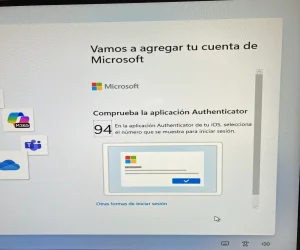
Thats incorrect, now it can be done. I have done it many times today.
 

My Computer My Computer

At a glance

Windows 11
OS
Windows 11
and here's the proof, passwordless...

IMG_0108.webp

But this is NOT my issue, i just attached the bloody icon on the taskbar and forgot about it for my sanity. 24H2 has many bugs.
 

My Computer My Computer

At a glance

Windows 11
OS
Windows 11
I imagine they've rolled out a newer OOBE to support Authenticator. In older Windows builds, this wasn't an option.
 

My Computer My Computer

At a glance

Windows 7
OS
Windows 7
Told ya... and the "funny" thing now is i can't install anymore windows using my email and password says: no network connection available although there is one working fine. They add something new but unfix something else.

Thanks anyways everybody for trying to help.
 

My Computer My Computer

At a glance

Windows 11
OS
Windows 11
and here's the proof, passwordless...
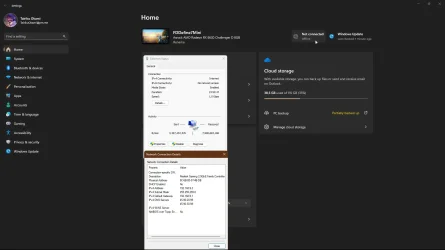
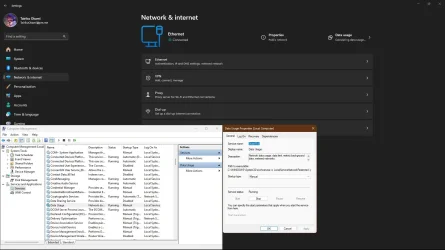
Windows verifies internet connectivity using NetworkConnectivityStatusIndicator
Code:
dns.msftncsi.com
reg add "HKLM\Software\Policies\Microsoft\Windows\NetworkConnectivityStatusIndicator" /v "DisablePassivePolling" /t REG_DWORD /d "0" /f
reg add "HKLM\Software\Policies\Microsoft\Windows\NetworkConnectivityStatusIndicator" /v "NoActiveProbe" /t REG_DWORD /d "0" /f
reg add "HKLM\System\CurrentControlSet\Services\NlaSvc\Parameters\Internet" /v "EnableActiveProbing" /t REG_DWORD /d "1" /f

Network services and also Data usage tasks have to be running, otherwise you have no internet, even when you do.

capture_06282025_221020.webp capture_06282025_221500.webp
 

My Computer My Computer

At a glance

Home26H2CanAMD Ryzen 5 8600G (07/24)2x32GB Kingston FURY DDR5 5600 MHz CL36 @5200...ASROCK Radeon RX 6600 Challenger D 8G @48FPS ...
OS
Home26H2Can
Computer type
PC/Desktop
CPU
AMD Ryzen 5 8600G (07/24)
Motherboard
ASROCK B650M-HDV/M.2 (07/24) BIOS 4.21 AGESA ComboAM5 1.3.0.1 (04/26)
Memory
2x32GB Kingston FURY DDR5 5600 MHz CL36 @5200 CL36 (07/24)
Graphics Card(s)
ASROCK Radeon RX 6600 Challenger D 8G @48FPS (08/24)
Sound Card
Creative Sound BlasterX AE-5 Plus (05/24)
Monitor(s) Displays
24" Philips 24M1N3200ZS/00 (05/24)
Screen Resolution
1920×1080@165Hz via DP1.4
Hard Drives
Kingston KC3000 NVMe 2TB (05/24)
ADATA XPG GAMMIX S11 Pro 512GB (07/19)
PSU
Seasonic Core GM 550 Gold (04/24)
Case
Fractal Design Define 7 Mini with 3x Noctua NF-P14s/12@555rpm (04/24)
Cooling
Noctua NH-U12S with Noctua NF-P12 (04/24)
Keyboard
HP Pavilion Wired Keyboard 300 (07/24) + Rabalux 76017 Parker (01/24)
Mouse
Logitech M330 Silent Plus (01/26)
Internet Speed
500/100 Mbps via RouterOS (05/21) & TCP Optimizer
Browser
Edge, Brave for YouTube, LibreWolf for FB
Antivirus
NextDNS blocking 1/3 Traffic
Other Info
Phone: Motorola Moto G86 (02/26)
Backup: Hasleo Backup Suite (PreOS)
Headphones: Sennheiser RS170 (09/10)
Chair: Huzaro Force 4.4 Grey Mesh (05/24)
Notifier: Xiaomi Mi Band 9 Milanese (10/24)
FlexCore USB-C 3.2 Gen 1 (M) to LAN (F) (08/25)

Latest Support Threads

Back
Top Bottom