
Solved Microsoft Store not initialising after fresh install of 25H2 Pro - 26200.7840


Win7ine

Well-known member
Member
Local time
5:04 AM
Posts
185
Location
Metropolis
OS
Windows 11 PRO / Windows Server 2016 Essentials
Noticed on one of the machines (Surface Laptop Go) I am looking after that the Microsoft Store would stay blank and not initialize, repairing, resetting it did not make any difference, so I initiated an in-place upgrade from the cloud, which still not made any difference. So I decided to do it again, this time from a USB stick created with the latest available Media Creation Tool, still no joy. After a complete SSD wipe and clean install going through OOBE I am still seeing this issue ....
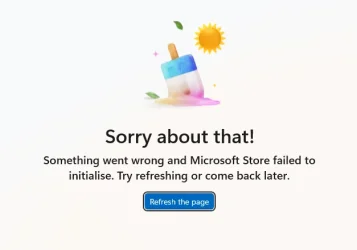
Screenshot 2026-02-15 125255.webp

Also there is no option to sign in with a local account on this particular machine at all and hence I cannot sign out the Microsoft account from the store and sign in with a local account.
 

My Computer

System One

  • OS
    Windows 11 PRO / Windows Server 2016 Essentials
Noticed on one of the machines (Surface Laptop Go) I am looking after that the Microsoft Store would stay blank and not initialize, repairing, resetting it did not make any difference, so I initiated an in-place upgrade from the cloud, which still not made any difference. So I decided to do it again, this time from a USB stick created with the latest available Media Creation Tool, still no joy. After a complete SSD wipe and clean install going through OOBE I am still seeing this issue ....

View attachment 163385

Also there is no option to sign in with a local account on this particular machine at all and hence I cannot sign out the Microsoft account from the store and sign in with a local account.
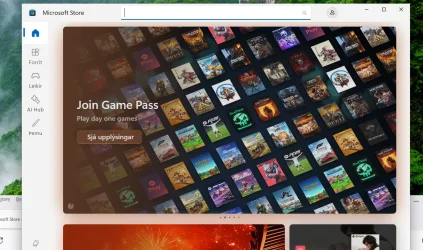
Working OK here :

@Win7ine

(Note -- to use local account you should have done at OOBE stage -- sign in options ->domain join. (you don't need a domain). Then you just get asked to enter a user name and setup procedes normally with a LOCAL account. For W11 pro and above ignore any of the bonkers complex scripts or get arounds -- the current easiest and still working way at setup - choose school/workplace and then domain join for login / sign in option).

Skjámynd 2026-02-15 134621.webp

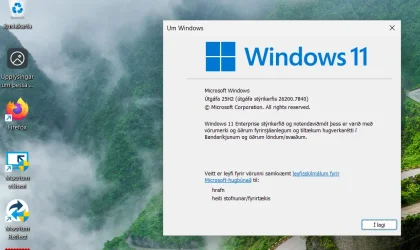
Windows version :

Skjámynd 2026-02-15 134716.webp

Cheers
jimbo
 

My Computer

System One

  • OS
    Windows XP,11 Linux Fedora Rawhide pre-release 45
    Computer type
    PC/Desktop
    CPU
    2 X Intel i7
    Screen Resolution
    4KUHD X 2
Also there is no option to sign in with a local account on this particular machine at all and hence I cannot sign out the Microsoft account from the store and sign in with a local account.
You cannot create another non-administrative user account with local username/password? Is this option blocked by your policy or somehow else? Otherwise try "Add account", "Add a user without a Microsoft account".
 

My Computer

System One

  • OS
    Windows 11 Pro 25H2
    Computer type
    Laptop
    Manufacturer/Model
    Lenovo Legion 5-15ARH05
    CPU
    AMD Rysen 5 4600H
    Memory
    32 GB (2 x 16 GB Samsung SO-DIMM DDR4-3200)
    Graphics Card(s)
    GeForce GTX 1650 Ti, 4 GB GDDR6
    Screen Resolution
    1920x1080
    Hard Drives
    SSD M.2 512 GB SAMSUNG MZALQ512; SSD M.2 1 TB Seagate FireCuda 530
    Mouse
    Logitech M650L in Bluetooth mode
Working OK here :

@Win7ine

(Note -- to use local account you should have done at OOBE stage -- sign in options ->domain join. (you don't need a domain). Then you just get asked to enter a user name and setup procedes normally with a LOCAL account. For W11 pro and above ignore any of the bonkers complex scripts or get arounds -- the current easiest and still working way at setup - choose school/workplace and then domain join for login / sign in option).

View attachment 163389

Windows version :

View attachment 163390

Cheers
jimbo
Well, it is working here too on all other machines .... just not on this particular machine, and I have reinstalled all in 3 different ways ... had enough, need some workaround - looks as if KB5071430 is the culprit, but removing it makes no difference as all past OOBE stage now.
 

My Computer

System One

  • OS
    Windows 11 PRO / Windows Server 2016 Essentials
I have the same situation in 2 of 3 PCs. In one of those, I tried absolutely everything even complete Windows reinstall but always the same error with Microsoft Store.

I dont know what else to do
 

My Computer

System One

  • OS
    Windows 11 25H2
    Computer type
    PC/Desktop
You cannot create another non-administrative user account with local username/password? Is this option blocked by your policy or somehow else? Otherwise try "Add account", "Add a user without a Microsoft account".
Yes, managed to create a local user account this way with a functional Microsoft Store and the moment I sign into this working store with the Microsoft account it becomes non functional and throws the same message ....
 

My Computer

System One

  • OS
    Windows 11 PRO / Windows Server 2016 Essentials
I have the same situation in 2 of 3 PCs. In one of those, I tried absolutely everything even complete Windows reinstall but always the same error with Microsoft Store.

I dont know what else to do
Yeah, I saw instances popping up all over the web - seems another proper MS screw --- Do those two machines of yours show up in the online store management in the MS accounts?

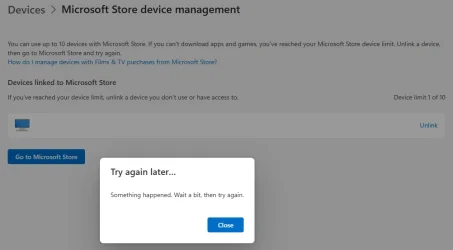
Screenshot 2026-02-15 151607.webp

And if they do, did you manage to Unlink them so that they can be newly registered? It is a no go here see screenshot ...
 

My Computer

System One

  • OS
    Windows 11 PRO / Windows Server 2016 Essentials
Yeah, I saw instances popping up all over the web - seems another proper MS screw --- Do those two machines of yours show up in the online store management in the MS accounts?

View attachment 163393

And if they do, did you manage to Unlink them so that they can be newly registered? It is a no go here see screenshot ...
The one that I'm doing the test with appeared before in that screen of devices. After reinstalling Windows, no longer shows up there. I cannot activate Bitlocker neither (it says it cannot save the key in the account) nor start the Microsoft Store.
 
Last edited:

My Computer

System One

  • OS
    Windows 11 25H2
    Computer type
    PC/Desktop
Yeah, I saw instances popping up all over the web - seems another proper MS screw --- Do those two machines of yours show up in the online store management in the MS accounts?

View attachment 163393

And if they do, did you manage to Unlink them so that they can be newly registered? It is a no go here see screenshot ...

Same happening in Germany on another machine in another country ....

Screenshot 2026-02-15 163450.webp
 

My Computer

System One

  • OS
    Windows 11 PRO / Windows Server 2016 Essentials
Yes, managed to create a local user account this way with a functional Microsoft Store and the moment I sign into this working store with the Microsoft account it becomes non functional and throws the same message ....
Logging to MS account in Store allows to install the apps which are linked to your account, primarily the paid apps. But to update the apps which are installed with Windows 11 (all they are free) you don't need to log, simply go to "Downloads" and check for updates. I don't mean that you should always do this way, but for test how the Store does work on your PC this may be very helpful. Need to filter out the possible local problems and problems with your MS account on Microsoft server.
 

My Computer

System One

  • OS
    Windows 11 Pro 25H2
    Computer type
    Laptop
    Manufacturer/Model
    Lenovo Legion 5-15ARH05
    CPU
    AMD Rysen 5 4600H
    Memory
    32 GB (2 x 16 GB Samsung SO-DIMM DDR4-3200)
    Graphics Card(s)
    GeForce GTX 1650 Ti, 4 GB GDDR6
    Screen Resolution
    1920x1080
    Hard Drives
    SSD M.2 512 GB SAMSUNG MZALQ512; SSD M.2 1 TB Seagate FireCuda 530
    Mouse
    Logitech M650L in Bluetooth mode
Logging to MS account in Store allows to install the apps which are linked to your account, primarily the paid apps. But to update the apps which are installed with Windows 11 (all they are free) you don't need to log, simply go to "Downloads" and check for updates. I don't mean that you should always do this way, but for test how the Store does work on your PC this may be very helpful. Need to filter out the possible local problems and problems with your MS account on Microsoft server.
This is not a local problem it appears, but at least an EMEA wide Microsoft issue. Saw someone reporting exactly the same from S.A."simply go to Downloads" does not work as it is not there as an option after logging in with a Microsoft account. All deployed store apps seem to be up to date comparing versions on other machines.
 

My Computer

System One

  • OS
    Windows 11 PRO / Windows Server 2016 Essentials
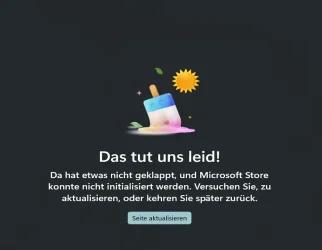
Store still not initializing. However, Store version apps such as Telegram, Whatsapp or Plex, can still be downloaded from their respective websites and installed as normal.
 

My Computer

System One

  • OS
    Windows 11 25H2
    Computer type
    PC/Desktop

My Computer

System One

  • OS
    Windows 11 PRO / Windows Server 2016 Essentials
Just a heads up, the previously, for days non-working Microsoft Store despite reinstallation of the entire OS is now working out of the blue
without any changes locally. Apparently, Microsoft have woken up from a long weekend ...
 

My Computer

System One

  • OS
    Windows 11 PRO / Windows Server 2016 Essentials
Just a heads up, the previously, for days non-working Microsoft Store despite reinstallation of the entire OS is now working out of the blue
without any changes locally. Apparently, Microsoft have woken up from a long weekend ...
Yes, it's working again without doing anything. Thank you for the message!
 

My Computer

System One

  • OS
    Windows 11 25H2
    Computer type
    PC/Desktop
Ya, all working again!! :clap: 🍻
 

My Computer

System One

  • OS
    W11 24H2
    Computer type
    Laptop
    Manufacturer/Model
    ASUS A 14
    CPU
    Ryzen 7
    Memory
    16Gb
    Graphics Card(s)
    AMD Radeon & NVIDIA GeForce RTX 3050
    Hard Drives
    500GB SSD & 2 TB portable
    Browser
    Edge
    Antivirus
    Defender
Back
Top Bottom


