
"Microsoft.Windows.Remediation" failed to start


denvilledon

Well-known member
Member
Local time
7:35 AM
Posts
43
OS
Winsows 11 Pro
Running Version 21H2 build 22000.493 In the event viewer I am getting the following error "Session "Microsoft.Windows.Remediation" failed to start with the following error: 0xC0000035. The error happens about once a day. There are some google entries about deleting the files and directory but I really don't want to do that. Any Ideas what is causing the error?
 

My Computer My Computer

At a glance

Winsows 11 Pro11th Gen Intel(R) Core(TM) i7-1195G7 @ 2.90GHz16.00 GBIntel Tiger Lake-UP3 - GT2 Integrated Graphic...
OS
Winsows 11 Pro
Computer type
Laptop
Manufacturer/Model
HP HP Pavilion Laptop 15-eg1xxx
CPU
11th Gen Intel(R) Core(TM) i7-1195G7 @ 2.90GHz
Motherboard
HP 898C Intel Tiger Lake-UP3 PCH-LP
Memory
16.00 GB
Graphics Card(s)
Intel Tiger Lake-UP3 - GT2 Integrated Graphics [Hewlett-Packard
Sound Card
Intel Tiger Lake-U/Y PCH-LP - cAVS (Audio, Voice, Speech)
Monitor(s) Displays
L2251x Wide
Hard Drives
SAMSUNG MZVLQ1T0HBLB-00BH1
WDC WD20NMVW-11EDZS7
Found this, may be of help......


My Computer My Computer

At a glance

Windows 11 Pro Beta, 11 Dev, W11 CanaryAMD Ryzen™ 9 5900HX32GBNVIDIA® GeForce RTX™ 3070 8GB GDDR6
OS
Windows 11 Pro Beta, 11 Dev, W11 Canary
Computer type
Laptop
Manufacturer/Model
Dell Alienware M15 Ryzen Edition R6
CPU
AMD Ryzen™ 9 5900HX
Memory
32GB
Graphics Card(s)
NVIDIA® GeForce RTX™ 3070 8GB GDDR6
Hard Drives
1 x Samsung 980 Pro 1TB
1 x Samsung 970 Evo Plus 1TB
You could try:
Right-click Command Prompt and select the Run as administrator
Type the following command to repair system files and press Enter: sfc /scannow
Or try this:
Right-click Command Prompt
and select the Run as administrator option
Type the following command to perform a quick check:

DISM /Online /Cleanup-Image /CheckHealth

To perform a more advanced check:

DISM /Online /Cleanup-Image /ScanHealth

To repair the disc image:

DISM /Online /Cleanup-Image /RestoreHealth
 

My Computers My Computers

  • At a glance

    Windows 11 Pro13th Gen Core i9 13900HX32GB DDR5 @4800MHz 2x16GBGeforce RTX 4090HX 16GB
    OS
    Windows 11 Pro
    Computer type
    Laptop
    Manufacturer/Model
    Alienware M18 R1
    CPU
    13th Gen Core i9 13900HX
    Memory
    32GB DDR5 @4800MHz 2x16GB
    Graphics Card(s)
    Geforce RTX 4090HX 16GB
    Sound Card
    Nvidia HD / Realtek ALC3254
    Monitor(s) Displays
    18" QHD+
    Screen Resolution
    25660 X 1600
    Hard Drives
    C: KIOXIA (Toshiba) 2TB KXG80ZNV2T04 NVMe PCIe M.2 SSD
    D: KIOXIA (Toshiba) 2TB KXG80ZNV2T04 NVMe PCIe M.2 SSD
    Case
    Dark Metallic Moon
    Keyboard
    Alienware M Series per-key AlienFX RGB
    Mouse
    Alienware AW610M
    Browser
    Chrome and Firefox
    Antivirus
    Norton
    Other Info
    Killer E3000 Ethernet Controller
    Killer Killer AX1690 Wi-Fi Network Adaptor Wi-Fi 6E
    Bluetooth 5.2
    Alienware Z01G Graphic Amplifier
  • At a glance

    Windows 11 Pro10th Gen i-9 10900 K32Gb Dual Channel DDR4 @ 8843MHzNvidia RTX 2080 Super
    Operating System
    Windows 11 Pro
    Computer type
    Laptop
    Manufacturer/Model
    Alienware Area 51m R2
    CPU
    10th Gen i-9 10900 K
    Memory
    32Gb Dual Channel DDR4 @ 8843MHz
    Graphics card(s)
    Nvidia RTX 2080 Super
    Sound Card
    Nvidia
    Screen Resolution
    1920 x 1080
    Hard Drives
    Hard Drive C: Samsung 2TB SSD PM981a NVMe
    Hard Drive D:Samsung 2TB SSD 970 EVO Plus
    Mouse
    Alienware 610M
    Browser
    Chrome
    Antivirus
    Norton
It would help if you could provide the details of this event by furnishing a screenshot. Know that it's completely normal to have occasional Warnings and Errors in Event Viewer and there is no way to stop them all.

Is it random, or can you correlate the time of this error with any other event such as does it happen when you boot up the computer, put it to sleep, plug in an external device, or run a particular application?

If you see no affect in the operation of your system (ie freezes, crashes, black screens, application hangs, etc) you will probably be chasing your tail trying to get to the bottom of it. If your computer is otherwise running fine and you see it only once a day, I wouldn't worry about it. We all see errors every once in a while.
 

My Computers My Computers

  • At a glance

    Windows 11 Pro 25H2 26200.8655i9-10900 10 core 20 threads32 gbnone-Intel UHD Graphics 630
    OS
    Windows 11 Pro 25H2 26200.8655
    Computer type
    PC/Desktop
    Manufacturer/Model
    Dell Optiplex 7080
    CPU
    i9-10900 10 core 20 threads
    Motherboard
    DELL 0J37VM
    Memory
    32 gb
    Graphics Card(s)
    none-Intel UHD Graphics 630
    Sound Card
    Integrated Realtek
    Monitor(s) Displays
    Benq 27
    Screen Resolution
    2560x1440
    Hard Drives
    2x1tb Solidigm m.2 nvme /External drives 512gb Samsung m.2 sata+2tb Kingston m2.nvme
    PSU
    500w
    Case
    MT
    Cooling
    Dell Premium
    Keyboard
    Logitech wired
    Mouse
    Logitech wireless
    Internet Speed
    so slow I'm too embarrassed to tell
    Browser
    #1 Edge #2 Firefox
    Antivirus
    Defender+MWB Premium
  • At a glance

    Windows 11 Pro 24H2 26200.8457AMD Ryzen 7 6800U32 gbintegrated
    Operating System
    Windows 11 Pro 24H2 26200.8457
    Computer type
    PC/Desktop
    Manufacturer/Model
    Beelink Mini PC SER5
    CPU
    AMD Ryzen 7 6800U
    Memory
    32 gb
    Graphics card(s)
    integrated
    Sound Card
    integrated
    Monitor(s) Displays
    Benq 27
    Screen Resolution
    2560x1440
    Hard Drives
    1TB Crucial nvme
    Keyboard
    Logitech wired
    Mouse
    Logitech wireless
    Internet Speed
    still too embarrassed to tell
    Browser
    Firefox
    Antivirus
    Defender
    Other Info
    System 3 is non compliant Dell 9020 i7-4770/24gb ram Win11 PRO 26200.8457
Yes, there is really no impact to my system just like a "clean system" (I know it will never happen). I did run DISM and SFC commands and they run clean. I was wondering if Remediation is a scheduled process, I can't seem to find out what kicks it off. Seems to happen early in the morning when no one is on the system but not at the same hour
 

My Computer My Computer

At a glance

Winsows 11 Pro11th Gen Intel(R) Core(TM) i7-1195G7 @ 2.90GHz16.00 GBIntel Tiger Lake-UP3 - GT2 Integrated Graphic...
OS
Winsows 11 Pro
Computer type
Laptop
Manufacturer/Model
HP HP Pavilion Laptop 15-eg1xxx
CPU
11th Gen Intel(R) Core(TM) i7-1195G7 @ 2.90GHz
Motherboard
HP 898C Intel Tiger Lake-UP3 PCH-LP
Memory
16.00 GB
Graphics Card(s)
Intel Tiger Lake-UP3 - GT2 Integrated Graphics [Hewlett-Packard
Sound Card
Intel Tiger Lake-U/Y PCH-LP - cAVS (Audio, Voice, Speech)
Monitor(s) Displays
L2251x Wide
Hard Drives
SAMSUNG MZVLQ1T0HBLB-00BH1
WDC WD20NMVW-11EDZS7
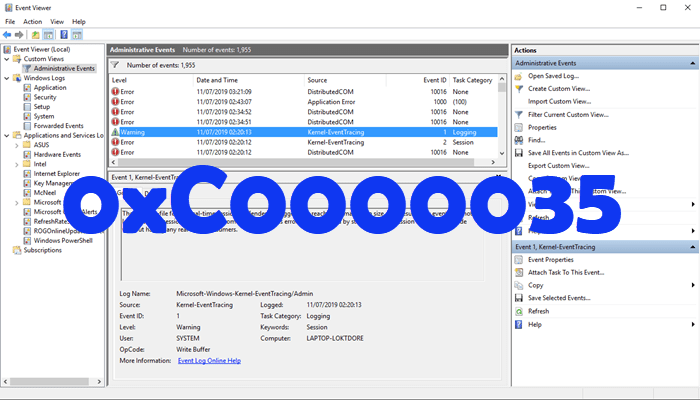
Check Task Scheduler and try to correlate the time of the event to a particular scheduled task. It will be a process elimination and of trial and error.
 

My Computers My Computers

  • At a glance

    Windows 11 Pro 25H2 26200.8655i9-10900 10 core 20 threads32 gbnone-Intel UHD Graphics 630
    OS
    Windows 11 Pro 25H2 26200.8655
    Computer type
    PC/Desktop
    Manufacturer/Model
    Dell Optiplex 7080
    CPU
    i9-10900 10 core 20 threads
    Motherboard
    DELL 0J37VM
    Memory
    32 gb
    Graphics Card(s)
    none-Intel UHD Graphics 630
    Sound Card
    Integrated Realtek
    Monitor(s) Displays
    Benq 27
    Screen Resolution
    2560x1440
    Hard Drives
    2x1tb Solidigm m.2 nvme /External drives 512gb Samsung m.2 sata+2tb Kingston m2.nvme
    PSU
    500w
    Case
    MT
    Cooling
    Dell Premium
    Keyboard
    Logitech wired
    Mouse
    Logitech wireless
    Internet Speed
    so slow I'm too embarrassed to tell
    Browser
    #1 Edge #2 Firefox
    Antivirus
    Defender+MWB Premium
  • At a glance

    Windows 11 Pro 24H2 26200.8457AMD Ryzen 7 6800U32 gbintegrated
    Operating System
    Windows 11 Pro 24H2 26200.8457
    Computer type
    PC/Desktop
    Manufacturer/Model
    Beelink Mini PC SER5
    CPU
    AMD Ryzen 7 6800U
    Memory
    32 gb
    Graphics card(s)
    integrated
    Sound Card
    integrated
    Monitor(s) Displays
    Benq 27
    Screen Resolution
    2560x1440
    Hard Drives
    1TB Crucial nvme
    Keyboard
    Logitech wired
    Mouse
    Logitech wireless
    Internet Speed
    still too embarrassed to tell
    Browser
    Firefox
    Antivirus
    Defender
    Other Info
    System 3 is non compliant Dell 9020 i7-4770/24gb ram Win11 PRO 26200.8457

My Computers My Computers

  • At a glance

    Windows11intel 8250 I58gbintel uhd 620
    OS
    Windows11
    Computer type
    Laptop
    Manufacturer/Model
    Huawei Matebook X Pro
    CPU
    intel 8250 I5
    Memory
    8gb
    Graphics Card(s)
    intel uhd 620
    Monitor(s) Displays
    built in laptop display
    Screen Resolution
    1920x1280
    Hard Drives
    Samsung 970 Evo 500gb M2
    Browser
    Edge
    Antivirus
    Defender
  • At a glance

    Windows 10AMD Ryzen 7300U16 GB DDR4AMD Raedon RX Vega graphics onboard
    Operating System
    Windows 10
    Computer type
    Laptop
    Manufacturer/Model
    Acer A515-43-R6DE
    CPU
    AMD Ryzen 7300U
    Memory
    16 GB DDR4
    Graphics card(s)
    AMD Raedon RX Vega graphics onboard
    Monitor(s) Displays
    15"6 FHD IPS Slim Bezel
    Hard Drives
    512cb PCie NVME SSD
    Case
    Pure Silver
    Keyboard
    Inbuilt
    Mouse
    Touchpad and Logitech external mouse
    Browser
    Edge
    Antivirus
    Defender
I resolved this error by changing from automatic to delayed start. The error does not show up after coming out of sleep mode or a restart.


1708370537076.png
 

My Computer My Computer

At a glance

Windows 11 PROIntel Core i9-9900K Desktop Processor 8 Cores...G.SKILL Trident Z RGB Series (Intel XMP) DDR4...ROG STRIX GTX1060 A6G
OS
Windows 11 PRO
Computer type
PC/Desktop
Manufacturer/Model
Asus
CPU
Intel Core i9-9900K Desktop Processor 8 Cores up to 5.0
Motherboard
ROG MAXIMS XI HERO (WI-FI)
Memory
G.SKILL Trident Z RGB Series (Intel XMP) DDR4 RAM 32GB (2x16GB) 3200
Graphics Card(s)
ROG STRIX GTX1060 A6G
Monitor(s) Displays
LG 34UM88C-P 34-Inch & ViewSonic VP2770-LED 27-Inch
Screen Resolution
3440 X 1440, 2560 X 1440
Hard Drives
Samsung 970 PRO 512GB - NVMe, Samsung 980 PRO 1TB PCIe 4.0 NVME M.2 SSD
& Toshiba Canvio Basics 4TB Portable External Hard Drive USB 3.0,
PSU
Seasonic PRIME 850 Platinum SSR-850PD 850W 80+
Case
Corsair iCUE 4000X RGB Mid-Tower ATX PC Case - Black
Cooling
CORSAIR HYDRO Series H115i PRO RGB AIO
Keyboard
WASD
Mouse
Logitech
Internet Speed
400MB
Browser
Edge

Latest Support Threads

Back
Top Bottom




