"Missing important updates" nag


pokeefe0001

Well-known member
Member
VIP
Local time
4:25 AM
Posts
299
Location
Pacific Northwest USA
OS
Windows 11
I usually delay installing Windows maint a few weeks to allow others to find surprises. That means I usually have the "Your device is missing important updates" nag showing. Sometimes it shows an orange dot; sometimes it shows a red dot. Does the color indicate something about the maint (such as a security fix), or is it just an indication of how old the missing fixes are? (Or something else?)
 
Windows Build/Version
Win 11 Pro x64 22621.1848

My Computer

System One

  • OS
    Windows 11
    Computer type
    PC/Desktop
    Manufacturer/Model
    Microsoft
    CPU
    Intel Core i5-8400
    Motherboard
    ASUS PRIME H370-PLUS
    Memory
    16GB
    Graphics Card(s)
    Intel UHD Graphics 630
    Sound Card
    On board
    Monitor(s) Displays
    Samsung SyncMaster 2043BWX
    Screen Resolution
    1680 x 1050
    Hard Drives
    Samsung SSD 850 256GB
    WDC 1TB NVMe
    WD 3TB external USB drive
    PSU
    I don't remember
    Case
    Corsair something-or-other
    Cooling
    Air CPU + 2 case fans
    Keyboard
    DAS S Pro (Cherry Brown)
    Mouse
    Logitech USB of some sort
Can you post a photo?
 

My Computers

System One System Two

  • OS
    Windows 11 Pro
    Computer type
    PC/Desktop
    Manufacturer/Model
    GMKtec K11
    CPU
    AMD Ryzen 9 8945HS
    Memory
    32GB DDR5 SO-DIMM
    Graphics Card(s)
    Integrated AMD Radeon 780M (4.00 GHz)
    Monitor(s) Displays
    Benq 2250HM
    Screen Resolution
    1920 x 1080
    Hard Drives
    1 TB PCIe 4.0 NVMe M.2 SSD
  • Operating System
    Windows 11 Home
    Computer type
    Laptop
    Manufacturer/Model
    ASUS Zenbook 14 OLED 14" Laptop - UX3405CA-QL192W
    CPU
    Intel® Core™ Ultra 7 - 255H processor
    Memory
    16 GB LPDDR5 SDRAM
    Graphics card(s)
    Intel Arc 140T onboard graphics
    Screen Resolution
    1920 x 1200 (16:10 WUXGA resolution) OLED Touchscreen
    Hard Drives
    1TB SSD
Does the color indicate something
I think you are correct.

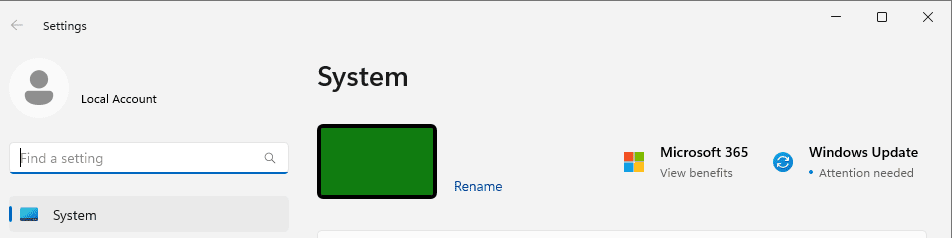
I've got a blue dot at the moment, 'Attention needed'.
I updated Windows a week ago but left out some MSOffice updates.
Missing updates - blue dot.png

Now that I've noticed it, I'll post again if the dot changes to a scarier colour.


All the best,
Denis
 

My Computer

System One

  • OS
    Windows 11 Home x64 Version 25H2 Build 26200.8037
I think you can get rid of the annoying reminders if you click on pause/postpone/defer updates (I don't remember how it is called).
 

My Computers

System One System Two

  • OS
    Windows 11 Pro 23H2 (5699), 25H2 (8655)
    Computer type
    Laptop
    Manufacturer/Model
    Acer Extensa 5630EZ
    CPU
    Mobile DualCore Intel Core 2 Duo T7250, 2000 MHz
    Motherboard
    Acer Extensa 5630
    Memory
    4GB
    Graphics Card(s)
    Mobile Intel(R) GMA 4500M (Mobile 4 series)
    Sound Card
    Realtek ALC268 @ Intel 82801IB ICH9 - High Definition Audio Controller
    Monitor(s) Displays
    1
    Screen Resolution
    1280x800
    Hard Drives
    Samsung SSD 850 EVO 250GB SATA Device (250 GB, SATA-III)
    Internet Speed
    VDSL 50 Mbps
    Browser
    MICROSOFT EDGE
    Antivirus
    WINDOWS DEFENDER
    Other Info
    Legacy MBR installation, no TPM, no Secure Boot, no WDDM 2.0 graphics drivers, no SSE4.2, cannot get more unsupported ;) This is only my test laptop. I had installed Windows 11 here before upgrading my main PC. For my main PC I use everyday see my 2nd system specs.
  • Operating System
    Windows 11 Pro v25H2 (build 26200.8655)
    Computer type
    PC/Desktop
    Manufacturer/Model
    Custom-built PC
    CPU
    Intel Core-i7 3770 3.40GHz s1155 (3rd generation)
    Motherboard
    Asus P8H61 s1155 ATX
    Memory
    2x Kingston Hyper-X Blu 8GB DDR3-1600
    Graphics card(s)
    GIGABYTE GeForce RTX 3050 WINDFORCE OC V2 6GB (GV-N3050WF2OCV2-6GD)
    Sound Card
    Realtek HD audio (ALC887)
    Monitor(s) Displays
    Sony Bravia KDL-19L4000 19" LCD TV via VGA
    Screen Resolution
    1440x900 32-bit 60Hz
    Hard Drives
    WD Blue SA510 2.5 1000GB SSD as system disk, Western Digital Caviar Purple 4TB SATA III (WD40PURZ) as second
    PSU
    Thermaltake Litepower RGB 550W Full Wired
    Case
    SUPERCASE MIDI-TOWER
    Cooling
    Deepcool Gamma Archer CPU cooler, 1x 8cm fan at the back
    Keyboard
    Mitsumi 101-key PS/2
    Mouse
    Sunnyline OptiEye PS/2
    Internet Speed
    100Mbps
    Browser
    Microsoft Edge, Mozilla Firefox
    Antivirus
    Microsoft Windows Defender
    Other Info
    Legacy BIOS (MBR) installation, no TPM, no Secure Boot, WDDM 3.0 graphics drivers, WEI score 7.4
But that's not what the OP is trying to achieve.
You're right. I didn't state it, but I'd like to know if there was an important update - a security patch or something. I've partially answered my own question, though by comparing a PC and laptop yesterday. The PC showed a red dot and had two pending updates. The laptop had the same two updates plus a third and showed orange.

The two updated on the PC were
  • 2023-07 Cumulative Update for Windows 11 Version 22H2 for x64-based Systems (KB5028185)
  • Windows Malicious Software Removal Tool x64 - v5.115 (KB890830)
I don't have access to the laptop right now but I think 3rd update was a patch to .NET.

Either orange indicates a higher importance than red (very unlikely) or the color does not signify importance.
 

My Computer

System One

  • OS
    Windows 11
    Computer type
    PC/Desktop
    Manufacturer/Model
    Microsoft
    CPU
    Intel Core i5-8400
    Motherboard
    ASUS PRIME H370-PLUS
    Memory
    16GB
    Graphics Card(s)
    Intel UHD Graphics 630
    Sound Card
    On board
    Monitor(s) Displays
    Samsung SyncMaster 2043BWX
    Screen Resolution
    1680 x 1050
    Hard Drives
    Samsung SSD 850 256GB
    WDC 1TB NVMe
    WD 3TB external USB drive
    PSU
    I don't remember
    Case
    Corsair something-or-other
    Cooling
    Air CPU + 2 case fans
    Keyboard
    DAS S Pro (Cherry Brown)
    Mouse
    Logitech USB of some sort

Latest Support Threads

Back
Top Bottom