Solved Missing Windows 11 Toolbar after Windows update.


My Computer My Computer

At a glance

Windows 11 Pro Version 23H2 OS build 22631.32...Intel Core i7 9700K 3.6GHz32GB DDR4 3.200 MHzNVidia GeForce RTX 2060 Super 8 GB
OS
Windows 11 Pro Version 23H2 OS build 22631.3235 (First install 22H2 ‎04/‎10/‎22)
Computer type
PC/Desktop
Manufacturer/Model
Asus Hand built to my Spec
CPU
Intel Core i7 9700K 3.6GHz
Motherboard
Asus TUF Z390-Plus Gaming WiFi
Memory
32GB DDR4 3.200 MHz
Graphics Card(s)
NVidia GeForce RTX 2060 Super 8 GB
Sound Card
On Motherboard
Monitor(s) Displays
BENQ GL2780E 27"
Screen Resolution
1920 x 1080
Hard Drives
2 SSDs and 1 HDD
PSU
Corsair RM750X Gold - 750w
Case
Fractal Design Define R6 Black/Silent Case
Cooling
1 CPU fan and 5 case fans
Keyboard
Logitech K800
Mouse
Logi
Internet Speed
200Mbps down 20Mbps up
Browser
Edge and Crome
Antivirus
Zone Alarm
Other Info
Upgraded from Win 10 to Win 11 on 22/10/21.
Yes, I know. It should be Servicing Stack Update SSU but, it kinda fits.
If you look at the opening post, he does say that the update took so
long that he restarted the PC. So, in essence, it was a Stuck update.
 

My Computers My Computers

  • At a glance

    windows 11 22631.5039Core i9 12th gen 12900HK 2.9 MHz (overcloked:...32 Gigs DDR5-4800nVidia RTX 3070 Ti / 8 Gigs DDR6
    OS
    windows 11 22631.5039
    Computer type
    Laptop
    Manufacturer/Model
    MSI Raider GE76
    CPU
    Core i9 12th gen 12900HK 2.9 MHz (overcloked: 3890.48)
    Motherboard
    MSI
    Memory
    32 Gigs DDR5-4800
    Graphics Card(s)
    nVidia RTX 3070 Ti / 8 Gigs DDR6
    Sound Card
    DYNAUDIO - Steelsries Arena 7- Sound Effects by Nahimic 3
    Monitor(s) Displays
    17.3" 1920 x 1080 360 Hz 3 ms, IPS / Connected to MSI 32 inch curved @ 165 Hz
    Screen Resolution
    1920 x 1080 / Both
    Hard Drives
    Samsung 990 Pro 2TB (OS) - Solidigm P41 2TB (Storage)
    PSU
    280 watts
    Case
    MSI GE series
    Cooling
    internal
    Keyboard
    Steelseries
    Mouse
    G903 Lightspeed
    Internet Speed
    1000 Mbps
    Browser
    Firefox / Opera GX- Do not like Edge
    Antivirus
    Malwarebytes'
    Other Info
    just ask.
  • At a glance

    Windows 10 22H2Intel Core i7 7820HK 2.9 Ghz16 Gigs DDR4 2400 MhznVidia 1070 8GB RAM
    Operating System
    Windows 10 22H2
    Computer type
    Laptop
    Manufacturer/Model
    MSI GT73 7RE VR Titan
    CPU
    Intel Core i7 7820HK 2.9 Ghz
    Motherboard
    MSI
    Memory
    16 Gigs DDR4 2400 Mhz
    Graphics card(s)
    nVidia 1070 8GB RAM
    Sound Card
    DYNAUDIO / Nahimic 2
    Monitor(s) Displays
    IPS / 120HZ
    Screen Resolution
    1920x1080P
    Hard Drives
    Samsung NVME EVO 970 1TB / Samsung SSD (SATA) 1TB
    PSU
    240 watts
    Case
    MSI
    Cooling
    Internal
    Keyboard
    Steelseries
    Mouse
    Logitech G903 Lightspeed
    Internet Speed
    1 Gb/s
    Browser
    Firefox / Vivaldi
    Antivirus
    MalwareBytes'
    Other Info
    none.
BUT only if the 'create as Administrator' box is NOT TICKED.
I don't get this. Which box and from where?
Or, do you mean Run as Admin?
 

My Computers My Computers

  • At a glance

    windows 11 22631.5039Core i9 12th gen 12900HK 2.9 MHz (overcloked:...32 Gigs DDR5-4800nVidia RTX 3070 Ti / 8 Gigs DDR6
    OS
    windows 11 22631.5039
    Computer type
    Laptop
    Manufacturer/Model
    MSI Raider GE76
    CPU
    Core i9 12th gen 12900HK 2.9 MHz (overcloked: 3890.48)
    Motherboard
    MSI
    Memory
    32 Gigs DDR5-4800
    Graphics Card(s)
    nVidia RTX 3070 Ti / 8 Gigs DDR6
    Sound Card
    DYNAUDIO - Steelsries Arena 7- Sound Effects by Nahimic 3
    Monitor(s) Displays
    17.3" 1920 x 1080 360 Hz 3 ms, IPS / Connected to MSI 32 inch curved @ 165 Hz
    Screen Resolution
    1920 x 1080 / Both
    Hard Drives
    Samsung 990 Pro 2TB (OS) - Solidigm P41 2TB (Storage)
    PSU
    280 watts
    Case
    MSI GE series
    Cooling
    internal
    Keyboard
    Steelseries
    Mouse
    G903 Lightspeed
    Internet Speed
    1000 Mbps
    Browser
    Firefox / Opera GX- Do not like Edge
    Antivirus
    Malwarebytes'
    Other Info
    just ask.
  • At a glance

    Windows 10 22H2Intel Core i7 7820HK 2.9 Ghz16 Gigs DDR4 2400 MhznVidia 1070 8GB RAM
    Operating System
    Windows 10 22H2
    Computer type
    Laptop
    Manufacturer/Model
    MSI GT73 7RE VR Titan
    CPU
    Intel Core i7 7820HK 2.9 Ghz
    Motherboard
    MSI
    Memory
    16 Gigs DDR4 2400 Mhz
    Graphics card(s)
    nVidia 1070 8GB RAM
    Sound Card
    DYNAUDIO / Nahimic 2
    Monitor(s) Displays
    IPS / 120HZ
    Screen Resolution
    1920x1080P
    Hard Drives
    Samsung NVME EVO 970 1TB / Samsung SSD (SATA) 1TB
    PSU
    240 watts
    Case
    MSI
    Cooling
    Internal
    Keyboard
    Steelseries
    Mouse
    Logitech G903 Lightspeed
    Internet Speed
    1 Gb/s
    Browser
    Firefox / Vivaldi
    Antivirus
    MalwareBytes'
    Other Info
    none.
I don't get this. Which box and from where?
Or, do you mean Run as Admin?
When I use the 'Run New Task' (Top of Task Manager), under the box for the new task is a box and the words
"Create this task with administrative privileges". It was this that was ticked.

Moving on, I have once managed to get ZANG to run, but believe that in trying to manipulate the open windows to get back to Task Manager, I must have minimized ZANG, and now when double clicking it does not open as visible.
I now need to know how to edit the registry to get ZANG to load either full screen or last part screen.
 

My Computer My Computer

At a glance

Windows 11 Pro Version 23H2 OS build 22631.32...Intel Core i7 9700K 3.6GHz32GB DDR4 3.200 MHzNVidia GeForce RTX 2060 Super 8 GB
OS
Windows 11 Pro Version 23H2 OS build 22631.3235 (First install 22H2 ‎04/‎10/‎22)
Computer type
PC/Desktop
Manufacturer/Model
Asus Hand built to my Spec
CPU
Intel Core i7 9700K 3.6GHz
Motherboard
Asus TUF Z390-Plus Gaming WiFi
Memory
32GB DDR4 3.200 MHz
Graphics Card(s)
NVidia GeForce RTX 2060 Super 8 GB
Sound Card
On Motherboard
Monitor(s) Displays
BENQ GL2780E 27"
Screen Resolution
1920 x 1080
Hard Drives
2 SSDs and 1 HDD
PSU
Corsair RM750X Gold - 750w
Case
Fractal Design Define R6 Black/Silent Case
Cooling
1 CPU fan and 5 case fans
Keyboard
Logitech K800
Mouse
Logi
Internet Speed
200Mbps down 20Mbps up
Browser
Edge and Crome
Antivirus
Zone Alarm
Other Info
Upgraded from Win 10 to Win 11 on 22/10/21.
Just jumping in this thread to let you know I'm having the same issue. It started when Windows update and Microsoft store were not updating. I also noticed that Task Manager was not responding when I tried to close it. I managed to reset both WU & the store and then it installed the last cumulative update for 23H2. I'm on the stable build 22632.3155. Then I got an error that it could not install the Windows Intelligence update. All the while I was performing SFC, DISM & even chkdsk.

But I think my fatal error occurred when I tried taking ownership of the Windows folder in my frustration. Then that really caused problems for me, so I stupidly used Tweaking.com windows repair. Everything seemed fine at first until Windows tried to update again and I was left with no taskbar and it won't even open up settings.

I really don't know why I didn't try to perform System Restore from the get go but I think it was because some of my earlier restore points that were glitch free were wiped out.

Anyway I did an inplace upgrade and that did not solve the problem at all. I have read several news articles saying the Windows 11 users who installed this last update are having this issue as well and have tried SFC, DISM and even a clean install without any luck.

So I've decided my only option is to go back to an old AMOEI backup I have from a year ago (I got lazy with my backups). That one would be the 22H2 version and I recently synced all my docs, pics, music etc. So I'll only have to update and add a few apps.
 

My Computer My Computer

At a glance

Windows 11 23H2 stable channelIntel Core i5 8300H @ 2.30GHz16.0GB Dual-Channel DDR4 @ 1329MHzIntel UHD Graphics 630 & 4GB NVIDIA GeForce G...
OS
Windows 11 23H2 stable channel
Computer type
Laptop
Manufacturer/Model
Dell
CPU
Intel Core i5 8300H @ 2.30GHz
Motherboard
Dell Inc. 0236PM (U3E1)
Memory
16.0GB Dual-Channel DDR4 @ 1329MHz
Graphics Card(s)
Intel UHD Graphics 630 & 4GB NVIDIA GeForce GTX 1050
Sound Card
NVIDIA High Definition Audio, Realtek Audio, Intel Display Audio, NVIDIA Virtual Audio Device
Monitor(s) Displays
Internal Dell 1920x1080, External Hisense 43" 4K tv
Screen Resolution
3840x2160@60Hz
Hard Drives
CT1000MX500SSD1 (SSD) 1TB
Keyboard
iClever DK03
Mouse
Logitech MX Veritcal
Browser
Edge & Dev Channel Edge
Antivirus
McAfee
When I use the 'Run New Task' (Top of Task Manager), under the box for the new task is a box and the words
"Create this task with administrative privileges". It was this that was ticked.

Moving on, I have once managed to get ZANG to run, but believe that in trying to manipulate the open windows to get back to Task Manager, I must have minimized ZANG, and now when double clicking it does not open as visible.
I now need to know how to edit the registry to get ZANG to load either full screen or last part screen.
Just restart your PC. All programs will close but, you will have to start over again.
Am not gonna comment any further as this would be a good opportunity LOL.
 

My Computers My Computers

  • At a glance

    windows 11 22631.5039Core i9 12th gen 12900HK 2.9 MHz (overcloked:...32 Gigs DDR5-4800nVidia RTX 3070 Ti / 8 Gigs DDR6
    OS
    windows 11 22631.5039
    Computer type
    Laptop
    Manufacturer/Model
    MSI Raider GE76
    CPU
    Core i9 12th gen 12900HK 2.9 MHz (overcloked: 3890.48)
    Motherboard
    MSI
    Memory
    32 Gigs DDR5-4800
    Graphics Card(s)
    nVidia RTX 3070 Ti / 8 Gigs DDR6
    Sound Card
    DYNAUDIO - Steelsries Arena 7- Sound Effects by Nahimic 3
    Monitor(s) Displays
    17.3" 1920 x 1080 360 Hz 3 ms, IPS / Connected to MSI 32 inch curved @ 165 Hz
    Screen Resolution
    1920 x 1080 / Both
    Hard Drives
    Samsung 990 Pro 2TB (OS) - Solidigm P41 2TB (Storage)
    PSU
    280 watts
    Case
    MSI GE series
    Cooling
    internal
    Keyboard
    Steelseries
    Mouse
    G903 Lightspeed
    Internet Speed
    1000 Mbps
    Browser
    Firefox / Opera GX- Do not like Edge
    Antivirus
    Malwarebytes'
    Other Info
    just ask.
  • At a glance

    Windows 10 22H2Intel Core i7 7820HK 2.9 Ghz16 Gigs DDR4 2400 MhznVidia 1070 8GB RAM
    Operating System
    Windows 10 22H2
    Computer type
    Laptop
    Manufacturer/Model
    MSI GT73 7RE VR Titan
    CPU
    Intel Core i7 7820HK 2.9 Ghz
    Motherboard
    MSI
    Memory
    16 Gigs DDR4 2400 Mhz
    Graphics card(s)
    nVidia 1070 8GB RAM
    Sound Card
    DYNAUDIO / Nahimic 2
    Monitor(s) Displays
    IPS / 120HZ
    Screen Resolution
    1920x1080P
    Hard Drives
    Samsung NVME EVO 970 1TB / Samsung SSD (SATA) 1TB
    PSU
    240 watts
    Case
    MSI
    Cooling
    Internal
    Keyboard
    Steelseries
    Mouse
    Logitech G903 Lightspeed
    Internet Speed
    1 Gb/s
    Browser
    Firefox / Vivaldi
    Antivirus
    MalwareBytes'
    Other Info
    none.
Windows Intelligence update
Hi!
I wouldn't worry about the Defender Intelligence updates as they will install eventually.
Mine takes a few tries before they do install and they are not attached to the regular
updates. It is a separate operation.
Are you using other security programs other than Windows Defender?
As for the 22H2 version, there is news:
IMPORTANT: New dates for the end of non-security updates for Windows 11, version 22H2.
 

My Computers My Computers

  • At a glance

    windows 11 22631.5039Core i9 12th gen 12900HK 2.9 MHz (overcloked:...32 Gigs DDR5-4800nVidia RTX 3070 Ti / 8 Gigs DDR6
    OS
    windows 11 22631.5039
    Computer type
    Laptop
    Manufacturer/Model
    MSI Raider GE76
    CPU
    Core i9 12th gen 12900HK 2.9 MHz (overcloked: 3890.48)
    Motherboard
    MSI
    Memory
    32 Gigs DDR5-4800
    Graphics Card(s)
    nVidia RTX 3070 Ti / 8 Gigs DDR6
    Sound Card
    DYNAUDIO - Steelsries Arena 7- Sound Effects by Nahimic 3
    Monitor(s) Displays
    17.3" 1920 x 1080 360 Hz 3 ms, IPS / Connected to MSI 32 inch curved @ 165 Hz
    Screen Resolution
    1920 x 1080 / Both
    Hard Drives
    Samsung 990 Pro 2TB (OS) - Solidigm P41 2TB (Storage)
    PSU
    280 watts
    Case
    MSI GE series
    Cooling
    internal
    Keyboard
    Steelseries
    Mouse
    G903 Lightspeed
    Internet Speed
    1000 Mbps
    Browser
    Firefox / Opera GX- Do not like Edge
    Antivirus
    Malwarebytes'
    Other Info
    just ask.
  • At a glance

    Windows 10 22H2Intel Core i7 7820HK 2.9 Ghz16 Gigs DDR4 2400 MhznVidia 1070 8GB RAM
    Operating System
    Windows 10 22H2
    Computer type
    Laptop
    Manufacturer/Model
    MSI GT73 7RE VR Titan
    CPU
    Intel Core i7 7820HK 2.9 Ghz
    Motherboard
    MSI
    Memory
    16 Gigs DDR4 2400 Mhz
    Graphics card(s)
    nVidia 1070 8GB RAM
    Sound Card
    DYNAUDIO / Nahimic 2
    Monitor(s) Displays
    IPS / 120HZ
    Screen Resolution
    1920x1080P
    Hard Drives
    Samsung NVME EVO 970 1TB / Samsung SSD (SATA) 1TB
    PSU
    240 watts
    Case
    MSI
    Cooling
    Internal
    Keyboard
    Steelseries
    Mouse
    Logitech G903 Lightspeed
    Internet Speed
    1 Gb/s
    Browser
    Firefox / Vivaldi
    Antivirus
    MalwareBytes'
    Other Info
    none.
Moving on, I have once managed to get ZANG to run, but believe that in trying to manipulate the open windows to get back to Task Manager, I must have minimized ZANG, and now when double clicking it does not open as visible.
I now need to know how to edit the registry to get ZANG to load either full screen or last part screen.
Alt+Tab doesn't work? Or Win+Shift+M to restore minimized windows on the desktop or Win+Up to maximize the window.
 

My Computers My Computers

  • At a glance

    11 Homei7 13650HX16GB DDR5GeForce RTX 4060 Mobile
    OS
    11 Home
    Computer type
    Laptop
    Manufacturer/Model
    Asus TUF Gaming F16 (2024)
    CPU
    i7 13650HX
    Memory
    16GB DDR5
    Graphics Card(s)
    GeForce RTX 4060 Mobile
    Sound Card
    Eastern Electric MiniMax DAC Supreme; Emotiva UMC-200; Astell & Kern AK240
    Monitor(s) Displays
    Sony Bravia XR-55X90J
    Screen Resolution
    3840×2160
    Hard Drives
    512GB SSD internal
    37TB external
    PSU
    Li-ion
    Cooling
    2× Arc Flow Fans, 4× exhaust vents, 5× heatpipes
    Keyboard
    Logitech K800
    Mouse
    Logitech G402
    Internet Speed
    30Mbit/s up, 500Mbit/s down
    Browser
    FF
    Antivirus
    What's an antivirus?
  • At a glance

    11 Homei5 1135G716GB DDR4Intel Iris Xe
    Operating System
    11 Home
    Computer type
    Laptop
    Manufacturer/Model
    Medion S15450
    CPU
    i5 1135G7
    Memory
    16GB DDR4
    Graphics card(s)
    Intel Iris Xe
    Sound Card
    Eastern Electric MiniMax DAC Supreme; Emotiva UMC-200; Astell & Kern AK240
    Monitor(s) Displays
    Sony Bravia XR-55X90J
    Screen Resolution
    3840×2160
    Hard Drives
    2TB SSD internal
    37TB external
    PSU
    Li-ion
    Keyboard
    Logitech K800
    Mouse
    Logitech G402
    Internet Speed
    30Mbit/s up, 500Mbit/s down
    Browser
    FF
Hi!
I wouldn't worry about the Defender Intelligence updates as they will install eventually.
Mine takes a few tries before they do install and they are not attached to the regular
updates. It is a separate operation.
Are you using other security programs other than Windows Defender?
As for the 22H2 version, there is news:
IMPORTANT: New dates for the end of non-security updates for Windows 11, version 22H2.
Isn't "Defender Intelligence updates" an oxymoron?
 

My Computer My Computer

At a glance

Windows 11 Pro Version 23H2 OS build 22631.32...Intel Core i7 9700K 3.6GHz32GB DDR4 3.200 MHzNVidia GeForce RTX 2060 Super 8 GB
OS
Windows 11 Pro Version 23H2 OS build 22631.3235 (First install 22H2 ‎04/‎10/‎22)
Computer type
PC/Desktop
Manufacturer/Model
Asus Hand built to my Spec
CPU
Intel Core i7 9700K 3.6GHz
Motherboard
Asus TUF Z390-Plus Gaming WiFi
Memory
32GB DDR4 3.200 MHz
Graphics Card(s)
NVidia GeForce RTX 2060 Super 8 GB
Sound Card
On Motherboard
Monitor(s) Displays
BENQ GL2780E 27"
Screen Resolution
1920 x 1080
Hard Drives
2 SSDs and 1 HDD
PSU
Corsair RM750X Gold - 750w
Case
Fractal Design Define R6 Black/Silent Case
Cooling
1 CPU fan and 5 case fans
Keyboard
Logitech K800
Mouse
Logi
Internet Speed
200Mbps down 20Mbps up
Browser
Edge and Crome
Antivirus
Zone Alarm
Other Info
Upgraded from Win 10 to Win 11 on 22/10/21.
I have just (16:45 UK time) started my Restore.
As this my first one on Window 11, can somebody tell me what should be displayed on the screen during the process please.
 

My Computer My Computer

At a glance

Windows 11 Pro Version 23H2 OS build 22631.32...Intel Core i7 9700K 3.6GHz32GB DDR4 3.200 MHzNVidia GeForce RTX 2060 Super 8 GB
OS
Windows 11 Pro Version 23H2 OS build 22631.3235 (First install 22H2 ‎04/‎10/‎22)
Computer type
PC/Desktop
Manufacturer/Model
Asus Hand built to my Spec
CPU
Intel Core i7 9700K 3.6GHz
Motherboard
Asus TUF Z390-Plus Gaming WiFi
Memory
32GB DDR4 3.200 MHz
Graphics Card(s)
NVidia GeForce RTX 2060 Super 8 GB
Sound Card
On Motherboard
Monitor(s) Displays
BENQ GL2780E 27"
Screen Resolution
1920 x 1080
Hard Drives
2 SSDs and 1 HDD
PSU
Corsair RM750X Gold - 750w
Case
Fractal Design Define R6 Black/Silent Case
Cooling
1 CPU fan and 5 case fans
Keyboard
Logitech K800
Mouse
Logi
Internet Speed
200Mbps down 20Mbps up
Browser
Edge and Crome
Antivirus
Zone Alarm
Other Info
Upgraded from Win 10 to Win 11 on 22/10/21.

My Computers My Computers

  • At a glance

    windows 11 22631.5039Core i9 12th gen 12900HK 2.9 MHz (overcloked:...32 Gigs DDR5-4800nVidia RTX 3070 Ti / 8 Gigs DDR6
    OS
    windows 11 22631.5039
    Computer type
    Laptop
    Manufacturer/Model
    MSI Raider GE76
    CPU
    Core i9 12th gen 12900HK 2.9 MHz (overcloked: 3890.48)
    Motherboard
    MSI
    Memory
    32 Gigs DDR5-4800
    Graphics Card(s)
    nVidia RTX 3070 Ti / 8 Gigs DDR6
    Sound Card
    DYNAUDIO - Steelsries Arena 7- Sound Effects by Nahimic 3
    Monitor(s) Displays
    17.3" 1920 x 1080 360 Hz 3 ms, IPS / Connected to MSI 32 inch curved @ 165 Hz
    Screen Resolution
    1920 x 1080 / Both
    Hard Drives
    Samsung 990 Pro 2TB (OS) - Solidigm P41 2TB (Storage)
    PSU
    280 watts
    Case
    MSI GE series
    Cooling
    internal
    Keyboard
    Steelseries
    Mouse
    G903 Lightspeed
    Internet Speed
    1000 Mbps
    Browser
    Firefox / Opera GX- Do not like Edge
    Antivirus
    Malwarebytes'
    Other Info
    just ask.
  • At a glance

    Windows 10 22H2Intel Core i7 7820HK 2.9 Ghz16 Gigs DDR4 2400 MhznVidia 1070 8GB RAM
    Operating System
    Windows 10 22H2
    Computer type
    Laptop
    Manufacturer/Model
    MSI GT73 7RE VR Titan
    CPU
    Intel Core i7 7820HK 2.9 Ghz
    Motherboard
    MSI
    Memory
    16 Gigs DDR4 2400 Mhz
    Graphics card(s)
    nVidia 1070 8GB RAM
    Sound Card
    DYNAUDIO / Nahimic 2
    Monitor(s) Displays
    IPS / 120HZ
    Screen Resolution
    1920x1080P
    Hard Drives
    Samsung NVME EVO 970 1TB / Samsung SSD (SATA) 1TB
    PSU
    240 watts
    Case
    MSI
    Cooling
    Internal
    Keyboard
    Steelseries
    Mouse
    Logitech G903 Lightspeed
    Internet Speed
    1 Gb/s
    Browser
    Firefox / Vivaldi
    Antivirus
    MalwareBytes'
    Other Info
    none.
I have just (16:45 UK time) started my Restore.
As this my first one on Window 11, can somebody tell me what should be displayed on the screen during the process please.
So, did you get to the Zone Alarm program?
And , which of the restore points did you choose?
Don't worry about whats on screen as there won't be anything until
the process end and it will either say that it failed or Succeeded.
It will take a bit of time. Just don't restart it.
 

My Computers My Computers

  • At a glance

    windows 11 22631.5039Core i9 12th gen 12900HK 2.9 MHz (overcloked:...32 Gigs DDR5-4800nVidia RTX 3070 Ti / 8 Gigs DDR6
    OS
    windows 11 22631.5039
    Computer type
    Laptop
    Manufacturer/Model
    MSI Raider GE76
    CPU
    Core i9 12th gen 12900HK 2.9 MHz (overcloked: 3890.48)
    Motherboard
    MSI
    Memory
    32 Gigs DDR5-4800
    Graphics Card(s)
    nVidia RTX 3070 Ti / 8 Gigs DDR6
    Sound Card
    DYNAUDIO - Steelsries Arena 7- Sound Effects by Nahimic 3
    Monitor(s) Displays
    17.3" 1920 x 1080 360 Hz 3 ms, IPS / Connected to MSI 32 inch curved @ 165 Hz
    Screen Resolution
    1920 x 1080 / Both
    Hard Drives
    Samsung 990 Pro 2TB (OS) - Solidigm P41 2TB (Storage)
    PSU
    280 watts
    Case
    MSI GE series
    Cooling
    internal
    Keyboard
    Steelseries
    Mouse
    G903 Lightspeed
    Internet Speed
    1000 Mbps
    Browser
    Firefox / Opera GX- Do not like Edge
    Antivirus
    Malwarebytes'
    Other Info
    just ask.
  • At a glance

    Windows 10 22H2Intel Core i7 7820HK 2.9 Ghz16 Gigs DDR4 2400 MhznVidia 1070 8GB RAM
    Operating System
    Windows 10 22H2
    Computer type
    Laptop
    Manufacturer/Model
    MSI GT73 7RE VR Titan
    CPU
    Intel Core i7 7820HK 2.9 Ghz
    Motherboard
    MSI
    Memory
    16 Gigs DDR4 2400 Mhz
    Graphics card(s)
    nVidia 1070 8GB RAM
    Sound Card
    DYNAUDIO / Nahimic 2
    Monitor(s) Displays
    IPS / 120HZ
    Screen Resolution
    1920x1080P
    Hard Drives
    Samsung NVME EVO 970 1TB / Samsung SSD (SATA) 1TB
    PSU
    240 watts
    Case
    MSI
    Cooling
    Internal
    Keyboard
    Steelseries
    Mouse
    Logitech G903 Lightspeed
    Internet Speed
    1 Gb/s
    Browser
    Firefox / Vivaldi
    Antivirus
    MalwareBytes'
    Other Info
    none.
can somebody tell me what should be displayed on the screen during the process please.
It is totally irrelevant; besides it will confirm success after the reboot.
One thing that is relevant is that some Windows Apps, not programs, may not work correctly when launched.
If that is the case, simply use the Settings/apps/installed Apps/ <AppName>/Repair.

Screenshot 2024-03-04 182109.jpg
 

My Computers My Computers

  • At a glance

    All Branches but ReleaseAMD Ryzen 7 7735HS 3200-4500 Mhz 8 cores x 232 GB DDR5Radeon Graphic / NVIDIA GeForce RTX 4060 8 GB...
    OS
    All Branches but Release
    Computer type
    Laptop
    Manufacturer/Model
    Acer Nitro ANV15-51
    CPU
    AMD Ryzen 7 7735HS 3200-4500 Mhz 8 cores x 2
    Motherboard
    Sportage_RBH
    Memory
    32 GB DDR5
    Graphics Card(s)
    Radeon Graphic / NVIDIA GeForce RTX 4060 8 GB GDDR6
    Sound Card
    AMD/Realtek(R) Audio
    Monitor(s) Displays
    Integrated Monitor (15.3"vis)
    Screen Resolution
    FHD 1920X1080 16:9 144Hz
    Hard Drives
    KINGSTON OM8SEP4512Q-AA 1TB
    Western Digital 256GB
    PSU
    19V DC 6.32 A 120 W
    Cooling
    Dual Fans
    Mouse
    MS Bluetooth
    Internet Speed
    Fiber 1GB Cox -us & 1GB Orange-fr
    Browser
    Edge Canary- Firefox Nightly-Chrome Dev-Chrome Dev
    Antivirus
    Windows Defender
  • At a glance

    Windows 11 BetaAMD A9-94208 GB of DDR4AMD Radeon R5
    Operating System
    Windows 11 Beta
    Computer type
    Laptop
    Manufacturer/Model
    Asus X751BP
    CPU
    AMD A9-9420
    Memory
    8 GB of DDR4
    Graphics card(s)
    AMD Radeon R5
    Screen Resolution
    1600x900
    Hard Drives
    Seagate 1 TB
So, did you get to the Zone Alarm program?
And , which of the restore points did you choose?
Don't worry about whats on screen as there won't be anything until
the process end and it either say that it failed or Succeded.
It will take a bit of time. Just don't restart it.
Yes - I was playing about with the windows and the 'Apps' screen suddenly appeared, so I took the opportunity.
I suspect it was because it took about 10 minutes to load.
Yesterday I had a choice of 2 restore points the Windows update (that caused the problem) and a previous one that I did before removing Google Earth Pro. Today there was only the Windows update option, so no choice.

Currently with the Restore running just the Date and Time are on the screen.
 

My Computer My Computer

At a glance

Windows 11 Pro Version 23H2 OS build 22631.32...Intel Core i7 9700K 3.6GHz32GB DDR4 3.200 MHzNVidia GeForce RTX 2060 Super 8 GB
OS
Windows 11 Pro Version 23H2 OS build 22631.3235 (First install 22H2 ‎04/‎10/‎22)
Computer type
PC/Desktop
Manufacturer/Model
Asus Hand built to my Spec
CPU
Intel Core i7 9700K 3.6GHz
Motherboard
Asus TUF Z390-Plus Gaming WiFi
Memory
32GB DDR4 3.200 MHz
Graphics Card(s)
NVidia GeForce RTX 2060 Super 8 GB
Sound Card
On Motherboard
Monitor(s) Displays
BENQ GL2780E 27"
Screen Resolution
1920 x 1080
Hard Drives
2 SSDs and 1 HDD
PSU
Corsair RM750X Gold - 750w
Case
Fractal Design Define R6 Black/Silent Case
Cooling
1 CPU fan and 5 case fans
Keyboard
Logitech K800
Mouse
Logi
Internet Speed
200Mbps down 20Mbps up
Browser
Edge and Crome
Antivirus
Zone Alarm
Other Info
Upgraded from Win 10 to Win 11 on 22/10/21.
System Restore did not complete successfully. Your computer's system files and settings were not changed.

Details:
System Restore failed to extract the file (C:\$extend\$Deleted) from the restore point.
An unspecified error occurred during System Restore. (0x80070005)
 

My Computer My Computer

At a glance

Windows 11 Pro Version 23H2 OS build 22631.32...Intel Core i7 9700K 3.6GHz32GB DDR4 3.200 MHzNVidia GeForce RTX 2060 Super 8 GB
OS
Windows 11 Pro Version 23H2 OS build 22631.3235 (First install 22H2 ‎04/‎10/‎22)
Computer type
PC/Desktop
Manufacturer/Model
Asus Hand built to my Spec
CPU
Intel Core i7 9700K 3.6GHz
Motherboard
Asus TUF Z390-Plus Gaming WiFi
Memory
32GB DDR4 3.200 MHz
Graphics Card(s)
NVidia GeForce RTX 2060 Super 8 GB
Sound Card
On Motherboard
Monitor(s) Displays
BENQ GL2780E 27"
Screen Resolution
1920 x 1080
Hard Drives
2 SSDs and 1 HDD
PSU
Corsair RM750X Gold - 750w
Case
Fractal Design Define R6 Black/Silent Case
Cooling
1 CPU fan and 5 case fans
Keyboard
Logitech K800
Mouse
Logi
Internet Speed
200Mbps down 20Mbps up
Browser
Edge and Crome
Antivirus
Zone Alarm
Other Info
Upgraded from Win 10 to Win 11 on 22/10/21.

My Computers My Computers

  • At a glance

    All Branches but ReleaseAMD Ryzen 7 7735HS 3200-4500 Mhz 8 cores x 232 GB DDR5Radeon Graphic / NVIDIA GeForce RTX 4060 8 GB...
    OS
    All Branches but Release
    Computer type
    Laptop
    Manufacturer/Model
    Acer Nitro ANV15-51
    CPU
    AMD Ryzen 7 7735HS 3200-4500 Mhz 8 cores x 2
    Motherboard
    Sportage_RBH
    Memory
    32 GB DDR5
    Graphics Card(s)
    Radeon Graphic / NVIDIA GeForce RTX 4060 8 GB GDDR6
    Sound Card
    AMD/Realtek(R) Audio
    Monitor(s) Displays
    Integrated Monitor (15.3"vis)
    Screen Resolution
    FHD 1920X1080 16:9 144Hz
    Hard Drives
    KINGSTON OM8SEP4512Q-AA 1TB
    Western Digital 256GB
    PSU
    19V DC 6.32 A 120 W
    Cooling
    Dual Fans
    Mouse
    MS Bluetooth
    Internet Speed
    Fiber 1GB Cox -us & 1GB Orange-fr
    Browser
    Edge Canary- Firefox Nightly-Chrome Dev-Chrome Dev
    Antivirus
    Windows Defender
  • At a glance

    Windows 11 BetaAMD A9-94208 GB of DDR4AMD Radeon R5
    Operating System
    Windows 11 Beta
    Computer type
    Laptop
    Manufacturer/Model
    Asus X751BP
    CPU
    AMD A9-9420
    Memory
    8 GB of DDR4
    Graphics card(s)
    AMD Radeon R5
    Screen Resolution
    1600x900
    Hard Drives
    Seagate 1 TB
System Restore did not complete successfully. Your computer's system files and settings were not changed.

Details:
System Restore failed to extract the file (C:\$extend\$Deleted) from the restore point.
An unspecified error occurred during System Restore. (0x80070005)
That error is a permission error meaning, something or a process is not letting the restore
complete. It could also be that the restore point is corrupt.
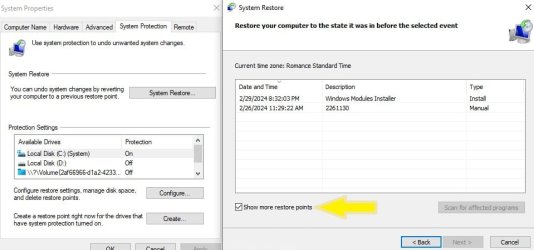
Go back to the restore app and as @OAT says, click on the show more restore points.
 

My Computers My Computers

  • At a glance

    windows 11 22631.5039Core i9 12th gen 12900HK 2.9 MHz (overcloked:...32 Gigs DDR5-4800nVidia RTX 3070 Ti / 8 Gigs DDR6
    OS
    windows 11 22631.5039
    Computer type
    Laptop
    Manufacturer/Model
    MSI Raider GE76
    CPU
    Core i9 12th gen 12900HK 2.9 MHz (overcloked: 3890.48)
    Motherboard
    MSI
    Memory
    32 Gigs DDR5-4800
    Graphics Card(s)
    nVidia RTX 3070 Ti / 8 Gigs DDR6
    Sound Card
    DYNAUDIO - Steelsries Arena 7- Sound Effects by Nahimic 3
    Monitor(s) Displays
    17.3" 1920 x 1080 360 Hz 3 ms, IPS / Connected to MSI 32 inch curved @ 165 Hz
    Screen Resolution
    1920 x 1080 / Both
    Hard Drives
    Samsung 990 Pro 2TB (OS) - Solidigm P41 2TB (Storage)
    PSU
    280 watts
    Case
    MSI GE series
    Cooling
    internal
    Keyboard
    Steelseries
    Mouse
    G903 Lightspeed
    Internet Speed
    1000 Mbps
    Browser
    Firefox / Opera GX- Do not like Edge
    Antivirus
    Malwarebytes'
    Other Info
    just ask.
  • At a glance

    Windows 10 22H2Intel Core i7 7820HK 2.9 Ghz16 Gigs DDR4 2400 MhznVidia 1070 8GB RAM
    Operating System
    Windows 10 22H2
    Computer type
    Laptop
    Manufacturer/Model
    MSI GT73 7RE VR Titan
    CPU
    Intel Core i7 7820HK 2.9 Ghz
    Motherboard
    MSI
    Memory
    16 Gigs DDR4 2400 Mhz
    Graphics card(s)
    nVidia 1070 8GB RAM
    Sound Card
    DYNAUDIO / Nahimic 2
    Monitor(s) Displays
    IPS / 120HZ
    Screen Resolution
    1920x1080P
    Hard Drives
    Samsung NVME EVO 970 1TB / Samsung SSD (SATA) 1TB
    PSU
    240 watts
    Case
    MSI
    Cooling
    Internal
    Keyboard
    Steelseries
    Mouse
    Logitech G903 Lightspeed
    Internet Speed
    1 Gb/s
    Browser
    Firefox / Vivaldi
    Antivirus
    MalwareBytes'
    Other Info
    none.
Were you able to disable Zone Alarm?
 

My Computers My Computers

  • At a glance

    windows 11 22631.5039Core i9 12th gen 12900HK 2.9 MHz (overcloked:...32 Gigs DDR5-4800nVidia RTX 3070 Ti / 8 Gigs DDR6
    OS
    windows 11 22631.5039
    Computer type
    Laptop
    Manufacturer/Model
    MSI Raider GE76
    CPU
    Core i9 12th gen 12900HK 2.9 MHz (overcloked: 3890.48)
    Motherboard
    MSI
    Memory
    32 Gigs DDR5-4800
    Graphics Card(s)
    nVidia RTX 3070 Ti / 8 Gigs DDR6
    Sound Card
    DYNAUDIO - Steelsries Arena 7- Sound Effects by Nahimic 3
    Monitor(s) Displays
    17.3" 1920 x 1080 360 Hz 3 ms, IPS / Connected to MSI 32 inch curved @ 165 Hz
    Screen Resolution
    1920 x 1080 / Both
    Hard Drives
    Samsung 990 Pro 2TB (OS) - Solidigm P41 2TB (Storage)
    PSU
    280 watts
    Case
    MSI GE series
    Cooling
    internal
    Keyboard
    Steelseries
    Mouse
    G903 Lightspeed
    Internet Speed
    1000 Mbps
    Browser
    Firefox / Opera GX- Do not like Edge
    Antivirus
    Malwarebytes'
    Other Info
    just ask.
  • At a glance

    Windows 10 22H2Intel Core i7 7820HK 2.9 Ghz16 Gigs DDR4 2400 MhznVidia 1070 8GB RAM
    Operating System
    Windows 10 22H2
    Computer type
    Laptop
    Manufacturer/Model
    MSI GT73 7RE VR Titan
    CPU
    Intel Core i7 7820HK 2.9 Ghz
    Motherboard
    MSI
    Memory
    16 Gigs DDR4 2400 Mhz
    Graphics card(s)
    nVidia 1070 8GB RAM
    Sound Card
    DYNAUDIO / Nahimic 2
    Monitor(s) Displays
    IPS / 120HZ
    Screen Resolution
    1920x1080P
    Hard Drives
    Samsung NVME EVO 970 1TB / Samsung SSD (SATA) 1TB
    PSU
    240 watts
    Case
    MSI
    Cooling
    Internal
    Keyboard
    Steelseries
    Mouse
    Logitech G903 Lightspeed
    Internet Speed
    1 Gb/s
    Browser
    Firefox / Vivaldi
    Antivirus
    MalwareBytes'
    Other Info
    none.
System Restore did not complete successfully. Your computer's system files and settings were not changed.

Details:
System Restore failed to extract the file (C:\$extend\$Deleted) from the restore point.
An unspecified error occurred during System Restore. (0x80070005)
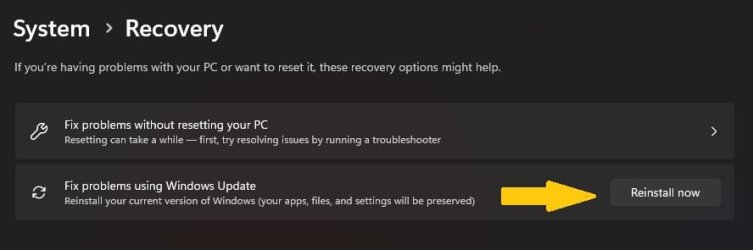
It looks like a Repair Installation is in order.
Using the same routine to run a program but instead put:

ms-settings:system <enter>
Select Recovery &

Screenshot 2024-03-04 184812.jpg
 

My Computers My Computers

  • At a glance

    All Branches but ReleaseAMD Ryzen 7 7735HS 3200-4500 Mhz 8 cores x 232 GB DDR5Radeon Graphic / NVIDIA GeForce RTX 4060 8 GB...
    OS
    All Branches but Release
    Computer type
    Laptop
    Manufacturer/Model
    Acer Nitro ANV15-51
    CPU
    AMD Ryzen 7 7735HS 3200-4500 Mhz 8 cores x 2
    Motherboard
    Sportage_RBH
    Memory
    32 GB DDR5
    Graphics Card(s)
    Radeon Graphic / NVIDIA GeForce RTX 4060 8 GB GDDR6
    Sound Card
    AMD/Realtek(R) Audio
    Monitor(s) Displays
    Integrated Monitor (15.3"vis)
    Screen Resolution
    FHD 1920X1080 16:9 144Hz
    Hard Drives
    KINGSTON OM8SEP4512Q-AA 1TB
    Western Digital 256GB
    PSU
    19V DC 6.32 A 120 W
    Cooling
    Dual Fans
    Mouse
    MS Bluetooth
    Internet Speed
    Fiber 1GB Cox -us & 1GB Orange-fr
    Browser
    Edge Canary- Firefox Nightly-Chrome Dev-Chrome Dev
    Antivirus
    Windows Defender
  • At a glance

    Windows 11 BetaAMD A9-94208 GB of DDR4AMD Radeon R5
    Operating System
    Windows 11 Beta
    Computer type
    Laptop
    Manufacturer/Model
    Asus X751BP
    CPU
    AMD A9-9420
    Memory
    8 GB of DDR4
    Graphics card(s)
    AMD Radeon R5
    Screen Resolution
    1600x900
    Hard Drives
    Seagate 1 TB
Did you click on the check mark to show more?
The box to do that was not displayed (Yes I am aware that the box is normally there)
 

My Computer My Computer

At a glance

Windows 11 Pro Version 23H2 OS build 22631.32...Intel Core i7 9700K 3.6GHz32GB DDR4 3.200 MHzNVidia GeForce RTX 2060 Super 8 GB
OS
Windows 11 Pro Version 23H2 OS build 22631.3235 (First install 22H2 ‎04/‎10/‎22)
Computer type
PC/Desktop
Manufacturer/Model
Asus Hand built to my Spec
CPU
Intel Core i7 9700K 3.6GHz
Motherboard
Asus TUF Z390-Plus Gaming WiFi
Memory
32GB DDR4 3.200 MHz
Graphics Card(s)
NVidia GeForce RTX 2060 Super 8 GB
Sound Card
On Motherboard
Monitor(s) Displays
BENQ GL2780E 27"
Screen Resolution
1920 x 1080
Hard Drives
2 SSDs and 1 HDD
PSU
Corsair RM750X Gold - 750w
Case
Fractal Design Define R6 Black/Silent Case
Cooling
1 CPU fan and 5 case fans
Keyboard
Logitech K800
Mouse
Logi
Internet Speed
200Mbps down 20Mbps up
Browser
Edge and Crome
Antivirus
Zone Alarm
Other Info
Upgraded from Win 10 to Win 11 on 22/10/21.
Back
Top Bottom