Solved Monitor/PC signal Issues


Wookiefy

Well-known member
Local time
12:29 PM
Posts
9
OS
Windows 11 Home 25H2
Hello all! I have this problem with my PC. I bought this Gaming rig at my local PC shop. I also bought a OLED ASUS Monitor. When I turn on PC it starts up fine. When I restart pc, pc is unable to boot in windows. All it does is loops Display port then Display port [No Signal] over and over. I took it back to the store where I bought it and they can't replicate this issue. PC and monitor works and boots up fine there. I return home and setup my PC and monitor with a different power bar display port cable and no such luck. Different outlets. Different monitors. The problem continues to exist. I included a short video that shows the issue I am having.


PC Specs:

Windows 11 Home 25H2
Ryzen 7 9300X3D
MSI Pro X870-P WIFI
32GB DDR5 5600
GeForce 5070 TI OC 16GB

Monitor:

Asus ROG Strix OLED XG27AQDMG Gaming Monitor

 
Windows Build/Version
Win 11 25H2
Last edited:

My Computer

System One

  • OS
    Windows 11 Home 25H2
    Computer type
    PC/Desktop
    Manufacturer/Model
    Pre-build
    CPU
    Ryzen 7 9300X3D
    Motherboard
    MSI Pro X870-P WIFI
    Memory
    32GB DDR5 5600 2x 16GB RGB
    Graphics Card(s)
    MSI GeForce 5070 TI OC 16GB
    Monitor(s) Displays
    Asus ROG Strix OLED XG27AQDMG Gaming Monitor
    Screen Resolution
    2560 x 1440
    Hard Drives
    M.2 NVMe SSD 2TB
    PSU
    MSI MAG A850GL PCIE 5
    Case
    Jonsbo TK-3 Black
    Cooling
    MasterLiquid ML360L ARGB
    Internet Speed
    1G
Boot into Setup (Bios) usually by pressing the DEL continuously.
Go to the Boot tab.
the First Boot device should be Windows Boot Manager, if the computer is UEFI Bios. By clicking that it should show the SSD/HDD that Windows is installed on. If not change it to that.
You can also set the Bios to Optimized Defaults.

You can also check the BCD. go to Search or press the Windows key +R and type
msconfig and press enter.
Go to the Boot tab. The Windows BCD should only be one line.
Attach screenshots or pictures from smart phone in your next post if you still need help.
 

My Computer

System One

  • OS
    Windows 11 Pro Insider 64 bit 25H2 26200.5742
    Computer type
    PC/Desktop
    Manufacturer/Model
    Gigabyte Z390 UD
    CPU
    Intel Core i7 9700K 3.60
    Motherboard
    Gigabyte Z390 UD
    Memory
    16 GB
    Graphics Card(s)
    nVidia GEForce RTX 2060 Super
    Sound Card
    onboard
    Monitor(s) Displays
    Two 27" Dell 4K monitors
    Screen Resolution
    3840 x 2160
    Hard Drives
    M.2 NVME SSD, 500 GB; Two 2TB Mechanical HDD's
    PSU
    850w PSU
    Case
    Cyberpower PC
    Cooling
    Water cooled
    Keyboard
    Backlit Cyberpower gaming keyboard
    Mouse
    Backlit Cyberpower gaming mouse
    Internet Speed
    1 GB mbps
    Browser
    Brave
    Antivirus
    Windows Security
Boot into Setup (Bios) usually by pressing the DEL continuously.
Go to the Boot tab.
the First Boot device should be Windows Boot Manager, if the computer is UEFI Bios. By clicking that it should show the SSD/HDD that Windows is installed on. If not change it to that.
You can also set the Bios to Optimized Defaults.

You can also check the BCD. go to Search or press the Windows key +R and type
msconfig and press enter.
Go to the Boot tab. The Windows BCD should only be one line.
Attach screenshots or pictures from smart phone in your next post if you still need help.
Hello Spunk! Thanks for your reply. I really don't think it has anything to do with bios because my pc boots fine at the store where I bought it from. They rebooted my pc 4 times and restarts and booted up fine each time. As soon as I get home my PC boots up fine. Once you do a restart it will just loop like what you see in the video. In order to get pc to boot into windows you have to shut down by unplugging pc.
 
Last edited:

My Computer

System One

  • OS
    Windows 11 Home 25H2
    Computer type
    PC/Desktop
    Manufacturer/Model
    Pre-build
    CPU
    Ryzen 7 9300X3D
    Motherboard
    MSI Pro X870-P WIFI
    Memory
    32GB DDR5 5600 2x 16GB RGB
    Graphics Card(s)
    MSI GeForce 5070 TI OC 16GB
    Monitor(s) Displays
    Asus ROG Strix OLED XG27AQDMG Gaming Monitor
    Screen Resolution
    2560 x 1440
    Hard Drives
    M.2 NVMe SSD 2TB
    PSU
    MSI MAG A850GL PCIE 5
    Case
    Jonsbo TK-3 Black
    Cooling
    MasterLiquid ML360L ARGB
    Internet Speed
    1G
It takes a few seconds to check your Boot Priority.
Then it takes another few seconds to check the Boot BCD. But it's your computer
 

My Computer

System One

  • OS
    Windows 11 Pro Insider 64 bit 25H2 26200.5742
    Computer type
    PC/Desktop
    Manufacturer/Model
    Gigabyte Z390 UD
    CPU
    Intel Core i7 9700K 3.60
    Motherboard
    Gigabyte Z390 UD
    Memory
    16 GB
    Graphics Card(s)
    nVidia GEForce RTX 2060 Super
    Sound Card
    onboard
    Monitor(s) Displays
    Two 27" Dell 4K monitors
    Screen Resolution
    3840 x 2160
    Hard Drives
    M.2 NVME SSD, 500 GB; Two 2TB Mechanical HDD's
    PSU
    850w PSU
    Case
    Cyberpower PC
    Cooling
    Water cooled
    Keyboard
    Backlit Cyberpower gaming keyboard
    Mouse
    Backlit Cyberpower gaming mouse
    Internet Speed
    1 GB mbps
    Browser
    Brave
    Antivirus
    Windows Security
Different monitors.
different power bar display port cable
so it always produces this error, despite completely different hardware?

possibly a corrupt UXStyle. you can run this in command prompt as admin to see if it helps:

Code:
Dism.exe /online /Cleanup-Image /StartComponentCleanup&sfc/scannow&Dism /Online /Cleanup-Image /RestoreHealth
 

My Computer

System One

  • OS
    Windows 11 Pro
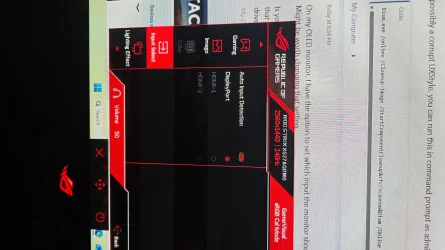
On my OLED monitor, I have the option to set which input the monitor should use or set to Auto. Might be worth changing that setting.

Is your PC actually booting into Windows when you get the Display port [No Signal] loop only that you can't see if it has got to your desktop? Only other thought is changing your graphics card drivers.
 

My Computer

System One

  • OS
    Windows 11 Pro 25H2 26200.7922
    Computer type
    PC/Desktop
    Manufacturer/Model
    Local shop built (KC Computers Ltd)
    CPU
    Intel Core i9 13900F
    Motherboard
    Gigabyte Z690 Gaming X (rev. 1.0/1.1) - (BIOS: F32 09 18 2025)
    Memory
    2 x Kingston Fury 32gb DDR5 5600 Beast
    Graphics Card(s)
    Gigabyte Eagle (Nvidia) RTX 3060
    Sound Card
    Chord Async USB 44.1kHz - 384kHz 2Qute DAC
    Monitor(s) Displays
    Gigabyte AORUS FO32U2 32” OLED Flat Gaming Monitor, 0.03ms, KVM, 250 cd/m2, FreeSync Premium Pro, HDR True Black 400
    Screen Resolution
    3840 x 2160 (UHD), 240Hz
    Hard Drives
    1 x KINGSTON NVMe M.2 SSDSKC3000D2048G 2TB
    1 x Samsung SSD 870 EVO 250GB
    2 x Crucial CT4000MX500SSD1 4TB
    2 x Crucial CT2000MX500SSD1 2TB
    1 x Crucial CT250MX500SSD1 250.0 GB
    PSU
    Gigabyte 750w
    Case
    Fractal Torrent
    Cooling
    Stock Intel CPU, 2 x Fractal 180mm PWM (front), 3 x Fractal 140mm PWM (bottom)
    Keyboard
    Logitech MX Mechanical Wireless Illuminated Performance Keyboard
    Mouse
    Logitech MX Master 3S Wireless Performance Mouse
    Internet Speed
    900 Mbps/900 Mbps Trooli FTTP
    Browser
    Firefox
    Antivirus
    Eset Nod32
On my OLED monitor, I have the option to set which input the monitor should use or set to Auto. Might be worth changing that setting.

Is your PC actually booting into Windows when you get the Display port [No Signal] loop only that you can't see if it has got to your desktop? Only other thought is changing your graphics card drivers.
Hello, Once I reboot the pc and all you will see on screen is Display port then Display port[No signal] and will not boot into windows unless you do a shutdown and press the power button and then pc will boot into windows. Each time you restart you have to completely do a shutdown. This is annoying because it does not to it at the PC repair shop.
 

Attachments

  • mon.webp
    mon.webp
    1.2 MB · Views: 1

My Computer

System One

  • OS
    Windows 11 Home 25H2
    Computer type
    PC/Desktop
    Manufacturer/Model
    Pre-build
    CPU
    Ryzen 7 9300X3D
    Motherboard
    MSI Pro X870-P WIFI
    Memory
    32GB DDR5 5600 2x 16GB RGB
    Graphics Card(s)
    MSI GeForce 5070 TI OC 16GB
    Monitor(s) Displays
    Asus ROG Strix OLED XG27AQDMG Gaming Monitor
    Screen Resolution
    2560 x 1440
    Hard Drives
    M.2 NVMe SSD 2TB
    PSU
    MSI MAG A850GL PCIE 5
    Case
    Jonsbo TK-3 Black
    Cooling
    MasterLiquid ML360L ARGB
    Internet Speed
    1G
When the PC is in the repair shop, are they using the same monitor and DP cable?
 

My Computers

System One System Two

  • OS
    Windows 11 26200.8728
    Computer type
    PC/Desktop
    Manufacturer/Model
    homebuilt
    CPU
    Amd Threadripper 7970X
    Motherboard
    Gigabyte TRX50 Aero D Rev. 1.0
    Memory
    128GB (4 X 32) G.Skill DDR5 6400 (RDIMM)
    Graphics Card(s)
    Gigabyte RTX 4090 OC
    Sound Card
    none (USB to speakers), Realtek
    Monitor(s) Displays
    Innocn 32" OLED
    Screen Resolution
    3840 X 2160 @ 60Hz
    Hard Drives
    Crucial T700 2TB M.2 NVME SSD
    WD 4TB Blue SATA SSD
    Seagate 18TB IronWolf Pro
    PSU
    BeQuiet! Straight Power 12 1500W
    Case
    Lian Li 011 Dynamic Evo XL
    Cooling
    SilverStone Technology XE360-TR5, with 3 Phanteks T30 fans
    Keyboard
    Cherry KC 500 MX LP (mechanical)
    Mouse
    Logitech M500s (wired)
    Internet Speed
    2000/250 Mbps (down/up)
    Other Info
    xFinity gateway
  • Operating System
    windows 11 26200.8728
    Computer type
    PC/Desktop
    Manufacturer/Model
    homebuilt
    CPU
    Intel I9-13900K
    Motherboard
    Asus RoG Strix Z690-E
    Memory
    64GB G.Skill DDR5-6000
    Graphics card(s)
    Gigabyte RTX 3090 ti
    Sound Card
    built in Realtek
    Monitor(s) Displays
    Philips 27E1N8900 27" OLED
    Screen Resolution
    3840 X 2160 @60Hz
    Hard Drives
    WDC SN850 1TB
    8TB Seagate Ironwolf
    4TB Seagate Ironwolf
    PSU
    eVGA SuperNOVA 1300 GT
    Case
    Lian Li 011 Dynamic Evo
    Cooling
    Corsair iCUE H150i ELITE CAPELLIX Liquid CPU Cooler
    Keyboard
    Cherry Streaming (wired)
    Mouse
    Logitech M500s (wired)
Do you use a Uninterruptible Power Supply (UPS) in your house to connect your computer?

If so, connect the computer directly to the wall outlet. Many modern UPS devices cause startup problems in computers, especially if they are very sensitive to voltage changes.
 

My Computer

System One

  • OS
    Win 11 Pro 23H2
    Computer type
    PC/Desktop
    CPU
    13700K
    Motherboard
    MAG Z790 TOMAHAWK WIFI (7D91vHH - 0x12F)
    Memory
    32GB DDR5 Kingston Fury Renegade @6400
    Graphics Card(s)
    MSI GeForce RTX 4070 Ti Gaming X Slim White 12G
    Sound Card
    Creative Sound Blaster Z SE
    Monitor(s) Displays
    ASUS VA24DQ
    Hard Drives
    WD Black SN850X 2TB (main)
    SAMSUNG SSD 990 Pro 2TB
    WD Blue 1TB 7200rpm
    PSU
    Corsair RM1000x SHIFT
    Case
    DeepCool CH560 WH
    Cooling
    Noctua NH-D15S
    Keyboard
    Ducky One 3 Pro Nazca Line
    Mouse
    Logitech G403 HERO
Do you use a Uninterruptible Power Supply (UPS) in your house to connect your computer?

If so, connect the computer directly to the wall outlet. Many modern UPS devices cause startup problems in computers, especially if they are very sensitive to voltage changes.
Hello, no UPS just plugged into surge protector power bar.
 

My Computer

System One

  • OS
    Windows 11 Home 25H2
    Computer type
    PC/Desktop
    Manufacturer/Model
    Pre-build
    CPU
    Ryzen 7 9300X3D
    Motherboard
    MSI Pro X870-P WIFI
    Memory
    32GB DDR5 5600 2x 16GB RGB
    Graphics Card(s)
    MSI GeForce 5070 TI OC 16GB
    Monitor(s) Displays
    Asus ROG Strix OLED XG27AQDMG Gaming Monitor
    Screen Resolution
    2560 x 1440
    Hard Drives
    M.2 NVMe SSD 2TB
    PSU
    MSI MAG A850GL PCIE 5
    Case
    Jonsbo TK-3 Black
    Cooling
    MasterLiquid ML360L ARGB
    Internet Speed
    1G
When the PC is in the repair shop, are they using the same monitor and DP cable?
Yes they had my monitor and DP cable
 

My Computer

System One

  • OS
    Windows 11 Home 25H2
    Computer type
    PC/Desktop
    Manufacturer/Model
    Pre-build
    CPU
    Ryzen 7 9300X3D
    Motherboard
    MSI Pro X870-P WIFI
    Memory
    32GB DDR5 5600 2x 16GB RGB
    Graphics Card(s)
    MSI GeForce 5070 TI OC 16GB
    Monitor(s) Displays
    Asus ROG Strix OLED XG27AQDMG Gaming Monitor
    Screen Resolution
    2560 x 1440
    Hard Drives
    M.2 NVMe SSD 2TB
    PSU
    MSI MAG A850GL PCIE 5
    Case
    Jonsbo TK-3 Black
    Cooling
    MasterLiquid ML360L ARGB
    Internet Speed
    1G
Yes they had my monitor and DP cable
Then I'm baffled. I can't think of a reason why the GPU wouldn't provide a signal when you restart. Especially if it does so in the shop.
 

My Computers

System One System Two

  • OS
    Windows 11 26200.8728
    Computer type
    PC/Desktop
    Manufacturer/Model
    homebuilt
    CPU
    Amd Threadripper 7970X
    Motherboard
    Gigabyte TRX50 Aero D Rev. 1.0
    Memory
    128GB (4 X 32) G.Skill DDR5 6400 (RDIMM)
    Graphics Card(s)
    Gigabyte RTX 4090 OC
    Sound Card
    none (USB to speakers), Realtek
    Monitor(s) Displays
    Innocn 32" OLED
    Screen Resolution
    3840 X 2160 @ 60Hz
    Hard Drives
    Crucial T700 2TB M.2 NVME SSD
    WD 4TB Blue SATA SSD
    Seagate 18TB IronWolf Pro
    PSU
    BeQuiet! Straight Power 12 1500W
    Case
    Lian Li 011 Dynamic Evo XL
    Cooling
    SilverStone Technology XE360-TR5, with 3 Phanteks T30 fans
    Keyboard
    Cherry KC 500 MX LP (mechanical)
    Mouse
    Logitech M500s (wired)
    Internet Speed
    2000/250 Mbps (down/up)
    Other Info
    xFinity gateway
  • Operating System
    windows 11 26200.8728
    Computer type
    PC/Desktop
    Manufacturer/Model
    homebuilt
    CPU
    Intel I9-13900K
    Motherboard
    Asus RoG Strix Z690-E
    Memory
    64GB G.Skill DDR5-6000
    Graphics card(s)
    Gigabyte RTX 3090 ti
    Sound Card
    built in Realtek
    Monitor(s) Displays
    Philips 27E1N8900 27" OLED
    Screen Resolution
    3840 X 2160 @60Hz
    Hard Drives
    WDC SN850 1TB
    8TB Seagate Ironwolf
    4TB Seagate Ironwolf
    PSU
    eVGA SuperNOVA 1300 GT
    Case
    Lian Li 011 Dynamic Evo
    Cooling
    Corsair iCUE H150i ELITE CAPELLIX Liquid CPU Cooler
    Keyboard
    Cherry Streaming (wired)
    Mouse
    Logitech M500s (wired)
Can a hdmi cable be tested?
 

My Computer

System One

  • OS
    Windows 10
    Computer type
    Laptop
    Manufacturer/Model
    HP
    CPU
    Intel(R) Core(TM) i7-4800MQ CPU @ 2.70GHz
    Motherboard
    Product : 190A Version : KBC Version 94.56
    Memory
    16 GB Total: Manufacturer : Samsung MemoryType : DDR3 FormFactor : SODIMM Capacity : 8GB Speed : 1600
    Graphics Card(s)
    NVIDIA Quadro K3100M; Intel(R) HD Graphics 4600
    Sound Card
    IDT High Definition Audio CODEC; PNP Device ID HDAUDIO\FUNC_01&VEN_111D&DEV_76E0
    Hard Drives
    Model Hitachi HTS727575A9E364
    Antivirus
    Microsoft Defender
    Other Info
    Mobile Workstation

My Computer

System One

  • OS
    Windows 11 Home 25H2
    Computer type
    PC/Desktop
    Manufacturer/Model
    Pre-build
    CPU
    Ryzen 7 9300X3D
    Motherboard
    MSI Pro X870-P WIFI
    Memory
    32GB DDR5 5600 2x 16GB RGB
    Graphics Card(s)
    MSI GeForce 5070 TI OC 16GB
    Monitor(s) Displays
    Asus ROG Strix OLED XG27AQDMG Gaming Monitor
    Screen Resolution
    2560 x 1440
    Hard Drives
    M.2 NVMe SSD 2TB
    PSU
    MSI MAG A850GL PCIE 5
    Case
    Jonsbo TK-3 Black
    Cooling
    MasterLiquid ML360L ARGB
    Internet Speed
    1G
command prompt

Code:
shutdown.exe /r /f /t 00

Does it have signal when it restarts?
 

My Computer

System One

  • OS
    Windows 11 Pro
Please run the V2 log collector > post a share link


My Computer

System One

  • OS
    Windows 10
    Computer type
    Laptop
    Manufacturer/Model
    HP
    CPU
    Intel(R) Core(TM) i7-4800MQ CPU @ 2.70GHz
    Motherboard
    Product : 190A Version : KBC Version 94.56
    Memory
    16 GB Total: Manufacturer : Samsung MemoryType : DDR3 FormFactor : SODIMM Capacity : 8GB Speed : 1600
    Graphics Card(s)
    NVIDIA Quadro K3100M; Intel(R) HD Graphics 4600
    Sound Card
    IDT High Definition Audio CODEC; PNP Device ID HDAUDIO\FUNC_01&VEN_111D&DEV_76E0
    Hard Drives
    Model Hitachi HTS727575A9E364
    Antivirus
    Microsoft Defender
    Other Info
    Mobile Workstation
Hello, no UPS just plugged into surge protector power bar.

Try plugging in the computer without that power bar or use a power bar without surge protection. In some way, these power bars work like a mini UPS.

For some reason, only when you restart your computer, your system (or maybe you graphic card) requires a variation (a peak) in the voltage/amperage, and the surge protection blocks that peak in the conditions of you home (but not in the store conditions).

It is not the first time I read that someone has problems with a power bar or UPS for this reason. That could explain why your computer works in the store.

The fact that you have to shut down your computer completely, and even unplug it from the power supply, may mean that it retains a lot of residual energy. When you disconnect it from the power supply, the computer discharges, and you can start it up normally.
 

My Computer

System One

  • OS
    Win 11 Pro 23H2
    Computer type
    PC/Desktop
    CPU
    13700K
    Motherboard
    MAG Z790 TOMAHAWK WIFI (7D91vHH - 0x12F)
    Memory
    32GB DDR5 Kingston Fury Renegade @6400
    Graphics Card(s)
    MSI GeForce RTX 4070 Ti Gaming X Slim White 12G
    Sound Card
    Creative Sound Blaster Z SE
    Monitor(s) Displays
    ASUS VA24DQ
    Hard Drives
    WD Black SN850X 2TB (main)
    SAMSUNG SSD 990 Pro 2TB
    WD Blue 1TB 7200rpm
    PSU
    Corsair RM1000x SHIFT
    Case
    DeepCool CH560 WH
    Cooling
    Noctua NH-D15S
    Keyboard
    Ducky One 3 Pro Nazca Line
    Mouse
    Logitech G403 HERO
Try plugging in the computer without that power bar or use a power bar without surge protection. In some way, these power bars work like a mini UPS.

For some reason, only when you restart your computer, your system (or maybe you graphic card) requires a variation (a peak) in the voltage/amperage, and the surge protection blocks that peak in the conditions of you home (but not in the store conditions).

It is not the first time I read that someone has problems with a power bar or UPS for this reason. That could explain why your computer works in the store.

The fact that you have to shut down your computer completely, and even unplug it from the power supply, may mean that it retains a lot of residual energy. When you disconnect it from the power supply, the computer discharges, and you can start it up normally.
My PC and monitor is plugged into the wall outlet and it restarted fine twice then will not restart on less I hold the power button to shut off PC. When pressing power button, PC will boot up!
 

My Computer

System One

  • OS
    Windows 11 Home 25H2
    Computer type
    PC/Desktop
    Manufacturer/Model
    Pre-build
    CPU
    Ryzen 7 9300X3D
    Motherboard
    MSI Pro X870-P WIFI
    Memory
    32GB DDR5 5600 2x 16GB RGB
    Graphics Card(s)
    MSI GeForce 5070 TI OC 16GB
    Monitor(s) Displays
    Asus ROG Strix OLED XG27AQDMG Gaming Monitor
    Screen Resolution
    2560 x 1440
    Hard Drives
    M.2 NVMe SSD 2TB
    PSU
    MSI MAG A850GL PCIE 5
    Case
    Jonsbo TK-3 Black
    Cooling
    MasterLiquid ML360L ARGB
    Internet Speed
    1G
My PC and monitor is plugged into the wall outlet and it restarted fine twice then will not restart on less I hold the power button to shut off PC. When pressing power button, PC will boot up!
does the command work?
 

My Computer

System One

  • OS
    Windows 11 Pro

My Computer

System One

  • OS
    Windows 11 Home 25H2
    Computer type
    PC/Desktop
    Manufacturer/Model
    Pre-build
    CPU
    Ryzen 7 9300X3D
    Motherboard
    MSI Pro X870-P WIFI
    Memory
    32GB DDR5 5600 2x 16GB RGB
    Graphics Card(s)
    MSI GeForce 5070 TI OC 16GB
    Monitor(s) Displays
    Asus ROG Strix OLED XG27AQDMG Gaming Monitor
    Screen Resolution
    2560 x 1440
    Hard Drives
    M.2 NVMe SSD 2TB
    PSU
    MSI MAG A850GL PCIE 5
    Case
    Jonsbo TK-3 Black
    Cooling
    MasterLiquid ML360L ARGB
    Internet Speed
    1G
Back
Top Bottom