Solved Moron needs help with corrupted Icon


REDDWARF

Member
Local time
8:14 PM
Posts
3
OS
11
Hi all,

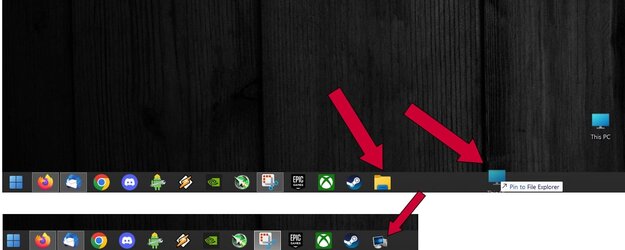
I was playing around with the "This PC" icon on the desktop. I changed it to a different one, and in doing so, I somehow replaced the icon for file explorer. I like to have File Explorer pinned to the taskbar. Now if I click on This PC, instead of the default vanilla folder icon appearing, the icon I used to change the This PC shows up. Tried everything to revert it back. As you can see in the screengrab, when I go to pin "This PC" to the taskbar, while hovering, it shows the correct icon, but when I actually drop it on the taskbark, it changes to the wrong icon pictured below. I tried right clicking and restoring it's default icon, but it doesn't seem to take. Any ideas? Thank you.

Edit: Forgot to mention I am using StartAllBack, which returns the classic U.I. to Windows 11. But I disabled it, and I still couldn't revert the icon back to it's proper default

System:

Windows 11 Pro 64 Bit 22H2 Build 22621.1485
ASUS STRIX ROG Z690-E Gaming Wifi mobo
Intel i7 13700k
Corsair H170i 420mm AIO cpu cooler
ASUS Tuff RTX 3080TI GPU
32GB G.Skill DDR5 5600Mhz Ram
Samsung 990 Pro 1 TB drive (OS)
Samsung 990 Pro 2TB drive (Games)
WD Black 8TB 7200 RPM Drive (storage)
Corsair 850 Watt Platinum rated Power Supply
 
Windows Build/Version
11 Pro 22H2 Build 22621.1485

Attachments
  • moron.jpg
    moron.jpg
    63.4 KB · Views: 3

My Computers My Computers

  • At a glance

    1113700K32GB G.Skill DDR5 5600ASUS Tuff RTX 3080TI
    OS
    11
    Computer type
    PC/Desktop
    Manufacturer/Model
    Custom Built
    CPU
    13700K
    Motherboard
    ASUS ROG STRIX Z690-E Gaming Wifi
    Memory
    32GB G.Skill DDR5 5600
    Graphics Card(s)
    ASUS Tuff RTX 3080TI
    PSU
    Corsair 850w
  • At a glance

    Windows 11 22H2 Build 22621.1413

    Operating System
    Windows 11 22H2 Build 22621.1413

How did you change the icon & how did you try to revert it?
The normal way is to use the Settings, Personalisation, Themes, Desktop Icon Settings link.
 

My Computer My Computer

At a glance

Windows 11 Pro 22H2, build: 22621.521Intel i7-12700K 3.6GHz Base (5.0GHz Turbo)64GB DDR 3600MhzAsus Tuff RTX 3080 10GB OC
OS
Windows 11 Pro 22H2, build: 22621.521
Computer type
PC/Desktop
Manufacturer/Model
Scan 3XS Custom 1700
CPU
Intel i7-12700K 3.6GHz Base (5.0GHz Turbo)
Motherboard
Asus ProArt Creator B660 D4
Memory
64GB DDR 3600Mhz
Graphics Card(s)
Asus Tuff RTX 3080 10GB OC
Sound Card
Onboard Realtek
Monitor(s) Displays
Gigabyte G32QC 32inch 16:9 curved @2560 x 1440p 165Hz Freesync Premium Pro/ Dell SE2422H 24inch 16:9 1920 x 1080p 75Hz Freesync
Screen Resolution
2560 x 1440p & 1920 x 1080p
Hard Drives
WD SN570 1TB NVME (Boot), Samsung 870QVO 1TB (SSD), SanDisk 3D Ultra 500Gb (SSD) x2, Seagate 3Tb Expansion Desk (Ext HDD), 2x Toshiba 1Tb P300 (Ext HDD)
PSU
Corsair RM1000X Modular
Case
Corsair 4000D Airflow Desktop
Cooling
Corsair Hydro H150i RGB Pro XT 360mm Liquid Cooler, 3 x 120mm fans, 1x Exhaust
Keyboard
Microsoft Ergonomic
Mouse
Logitech G402
Internet Speed
800Mbs
Browser
Edge Chromium
Antivirus
Defender, Malwarebytes
How did you change the icon & how did you try to revert it?
The normal way is to use the Settings, Personalisation, Themes, Desktop Icon Settings link.
Thank you for replying. I honestly have no idea. Luckily I found a restore point just prior to when I changed it. Learned my lesson. lol
 

My Computers My Computers

  • At a glance

    1113700K32GB G.Skill DDR5 5600ASUS Tuff RTX 3080TI
    OS
    11
    Computer type
    PC/Desktop
    Manufacturer/Model
    Custom Built
    CPU
    13700K
    Motherboard
    ASUS ROG STRIX Z690-E Gaming Wifi
    Memory
    32GB G.Skill DDR5 5600
    Graphics Card(s)
    ASUS Tuff RTX 3080TI
    PSU
    Corsair 850w
  • At a glance

    Windows 11 22H2 Build 22621.1413

    Operating System
    Windows 11 22H2 Build 22621.1413
Thank you for replying. I honestly have no idea. Luckily I found a restore point just prior to when I changed it. Learned my lesson. lol


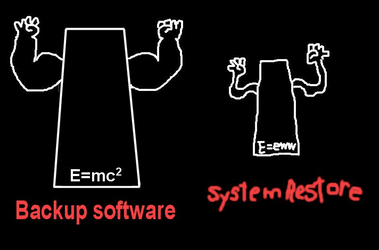
Very good, but always remember....


Backup Software.png
 

My Computers My Computers

  • At a glance

    Win 11 Home ♦♦♦26200.8655 ♦♦♦♦♦♦♦25H2AMD Ryzen 7 3700XG.Skill (F4-3200C14D-16GTZKW)EVGA RTX 2070 (08G-P4-2171-KR)
    OS
    Win 11 Home ♦♦♦26200.8655 ♦♦♦♦♦♦♦25H2
    Computer type
    PC/Desktop
    Manufacturer/Model
    Built by Ghot® [May 2020]
    CPU
    AMD Ryzen 7 3700X
    Motherboard
    Asus Pro WS X570-ACE (BIOS 5302)
    Memory
    G.Skill (F4-3200C14D-16GTZKW)
    Graphics Card(s)
    EVGA RTX 2070 (08G-P4-2171-KR)
    Sound Card
    Realtek ALC1220P / ALC S1220A
    Monitor(s) Displays
    Dell U3011 30"
    Screen Resolution
    2560 x 1600
    Hard Drives
    2x Samsung 860 EVO 500GB,
    WD 4TB Black FZBX - SATA III,
    WD 8TB Black FZBX - SATA III,
    DRW-24B1ST CD/DVD Burner
    PSU
    PC Power & Cooling 750W Quad EPS12V
    Case
    Cooler Master ATCS 840 Tower
    Cooling
    CM Hyper 212 EVO (push/pull)
    Keyboard
    Ducky DK9008 Shine II Blue LED
    Mouse
    Logitech Optical M-100
    Internet Speed
    300/300
    Browser
    Firefox (latest)
    Antivirus
    Bitdefender Total Security
    Other Info
    Speakers: Klipsch Pro Media 2.1
  • At a glance

    Windows XP Pro 32bit w/SP3AMD Athlon 64 X2 5000+ (OC'd @ 3.2Ghz)TWIN2X2048-6400C4DHX (2 x 1GB, DDR2 800)EVGA 256-P2-N758-TR GeForce 8600GT SSC
    Operating System
    Windows XP Pro 32bit w/SP3
    Computer type
    PC/Desktop
    Manufacturer/Model
    Built by Ghot® (not in use)
    CPU
    AMD Athlon 64 X2 5000+ (OC'd @ 3.2Ghz)
    Motherboard
    ASUS M2N32-SLI Deluxe Wireless Edition
    Memory
    TWIN2X2048-6400C4DHX (2 x 1GB, DDR2 800)
    Graphics card(s)
    EVGA 256-P2-N758-TR GeForce 8600GT SSC
    Sound Card
    Onboard
    Monitor(s) Displays
    ViewSonic G90FB Black 19" Professional (CRT)
    Screen Resolution
    up to 2048 x 1536
    Hard Drives
    WD 36GB 10,000rpm Raptor SATA
    Seagate 80GB 7200rpm SATA
    Lite-On LTR-52246S CD/RW
    Lite-On LH-18A1P CD/DVD Burner
    PSU
    PC Power & Cooling Silencer 750 Quad EPS12V
    Case
    Generic Beige case, 80mm fans
    Cooling
    ZALMAN 9500A 92mm CPU Cooler
    Keyboard
    Logitech Classic Keybooard 200
    Mouse
    Logitech Optical M-BT96a
    Internet Speed
    300/300
    Browser
    Firefox 3.x ??
    Antivirus
    Symantec (Norton)
    Other Info
    Still assembled, still runs. Haven't turned it on for 15 years?
Back
Top Bottom