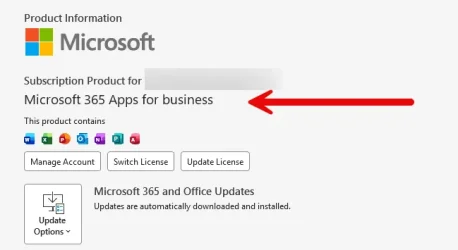
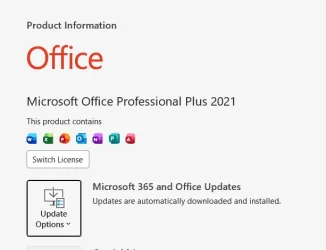
Are you using Microsoft 365 Personal or a Microsoft 365 business or enterprise version? Sounds like it isn't the personal version.
How would I know that?
Thanks.
GeneralNotificationsPinning and start
BackAbout Microsoft 365 Copilot
Current version
Version19.2602.54091.0
Correlation IDcd7e24f9-ba0a-4892-b612-2b36b9087ce4
Session ID70e08fc3-c0a3-7040-8ad1-17c6ad93c0b0
About Microsoft 365 Copilot
The Microsoft 365 Copilot app makes your day easier with AI-powered tools that help you save time, unlock your creativity, and make daily tasks easier. Technology based on large language models (LLMs), make it easier than ever to tackle your to-dos, summarize, create, and more.
Get information you need instantly, and turn a blank document into a polished draft in seconds. Turn simple ideas into stunning designs, and take your storytelling to the next level. Quickly analyze and visualize your data.
The data about your Microsoft 365 Copilot interactions is encrypted while it's stored and isn't used to train foundation LLMs, including those used by Microsoft 365 Copilot.
You can delete your Copilot activity history, which includes your prompts and the responses Copilot returns, by going to your My Account portal.
My Computers
-
At a glance
Windows 11 Pro 25H2 (26200.9550).core i7 11th gen16 GB DDR4 @3200 MHz- OS
- Windows 11 Pro 25H2 (26200.9550).
- Computer type
- Laptop
- Manufacturer/Model
- Dell Inspiron i5 5510
- CPU
- core i7 11th gen
- Memory
- 16 GB DDR4 @3200 MHz
- Hard Drives
- 1 TB SSD M.2 NVMe
- Keyboard
- Dell Premier Multi-Device Wireless Keyboard and Mouse – KM7321W
- Browser
- Brave.
- Other Info
- Edifier speakers. (Thanks to @Edwin).
-
At a glance
W11 25H2 (26200.7840)11th Gen Intel® Core i7-11700 processor32 GB, 2 x 16 GB, DDR4, 2933 MHz, dual channelNVIDIA GeForce RTX 3060 12GB GDDR6- Operating System
- W11 25H2 (26200.7840)
- Computer type
- PC/Desktop
- Manufacturer/Model
- XPS Special Edition
- CPU
- 11th Gen Intel® Core i7-11700 processor
- Memory
- 32 GB, 2 x 16 GB, DDR4, 2933 MHz, dual channel
- Graphics card(s)
- NVIDIA GeForce RTX 3060 12GB GDDR6
- Hard Drives
- 2TB M.2 PCIe NVMe SSD