MS broke My Phone app


sdowney717

Well-known member
Member
VIP
Local time
10:56 PM
Posts
1,335
OS
windows 11
I saw they had upgraded it. Went to use and it is horrible, I have no cursor position in the text box, and none of my contacts appear, have to type them in one by one. When I type text, I am lost in the text field as no indication of where I am typing. Maybe works ok for you still, I don't know, but on this particular PC it is not good like it used to be. Switching down to the text field after entering contacts was difficult, it refused to do it for awhile, it left open a text box entry in the contact text box which did not want to clear away
 

My Computer

System One

  • OS
    windows 11
    Computer type
    PC/Desktop
    Manufacturer/Model
    some kind of old ASUS MB
    CPU
    old AMD B95
    Motherboard
    ASUS
    Memory
    8gb
    Hard Drives
    ssd WD 500 gb
Just tried it again, still no contacts appearing, but the message text box now has a cursor.
 

My Computer

System One

  • OS
    windows 11
    Computer type
    PC/Desktop
    Manufacturer/Model
    some kind of old ASUS MB
    CPU
    old AMD B95
    Motherboard
    ASUS
    Memory
    8gb
    Hard Drives
    ssd WD 500 gb
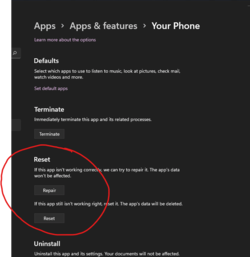
did you attempt to repair or reset the app?

1648166373034.png
 

My Computers

System One System Two

  • OS
    Windows 11 Pro
    Computer type
    PC/Desktop
    CPU
    AMD Ryzen 7 9800X3D
    Motherboard
    MSI PRO B850-P Wifi
    Memory
    32GB DDR5 CL30 Kingston Fury
    Graphics Card(s)
    ASUS Prime Radeon RX 9060 XT OC Edition 16GB
    Monitor(s) Displays
    LG Ultrawide 34" + LG 27" 1080p
    Screen Resolution
    3440x1440
    Hard Drives
    Main Boot Drive : 512GB Adata XPG RGB Gen3x4 NVMe M.2 SSD
    PSU
    EVGA 750 Watts 80+ Gold
    Case
    Deepcool Genome II
    Cooling
    Thermalright Burst Assassin 120
    Internet Speed
    1Gbps
    Browser
    Chrome
    Antivirus
    "Moderna"
  • Operating System
    Windows 11 Pro
    Computer type
    PC/Desktop
    CPU
    i7-4790K
    Motherboard
    ASRock Xtreme6 Z97
    Memory
    16GB Corsair Vengeance Pro
    Graphics card(s)
    MSI R9 290
    Monitor(s) Displays
    LG Ultrawide 34"
    Screen Resolution
    3440x1440
    Hard Drives
    500GB Adata SSD (OS Only)
    PSU
    Thermaltake 475 Watts 80 Bronze
    Case
    Thermaltake Commander I Snow Edition
    Cooling
    Deep Cool Archer Air Cooler
    Keyboard
    Armageddon MKA-5R RGB-Hornet
    Mouse
    Logitech G402
    Internet Speed
    1Gbps
    Browser
    Chrome
    Antivirus
    Moderna :)
Yes, I can confirm that OS Ver. 22581.1 Which was installed on my machine last night has indeed broken Your Phone. Not to the extent that the OP was describing, but my emojis fail to open for inclusion into messages. I click on the emoji face and it turns blue, but fails to open the selection screen. I have Repaired, Reset, and Re-installed the app, all to no avail. On a side note. My Zune 80gb which was working fine on the last build also fails to install even basic drivers and causes hardware notification every 10 seconds or so till un-docked.
 

My Computer

System One

  • OS
    Windows 11 beta
    Computer type
    PC/Desktop
    Manufacturer/Model
    Custom Build
    CPU
    AMD Ryzen 7 3800XT 8-Core Processor 3.90
    Motherboard
    AsRock X570 Phantom Gaming 4
    Memory
    32.0 GB
    Graphics Card(s)
    Radeon RX580
    Sound Card
    On-Board
    Monitor(s) Displays
    MSI Optix G27C2
    Screen Resolution
    1920x1080
    Hard Drives
    disk 0 = 240 GB SDD
    disk 1 = 4 TB HDD
    disk 2 = 12 TB HDD
    disk 3 = 4 TB HDD
    Cooling
    Custom liquid cooled, dual rad
Well, MS broke it again, just this am, tried to send a text to the wife, and it says "can not connect is your phone on?"
Yes my phone is on, this means likely have to set it up again.
It is a nice app, but if your life depended on it, it would fail you, it is not very reliable for me.
All the prior messages and data still shows in the app.

About the only usefulness to me, it is much easier to type or paste links in the app than on the phone
1650982567926.png
 

My Computer

System One

  • OS
    windows 11
    Computer type
    PC/Desktop
    Manufacturer/Model
    some kind of old ASUS MB
    CPU
    old AMD B95
    Motherboard
    ASUS
    Memory
    8gb
    Hard Drives
    ssd WD 500 gb
No issues here on 22598.2, aside from the fact that the app itself isn't worth using anyway
 

My Computer

System One

  • OS
    Windows 11 Pro Beta, 11 Dev, W11 Canary
    Computer type
    Laptop
    Manufacturer/Model
    Dell Alienware M15 Ryzen Edition R6
    CPU
    AMD Ryzen™ 9 5900HX
    Memory
    32GB
    Graphics Card(s)
    NVIDIA® GeForce RTX™ 3070 8GB GDDR6
    Hard Drives
    1 x Samsung 980 Pro 1TB
    1 x Samsung 970 Evo Plus 1TB
I'm of the school that Computers are Computers and Phones (even smart ones) are Phones "and Never the twain shall meet".
Works perfectly - Keep computers for what they are best at and phones for what they do best too and you won't go wrong.

Cheers
jimbo
 

My Computer

System One

  • OS
    Windows XP,11 Linux Fedora Rawhide pre-release 45
    Computer type
    PC/Desktop
    CPU
    2 X Intel i7
    Screen Resolution
    4KUHD X 2
Dang it is so HARD to relink the PC, I just did it going to some website aka.something, I deleted both PC's and setup one of the PC's following connection directions, and now I cant recall how to do it on my upstairs PC. MANY websites instructions including MS for troubleshooting are really awful, I just left then terrible feedback on instructions for linking the PC and the android app. It goes into all sorts of useless do this do that information.
I am talking about this here
Now I need to do it for this second PC.
Does somebody have a link to setup, and when I do it I will have to write it down for my own future use.

Even though I just did this, I cant find what i did for this other PC upstairs.
 

My Computer

System One

  • OS
    windows 11
    Computer type
    PC/Desktop
    Manufacturer/Model
    some kind of old ASUS MB
    CPU
    old AMD B95
    Motherboard
    ASUS
    Memory
    8gb
    Hard Drives
    ssd WD 500 gb
OK, on the android phone, the app is called "Link to Windows"
Open it and follow the simple instructions,
See it is that simple, and yet the MS instructions dont tell you anything useful
 

My Computer

System One

  • OS
    windows 11
    Computer type
    PC/Desktop
    Manufacturer/Model
    some kind of old ASUS MB
    CPU
    old AMD B95
    Motherboard
    ASUS
    Memory
    8gb
    Hard Drives
    ssd WD 500 gb
Well, MS broke it again, just this am, tried to send a text to the wife, and it says "can not connect is your phone on?"
Yes my phone is on, this means likely have to set it up again.
It is a nice app, but if your life depended on it, it would fail you, it is not very reliable for me.
All the prior messages and data still shows in the app.
Mine did the same on the update the other day. I had to go into the link to windows on my phone and reconnect the PC to the phone. May have rebooted the PC also before everything worked right with it again. Course I see you already went with the nuclear option and deleted the PC's from your phone. I agree it's no fun doing the initial linking, hopefully your up and running now.
 

My Computers

System One System Two

  • OS
    Windows 11 25H2
    Computer type
    Laptop
    Manufacturer/Model
    Alienware 18 Area-51
    CPU
    Intel Core Ultra 9 275HX (24-Core)
    Motherboard
    Alienware
    Memory
    64GB DDR5 6400MT/s
    Graphics Card(s)
    NVIDIA GeForce RTX 5080 and Intel UHD Graphics
    Sound Card
    Onboard, Realtek high-performance Audio chips (ALC3329 & ALC1708))
    Monitor(s) Displays
    300HZ 18-inch QHD 500 nit Comfort View+
    Screen Resolution
    2560 x 1600
    Hard Drives
    2TB NVMe M.2 PCIe Gen 5 SSD
    Case
    Magnesium Alloy
    Cooling
    Advanced Cryo-Tech Quad-Fan Cooling system & large vapor chamber
    Keyboard
    Cherry MX ultra low profile mechanical keyboard with per key AlienFX RGB lighting
    Mouse
    Logitech MX Master 4
    Browser
    Vivaldi (main), Firefox, Chrome, Edge
    Antivirus
    MS Defender and Malwarebytes Free
  • Operating System
    Windows 11 25H2
    Computer type
    Laptop
    Manufacturer/Model
    Microsoft Surface Laptop 7
    CPU
    Qualcomm Snapdragon X Elite (12 Core) ARM based CPU
    Motherboard
    Microsoft Corp.
    Memory
    16GB LPDDR5
    Graphics card(s)
    Qualcomm Adreno X1-85
    Sound Card
    Omnisonic speakers with Dolby Atmos spatial sound
    Monitor(s) Displays
    120 Hz 13.8-inch 600 nit PixelSense Flow touchscreen
    Screen Resolution
    2304x1536
    Hard Drives
    1TB NVMe Gen 4 SSD
    Case
    Anodized Aluminum
    Cooling
    Traditional active cooling fan system
    Keyboard
    Mechanical QWERTY, backlit when in use
    Mouse
    Logitech MX Master 4 and Surface Arc Mouse
    Browser
    Vivaldi (main), Firefox, Chrome, Edge
    Antivirus
    MS Defender and Malwarebytes Free
Mine did the same on the update the other day. I had to go into the link to windows on my phone and reconnect the PC to the phone. May have rebooted the PC also before everything worked right with it again. Course I see you already went with the nuclear option and deleted the PC's from your phone. I agree it's no fun doing the initial linking, hopefully your up and running now.
yes, up and working. It is not worth tinkering with, could be spend hours of frustration trying to figure out why, just delete and do setup again.

this is the second time in a few months I have had to delete computers start over, but it is really fast to do, and I don't make calls.
 

My Computer

System One

  • OS
    windows 11
    Computer type
    PC/Desktop
    Manufacturer/Model
    some kind of old ASUS MB
    CPU
    old AMD B95
    Motherboard
    ASUS
    Memory
    8gb
    Hard Drives
    ssd WD 500 gb
this is the second time in a few months I have had to delete computers start over, but it is really fast to do, and I don't make calls.
Good deal, I actually find the call feature works pretty well. I had to get in the habit of checking every morning that calls were connected but once connected I can take and make calls and hang up on all the spammers and scammers from my PC lol.
 

My Computers

System One System Two

  • OS
    Windows 11 25H2
    Computer type
    Laptop
    Manufacturer/Model
    Alienware 18 Area-51
    CPU
    Intel Core Ultra 9 275HX (24-Core)
    Motherboard
    Alienware
    Memory
    64GB DDR5 6400MT/s
    Graphics Card(s)
    NVIDIA GeForce RTX 5080 and Intel UHD Graphics
    Sound Card
    Onboard, Realtek high-performance Audio chips (ALC3329 & ALC1708))
    Monitor(s) Displays
    300HZ 18-inch QHD 500 nit Comfort View+
    Screen Resolution
    2560 x 1600
    Hard Drives
    2TB NVMe M.2 PCIe Gen 5 SSD
    Case
    Magnesium Alloy
    Cooling
    Advanced Cryo-Tech Quad-Fan Cooling system & large vapor chamber
    Keyboard
    Cherry MX ultra low profile mechanical keyboard with per key AlienFX RGB lighting
    Mouse
    Logitech MX Master 4
    Browser
    Vivaldi (main), Firefox, Chrome, Edge
    Antivirus
    MS Defender and Malwarebytes Free
  • Operating System
    Windows 11 25H2
    Computer type
    Laptop
    Manufacturer/Model
    Microsoft Surface Laptop 7
    CPU
    Qualcomm Snapdragon X Elite (12 Core) ARM based CPU
    Motherboard
    Microsoft Corp.
    Memory
    16GB LPDDR5
    Graphics card(s)
    Qualcomm Adreno X1-85
    Sound Card
    Omnisonic speakers with Dolby Atmos spatial sound
    Monitor(s) Displays
    120 Hz 13.8-inch 600 nit PixelSense Flow touchscreen
    Screen Resolution
    2304x1536
    Hard Drives
    1TB NVMe Gen 4 SSD
    Case
    Anodized Aluminum
    Cooling
    Traditional active cooling fan system
    Keyboard
    Mechanical QWERTY, backlit when in use
    Mouse
    Logitech MX Master 4 and Surface Arc Mouse
    Browser
    Vivaldi (main), Firefox, Chrome, Edge
    Antivirus
    MS Defender and Malwarebytes Free
Back
Top Bottom