MS generic webcam driver from 2006 > awful quality


I've only just noticed this thread.

my ditty - Search for drivers by HardwareID - TenForums

I agree with the explanations that those strange early driver dates are a mechanism for ranking driver priorities so that generic MS drivers do not overwrite OEM-provided ones, but
several people have recently reported, and I have witnessed, Windows update ignoring those ranking rules and overwriting OEM drivers with older ones, so
I agree with the suggestion about disabling all hardware updates in Windows update until this currently-unacknowledged Windows update problem is fixed.


I'll read the thread now,
Denis
 

My Computer

System One

  • OS
    Windows 11 Home x64 Version 25H2 Build 26200.8037
@Try3 Thanks for your reaction.

My device doesn't show a yellow triangle with an exclamation mark. It is non an unknown device.

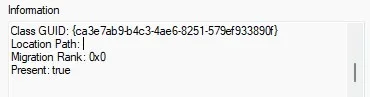
I've been searching a bit more and came across a website that learnt me that the "Information" shown in the Dev mgr/Events applies to the line that is highlighted. When I scroll down the events, I see that the driver apparently got migrated. But with a migration rank 0x0, and I learnt that that means that it didn't migrate as it should.

Dev mgr.webp
Dev mgr1.webp

The Events viewer gives the same info, with Event ID 440 (problem with driver, hardware conflict or power).
Looking up the Class Guid in the registry it is a REG_NONE.

Registry.webp

I am not sure how to interpret all of this but I suppose it could mean: successful migration of zero data (because no separate driver)... Something like that.
And then usbvideo.inf got configured.

If this hypothesis is true, then Windows "overwrote my driver" with the 21-Jun-2006 time stamp because of the absence of a separate driver having a date.
 

Attachments

  • Dev mgr1.webp
    Dev mgr1.webp
    4.8 KB · Views: 1

My Computer

System One

  • OS
    Windows11 Home
    Computer type
    Laptop
    Manufacturer/Model
    Acer Aspire 5 A517-51G-85RS
    CPU
    i7-8550U @1.80GHz 1.99GHz
    Motherboard
    Dragonite_KL, version V2.03
    Memory
    8GB
    Graphics Card(s)
    NVIDIA GeForce MX150
    Sound Card
    Realtek High Definition Audio (SST)
    Monitor(s) Displays
    17.3" IPS
    Screen Resolution
    1920x1080 (Full HD)
    Hard Drives
    SSD 256GB
    5400rpm HDD
    Keyboard
    qwerty
    Browser
    Firefox
then Windows "overwrote my driver" with the 21-Jun-2006 time stamp because of the absence of a separate driver having a date
I can see no evidence that you ever had another driver for that device.
I can see no evidence that your camera problem is related to its driver.

You do not say whether or not you have tried searching by its HardwareID.
I did not see any relevant driver on the Acer website.
If Acer do not provide a driver that does imply that the generic MS driver is sufficient.
Perhaps you can ask Acer support about the problem.

I do not see the problems in your diagrams that you are discussing.
I know nothing about 'driver migration' entries but I would be very surprised if a result of 0x0 indicated a problem.

You do not say when the problem started.
If the camera ever worked then the problem would seem to be with whatever has been changed since then. Perhaps you can roll back to that stage and backup its driver state for re-use.
Backup and Restore Device Drivers - ElevenForumTutorials
I also run some additional tools when I back up drivers. They create lists of driver properties that can help to identify an individual driver that I need to restore later on.
my driver backup and driver properties lists ditty - post #43 - TenForums
my augmented driver backup and driver properties lists ditty - post #5 - ElevenForum - this contains better explanations of what I do.

Denis
 
Last edited:

My Computer

System One

  • OS
    Windows 11 Home x64 Version 25H2 Build 26200.8037
  • Like
Reactions: OAT

My Computer

System One

  • OS
    Windows 11 Home x64 Version 25H2 Build 26200.8037
I am sorry Denis,

I did have a look at the HardwareID, but it is essentially the same that was already mentioned (apparently from Quanta Computer Inc., 0408 being the manufacturer, A060 the product ID):
"Device USB\VID_0408&PID_A060&MI_00\6&391c16c1&0&0000 requires further installation."
HardwareID:
USB\VID_0408&PID_A060&REV_0001&MI_00
USB\VID_0408&PID_A060&MI_00

I already rang Acer, they said it was Intel, Plug&Play. I needed to check with the Intel driver & support assistant. Which didn't not list any driver updates.

I don't know when the problem started. The few times I used the webcam in the past (in the evening) the quality had not struck me. But when I use it now the quality of the webcam is awful even in good daylight (no direct sun, no windows behind). It is not sharp, not at any distance.

So I had a look and discovered that Device manager states that the manufacturer is Microsoft and the driver date 21-June-2006.
I upgraded to W11 on 12 July this year, and that is the first entry in the Dev mgr Events.

I do have a backup (DISM, export) of 6 July this year, but I do not know which of the entries contains a driver for the webcam, if any does. Your link to the tutorial speaks of reinstalling all old drivers. I don't know if that is a good idea.
Your other 2 links give instructions for (a better/more detailed) backup, but it is a bit late for that.

If Acer do not provide a driver that does imply that the generic MS driver is sufficient.

That could be but that doesn't match what Acer said (Intel).

I do understand that my info c.q. history is quite "vague" in terms of quality before/after and when. Maybe this driver always has been here, and the quality of the webcam always has been very bad...

Maybe I should just leave it with this, stop pestering everyone here, and buy an external webcam.
 

My Computer

System One

  • OS
    Windows11 Home
    Computer type
    Laptop
    Manufacturer/Model
    Acer Aspire 5 A517-51G-85RS
    CPU
    i7-8550U @1.80GHz 1.99GHz
    Motherboard
    Dragonite_KL, version V2.03
    Memory
    8GB
    Graphics Card(s)
    NVIDIA GeForce MX150
    Sound Card
    Realtek High Definition Audio (SST)
    Monitor(s) Displays
    17.3" IPS
    Screen Resolution
    1920x1080 (Full HD)
    Hard Drives
    SSD 256GB
    5400rpm HDD
    Keyboard
    qwerty
    Browser
    Firefox
Maybe I should just leave it with this, stop pestering everyone here, and buy an external webcam.
Have you cleaned the lens with a cotton swab recently?
This could be as basic as that, especially if smokers have been around the system.
 

My Computers

System One System Two

  • OS
    All Branches but Release
    Computer type
    Laptop
    Manufacturer/Model
    Acer Nitro ANV15-51
    CPU
    AMD Ryzen 7 7735HS 3200-4500 Mhz 8 cores x 2
    Motherboard
    Sportage_RBH
    Memory
    32 GB DDR5
    Graphics Card(s)
    Radeon Graphic / NVIDIA GeForce RTX 4060 8 GB GDDR6
    Sound Card
    AMD/Realtek(R) Audio
    Monitor(s) Displays
    Integrated Monitor (15.3"vis)
    Screen Resolution
    FHD 1920X1080 16:9 144Hz
    Hard Drives
    KINGSTON OM8SEP4512Q-AA 1TB
    Western Digital 256GB
    PSU
    19V DC 6.32 A 120 W
    Cooling
    Dual Fans
    Mouse
    MS Bluetooth
    Internet Speed
    Fiber 1GB Cox -us & 1GB Orange-fr
    Browser
    Edge Canary- Firefox Nightly-Chrome Dev-Chrome Dev
    Antivirus
    Windows Defender
  • Operating System
    Windows 11 Beta
    Computer type
    Laptop
    Manufacturer/Model
    Asus X751BP
    CPU
    AMD A9-9420
    Memory
    8 GB of DDR4
    Graphics card(s)
    AMD Radeon R5
    Screen Resolution
    1600x900
    Hard Drives
    Seagate 1 TB
Have You looked under Windows Update, if any optional drivers are offered?. They often fill out if any hardware not recognized or with wrong driver.
 

My Computer

System One

  • OS
    Windows 11 Pro
    Computer type
    PC/Desktop
    Manufacturer/Model
    Homemade by me
    CPU
    Intel i5 12600K
    Motherboard
    MSI PRO Z690-A DDR4
    Memory
    G.Skill Ripjaws V DDR4 3600 MHz / PC4-28800 CL16 2x8 GB
    Graphics Card(s)
    Intel® UHD Graphics 770 (iGPU)
    Sound Card
    8-Channel (7.1) HD Audio
    Monitor(s) Displays
    Legion/Lenovo Y25-25
    Screen Resolution
    Full HD 1920 x 1080
    Hard Drives
    WD Black NVMe M.2 500 GB (system drive)
    Case
    Lian-Li
    Keyboard
    Old solid and heavy IBM🙂
    Mouse
    Logitech
    Internet Speed
    1000 mbit
    Antivirus
    Avast free
USB\VID_0408&PID
This search identified several apparent driver sources that would seem worth investigating. Do make a new driver backup before trying any of them.

Your link to the tutorial speaks of reinstalling all old drivers
It also explains how to restore individual drivers.
I do have a backup (DISM, export) of 6 July this year, but I do not know which of the entries contains a driver for the webcam
If you browse through your driver backup, you'll see that there is some identifying information but it is not at all easy to get to grips with. You should first try searching for usbvideo.inf which is what I would expect to be in the relevant backup folder given one of your earlier Device mgr pictures. But that only applies if the backup was of a non-MS driver. I don't think the Dism cmd backs up MS drivers.
Failing that, you could search for the partial HardwareID USB\VID_0408&PID or just 0408 or the word cam or ...
You could even just look through the folder names hoping for a likely-looking one.
But if you are not sure that the cam quality was good on the 6th of July then you might be going to a lot of effort for little benefit.

The additional links I gave you to my own posts explain what I do to generate driver property lists that can be used to identify individual drivers for such restoration.
- Using my driver property lists is not an easy job but it is possible - as my posts explained, I have used those records successfully myself.
You might consider adding them to your future driver backup procedures. I generate my lists using the same batch file that generates my driver backups themselves.

buy an external webcam
I would expect your usbvideo.inf driver search & its restoration to be fairly straighforward but I don't know if it will make your camera work any better.
So buying an external webcam might save a lot of stress & confusion.


Best of luck,
Denis
 

My Computer

System One

  • OS
    Windows 11 Home x64 Version 25H2 Build 26200.8037
@OAT and Jorgen
Yes I did follow the general advice I found the web for bad webcam quality, before contacting Elevenforum. So cleaning the lense and checking updates. I'm up to date, no optional ones offered.

@denis
I extensively searched the web for USB\VID_0408&PID_A060 (and all variations like 0408 and A060) before contacting Elevenforum. That's how I found out the camera is from Quanta. But there is no driver to be found anywhere. Or I don't know where to look.

I have no usbvideo.inf in my image back-up, and not in the DSIM backup (but it wouldn't be if, according to what you say, that doesn't backup Windows drivers).

But I do have 2 folders my actual WinSxS folder:
amd64_dual_usbvideo.inf_31bf3856ad364e35_10.0.26100.6899_none_4e9bc6e0e3da507d (17 Oct 2025)
amd64_dual_usbvideo.inf_31bf3856ad364e35_10.0.26100.7019_none_4eea45d6e3a0a364 (22 Nov 2025)

On 17 Oct 2025 I installed updates: KB5068331, KB5066131, KB5066835
On 22 Nov 2025 I installed updates: KB5071066, KB5068861, plus I deleted and reinstalled the webcam.

Some other thoughts:
When using this webcam previously, I was obviously not looking at myself (only small in a corner of my screen). So I would have been seeing the other person's webcam, which most likely was a lot better.

I have a 17" screen, which was available for this model, but not very standard. If I reduce to half screen, or the very small image in Windows settings, the image gets better/sharper. If it is full screen on my 17" there is no way to get it sharp. It is very pixely and flickery too. But maybe it was a low quality webcam (it's 720p), already barely enough for a 14/15.6" screen and with a 17" I pushed it limits?

I've seen other people with an Acer complaining about the bad quality of the webcam and/or noticing a 21-Jun-2006 generic driver (messages from back in 2021).

I guess that if I want any decent quality, I will need to buy an add-on webcam. I've been looking around today, but my system (4 cores, 8 logical threads, and Geforce MX150) will heavily limit my choice for eye contact through AI. And lesser AI software using lower ressources may make it look really fake/creepy/with lag. So maybe a webcam with an arm for videoconferencing. I don't know. I am new to all this.

In any event, I thank you all for your help trying to get my webcam to produce an acceptable quality image. I suggest we do not waste any more time on this.
Thank you all!
 

My Computer

System One

  • OS
    Windows11 Home
    Computer type
    Laptop
    Manufacturer/Model
    Acer Aspire 5 A517-51G-85RS
    CPU
    i7-8550U @1.80GHz 1.99GHz
    Motherboard
    Dragonite_KL, version V2.03
    Memory
    8GB
    Graphics Card(s)
    NVIDIA GeForce MX150
    Sound Card
    Realtek High Definition Audio (SST)
    Monitor(s) Displays
    17.3" IPS
    Screen Resolution
    1920x1080 (Full HD)
    Hard Drives
    SSD 256GB
    5400rpm HDD
    Keyboard
    qwerty
    Browser
    Firefox
Back
Top Bottom