I installed MS Office Professional 2016 on my computer when I first started using this pc. It is running Windows 11 Pro Version 23H2 (OS Build 22631.7584) and up until 09/23/26 I had no issues. I went to open a blank word document on 9/24/26 and realized that my shortcut is gone as well as the entire MS Office suite. I did not do any updates yesterday so it didn't have anything to do with an update and I did not uninstall it. I have no idea what happened to my program.Win11Raidar stated that they had just read an article about what just happened to me. "It seems that the September Windows update is the cause of your problem (yet another issue among the many caused by this update). The article mentioned that the September security update affects both Office 2013 and Office 2019 (it doesn’t say whether it affects other versions), either by removing the license or by directly uninstalling the programs. The solutions provided are: re-enter the license, reinstall Office, or uninstall the September update. And if none of those three solutions work, wait to see what Microsoft does or even reinstall Windows!!!! Thank goodness I blocked updates back in August."
This was my original post regarding the issue - MS Office (Word and Excel) missing
I tried uninstalling the most recent updates by going to updates, scrolling down and selecting the uninstall updates - but the most recent updates are not listed in the list of available updates to select for uninstalling.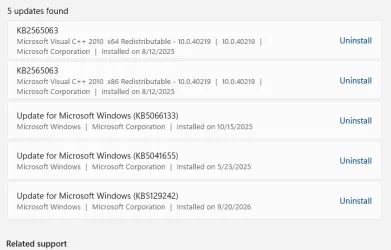
These are the most recent updates that I am thinking that could be the cause since it must have been one of these updates.
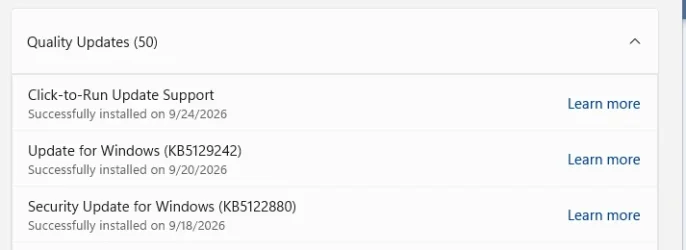
The only other update were the defender antivirus definitions updates.
How do I go about uninstalling the possible problematic updates if they are not listed in the uninstall section for updates?
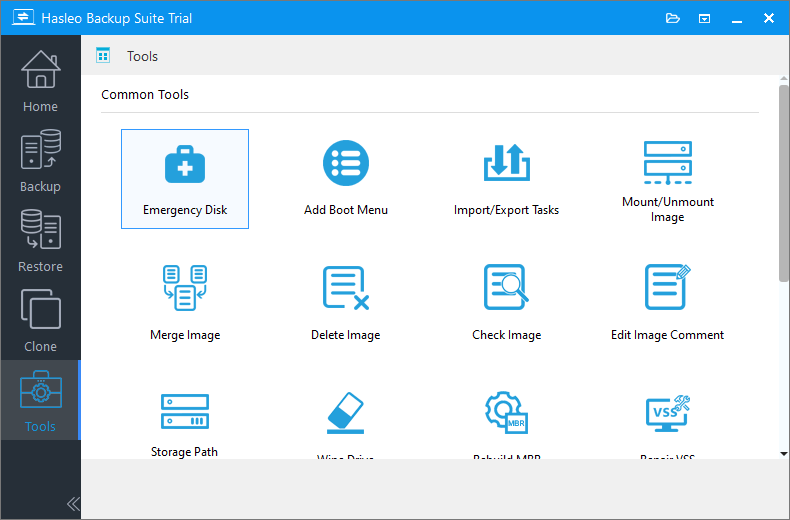
I do may weekly backups of my computer using Hasleo Backup Suite and I do full backups, and I always select to have a complete image check done when I make the backups.
So if need be I can using the most recent backup (which would have been a week ago) and get my computer back to that spot (if that is possible).
I was thinking that maybe I could just reinstall the software onto the computer, but I am worried that if I leave those updates on the computer the same thing is going to happen again. Just in case I started to look for the link for when I originally install the software on this computer. After some searching I did finally find the copy of the original installation that I had made to install the software on this computer but as I said, I am concerned about the same thing happening again if I just leave those updates on the computer.
If using the backup is the best option can someone please let me know where I find the information for using my backup to return my computer to a week ago. Thank You
This was my original post regarding the issue - MS Office (Word and Excel) missing
I tried uninstalling the most recent updates by going to updates, scrolling down and selecting the uninstall updates - but the most recent updates are not listed in the list of available updates to select for uninstalling.
These are the most recent updates that I am thinking that could be the cause since it must have been one of these updates.
The only other update were the defender antivirus definitions updates.
How do I go about uninstalling the possible problematic updates if they are not listed in the uninstall section for updates?
I do may weekly backups of my computer using Hasleo Backup Suite and I do full backups, and I always select to have a complete image check done when I make the backups.
So if need be I can using the most recent backup (which would have been a week ago) and get my computer back to that spot (if that is possible).
I was thinking that maybe I could just reinstall the software onto the computer, but I am worried that if I leave those updates on the computer the same thing is going to happen again. Just in case I started to look for the link for when I originally install the software on this computer. After some searching I did finally find the copy of the original installation that I had made to install the software on this computer but as I said, I am concerned about the same thing happening again if I just leave those updates on the computer.
If using the backup is the best option can someone please let me know where I find the information for using my backup to return my computer to a week ago. Thank You
My Computers
-
At a glance
windows 11 Pro11th Gen Intel Core i7-11390H (4 Cores, 8 Thr...32GB dual channel (DDR4)Intel® Iris® Xe- OS
- windows 11 Pro
- Computer type
- PC/Desktop
- Manufacturer/Model
- geekom mini IT11
- CPU
- 11th Gen Intel Core i7-11390H (4 Cores, 8 Threads, 12M
- Memory
- 32GB dual channel (DDR4)
- Graphics Card(s)
- Intel® Iris® Xe
- Monitor(s) Displays
- HP S2031
- Hard Drives
- 1TB SSD
-
At a glance
Windows 11 ProIntel Core i7-13620HDDR4: SO-DIMM 32GB- Operating System
- Windows 11 Pro
- Computer type
- PC/Desktop
- Manufacturer/Model
- Geekom Mini PC XT13 Pro
- CPU
- Intel Core i7-13620H
- Memory
- DDR4: SO-DIMM 32GB
- Monitor(s) Displays
- HPS2031
- Hard Drives
- M.2 1TB