MS Office uninstall - how much do I need to remove - and how?


Addlepate

Active member
Local time
6:32 PM
Posts
30
OS
Windows 11 24H2
Hi all,

I'm just setting up a new laptop which has / had an O365 trial loaded by the manufacturer. I don't want the 365 trial and have a perpetual licence version of Office. I uninstalled O365 via control panel but when I installed the perpetual licence version I got an activation error.

I think last time I did this I used the Office removal tool, but it seems that's no longer available. I've tried the current MS recommended approach using Get Help, but out of 8 or so tries I've only got it to run once and the uninstall process failed. I've tried the enterprise version of the removal tool (Support and Recovery Assistant) but that fails with an exit code [1]. I've tried following MS manual uninstall instructions but I'm obviously not doing it properly as I'm still finding files and folders, click to run still appears in task manager, and I'm seeing registry entries under HKLM>Software>Microsoft>Office, >OfficeCSP and >OfficeSoftwareProtectionPlatform. I can't delete those registry folders.

At this point I'm a bit stuck, don't want to throw anything at it randomly, and am wary of digging myself a hole. Just wondering what I really need to remove to ensure proper Office perpetual installation and activation, and how I go about it if these tools are all failing? Thanks.
 

My Computer

System One

  • OS
    Windows 11 24H2
    Computer type
    Laptop
    Manufacturer/Model
    MSI Prestige C1MG 0077UK
    CPU
    Intel core i5 Ultra 135H
    Motherboard
    MSI
    Memory
    16GB LPRDDR5
    Graphics Card(s)
    Integral (Intel Arc)
    Sound Card
    Integral
    Monitor(s) Displays
    BOE IPS NE140WUM-NX1 (BOE0A3A) 144 Hz full sRGB
    Screen Resolution
    1920 x 1200
    Hard Drives
    512GB SSD
    Antivirus
    Windows Defender
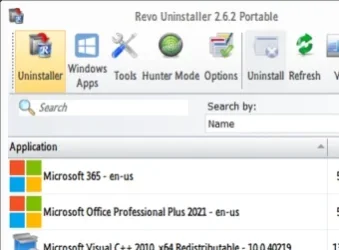
Try REVO uninstaller
 

My Computers

System One System Two

  • OS
    Windows 11 Enterprise 25H2 26200 7462
    Computer type
    PC/Desktop
    Manufacturer/Model
    Custom Build
    CPU
    Intel XEON E5-2699 v3
    Motherboard
    ASUS X99-A
    Memory
    64GB Teamgroup UD4-3600
    Graphics Card(s)
    NVIDIA GeForce GTX 1080 Ti
    Sound Card
    Integrated
    Monitor(s) Displays
    ACER X34 Predator
    Screen Resolution
    3440 x 1440
    Hard Drives
    Crucial CT1000P 3P SSD8 1TB
    Crucial CT1000 BX500 SSD 1TB
    PSU
    GameMax Pro
    Case
    Fractal Design
    Cooling
    Corsair H110iGT + 6 140mm Fans
    Keyboard
    Corsair K4
    Mouse
    G-Skill G502
    Internet Speed
    300MBs
    Browser
    Chrome
    Antivirus
    OEM
    Other Info
    ASUS RT-AC87U Router
  • Operating System
    25H2 26200.5074
    Computer type
    Laptop
    Manufacturer/Model
    ASUS X555LA
    Memory
    8GB
    Browser
    Chrome
    Antivirus
    OEM

My Computer

System One

  • OS
    Windows 11 Pro 25H2 (Build 26200.8524)
    Computer type
    PC/Desktop
    Manufacturer/Model
    Dell Pro Max Tower T2 FCT2250
    CPU
    Intel Core Ultra 9 285 5.6 GHz
    Motherboard
    64-bit operating system, x64-based processor
    Memory
    32.00 GB
    Graphics Card(s)
    Intel Integrated Graphics (128 MB)
    Sound Card
    Realtek Audio
    Monitor(s) Displays
    Dell P2714H Monitor
    Screen Resolution
    1920 x 1080
    Hard Drives
    1 x 512GB M.2 XG10d SED KIOXIA PCIe solid state drive (Internal)
    1 x 2TB Seagate ST2000DM008-2UB102 HDD (Internal)
    1 x 1TB Seagate STGX4000400 External HDD
    1 x 4TB Seagate STGX4000400 External HDD
    1 x 6TB WD Elements AE 2689 External HDD
    PSU
    500 Watts
    Cooling
    Air
    Keyboard
    Microsoft Wired Keyboard 600
    Mouse
    Microsoft USB Basic Optical Mouse v2.0
    Browser
    Firefox
    Antivirus
    Windows Defender + Malwarebytes Premium
    Other Info
    BaseBoard Manufacturer Dell Inc.
    BaseBoard Product 022RY57
    BaseBoard Version A01

My Computer

System One

  • OS
    Windows 11 Home x64 Version 25H2 Build 26200.8037
Try REVO uninstaller

Thanks. I'd looked at Revo as I'd seen it mentioned in other threads. There didn't seem to be a way of getting to the leftovers unless the app is still fully installed, but that was the free version.

I downloaded the pro version (trial) tonight and it seems I can get to the leftovers using forced uninstall? I haven't gone with it at the moment though as I'm a bit wary of an automated uninstaller poking deep into the registry. I'm also not sure whether it will remove registry folders / keys if I can't?

I did start the forced uninstall process and it found two click to run processes and lots of registry keys, haven't been brave enough to go through with registry deletions though!

I'd advise removing the whole lot.

These are the MS-suggested procedures:-
Uninstall Office from a PC - MSSupport
Manually uninstall Office apps - OfficeSupport

Then check in Settings, Apps lists that you have uninstalled every version of Office before then trying to install your own Office.


Denis

I think that's where I'm heading, though finding it all is a mare. The first link is the one that takes you to control panel and the troubleshooter via Get Help which is what I tried. The second is a manual uninstall I hadn't seen before and seems more comprehensive.

Probably wait until I'm fresh in the morning to decide what to do, particularly if going the manual process.
 

My Computer

System One

  • OS
    Windows 11 24H2
    Computer type
    Laptop
    Manufacturer/Model
    MSI Prestige C1MG 0077UK
    CPU
    Intel core i5 Ultra 135H
    Motherboard
    MSI
    Memory
    16GB LPRDDR5
    Graphics Card(s)
    Integral (Intel Arc)
    Sound Card
    Integral
    Monitor(s) Displays
    BOE IPS NE140WUM-NX1 (BOE0A3A) 144 Hz full sRGB
    Screen Resolution
    1920 x 1200
    Hard Drives
    512GB SSD
    Antivirus
    Windows Defender
Probably wait until I'm fresh in the morning to decide what to do, particularly if going the manual process.
I sure envy you; I have not been fresh in the morning since the early 80s. :crys:
 

My Computers

System One System Two

  • OS
    All Branches but Release
    Computer type
    Laptop
    Manufacturer/Model
    Acer Nitro ANV15-51
    CPU
    AMD Ryzen 7 7735HS 3200-4500 Mhz 8 cores x 2
    Motherboard
    Sportage_RBH
    Memory
    32 GB DDR5
    Graphics Card(s)
    Radeon Graphic / NVIDIA GeForce RTX 4060 8 GB GDDR6
    Sound Card
    AMD/Realtek(R) Audio
    Monitor(s) Displays
    Integrated Monitor (15.3"vis)
    Screen Resolution
    FHD 1920X1080 16:9 144Hz
    Hard Drives
    KINGSTON OM8SEP4512Q-AA 1TB
    Western Digital 256GB
    PSU
    19V DC 6.32 A 120 W
    Cooling
    Dual Fans
    Mouse
    MS Bluetooth
    Internet Speed
    Fiber 1GB Cox -us & 1GB Orange-fr
    Browser
    Edge Canary- Firefox Nightly-Chrome Dev-Chrome Dev
    Antivirus
    Windows Defender
  • Operating System
    Windows 11 Beta
    Computer type
    Laptop
    Manufacturer/Model
    Asus X751BP
    CPU
    AMD A9-9420
    Memory
    8 GB of DDR4
    Graphics card(s)
    AMD Radeon R5
    Screen Resolution
    1600x900
    Hard Drives
    Seagate 1 TB
I downloaded the pro version (trial) tonight and it seems I can get to the leftovers using forced uninstall? I haven't gone with it at the moment though as I'm a bit wary of an automated uninstaller poking deep into the registry. I'm also not sure whether it will remove registry folders / keys if I can't?
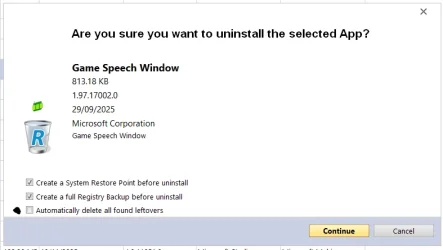
When you run Revo Uninstaller, select the 'Automatically delete all found leftovers' box -

1.webp

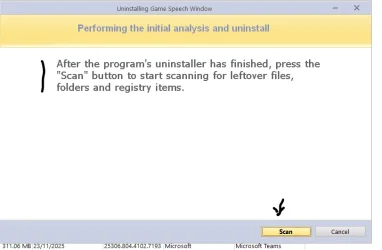
When the uninstall is 'complete', hit the 'Scan' button -

2.webp
There is NO need to use 'Forced Uninstall'
 

My Computer

System One

  • OS
    Windows 11 Pro 25H2 (Build 26200.8524)
    Computer type
    PC/Desktop
    Manufacturer/Model
    Dell Pro Max Tower T2 FCT2250
    CPU
    Intel Core Ultra 9 285 5.6 GHz
    Motherboard
    64-bit operating system, x64-based processor
    Memory
    32.00 GB
    Graphics Card(s)
    Intel Integrated Graphics (128 MB)
    Sound Card
    Realtek Audio
    Monitor(s) Displays
    Dell P2714H Monitor
    Screen Resolution
    1920 x 1080
    Hard Drives
    1 x 512GB M.2 XG10d SED KIOXIA PCIe solid state drive (Internal)
    1 x 2TB Seagate ST2000DM008-2UB102 HDD (Internal)
    1 x 1TB Seagate STGX4000400 External HDD
    1 x 4TB Seagate STGX4000400 External HDD
    1 x 6TB WD Elements AE 2689 External HDD
    PSU
    500 Watts
    Cooling
    Air
    Keyboard
    Microsoft Wired Keyboard 600
    Mouse
    Microsoft USB Basic Optical Mouse v2.0
    Browser
    Firefox
    Antivirus
    Windows Defender + Malwarebytes Premium
    Other Info
    BaseBoard Manufacturer Dell Inc.
    BaseBoard Product 022RY57
    BaseBoard Version A01
When you run Revo Uninstaller, select the 'Automatically delete all found leftovers' box -


When the uninstall is complete , hit the 'Scan' button -


There is NO need to use 'Forced Uninstall'

Doesn't that assume you're uninstalling from the app list though? If the app is part uninstalled already, you don't get those options? Or am I missing something?
 

My Computer

System One

  • OS
    Windows 11 24H2
    Computer type
    Laptop
    Manufacturer/Model
    MSI Prestige C1MG 0077UK
    CPU
    Intel core i5 Ultra 135H
    Motherboard
    MSI
    Memory
    16GB LPRDDR5
    Graphics Card(s)
    Integral (Intel Arc)
    Sound Card
    Integral
    Monitor(s) Displays
    BOE IPS NE140WUM-NX1 (BOE0A3A) 144 Hz full sRGB
    Screen Resolution
    1920 x 1200
    Hard Drives
    512GB SSD
    Antivirus
    Windows Defender
Thanks. I'd looked at Revo as I'd seen it mentioned in other threads. There didn't seem to be a way of getting to the leftovers unless the app is still fully installed, but that was the free version.

I downloaded the pro version (trial) tonight and it seems I can get to the leftovers using forced uninstall? I haven't gone with it at the moment though as I'm a bit wary of an automated uninstaller poking deep into the registry. I'm also not sure whether it will remove registry folders / keys if I can't?

I did start the forced uninstall process and it found two click to run processes and lots of registry keys, haven't been brave enough to go through with registry deletions though!

I've used Revo Uninstaller Pro for over a year and never had a single issue with it when using the app uninstaller functions. Before uninstalling apps and cleaning the Registry Revo always asks the user whether or not they want the a restore point and full back up of the Registry created.

Also, as a fall-back option, I have full system backups of both my computers at all times.
 

My Computers

System One System Two

  • OS
    Windows 11 Pro 25H2
    Computer type
    PC/Desktop
    Manufacturer/Model
    Homebuilt
    CPU
    Intel Core i9 13900K
    Motherboard
    Asus ProArt Z790 Creator WiFi - Bios 3107
    Memory
    Corsair Dominator Platinum 64gb 5600MT/s DDR5 Dual Channel
    Graphics Card(s)
    Sapphire NITRO+ AMD Radeon RX 7900 XTX Vapor-X 24GB
    Sound Card
    External DAC: Cambridge Audio DACMagic200M - Headphone Amp: Topping L50
    Monitor(s) Displays
    Panasonic MX950 Mini LED 55" TV 120hz
    Screen Resolution
    3840 x 2160 120hz
    Hard Drives
    Samsung 980 Pro 2TB (OS)
    Samsung 980 Pro 1TB (Files)
    Lexar NZ790 4TB
    LaCie d2 Professional 6TB external - USB 3.1
    Seagate Expansion 16TB external - USB 3.2
    Seagate One Touch 18TB external HD - USB 3.0
    PSU
    Corsair RM1200x Shift
    Case
    Corsair RGB Smart Case 5000x (white)
    Cooling
    Corsair iCue H150i Elite Capellix XT
    Keyboard
    Incase Ergonomic USB (Microsoft clone)
    Mouse
    Logitech MX Master 3S
    Internet Speed
    Fibre 900/500 Mbps
    Browser
    Microsoft Edge Chromium
    Antivirus
    Bitdefender Total Security
    Other Info
    AMD Radeon Software & Drivers 26.1.1
    Hasleo Backup Suite
    Dashlane password manager
    Kensington Verimark fingerprint reader
    Logitech Brio 4K webcam
    Orico 10-port powered USB 3.0 hub
  • Operating System
    Windows 11 Pro 25H2
    Computer type
    Laptop
    Manufacturer/Model
    Asus Vivobook X1605VA
    CPU
    Intel® Core™ i9-13900H
    Motherboard
    Asus X1605VA bios 309
    Memory
    32GB DDR4-3200 Dual channel
    Graphics card(s)
    *Intel Iris Xᵉ Graphics G7
    Sound Card
    Realtek | Intel SST Bluetooth & USB
    Monitor(s) Displays
    16.0-inch, WUXGA 16:10 aspect ratio, IPS-level Panel
    Screen Resolution
    1920 x 1200 60hz
    Hard Drives
    512GB M.2 NVMe™ PCIe® 3.0 SSD
    Mouse
    Logitech MX Ergo Trackball
    Antivirus
    Bitdefender Total Security
    Other Info
    720p Webcam
    WiFi & USB to ethernet
Doesn't that assume you're uninstalling from the app list though? If the app is part uninstalled already, you don't get those options? Or am I missing something?
If the app IS listed in the 'All Programs' list, you don't have run 'Forced Uninstall' if it IS NOT, then you have to run 'Forced Uninstall'.
 

My Computer

System One

  • OS
    Windows 11 Pro 25H2 (Build 26200.8524)
    Computer type
    PC/Desktop
    Manufacturer/Model
    Dell Pro Max Tower T2 FCT2250
    CPU
    Intel Core Ultra 9 285 5.6 GHz
    Motherboard
    64-bit operating system, x64-based processor
    Memory
    32.00 GB
    Graphics Card(s)
    Intel Integrated Graphics (128 MB)
    Sound Card
    Realtek Audio
    Monitor(s) Displays
    Dell P2714H Monitor
    Screen Resolution
    1920 x 1080
    Hard Drives
    1 x 512GB M.2 XG10d SED KIOXIA PCIe solid state drive (Internal)
    1 x 2TB Seagate ST2000DM008-2UB102 HDD (Internal)
    1 x 1TB Seagate STGX4000400 External HDD
    1 x 4TB Seagate STGX4000400 External HDD
    1 x 6TB WD Elements AE 2689 External HDD
    PSU
    500 Watts
    Cooling
    Air
    Keyboard
    Microsoft Wired Keyboard 600
    Mouse
    Microsoft USB Basic Optical Mouse v2.0
    Browser
    Firefox
    Antivirus
    Windows Defender + Malwarebytes Premium
    Other Info
    BaseBoard Manufacturer Dell Inc.
    BaseBoard Product 022RY57
    BaseBoard Version A01
I don't want the 365 trial
The only step I have not seen mentioned yet is making sure the Trial version is Canceled in your MS Account. (I have see Trials versions come back from the dead during an Office Repair because it thinks "You've still got a subscription, so you must still want the software")
delete microsoft 365 trial - Microsoft Q&A
 

My Computer

System One

  • OS
    Windows 10, Windows 11
    Computer type
    PC/Desktop
You need to understand the options for 365 on a new computer and how they relate to RevoUninstaller use ...
- under the Revo tab Windows Apps, this entry for 365 which is just a "stub" for the installation of the program. When this "stub" entry is activated it will direct the user to steps to purchase the product from Microsoft (NOT RECOMMENDED). The program is not installed (fully) until the purchase is complete. Revo will uninstall all the components for this stub
- under the Revo tab Uninstaller, any 365 entry is an indication that the program is fully installed. You need to use Revo to uninstall it, including the Advanced option to remove all leftover files/folders/registry entry

Microsoft also provide Office/365 uninstall software, but I'm always sceptical of companies that have a vested interest in leaving traces of their software on a device but purport to provide so-called "clean" uninstalling software
 

My Computers

System One System Two

  • OS
    Windows 11 2xH2 (latest update ... forever anal)
    Computer type
    PC/Desktop
    Manufacturer/Model
    HP Slim S01
    CPU
    Intel i5-12400
    Memory
    8GB
    Graphics Card(s)
    NVIDIA GeForce GT730
    Sound Card
    OOBE
    Monitor(s) Displays
    Acer 32"
    Screen Resolution
    1920x1080
    Hard Drives
    512GB KIOXIA NVMe
    1TB SATA SSD
    PSU
    OOBE
    Case
    OOBE
    Cooling
    OOBE
    Keyboard
    BT
    Mouse
    BT
    Browser
    Brave FFox Chrome Opera
    Antivirus
    KIS
  • Operating System
    Windows 11 Pro 2xH2 (latest update ... 4ever anal)
    Computer type
    Laptop
    Manufacturer/Model
    HP Pavillion 15
    CPU
    i7-1165G7 @ 2.80GHz
    Graphics card(s)
    Intel Iris Xe Graphics
    Hard Drives
    Samsung NVMe 512GB
    + numerous/multiple SSD Type C USB enclosures
    Internet Speed
    NBN FTTN 50
    Browser
    Brave
    Antivirus
    KIS
Just install it over top and click on Switch License..., it'll find the proper features.
 

My Computers

System One System Two

  • OS
    Windows 11 Pro
    Computer type
    PC/Desktop
    Manufacturer/Model
    ASUS ROG Strix
  • Operating System
    Windows 11 Pro
    Computer type
    Laptop
    Manufacturer/Model
    ASUS VivoBook
Just install it over top and click on Switch License..., it'll find the proper features.
That is what have to do every time I install Microsoft 365 after a clean install of Windows 11 on my computers. Hasn't failed yet.
 

My Computers

System One System Two

  • OS
    Windows 11 Pro 25H2
    Computer type
    PC/Desktop
    Manufacturer/Model
    Homebuilt
    CPU
    Intel Core i9 13900K
    Motherboard
    Asus ProArt Z790 Creator WiFi - Bios 3107
    Memory
    Corsair Dominator Platinum 64gb 5600MT/s DDR5 Dual Channel
    Graphics Card(s)
    Sapphire NITRO+ AMD Radeon RX 7900 XTX Vapor-X 24GB
    Sound Card
    External DAC: Cambridge Audio DACMagic200M - Headphone Amp: Topping L50
    Monitor(s) Displays
    Panasonic MX950 Mini LED 55" TV 120hz
    Screen Resolution
    3840 x 2160 120hz
    Hard Drives
    Samsung 980 Pro 2TB (OS)
    Samsung 980 Pro 1TB (Files)
    Lexar NZ790 4TB
    LaCie d2 Professional 6TB external - USB 3.1
    Seagate Expansion 16TB external - USB 3.2
    Seagate One Touch 18TB external HD - USB 3.0
    PSU
    Corsair RM1200x Shift
    Case
    Corsair RGB Smart Case 5000x (white)
    Cooling
    Corsair iCue H150i Elite Capellix XT
    Keyboard
    Incase Ergonomic USB (Microsoft clone)
    Mouse
    Logitech MX Master 3S
    Internet Speed
    Fibre 900/500 Mbps
    Browser
    Microsoft Edge Chromium
    Antivirus
    Bitdefender Total Security
    Other Info
    AMD Radeon Software & Drivers 26.1.1
    Hasleo Backup Suite
    Dashlane password manager
    Kensington Verimark fingerprint reader
    Logitech Brio 4K webcam
    Orico 10-port powered USB 3.0 hub
  • Operating System
    Windows 11 Pro 25H2
    Computer type
    Laptop
    Manufacturer/Model
    Asus Vivobook X1605VA
    CPU
    Intel® Core™ i9-13900H
    Motherboard
    Asus X1605VA bios 309
    Memory
    32GB DDR4-3200 Dual channel
    Graphics card(s)
    *Intel Iris Xᵉ Graphics G7
    Sound Card
    Realtek | Intel SST Bluetooth & USB
    Monitor(s) Displays
    16.0-inch, WUXGA 16:10 aspect ratio, IPS-level Panel
    Screen Resolution
    1920 x 1200 60hz
    Hard Drives
    512GB M.2 NVMe™ PCIe® 3.0 SSD
    Mouse
    Logitech MX Ergo Trackball
    Antivirus
    Bitdefender Total Security
    Other Info
    720p Webcam
    WiFi & USB to ethernet
That is what have to do every time I install Microsoft 365 after a clean install of Windows 11 on my computers. Hasn't failed yet.
I just started a 365 subscription, ran Setup, signed in and it loaded the proper features...,
if I sign out, it unloads the features and reverts back to 2021..., it's weird that way!!! :cool:

0008204.webp
 

My Computers

System One System Two

  • OS
    Windows 11 Pro
    Computer type
    PC/Desktop
    Manufacturer/Model
    ASUS ROG Strix
  • Operating System
    Windows 11 Pro
    Computer type
    Laptop
    Manufacturer/Model
    ASUS VivoBook
I just started a 365 subscription, ran Setup, signed in and it loaded the proper features...,
if I sign out, it unloads the features and reverts back to 2021..., it's weird that way!!! :cool:

View attachment 154445
That's a bit screwy.
 

My Computers

System One System Two

  • OS
    Windows 11 Pro 25H2
    Computer type
    PC/Desktop
    Manufacturer/Model
    Homebuilt
    CPU
    Intel Core i9 13900K
    Motherboard
    Asus ProArt Z790 Creator WiFi - Bios 3107
    Memory
    Corsair Dominator Platinum 64gb 5600MT/s DDR5 Dual Channel
    Graphics Card(s)
    Sapphire NITRO+ AMD Radeon RX 7900 XTX Vapor-X 24GB
    Sound Card
    External DAC: Cambridge Audio DACMagic200M - Headphone Amp: Topping L50
    Monitor(s) Displays
    Panasonic MX950 Mini LED 55" TV 120hz
    Screen Resolution
    3840 x 2160 120hz
    Hard Drives
    Samsung 980 Pro 2TB (OS)
    Samsung 980 Pro 1TB (Files)
    Lexar NZ790 4TB
    LaCie d2 Professional 6TB external - USB 3.1
    Seagate Expansion 16TB external - USB 3.2
    Seagate One Touch 18TB external HD - USB 3.0
    PSU
    Corsair RM1200x Shift
    Case
    Corsair RGB Smart Case 5000x (white)
    Cooling
    Corsair iCue H150i Elite Capellix XT
    Keyboard
    Incase Ergonomic USB (Microsoft clone)
    Mouse
    Logitech MX Master 3S
    Internet Speed
    Fibre 900/500 Mbps
    Browser
    Microsoft Edge Chromium
    Antivirus
    Bitdefender Total Security
    Other Info
    AMD Radeon Software & Drivers 26.1.1
    Hasleo Backup Suite
    Dashlane password manager
    Kensington Verimark fingerprint reader
    Logitech Brio 4K webcam
    Orico 10-port powered USB 3.0 hub
  • Operating System
    Windows 11 Pro 25H2
    Computer type
    Laptop
    Manufacturer/Model
    Asus Vivobook X1605VA
    CPU
    Intel® Core™ i9-13900H
    Motherboard
    Asus X1605VA bios 309
    Memory
    32GB DDR4-3200 Dual channel
    Graphics card(s)
    *Intel Iris Xᵉ Graphics G7
    Sound Card
    Realtek | Intel SST Bluetooth & USB
    Monitor(s) Displays
    16.0-inch, WUXGA 16:10 aspect ratio, IPS-level Panel
    Screen Resolution
    1920 x 1200 60hz
    Hard Drives
    512GB M.2 NVMe™ PCIe® 3.0 SSD
    Mouse
    Logitech MX Ergo Trackball
    Antivirus
    Bitdefender Total Security
    Other Info
    720p Webcam
    WiFi & USB to ethernet
They probably know I'm gonna cancel the subscription as soon as the 2 free months runs out!!! :woozy:
 

My Computers

System One System Two

  • OS
    Windows 11 Pro
    Computer type
    PC/Desktop
    Manufacturer/Model
    ASUS ROG Strix
  • Operating System
    Windows 11 Pro
    Computer type
    Laptop
    Manufacturer/Model
    ASUS VivoBook
I sure envy you; I have not been fresh in the morning since the early 80s. :crys:
Turned out I wasn't fresh this morning either, so it didn't get done today and I'm frazzled from work now. Try again tomorrow.
 

My Computer

System One

  • OS
    Windows 11 24H2
    Computer type
    Laptop
    Manufacturer/Model
    MSI Prestige C1MG 0077UK
    CPU
    Intel core i5 Ultra 135H
    Motherboard
    MSI
    Memory
    16GB LPRDDR5
    Graphics Card(s)
    Integral (Intel Arc)
    Sound Card
    Integral
    Monitor(s) Displays
    BOE IPS NE140WUM-NX1 (BOE0A3A) 144 Hz full sRGB
    Screen Resolution
    1920 x 1200
    Hard Drives
    512GB SSD
    Antivirus
    Windows Defender
The only step I have not seen mentioned yet is making sure the Trial version is Canceled in your MS Account. (I have see Trials versions come back from the dead during an Office Repair because it thinks "You've still got a subscription, so you must still want the software")
delete microsoft 365 trial - Microsoft Q&A

I'd heard of that. I didn't take up the trial and don't have it or the perpetual licence registered to an MS account though, so in this case I'm OK.

@idgat @Edwin @Marcus Vinicus, thanks. @Edwin, I wasn't sure you could install over the top like that - normal advice seems to be don't as it'll cause problems? Does that apply to 2021 or 2024 over trial 365?
 

My Computer

System One

  • OS
    Windows 11 24H2
    Computer type
    Laptop
    Manufacturer/Model
    MSI Prestige C1MG 0077UK
    CPU
    Intel core i5 Ultra 135H
    Motherboard
    MSI
    Memory
    16GB LPRDDR5
    Graphics Card(s)
    Integral (Intel Arc)
    Sound Card
    Integral
    Monitor(s) Displays
    BOE IPS NE140WUM-NX1 (BOE0A3A) 144 Hz full sRGB
    Screen Resolution
    1920 x 1200
    Hard Drives
    512GB SSD
    Antivirus
    Windows Defender

Latest Support Threads

Back
Top Bottom