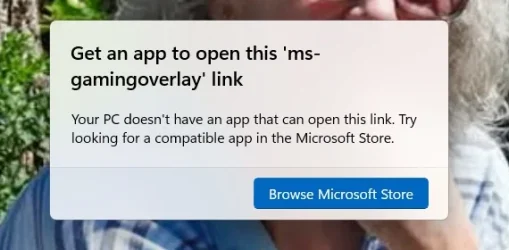
MS Overplay Link


elbmek

Well-known member
Member
VIP
Local time
5:45 AM
Posts
982
Location
Sutton Coldfield England
OS
Win 11 x 64 Home
whatever this is, my pc has just started reporting it, with annoying pop ups, especially when using Fallout New Vegas. A missing file ?
 

My Computer

System One

  • OS
    Win 11 x 64 Home
    Computer type
    PC/Desktop
    Manufacturer/Model
    pc specialists build (updated various times)
    CPU
    AMD Ryzen 5 7600 6-Core Processor
    Motherboard
    Gigabyte Technology Co., Ltd. Product:B650M K
    Memory
    DDR 5. 32GB (2 x16GB)
    Graphics Card(s)
    GeForce RTX 5060i
    Sound Card
    2 channel HD Audio + Mic/Hphone jack
    Monitor(s) Displays
    coolermaster 27 inch
    Screen Resolution
    1920 x 1080
    Hard Drives
    three external 3TBs, 4 TBs and 5tb. (Storage) Samsung SSD 970 (C).
    Case
    Coolermaster
    Cooling
    internal fans
    Keyboard
    Logi K270 & Logitech gamer G213
    Mouse
    M310 and Logi Gamer G203
    Internet Speed
    530.85mbps download. 52.70 upload
    Browser
    Opera, Vivaldi, Chrome & Firefox
    Antivirus
    Kaspersky Premium
    Other Info
    Build: 26100.ge_release 240331-1435
OK as soon as I get it back

here -MS store does not know what the file is?
 

Attachments

  • msoverlay.webp
    msoverlay.webp
    20.4 KB · Views: 2

My Computer

System One

  • OS
    Win 11 x 64 Home
    Computer type
    PC/Desktop
    Manufacturer/Model
    pc specialists build (updated various times)
    CPU
    AMD Ryzen 5 7600 6-Core Processor
    Motherboard
    Gigabyte Technology Co., Ltd. Product:B650M K
    Memory
    DDR 5. 32GB (2 x16GB)
    Graphics Card(s)
    GeForce RTX 5060i
    Sound Card
    2 channel HD Audio + Mic/Hphone jack
    Monitor(s) Displays
    coolermaster 27 inch
    Screen Resolution
    1920 x 1080
    Hard Drives
    three external 3TBs, 4 TBs and 5tb. (Storage) Samsung SSD 970 (C).
    Case
    Coolermaster
    Cooling
    internal fans
    Keyboard
    Logi K270 & Logitech gamer G213
    Mouse
    M310 and Logi Gamer G203
    Internet Speed
    530.85mbps download. 52.70 upload
    Browser
    Opera, Vivaldi, Chrome & Firefox
    Antivirus
    Kaspersky Premium
    Other Info
    Build: 26100.ge_release 240331-1435
Open Windows PowerShell as an admin, and paste this all-together in there, to reinstall it. See if this resolves the issue:

Get-AppxPackage Microsoft.XboxGamingOverlay | Foreach {Add-AppxPackage -DisableDevelopmentMode -Register "$($_.InstallLocation)\AppXManifest.xml"}
 

My Computer

System One

  • OS
    Windows 11
    Computer type
    PC/Desktop
    Manufacturer/Model
    Custom Built
Run these commands as Administrator to disable the pop-up:
Code:
reg add HKEY_CURRENT_USER\SOFTWARE\Microsoft\Windows\CurrentVersion\GameDVR /f /t REG_DWORD /v "AppCaptureEnabled" /d 0
reg add HKEY_CURRENT_USER\System\GameConfigStore /f /t REG_DWORD /v "GameDVR_Enabled" /d 0
 

My Computer

System One

  • OS
    Windows 7
It's a bug that I ignore when opening a time waster game.

Snipaste_2026-03-02_07-12-12.webp
 

My Computers

System One System Two

  • OS
    Win 11 Pro
    Computer type
    Laptop
    Manufacturer/Model
    ASUS Vivobook
    CPU
    AMD Ryzen™ 7 7730U
    Motherboard
    M1605YA
    Memory
    24GB Dual-Channel DDR4 @ 1596MHz (22-22-22-52)
    Graphics Card(s)
    512MB ATI AMD Radeon Graphics (ASUStek Computer Inc)
    Monitor(s) Displays
    Generic PnP Monitor (1920x1200@60Hz) - P1 PLUS (1920x1080@59Hz)
    Screen Resolution
    1920 X 1200
    Hard Drives
    953GB Western Digital WD
    PSU
    45 Watts
    Mouse
    Lenovo Bluetooth.
    Internet Speed
    500 Mbps
    Browser
    Edge
    Antivirus
    Defender
  • Operating System
    Windows 11
    Computer type
    Laptop
    Manufacturer/Model
    ACER NITRO
    CPU
    AMD Ryzen 7 5800H / 3.2 GHz
    Motherboard
    CZ Scala_CAS (FP6)
    Memory
    32 GB DDR4 SDRAM 3200 MHz
    Graphics card(s)
    NVIDIA GeForce RTX 3060 6 GB GDDR6 SDRAM
    Sound Card
    Realtek Audio. NVIDIA High Definition Audio
    Monitor(s) Displays
    15.6" LED backlight 1920 x 1080 (Full HD) 144 Hz
    Screen Resolution
    1920 x 1080 (Full HD)
    Hard Drives
    Samsung 970 Evo Plus 2TB NVMe M.2
    PSU
    180 Watt, 19.5 V
    Mouse
    Lenovo Bluetooth
    Internet Speed
    500 Mbps
    Browser
    Edge
    Antivirus
    Defender
Run these commands as Administrator to disable the pop-up:
Code:
reg add HKEY_CURRENT_USER\SOFTWARE\Microsoft\Windows\CurrentVersion\GameDVR /f /t REG_DWORD /v "AppCaptureEnabled" /d 0
reg add HKEY_CURRENT_USER\System\GameConfigStore /f /t REG_DWORD /v "GameDVR_Enabled" /d 0
sorry this makes no sense to me. I went into correct place in Reg. into current version and there was only a short line and then pop us was weird
 

My Computer

System One

  • OS
    Win 11 x 64 Home
    Computer type
    PC/Desktop
    Manufacturer/Model
    pc specialists build (updated various times)
    CPU
    AMD Ryzen 5 7600 6-Core Processor
    Motherboard
    Gigabyte Technology Co., Ltd. Product:B650M K
    Memory
    DDR 5. 32GB (2 x16GB)
    Graphics Card(s)
    GeForce RTX 5060i
    Sound Card
    2 channel HD Audio + Mic/Hphone jack
    Monitor(s) Displays
    coolermaster 27 inch
    Screen Resolution
    1920 x 1080
    Hard Drives
    three external 3TBs, 4 TBs and 5tb. (Storage) Samsung SSD 970 (C).
    Case
    Coolermaster
    Cooling
    internal fans
    Keyboard
    Logi K270 & Logitech gamer G213
    Mouse
    M310 and Logi Gamer G203
    Internet Speed
    530.85mbps download. 52.70 upload
    Browser
    Opera, Vivaldi, Chrome & Firefox
    Antivirus
    Kaspersky Premium
    Other Info
    Build: 26100.ge_release 240331-1435
Open Windows PowerShell as an admin, and paste this all-together in there, to reinstall it. See if this resolves the issue:

Get-AppxPackage Microsoft.XboxGamingOverlay | Foreach {Add-AppxPackage -DisableDevelopmentMode -Register "$($_.InstallLocation)\AppXManifest.xml"}
I did this and pressed enter. Then went back into fallout 3, opened it, closed it down and the pop up came back. Should I delete game (on Steam) and reinstall. I was going to do it last night but wanted to see what you all said first. I am also using vortex pro but that was ok.
 

My Computer

System One

  • OS
    Win 11 x 64 Home
    Computer type
    PC/Desktop
    Manufacturer/Model
    pc specialists build (updated various times)
    CPU
    AMD Ryzen 5 7600 6-Core Processor
    Motherboard
    Gigabyte Technology Co., Ltd. Product:B650M K
    Memory
    DDR 5. 32GB (2 x16GB)
    Graphics Card(s)
    GeForce RTX 5060i
    Sound Card
    2 channel HD Audio + Mic/Hphone jack
    Monitor(s) Displays
    coolermaster 27 inch
    Screen Resolution
    1920 x 1080
    Hard Drives
    three external 3TBs, 4 TBs and 5tb. (Storage) Samsung SSD 970 (C).
    Case
    Coolermaster
    Cooling
    internal fans
    Keyboard
    Logi K270 & Logitech gamer G213
    Mouse
    M310 and Logi Gamer G203
    Internet Speed
    530.85mbps download. 52.70 upload
    Browser
    Opera, Vivaldi, Chrome & Firefox
    Antivirus
    Kaspersky Premium
    Other Info
    Build: 26100.ge_release 240331-1435
That popup is not a virus—it’s a Windows bug caused by a broken or removed Xbox Game Bar (ms-gamingoverlay) handler. If it's annoying re-install Game Bar.


My Computers

System One System Two

  • OS
    Win 11 Pro
    Computer type
    Laptop
    Manufacturer/Model
    ASUS Vivobook
    CPU
    AMD Ryzen™ 7 7730U
    Motherboard
    M1605YA
    Memory
    24GB Dual-Channel DDR4 @ 1596MHz (22-22-22-52)
    Graphics Card(s)
    512MB ATI AMD Radeon Graphics (ASUStek Computer Inc)
    Monitor(s) Displays
    Generic PnP Monitor (1920x1200@60Hz) - P1 PLUS (1920x1080@59Hz)
    Screen Resolution
    1920 X 1200
    Hard Drives
    953GB Western Digital WD
    PSU
    45 Watts
    Mouse
    Lenovo Bluetooth.
    Internet Speed
    500 Mbps
    Browser
    Edge
    Antivirus
    Defender
  • Operating System
    Windows 11
    Computer type
    Laptop
    Manufacturer/Model
    ACER NITRO
    CPU
    AMD Ryzen 7 5800H / 3.2 GHz
    Motherboard
    CZ Scala_CAS (FP6)
    Memory
    32 GB DDR4 SDRAM 3200 MHz
    Graphics card(s)
    NVIDIA GeForce RTX 3060 6 GB GDDR6 SDRAM
    Sound Card
    Realtek Audio. NVIDIA High Definition Audio
    Monitor(s) Displays
    15.6" LED backlight 1920 x 1080 (Full HD) 144 Hz
    Screen Resolution
    1920 x 1080 (Full HD)
    Hard Drives
    Samsung 970 Evo Plus 2TB NVMe M.2
    PSU
    180 Watt, 19.5 V
    Mouse
    Lenovo Bluetooth
    Internet Speed
    500 Mbps
    Browser
    Edge
    Antivirus
    Defender
The link has gone but a blank window pops up then vanished and game bar does not appear in apps. Anyway pressing win +G brings up bar so I know its in. Nealt forgot - the link X Box Game Bar does not appear in Store, only Gamebox
 
Last edited:

My Computer

System One

  • OS
    Win 11 x 64 Home
    Computer type
    PC/Desktop
    Manufacturer/Model
    pc specialists build (updated various times)
    CPU
    AMD Ryzen 5 7600 6-Core Processor
    Motherboard
    Gigabyte Technology Co., Ltd. Product:B650M K
    Memory
    DDR 5. 32GB (2 x16GB)
    Graphics Card(s)
    GeForce RTX 5060i
    Sound Card
    2 channel HD Audio + Mic/Hphone jack
    Monitor(s) Displays
    coolermaster 27 inch
    Screen Resolution
    1920 x 1080
    Hard Drives
    three external 3TBs, 4 TBs and 5tb. (Storage) Samsung SSD 970 (C).
    Case
    Coolermaster
    Cooling
    internal fans
    Keyboard
    Logi K270 & Logitech gamer G213
    Mouse
    M310 and Logi Gamer G203
    Internet Speed
    530.85mbps download. 52.70 upload
    Browser
    Opera, Vivaldi, Chrome & Firefox
    Antivirus
    Kaspersky Premium
    Other Info
    Build: 26100.ge_release 240331-1435
Try the suggestions on this site:
 

My Computer

System One

  • OS
    Windows 11
    Computer type
    PC/Desktop
    Manufacturer/Model
    Custom Built

My Computer

System One

  • OS
    Windows 11 Pro Insider 64 bit 25H2 26200.5742
    Computer type
    PC/Desktop
    Manufacturer/Model
    Gigabyte Z390 UD
    CPU
    Intel Core i7 9700K 3.60
    Motherboard
    Gigabyte Z390 UD
    Memory
    16 GB
    Graphics Card(s)
    nVidia GEForce RTX 2060 Super
    Sound Card
    onboard
    Monitor(s) Displays
    Two 27" Dell 4K monitors
    Screen Resolution
    3840 x 2160
    Hard Drives
    M.2 NVME SSD, 500 GB; Two 2TB Mechanical HDD's
    PSU
    850w PSU
    Case
    Cyberpower PC
    Cooling
    Water cooled
    Keyboard
    Backlit Cyberpower gaming keyboard
    Mouse
    Backlit Cyberpower gaming mouse
    Internet Speed
    1 GB mbps
    Browser
    Brave
    Antivirus
    Windows Security

My Computers

System One System Two

  • OS
    Win 11 Pro
    Computer type
    Laptop
    Manufacturer/Model
    ASUS Vivobook
    CPU
    AMD Ryzen™ 7 7730U
    Motherboard
    M1605YA
    Memory
    24GB Dual-Channel DDR4 @ 1596MHz (22-22-22-52)
    Graphics Card(s)
    512MB ATI AMD Radeon Graphics (ASUStek Computer Inc)
    Monitor(s) Displays
    Generic PnP Monitor (1920x1200@60Hz) - P1 PLUS (1920x1080@59Hz)
    Screen Resolution
    1920 X 1200
    Hard Drives
    953GB Western Digital WD
    PSU
    45 Watts
    Mouse
    Lenovo Bluetooth.
    Internet Speed
    500 Mbps
    Browser
    Edge
    Antivirus
    Defender
  • Operating System
    Windows 11
    Computer type
    Laptop
    Manufacturer/Model
    ACER NITRO
    CPU
    AMD Ryzen 7 5800H / 3.2 GHz
    Motherboard
    CZ Scala_CAS (FP6)
    Memory
    32 GB DDR4 SDRAM 3200 MHz
    Graphics card(s)
    NVIDIA GeForce RTX 3060 6 GB GDDR6 SDRAM
    Sound Card
    Realtek Audio. NVIDIA High Definition Audio
    Monitor(s) Displays
    15.6" LED backlight 1920 x 1080 (Full HD) 144 Hz
    Screen Resolution
    1920 x 1080 (Full HD)
    Hard Drives
    Samsung 970 Evo Plus 2TB NVMe M.2
    PSU
    180 Watt, 19.5 V
    Mouse
    Lenovo Bluetooth
    Internet Speed
    500 Mbps
    Browser
    Edge
    Antivirus
    Defender
game mod now off. Thanks Fabler and pepanee.Fabler is right - win 11
 

My Computer

System One

  • OS
    Win 11 x 64 Home
    Computer type
    PC/Desktop
    Manufacturer/Model
    pc specialists build (updated various times)
    CPU
    AMD Ryzen 5 7600 6-Core Processor
    Motherboard
    Gigabyte Technology Co., Ltd. Product:B650M K
    Memory
    DDR 5. 32GB (2 x16GB)
    Graphics Card(s)
    GeForce RTX 5060i
    Sound Card
    2 channel HD Audio + Mic/Hphone jack
    Monitor(s) Displays
    coolermaster 27 inch
    Screen Resolution
    1920 x 1080
    Hard Drives
    three external 3TBs, 4 TBs and 5tb. (Storage) Samsung SSD 970 (C).
    Case
    Coolermaster
    Cooling
    internal fans
    Keyboard
    Logi K270 & Logitech gamer G213
    Mouse
    M310 and Logi Gamer G203
    Internet Speed
    530.85mbps download. 52.70 upload
    Browser
    Opera, Vivaldi, Chrome & Firefox
    Antivirus
    Kaspersky Premium
    Other Info
    Build: 26100.ge_release 240331-1435

Latest Support Threads

Back
Top Bottom