Multi Monitor Setup


Thorenzz

Well-known member
Member
Local time
12:40 PM
Posts
143
Location
Slovakia/England
OS
Win 11 Pro Insider Beta (26220.8370), Kali Linux
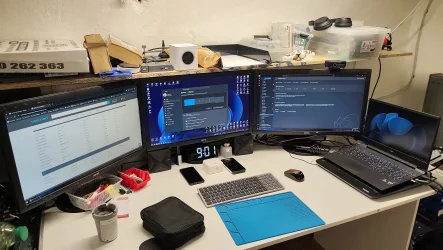
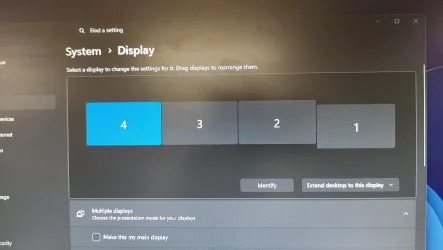
Does anyone know the way to show Icons on desktop on all 4 monitors (not just on primary) I use in extended mode?

Thanks.
 

My Computer

System One

  • OS
    Win 11 Pro Insider Beta (26220.8370), Kali Linux
    Computer type
    Laptop
    Manufacturer/Model
    HP Victus 15
    CPU
    AMD Ryzen 5 5600H
    Memory
    16GB (2x8GB) Dual Channel
    Graphics Card(s)
    Nvidia RTX 3050
    Monitor(s) Displays
    1080p IPS 144Hz (Laptop Screen) + 3x 1080p 60Hz screens
    Screen Resolution
    4x 1920x1080 monitors
    Hard Drives
    M.2 NVMe 512GB Samsung - PCIe 4.0x4 - Main system drive

    USB-A and USB-C M.2 NVMe Enclosure with NVMe SSSTC 256GB - NVM Express 1.3 - Ventoy with all install files and all ISO images i use.

    USB External SSD Kingston XS100 1TB - USB 3.2 Gen 2 - WindowsToGo (Clone of my existing Sytem), and all games I play.

    USB External SSHD Seagate FireCuda 2TB - USB 3.0 - For Macrium system images, data, photos, stays always safe at home
    PSU
    200W
    Cooling
    Zalman ZM-NC3 Cooling pad
    Keyboard
    Dell KM7120W
    Mouse
    Dell KM7120W
    Internet Speed
    1Gb/s down / 500Mb/s up
    Browser
    Chrome
    Antivirus
    Windows Defender
Does anyone know the way to show Icons on desktop on all 4 monitors (not just on primary) I use in extended mode?
- What kind of icons, folders, shortcuts, other?
- If you are using Extended Mode, what's the point?
- Without installing some 3rd party app, I'd say just copy them.
 

My Computers

System One System Two

  • OS
    Windows 11 Pro
    Computer type
    PC/Desktop
    Manufacturer/Model
    ASUS ROG Strix
  • Operating System
    Windows 11 Pro
    Computer type
    Laptop
    Manufacturer/Model
    ASUS VivoBook
Its mostly shortcuts. But dont like the copy way as u need to have different name, and when i disconnect all 3 screens from my laptop it makes a hell of a mess from my desktop as all the icons from 3 monitors will move to laptop screen. :unsure: :rolleyes:
 

My Computer

System One

  • OS
    Win 11 Pro Insider Beta (26220.8370), Kali Linux
    Computer type
    Laptop
    Manufacturer/Model
    HP Victus 15
    CPU
    AMD Ryzen 5 5600H
    Memory
    16GB (2x8GB) Dual Channel
    Graphics Card(s)
    Nvidia RTX 3050
    Monitor(s) Displays
    1080p IPS 144Hz (Laptop Screen) + 3x 1080p 60Hz screens
    Screen Resolution
    4x 1920x1080 monitors
    Hard Drives
    M.2 NVMe 512GB Samsung - PCIe 4.0x4 - Main system drive

    USB-A and USB-C M.2 NVMe Enclosure with NVMe SSSTC 256GB - NVM Express 1.3 - Ventoy with all install files and all ISO images i use.

    USB External SSD Kingston XS100 1TB - USB 3.2 Gen 2 - WindowsToGo (Clone of my existing Sytem), and all games I play.

    USB External SSHD Seagate FireCuda 2TB - USB 3.0 - For Macrium system images, data, photos, stays always safe at home
    PSU
    200W
    Cooling
    Zalman ZM-NC3 Cooling pad
    Keyboard
    Dell KM7120W
    Mouse
    Dell KM7120W
    Internet Speed
    1Gb/s down / 500Mb/s up
    Browser
    Chrome
    Antivirus
    Windows Defender
Its mostly shortcuts. But dont like the copy way as u need to have different name, and when i disconnect all 3 screens from my laptop it makes a hell of a mess from my desktop as all the icons from 3 monitors will move to laptop screen.
Ah..., I don't know of any way to accomplish that natively. 🤷‍♂️
 

My Computers

System One System Two

  • OS
    Windows 11 Pro
    Computer type
    PC/Desktop
    Manufacturer/Model
    ASUS ROG Strix
  • Operating System
    Windows 11 Pro
    Computer type
    Laptop
    Manufacturer/Model
    ASUS VivoBook
I dont mind 3rd party software, but cant find anything. :(

IMG_20260420_090116 (1).webpIMG_20260420_090033 (2).webp
 

My Computer

System One

  • OS
    Win 11 Pro Insider Beta (26220.8370), Kali Linux
    Computer type
    Laptop
    Manufacturer/Model
    HP Victus 15
    CPU
    AMD Ryzen 5 5600H
    Memory
    16GB (2x8GB) Dual Channel
    Graphics Card(s)
    Nvidia RTX 3050
    Monitor(s) Displays
    1080p IPS 144Hz (Laptop Screen) + 3x 1080p 60Hz screens
    Screen Resolution
    4x 1920x1080 monitors
    Hard Drives
    M.2 NVMe 512GB Samsung - PCIe 4.0x4 - Main system drive

    USB-A and USB-C M.2 NVMe Enclosure with NVMe SSSTC 256GB - NVM Express 1.3 - Ventoy with all install files and all ISO images i use.

    USB External SSD Kingston XS100 1TB - USB 3.2 Gen 2 - WindowsToGo (Clone of my existing Sytem), and all games I play.

    USB External SSHD Seagate FireCuda 2TB - USB 3.0 - For Macrium system images, data, photos, stays always safe at home
    PSU
    200W
    Cooling
    Zalman ZM-NC3 Cooling pad
    Keyboard
    Dell KM7120W
    Mouse
    Dell KM7120W
    Internet Speed
    1Gb/s down / 500Mb/s up
    Browser
    Chrome
    Antivirus
    Windows Defender

I briefly tinkered with this, but I don't see any way to simply have Windows duplicate the icons on the primary screen to other attached screens. I'm guessing this isn't a common need.
 

My Computers

System One System Two

  • OS
    Win 11 Pro 25H2, Build 26200.8655
    Computer type
    PC/Desktop
    Manufacturer/Model
    Home Brew
    CPU
    Intel Core i5 14500
    Motherboard
    Gigabyte B760M G P WIFI
    Memory
    64GB DDR4
    Graphics Card(s)
    GeForce RTX 4060
    Sound Card
    Chipset Realtek
    Monitor(s) Displays
    LG 45" Ultragear, Acer 24" 1080p
    Screen Resolution
    5120x1440, 1920x1080
    Hard Drives
    Crucial P310 2TB 2280 PCIe Gen4 3D NAND NVMe M.2 SSD (O/S)
    Silicon Power 2TB US75 NVMe PCIe Gen4 M.2 2280 SSD (backup)
    Crucial BX500 2TB 3D NAND (2nd backup)
    Seagate 4TB Ironwolf, rotating HDD archive files
    External off-line backup Drives: 2 NVMe 4TB drives in external enclosures
    PSU
    Thermaltake Toughpower GF3 750W
    Case
    LIAN LI LANCOOL 216 E-ATX PC Case
    Cooling
    Lots of fans!
    Keyboard
    Microsoft Comfort Curve 2000
    Mouse
    Logitech G305
    Internet Speed
    Verizon FiOS 1GB
    Browser
    Firefox
    Antivirus
    Malware Bytes & Windows Defender Security

  • Operating System
    Win 11 Pro 25H2, Build 26200.8524
    Computer type
    PC/Desktop
    Manufacturer/Model
    Home Brew
    CPU
    Intel Core i5 14400
    Motherboard
    Gigabyte B760M DS3H AX
    Memory
    32GB DDR5
    Graphics card(s)
    Intel 700 Embedded GPU
    Sound Card
    Realtek Embedded
    Monitor(s) Displays
    27" HP 1080p
    Screen Resolution
    1920x1080
    Hard Drives
    Crucial P310 2TB 2280 PCIe Gen4 eD NAND PCIe SSD
    Samsung EVO 990 2TB NVMe Gen4 SSD
    Samsung 2TB SATA SSD
    PSU
    Thermaltake Smart BM3 650W
    Case
    Okinos Micro ATX Case
    Cooling
    Fans
    Keyboard
    Microsoft Comfort Curve 2000
    Mouse
    Logitech G305
    Internet Speed
    Verizon FiOS 1GB
    Browser
    Firefox
    Antivirus
    Malware Bytes & Windows Defender Security

The only way I see this being remotely doable is to give the auxiliary shortcuts, (the copies), hidden prefixes, (Alt255), then make them Hidden when you detach the external monitors...
(Probably too much of a p-i-t-a though!!!)

13115.webp
 
Last edited:

My Computers

System One System Two

  • OS
    Windows 11 Pro
    Computer type
    PC/Desktop
    Manufacturer/Model
    ASUS ROG Strix
  • Operating System
    Windows 11 Pro
    Computer type
    Laptop
    Manufacturer/Model
    ASUS VivoBook
The only way I see this being remotely doable is to give the auxiliary shortcuts, (the copies), hidden prefixes, (Alt255), then make them Hidden when you detach the external monitors...
(Probably too much of a p-i-t-a though!!!)

View attachment 169523
Yeah that is too much to mess around. Same that there isnt any 3rd party app
 

My Computer

System One

  • OS
    Win 11 Pro Insider Beta (26220.8370), Kali Linux
    Computer type
    Laptop
    Manufacturer/Model
    HP Victus 15
    CPU
    AMD Ryzen 5 5600H
    Memory
    16GB (2x8GB) Dual Channel
    Graphics Card(s)
    Nvidia RTX 3050
    Monitor(s) Displays
    1080p IPS 144Hz (Laptop Screen) + 3x 1080p 60Hz screens
    Screen Resolution
    4x 1920x1080 monitors
    Hard Drives
    M.2 NVMe 512GB Samsung - PCIe 4.0x4 - Main system drive

    USB-A and USB-C M.2 NVMe Enclosure with NVMe SSSTC 256GB - NVM Express 1.3 - Ventoy with all install files and all ISO images i use.

    USB External SSD Kingston XS100 1TB - USB 3.2 Gen 2 - WindowsToGo (Clone of my existing Sytem), and all games I play.

    USB External SSHD Seagate FireCuda 2TB - USB 3.0 - For Macrium system images, data, photos, stays always safe at home
    PSU
    200W
    Cooling
    Zalman ZM-NC3 Cooling pad
    Keyboard
    Dell KM7120W
    Mouse
    Dell KM7120W
    Internet Speed
    1Gb/s down / 500Mb/s up
    Browser
    Chrome
    Antivirus
    Windows Defender

Shame that there isn't any 3rd party app
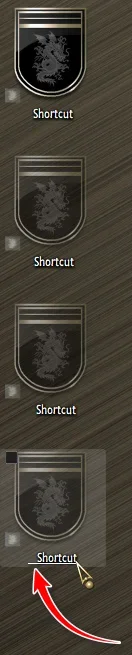
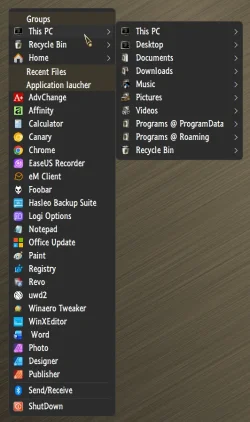
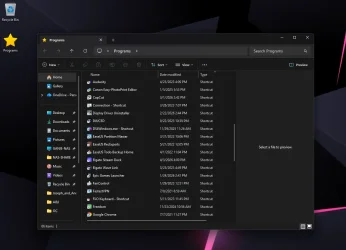
What about an Application/Folder launcher that you could invoke from a right click or middle-click menu?
QTTabBar:

12931.webp
 

My Computers

System One System Two

  • OS
    Windows 11 Pro
    Computer type
    PC/Desktop
    Manufacturer/Model
    ASUS ROG Strix
  • Operating System
    Windows 11 Pro
    Computer type
    Laptop
    Manufacturer/Model
    ASUS VivoBook
When you are in extended mode, you virtually only have one screen spread across 3 displays and you have to set the primary monitor where the icons shoul be shown by default when you boot up. The best option you have is to copy those shortcuts inside a folder that you can move around on any display.
 

My Computers

System One System Two

  • OS
    Windows 11 Pro
    Computer type
    PC/Desktop
    CPU
    AMD Ryzen 7 9800X3D
    Motherboard
    MSI PRO B850-P Wifi
    Memory
    32GB DDR5 CL30 Kingston Fury
    Graphics Card(s)
    ASUS Prime Radeon RX 9060 XT OC Edition 16GB
    Monitor(s) Displays
    LG Ultrawide 34" + LG 27" 1080p
    Screen Resolution
    3440x1440
    Hard Drives
    Main Boot Drive : 512GB Adata XPG RGB Gen3x4 NVMe M.2 SSD
    PSU
    EVGA 750 Watts 80+ Gold
    Case
    Deepcool Genome II
    Cooling
    Thermalright Burst Assassin 120
    Internet Speed
    1Gbps
    Browser
    Chrome
    Antivirus
    "Moderna"
  • Operating System
    Windows 11 Pro
    Computer type
    PC/Desktop
    CPU
    i7-4790K
    Motherboard
    ASRock Xtreme6 Z97
    Memory
    16GB Corsair Vengeance Pro
    Graphics card(s)
    MSI R9 290
    Monitor(s) Displays
    LG Ultrawide 34"
    Screen Resolution
    3440x1440
    Hard Drives
    500GB Adata SSD (OS Only)
    PSU
    Thermaltake 475 Watts 80 Bronze
    Case
    Thermaltake Commander I Snow Edition
    Cooling
    Deep Cool Archer Air Cooler
    Keyboard
    Armageddon MKA-5R RGB-Hornet
    Mouse
    Logitech G402
    Internet Speed
    1Gbps
    Browser
    Chrome
    Antivirus
    Moderna :)
When you are in extended mode, you virtually only have one screen spread across 3 displays and you have to set the primary monitor where the icons shoul be shown by default when you boot up. The best option you have is to copy those shortcuts inside a folder that you can move around on any display.
I know how it works. My problem is exactly that....the way it works. I am using 4 screens including laptop screen where 3 screens are connected too. Only at work. So if i copy all the icons, then when i take my laptop home, my desktop will be absolute mess without additional 3 screens, Will try Edwins sugestion and see how i like it.
 
Last edited:

My Computer

System One

  • OS
    Win 11 Pro Insider Beta (26220.8370), Kali Linux
    Computer type
    Laptop
    Manufacturer/Model
    HP Victus 15
    CPU
    AMD Ryzen 5 5600H
    Memory
    16GB (2x8GB) Dual Channel
    Graphics Card(s)
    Nvidia RTX 3050
    Monitor(s) Displays
    1080p IPS 144Hz (Laptop Screen) + 3x 1080p 60Hz screens
    Screen Resolution
    4x 1920x1080 monitors
    Hard Drives
    M.2 NVMe 512GB Samsung - PCIe 4.0x4 - Main system drive

    USB-A and USB-C M.2 NVMe Enclosure with NVMe SSSTC 256GB - NVM Express 1.3 - Ventoy with all install files and all ISO images i use.

    USB External SSD Kingston XS100 1TB - USB 3.2 Gen 2 - WindowsToGo (Clone of my existing Sytem), and all games I play.

    USB External SSHD Seagate FireCuda 2TB - USB 3.0 - For Macrium system images, data, photos, stays always safe at home
    PSU
    200W
    Cooling
    Zalman ZM-NC3 Cooling pad
    Keyboard
    Dell KM7120W
    Mouse
    Dell KM7120W
    Internet Speed
    1Gb/s down / 500Mb/s up
    Browser
    Chrome
    Antivirus
    Windows Defender

let me know when you have the solution. my office has a similar issue when running multi-monitor.
 

My Computer

System One

  • OS
    Windows 7/11
    Computer type
    PC/Desktop
    Manufacturer/Model
    HP/Lenovo/Asus
    CPU
    Intel i7-11800H
    Motherboard
    Lenovo Legion 5i Pro Gen 6
    Memory
    32GB DDR4 3200MHz
    Graphics Card(s)
    NVIDIA GeForce RTX 3070
    Monitor(s) Displays
    LG 35WN65C-B
    Screen Resolution
    3440 x 1440
    Hard Drives
    1TB PCIe SSD
    Other Info
    Edition Windows 11 Pro
    Version 25H2
    Installed on ‎12/‎12/‎2025
    OS build 26200.7462
I know how it works. My problem is exactly that....the way it works. I am using 4 screens including laptop screen where 3 screens are connected too. Only at work. So if i copy all the icons, then when i take my laptop home, my desktop will be absolute mess without additional 3 screens, Will try Edwins sugestion and see how i like it.
I'm beginning to see the light..., you would like the work related icons to stay at work, correct?
 

My Computers

System One System Two

  • OS
    Windows 11 Pro
    Computer type
    PC/Desktop
    Manufacturer/Model
    ASUS ROG Strix
  • Operating System
    Windows 11 Pro
    Computer type
    Laptop
    Manufacturer/Model
    ASUS VivoBook
I'm beginning to see the light..., you would like the work related icons to stay at work, correct?
No, ideally i want exactly same icons and layout on all screens at the same time. so when i have something open on main screen i can quickly use icons from my desktop on another monitor when i want to open something else on that monitor. without minimizing all the stuff on Primary screens where desktop icons are. I am surprised that this doesnt bother everyone when using multimonitor setup. I am sure MS could make this possible, but probably newer wil.
 

My Computer

System One

  • OS
    Win 11 Pro Insider Beta (26220.8370), Kali Linux
    Computer type
    Laptop
    Manufacturer/Model
    HP Victus 15
    CPU
    AMD Ryzen 5 5600H
    Memory
    16GB (2x8GB) Dual Channel
    Graphics Card(s)
    Nvidia RTX 3050
    Monitor(s) Displays
    1080p IPS 144Hz (Laptop Screen) + 3x 1080p 60Hz screens
    Screen Resolution
    4x 1920x1080 monitors
    Hard Drives
    M.2 NVMe 512GB Samsung - PCIe 4.0x4 - Main system drive

    USB-A and USB-C M.2 NVMe Enclosure with NVMe SSSTC 256GB - NVM Express 1.3 - Ventoy with all install files and all ISO images i use.

    USB External SSD Kingston XS100 1TB - USB 3.2 Gen 2 - WindowsToGo (Clone of my existing Sytem), and all games I play.

    USB External SSHD Seagate FireCuda 2TB - USB 3.0 - For Macrium system images, data, photos, stays always safe at home
    PSU
    200W
    Cooling
    Zalman ZM-NC3 Cooling pad
    Keyboard
    Dell KM7120W
    Mouse
    Dell KM7120W
    Internet Speed
    1Gb/s down / 500Mb/s up
    Browser
    Chrome
    Antivirus
    Windows Defender
The best you can do is set it to show taskbar on all screens. Then you can click start and open from your pinned section. I know the struggle, I've been using 4 screens for years.
 

My Computers

System One System Two

  • OS
    Windows 11
    Computer type
    PC/Desktop
    Manufacturer/Model
    self
    CPU
    AMD 9700X
    Motherboard
    MSI X870E Carbon
    Memory
    64 gig G-Skill cl30
    Graphics Card(s)
    Nvidia 4070Ti
    Sound Card
    onboard
    Monitor(s) Displays
    3 x Samsung 34" UW QHD 240hz running in Surround
    Screen Resolution
    10320 x 1440
    Hard Drives
    Samsung 980 Pro 2 TB M.2
    PSU
    Lian LI 1000W side mount
    Case
    Lian LI Der Bauer edition
    Cooling
    Self made using Aqua chiller
    Keyboard
    RK Andhadum
    Mouse
    G-903 Lightspeed
    Internet Speed
    1 Gig Fiber
    Browser
    Edge
    Antivirus
    Windows
  • Operating System
    Win 11 24H2
    Computer type
    PC/Desktop
    Manufacturer/Model
    Self made
    CPU
    AMD 9800X 3D
    Motherboard
    MSI X870E Carbon
    Memory
    32 Gig G.Skill cl 28
    Graphics card(s)
    AMD RX 9070XT
    Sound Card
    Onboard
    Monitor(s) Displays
    Acer 32" 2560 x 1440 x3
    Screen Resolution
    7680 x 1400
    Hard Drives
    Samsun 980 Pro 1TB M.2
    PSU
    Corsair 1000w Modular
    Case
    Meshify 2 XL
    Cooling
    Thermaltake 360 AIO
    Keyboard
    RK junior
    Mouse
    Logitech G-903
    Internet Speed
    1 Gig Fiber
    Browser
    Edge
    Antivirus
    Windows
    Other Info
    Racing system
The best you can do is set it to show taskbar on all screens. Then you can click start and open from your pinned section. I know the struggle, I've been using 4 screens for years.
Yeah i am doing that too. Its just really annoying that option we miss is not available natively in Win. May be worth a shot to submit it to feedback hub :unsure:
 

My Computer

System One

  • OS
    Win 11 Pro Insider Beta (26220.8370), Kali Linux
    Computer type
    Laptop
    Manufacturer/Model
    HP Victus 15
    CPU
    AMD Ryzen 5 5600H
    Memory
    16GB (2x8GB) Dual Channel
    Graphics Card(s)
    Nvidia RTX 3050
    Monitor(s) Displays
    1080p IPS 144Hz (Laptop Screen) + 3x 1080p 60Hz screens
    Screen Resolution
    4x 1920x1080 monitors
    Hard Drives
    M.2 NVMe 512GB Samsung - PCIe 4.0x4 - Main system drive

    USB-A and USB-C M.2 NVMe Enclosure with NVMe SSSTC 256GB - NVM Express 1.3 - Ventoy with all install files and all ISO images i use.

    USB External SSD Kingston XS100 1TB - USB 3.2 Gen 2 - WindowsToGo (Clone of my existing Sytem), and all games I play.

    USB External SSHD Seagate FireCuda 2TB - USB 3.0 - For Macrium system images, data, photos, stays always safe at home
    PSU
    200W
    Cooling
    Zalman ZM-NC3 Cooling pad
    Keyboard
    Dell KM7120W
    Mouse
    Dell KM7120W
    Internet Speed
    1Gb/s down / 500Mb/s up
    Browser
    Chrome
    Antivirus
    Windows Defender
Its just really annoying that option we miss is not available natively in Win.
I just came to realize that Windows will remember individual wallpaper settings per monitor, after disconnect/reconnect..., so why not shortcuts and icons!?!?!? 🤷‍♂️
 

My Computers

System One System Two

  • OS
    Windows 11 Pro
    Computer type
    PC/Desktop
    Manufacturer/Model
    ASUS ROG Strix
  • Operating System
    Windows 11 Pro
    Computer type
    Laptop
    Manufacturer/Model
    ASUS VivoBook
No, ideally i want exactly same icons and layout on all screens at the same time. so when i have something open on main screen i can quickly use icons from my desktop on another monitor when i want to open something else on that monitor. without minimizing all the stuff on Primary screens where desktop icons are. I am surprised that this doesnt bother everyone when using multimonitor setup. I am sure MS could make this possible, but probably newer wil.
I do the exact opposite of what you want. I never want any shorcuts on my desktop. I have all my shortcuts in a folder which I can drag around on any screen and open apps from there. 1777163665777.webp
 

My Computers

System One System Two

  • OS
    Windows 11 Pro
    Computer type
    PC/Desktop
    CPU
    AMD Ryzen 7 9800X3D
    Motherboard
    MSI PRO B850-P Wifi
    Memory
    32GB DDR5 CL30 Kingston Fury
    Graphics Card(s)
    ASUS Prime Radeon RX 9060 XT OC Edition 16GB
    Monitor(s) Displays
    LG Ultrawide 34" + LG 27" 1080p
    Screen Resolution
    3440x1440
    Hard Drives
    Main Boot Drive : 512GB Adata XPG RGB Gen3x4 NVMe M.2 SSD
    PSU
    EVGA 750 Watts 80+ Gold
    Case
    Deepcool Genome II
    Cooling
    Thermalright Burst Assassin 120
    Internet Speed
    1Gbps
    Browser
    Chrome
    Antivirus
    "Moderna"
  • Operating System
    Windows 11 Pro
    Computer type
    PC/Desktop
    CPU
    i7-4790K
    Motherboard
    ASRock Xtreme6 Z97
    Memory
    16GB Corsair Vengeance Pro
    Graphics card(s)
    MSI R9 290
    Monitor(s) Displays
    LG Ultrawide 34"
    Screen Resolution
    3440x1440
    Hard Drives
    500GB Adata SSD (OS Only)
    PSU
    Thermaltake 475 Watts 80 Bronze
    Case
    Thermaltake Commander I Snow Edition
    Cooling
    Deep Cool Archer Air Cooler
    Keyboard
    Armageddon MKA-5R RGB-Hornet
    Mouse
    Logitech G402
    Internet Speed
    1Gbps
    Browser
    Chrome
    Antivirus
    Moderna :)
Code:
HKEY_CURRENT_USER\Software\Microsoft\Windows\CurrentVersion\Policies\System

new DWORD = NoDispBackgroundPage
value = 1
reboot

if that doesnt work, you can use DeskLock. just create shortcuts to all of your primary display's desktop links and place them on your other monitors in the desired layout, then run desktop and it should prevent them from being moved (i believe it will work even when the display is disconnected)...


My Computer

System One

  • OS
    Windows 11 Pro
I think @Thorenzz would like to have instant access to any and all of his Desktop shortcuts and folders from any screen, regardless of what window is completely covering some other screen, and, preferably not copying them all that makes a mess on the Laptop screen when he disconnects the external monitors.
I think a right click menu of some sort is his best bet, similar to what I posted in #9.
 

My Computers

System One System Two

  • OS
    Windows 11 Pro
    Computer type
    PC/Desktop
    Manufacturer/Model
    ASUS ROG Strix
  • Operating System
    Windows 11 Pro
    Computer type
    Laptop
    Manufacturer/Model
    ASUS VivoBook

Latest Support Threads

Back
Top Bottom