My laptop froze while on a screensaver after i left upstairs for a few hours to watch tv.


nocruoro

Well-known member
Member
Local time
9:24 PM
Posts
168
OS
Windows 11 Home
This is only the second time my laptop froze on screensaver. I never set it to go go to hard sleep mode or power off fully after any set time on screensaver or inactivity.

I lost several unsaved images in paint.net a few minutes ago from this because my laptop did not respond to the :win: key +ctrl + shift + b emergency command my phone showed on google.
I had to hard turn off my laptop by holding the power button down for several seconds. It was not work related images. But now i'm worried about this sneaking up on me again.
We have no repair places or laptop warranties since it was from costco and it is barely 2 years old. What causes this lock-up ? Everything is up to date.


Normally it waits for 30 minutes. But i'm putting my laptop on no screensaver at all for now.
 

My Computer My Computer

At a glance

Windows 11 Home
OS
Windows 11 Home
Computer type
Laptop
Manufacturer/Model
Lenovo Yoga 7 Slim 14I110
But i'm putting my laptop on no screensaver at all for now.


I think you just solved your own problem. ^^

Especially if it was some 3rd party screensaver.
 

My Computers My Computers

  • At a glance

    Win 11 Home ♦♦♦26300.9550 ♦♦♦♦♦♦♦26H2AMD Ryzen 7 3700XG.Skill (F4-3200C14D-16GTZKW)EVGA RTX 2070 (08G-P4-2171-KR)
    OS
    Win 11 Home ♦♦♦26300.9550 ♦♦♦♦♦♦♦26H2
    Computer type
    PC/Desktop
    Manufacturer/Model
    Built by Ghot® [May 2020]
    CPU
    AMD Ryzen 7 3700X
    Motherboard
    Asus Pro WS X570-ACE (BIOS 5302)
    Memory
    G.Skill (F4-3200C14D-16GTZKW)
    Graphics Card(s)
    EVGA RTX 2070 (08G-P4-2171-KR)
    Sound Card
    Realtek ALC1220P / ALC S1220A
    Monitor(s) Displays
    Dell U3011 30"
    Screen Resolution
    2560 x 1600
    Hard Drives
    2x Samsung 860 EVO 500GB,
    WD 4TB Black FZBX - SATA III,
    WD 8TB Black FZBX - SATA III,
    DRW-24B1ST CD/DVD Burner
    PSU
    PC Power & Cooling 750W Quad EPS12V
    Case
    Cooler Master ATCS 840 Tower
    Cooling
    CM Hyper 212 EVO (push/pull)
    Keyboard
    Ducky DK9008 Shine II Blue LED
    Mouse
    Logitech Optical M-100
    Internet Speed
    300/300
    Browser
    Firefox (latest)
    Antivirus
    Bitdefender Total Security
    Other Info
    Speakers: Klipsch Pro Media 2.1
  • At a glance

    Windows XP Pro 32bit w/SP3AMD Athlon 64 X2 5000+ (OC'd @ 3.2Ghz)TWIN2X2048-6400C4DHX (2 x 1GB, DDR2 800)EVGA 256-P2-N758-TR GeForce 8600GT SSC
    Operating System
    Windows XP Pro 32bit w/SP3
    Computer type
    PC/Desktop
    Manufacturer/Model
    Built by Ghot® (not in use)
    CPU
    AMD Athlon 64 X2 5000+ (OC'd @ 3.2Ghz)
    Motherboard
    ASUS M2N32-SLI Deluxe Wireless Edition
    Memory
    TWIN2X2048-6400C4DHX (2 x 1GB, DDR2 800)
    Graphics card(s)
    EVGA 256-P2-N758-TR GeForce 8600GT SSC
    Sound Card
    Onboard
    Monitor(s) Displays
    ViewSonic G90FB Black 19" Professional (CRT)
    Screen Resolution
    up to 2048 x 1536
    Hard Drives
    WD 36GB 10,000rpm Raptor SATA
    Seagate 80GB 7200rpm SATA
    Lite-On LTR-52246S CD/RW
    Lite-On LH-18A1P CD/DVD Burner
    PSU
    PC Power & Cooling Silencer 750 Quad EPS12V
    Case
    Generic Beige case, 80mm fans
    Cooling
    ZALMAN 9500A 92mm CPU Cooler
    Keyboard
    Logitech Classic Keybooard 200
    Mouse
    Logitech Optical M-BT96a
    Internet Speed
    300/300
    Browser
    Firefox 3.x ??
    Antivirus
    Symantec (Norton)
    Other Info
    Still assembled, still runs. Haven't turned it on for 15 years?
I think you just solved your own problem. ^^

Especially if it was some 3rd party screensaver.
It's a The Matrix animated saver which is usually works fine maker is www,catch22,net I just found it and uninstalled it from the folder.
 

My Computer My Computer

At a glance

Windows 11 Home
OS
Windows 11 Home
Computer type
Laptop
Manufacturer/Model
Lenovo Yoga 7 Slim 14I110
It's a The Matrix animated saver which is usually works fine maker is www,catch22,net


Just run for a few days with NO screensaver, and see if it freezes up.

Could also be temps. Get some canned air and blow the dust out.
 

My Computers My Computers

  • At a glance

    Win 11 Home ♦♦♦26300.9550 ♦♦♦♦♦♦♦26H2AMD Ryzen 7 3700XG.Skill (F4-3200C14D-16GTZKW)EVGA RTX 2070 (08G-P4-2171-KR)
    OS
    Win 11 Home ♦♦♦26300.9550 ♦♦♦♦♦♦♦26H2
    Computer type
    PC/Desktop
    Manufacturer/Model
    Built by Ghot® [May 2020]
    CPU
    AMD Ryzen 7 3700X
    Motherboard
    Asus Pro WS X570-ACE (BIOS 5302)
    Memory
    G.Skill (F4-3200C14D-16GTZKW)
    Graphics Card(s)
    EVGA RTX 2070 (08G-P4-2171-KR)
    Sound Card
    Realtek ALC1220P / ALC S1220A
    Monitor(s) Displays
    Dell U3011 30"
    Screen Resolution
    2560 x 1600
    Hard Drives
    2x Samsung 860 EVO 500GB,
    WD 4TB Black FZBX - SATA III,
    WD 8TB Black FZBX - SATA III,
    DRW-24B1ST CD/DVD Burner
    PSU
    PC Power & Cooling 750W Quad EPS12V
    Case
    Cooler Master ATCS 840 Tower
    Cooling
    CM Hyper 212 EVO (push/pull)
    Keyboard
    Ducky DK9008 Shine II Blue LED
    Mouse
    Logitech Optical M-100
    Internet Speed
    300/300
    Browser
    Firefox (latest)
    Antivirus
    Bitdefender Total Security
    Other Info
    Speakers: Klipsch Pro Media 2.1
  • At a glance

    Windows XP Pro 32bit w/SP3AMD Athlon 64 X2 5000+ (OC'd @ 3.2Ghz)TWIN2X2048-6400C4DHX (2 x 1GB, DDR2 800)EVGA 256-P2-N758-TR GeForce 8600GT SSC
    Operating System
    Windows XP Pro 32bit w/SP3
    Computer type
    PC/Desktop
    Manufacturer/Model
    Built by Ghot® (not in use)
    CPU
    AMD Athlon 64 X2 5000+ (OC'd @ 3.2Ghz)
    Motherboard
    ASUS M2N32-SLI Deluxe Wireless Edition
    Memory
    TWIN2X2048-6400C4DHX (2 x 1GB, DDR2 800)
    Graphics card(s)
    EVGA 256-P2-N758-TR GeForce 8600GT SSC
    Sound Card
    Onboard
    Monitor(s) Displays
    ViewSonic G90FB Black 19" Professional (CRT)
    Screen Resolution
    up to 2048 x 1536
    Hard Drives
    WD 36GB 10,000rpm Raptor SATA
    Seagate 80GB 7200rpm SATA
    Lite-On LTR-52246S CD/RW
    Lite-On LH-18A1P CD/DVD Burner
    PSU
    PC Power & Cooling Silencer 750 Quad EPS12V
    Case
    Generic Beige case, 80mm fans
    Cooling
    ZALMAN 9500A 92mm CPU Cooler
    Keyboard
    Logitech Classic Keybooard 200
    Mouse
    Logitech Optical M-BT96a
    Internet Speed
    300/300
    Browser
    Firefox 3.x ??
    Antivirus
    Symantec (Norton)
    Other Info
    Still assembled, still runs. Haven't turned it on for 15 years?
Just run for a few days with NO screensaver, and see if it freezes up.

Could also be temps. Get some canned air and blow the dust out.
I just googled and it was in a system 32 file called matrix.scr Gonna just use the blank screensaver and make sure the laptop goes into hibernate when needed too
 

My Computer My Computer

At a glance

Windows 11 Home
OS
Windows 11 Home
Computer type
Laptop
Manufacturer/Model
Lenovo Yoga 7 Slim 14I110
In the Search box,type in---dxdiag---and >run as admin---
Check the System page that the DirectX version in use is DirectX12.
Have a look through the other pages for any reports.
 

My Computer My Computer

At a glance

win 10amd ryzen 5-2600ng skill sniper x 16gbnvidea gtx 1050
OS
win 10
Computer type
PC/Desktop
Manufacturer/Model
home built
CPU
amd ryzen 5-2600
Motherboard
gigabyte b450m-ds3h
Memory
ng skill sniper x 16gb
Graphics Card(s)
nvidea gtx 1050
Monitor(s) Displays
benq fp 92
Hard Drives
samsung 860 evo 500gb m2 ssd
PSU
antec ea550g
Case
nzxt noctis 450
Browser
edge
  • Like
Reactions: OAT
my laptop did not respond to the :win: key +ctrl + shift + b emergency command my phone showed on google
That's merely a command for restarting the display adapter.

How does your computer's user manual tell you to rouse the computer?
If it's got S0 Modern standby [aka S0 Low power idle] then it's likely to need you to wave the mouse around.
If it's got S3 Sleep then it's likely to need you to use the keyboard.
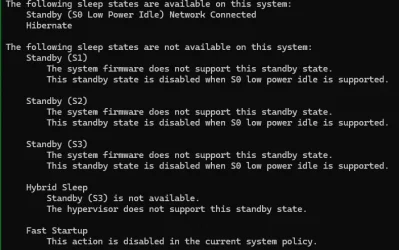
To find out which you have, you can run the command PowerCfg -a and post the response.

Personally, if I'm leaving a computer for hours, I either turn it off or put it into hibernation. I get no problems if I let it go into S3 Sleep /S0 Modern standby instead [I just blank the display, I don't bother with any screensavers].

Denis
 

My Computer My Computer

At a glance

Windows 11 Home x64 Version 26H2 Build 26300....
OS
Windows 11 Home x64 Version 26H2 Build 26300.9457
That's merely a command for restarting the display adapter.

How does your computer's user manual tell you to rouse the computer?
If it's got S0 Modern standby [aka S0 Low power idle] then it's likely to need you to wave the mouse around.
If it's got S3 Sleep then it's likely to need you to use the keyboard.
To find out which you have, you can run the command PowerCfg -a and post the response.

Personally, if I'm leaving a computer for hours, I either turn it off or put it into hibernation. I get no problems if I let it go into S3 Sleep /S0 Modern standby instead [I just blank the display, I don't bother with any screensavers].

Denis
I tested the power cfg but the prompt closes inmediately. My laptop responds to both mouse waving, touchpad, keyboard and opening the lid.
I also tested the Direct X12 error logs and found nothing.
 

My Computer My Computer

At a glance

Windows 11 Home
OS
Windows 11 Home
Computer type
Laptop
Manufacturer/Model
Lenovo Yoga 7 Slim 14I110
the prompt closes inmediately
That sounds to me like you did not open a cmd prompt / PS window but entered the cmd in, say, Run. You need to open cmd prompt windows or Powershell windows if you want to see the responses to cmds.
You can open a cmd prompt /PS window by many methods including right-clicking on the Start menu and selecting Terminal.
Then enter the cmd PowerCfg -a and you'll see the response to it e.g.
PowerCfg -a in Terminal window.webp

This particular cmd works equally well in cmd prompt windows and in Powershell windows. Not all do.


Denis
 

My Computer My Computer

At a glance

Windows 11 Home x64 Version 26H2 Build 26300....
OS
Windows 11 Home x64 Version 26H2 Build 26300.9457
Reliability Monitor keeps what Windows logged before a forced power-off, so I'd check it first. Type "reliability" in Start, open View reliability history, and click the day of the freeze. A "Hardware error" entry with LiveKernelEvent in its details at that time likely means the graphics driver hung, and the laptop maker's support page for your model is where to get a newer driver than the one Windows Update installs. If the only entry is "Windows was not properly shut down", open Event Viewer > Windows Logs > System and read the events in the minutes before the Kernel-Power 41 entry.

Drafted with AI.
 

My Computer My Computer

At a glance

Windows 11
OS
Windows 11
Computer type
PC/Desktop
Manufacturer/Model
Asus
Only thing i found in Reliability Monitor is that Windows did a security update for windows defender that day. Microsoft Defender Antivirus - KB2267602 without issues.
 

My Computer My Computer

At a glance

Windows 11 Home
OS
Windows 11 Home
Computer type
Laptop
Manufacturer/Model
Lenovo Yoga 7 Slim 14I110
A graphics driver hang is less likely because Windows didn't record a hardware error. It is most likely the Matrix screensaver you removed. Does the day of the freeze show a "Windows was not properly shut down" entry at the time you held the power button?

Drafted with AI.
 

My Computer My Computer

At a glance

Windows 11
OS
Windows 11
Computer type
PC/Desktop
Manufacturer/Model
Asus

Latest Support Threads

Back
Top Bottom