
Hey everyone !
I am facing a problem since a few days, as i mentionned in the title, I was updating a driver (from my CPU or my RAM I can't remember..) and my pc crashed during the installation.
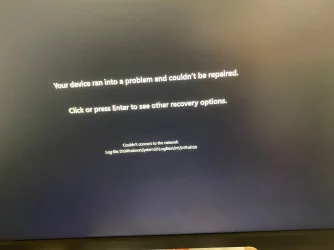
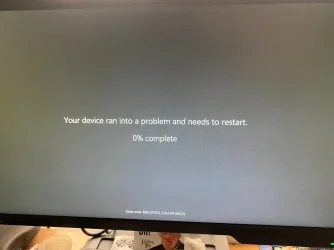
When I rebooted the first time, I got an error saying " Your device ran into a problem and needs to restart ( Stop code : BAD_POOL_CALLER (0xC2)". Then the next screen saying it ran into a problem and couldn't be repaired. (I am linking some pictures)
Since then, I tried scanning for corrupted files in the Command window, wich I believe succeeded cause at some point i was able to reach the desktop. But Windows wasn't fully fuctionnal and it crashed again when I launched any app. Also it was acting like I had no audio device plugged in but I had, and i know realtek is sometimes a pain.
I thought it was my Windows that had failed, so I resetted my windows through the blue screen (which i think was a mistake) and now it won't reach the desktop at all.
When i try to boot in safe mode, it says "Windows cannot complete the installation in safe mode, to continue installing windows, restart the computer". I restart it and nothing happens there also.
I don't know what to do and I think i got it worst by resetting my PC, so sorry about that if that makes things even more complicated. So before calling a computer guy I would like to know if there is anything I can try ?
Thank you so much for any help
I am facing a problem since a few days, as i mentionned in the title, I was updating a driver (from my CPU or my RAM I can't remember..) and my pc crashed during the installation.
When I rebooted the first time, I got an error saying " Your device ran into a problem and needs to restart ( Stop code : BAD_POOL_CALLER (0xC2)". Then the next screen saying it ran into a problem and couldn't be repaired. (I am linking some pictures)
Since then, I tried scanning for corrupted files in the Command window, wich I believe succeeded cause at some point i was able to reach the desktop. But Windows wasn't fully fuctionnal and it crashed again when I launched any app. Also it was acting like I had no audio device plugged in but I had, and i know realtek is sometimes a pain.
I thought it was my Windows that had failed, so I resetted my windows through the blue screen (which i think was a mistake) and now it won't reach the desktop at all.
When i try to boot in safe mode, it says "Windows cannot complete the installation in safe mode, to continue installing windows, restart the computer". I restart it and nothing happens there also.
I don't know what to do and I think i got it worst by resetting my PC, so sorry about that if that makes things even more complicated. So before calling a computer guy I would like to know if there is anything I can try ?
Thank you so much for any help
- Windows Build/Version
- Windows 11
Attachments

My Computer
At a glance
Windows 11
- OS
- Windows 11
- Computer type
- PC/Desktop
- Manufacturer/Model
- PC buit from scratch








