
I have to sleep now but please if you know a solution post it and I will read it tomorrow...thanks alot
Plans are there but the names are missing.
Should have names next to them.
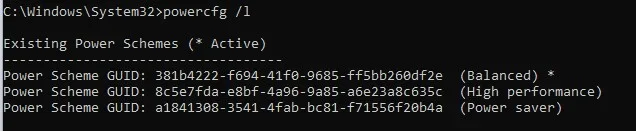
Enter these in admin command prompt one at a time to restore the names then they should appear in power options.
Code:
Powercfg /changename 381b4222-f694-41f0-9685-ff5bb260df2e "Balanced"
Code:
Powercfg /changename 8c5e7fda-e8bf-4a96-9a85-a6e23a8c635c "High performance"
Code:
Powercfg /changename a1841308-3541-4fab-bc81-f71556f20b4a "Power saver"My Computer
At a glance
Windows 11 Pro
- OS
- Windows 11 Pro






