@William654
You probably already know this, but I'll post it anyway...
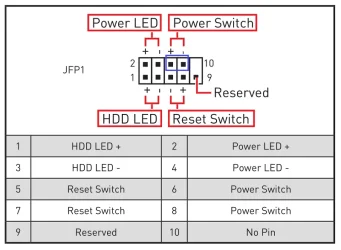
Here is the motherboard connector for the front panel wires.
The BLUE box encircles the spot where the case's power button attaches.
I'm guessing from your OP that the motherboard itself has a problem.
That's why the power switch and/or the software shutdown command have the same result.
The only thing common to both is the motherboard itself.
To troubleshoot, I would do the following...
1. Shut the computer completely OFF by disconnecting the power source (probably via the UPS).
2. Remove the UPS and temporarily plug the computer straight into the wall outlet.
3. Unhook the case's power switch leads from the motherboard (BLUE box)
4. Use a flat blade screwdriver to short the two power switch leads on the motherboard, to turn the comp ON.
Now this is the tricky part... the case's power switch is a momentary contact switch.
So to test the motherboard's shut down, we have to pretend, with our screwdriver, that we are a momentary contact switch.
5. To turn the computer OFF with the screwdriver, you need to short those two pins for
four seconds
6. At the four second mark you should hear the fans stop. When you hear that, quickly remove the screwdriver.
7. This "should" completely shut down the computer.
8. If it doesn't... then you probably have a motherboard issue, or some strange BIOS setting, that I can't think of.
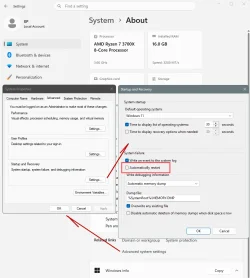
And just for the h*ll of it, make sure the
Automatically Restart is UNchecked...
I don't think this will help, but so far, this is one weird problem.
Also when testing... make sure ALL USB thingys are disconnected (except mouse and keyboard).
The fewer the number of things hooked to your computer, the easier it is to troubleshoot.










