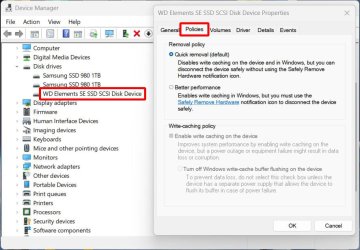
OK, I found the answer to my question. I had to use a 3rd party application called "PowerSettingsExplorer".
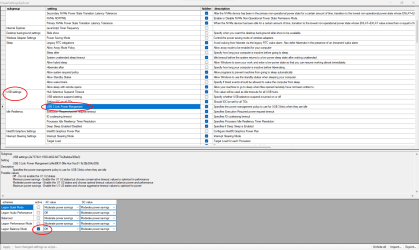
With that application I was able to change the USB3 link power management as you can see in the screenshot.
I now get the full speed of 380MB/s when I write a file to the drive.
Windows 11 Pro 25H2 (26200.6901)AMD Ryzen 7 6800H with Radeon 680M GPU (486MB...Crucial DDR5-4800 (2400MHz) 32GB (2 x 16GB)NVIDIA RTX 3060 Laptop (6GB RAM)
OS
Windows 11 Pro 25H2 (26200.6901)
Computer type
Laptop
Manufacturer/Model
ASUS TUF Gaming A15 (2022)
CPU
AMD Ryzen 7 6800H with Radeon 680M GPU (486MB RAM)
Memory
Crucial DDR5-4800 (2400MHz) 32GB (2 x 16GB)
Graphics Card(s)
NVIDIA RTX 3060 Laptop (6GB RAM)
Sound Card
n/a
Monitor(s) Displays
15.6-inch
Screen Resolution
1920x1080 300Hz
Hard Drives
2 x Samsung 990 Evo Plus (2TB M.2 NVME SSD)
PSU
n/a
Mouse
Wireless Mouse M510
Internet Speed
2100Mbps/300Mbps
Browser
Firefox
Antivirus
Malwarebytes
At a glance
Windows 11 Pro 25H2 (26200.8246)AMD Ryzen 7 5700X3DG.SKILL Flare X 32GB (2x16GB) DDR4ASUS ROG-STRIX-RTX3060TI-08G-V2-GAMING (RTX 3...
Operating System
Windows 11 Pro 25H2 (26200.8246)
Computer type
PC/Desktop
Manufacturer/Model
Custom build
CPU
AMD Ryzen 7 5700X3D
Motherboard
ASUS ROG Strix B550-F Gaming WiFi II
Memory
G.SKILL Flare X 32GB (2x16GB) DDR4
Graphics card(s)
ASUS ROG-STRIX-RTX3060TI-08G-V2-GAMING (RTX 3060-Ti, 8GB RAM)
Monitor(s) Displays
Samsung G50D IPS 27"
Screen Resolution
1440p/180Hz
Hard Drives
SAMSUNG 990 EVO Plus (2TB] M.2 NVME SSD
SAMSUNG 990 EVO Plus (4TB) M.2 NVME SSD
PSU
Corsair RM750x (750 watts)
Case
Cooler Master MasterCase 5
Cooling
Scythe Mugen 6
Keyboard
Logitech K520 (MK540 keyboard/mouse combo)
Mouse
Logitech M310 (MK540 keyboard/mouse combo)
Internet Speed
2100 Mbps down / 300 Mbps up
Browser
Firefox, Edge, Chrome
Antivirus
Malwarebytes (Premium)
Other Info
ASUS Blu-ray Burner BW-16D1HT (SATA) || Western Digital Easystore 20TB USB 3.0 external hard drive used with Acronis True Image 2025 backup software || HP OfficeJet Pro 6975 Printer/Scanner



![2024-07-09 00_16_16-CrystalDiskMark 8.0.4 x64 [Admin].jpg](https://www.elevenforum.com/data/attachments/100/100916-6f93bd9b4ba27e895a21f64e3cc4278c.jpg?hash=b5O9m0uifo "2024-07-09 00_16_16-CrystalDiskMark 8.0.4 x64 [Admin].jpg")