
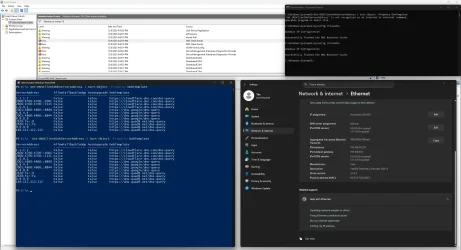
Need some help, setting up DNS and they are not active....


Obt1mus

Member
Local time
4:54 AM
Posts
19
OS
Windows 11
1765189302472.webp
 
Windows Build/Version
Windows 11 25h2

My Computer

System One

  • OS
    Windows 11
    Computer type
    PC/Desktop
    Manufacturer/Model
    Custom
    CPU
    AMD Ryzen 7 9700X
    Motherboard
    Asus Rog Strix B850-I Gaming Wifi
    Memory
    64gb Gskill Trident z Cl28
    Graphics Card(s)
    Asus TUF Gaming Radeon RX 6800 XT
    Sound Card
    ROG SupremeFX 7.1 Surround Sound High Definition Audio CODEC ALC4080
    Monitor(s) Displays
    Asus TUF Gaming VG27AQ1A
    Screen Resolution
    2560x1440p - 170hz
    Hard Drives
    Lexar SSD NQ790 2TB (2000 GB, PCI-E 4.0 x4)
    Samsumg 850 2tb SSD
    PSU
    Corsair RM850x
    Case
    Lian Li A3 mATX
    Cooling
    Deepcool LT360 AIO
    Keyboard
    Leobog Hi75
    Mouse
    Logitech G Pro X Superlight
    Internet Speed
    100mb/s
    Browser
    Brave, Firefox, Edge
    Antivirus
    Kaspersky Premium
So what does "not active" mean? This config looks fine and tested it myself with out any issues.
 

My Computer

System One

  • OS
    Linux Mint
    Computer type
    Laptop
    Manufacturer/Model
    System76 Lemur Pro
Q. why are you using so many DNS resolving servers
that in itself will cause DNS slowdowns.

unless there is a major need for so many DNS server lookups
i would limit DNS to just 2 DNS server addresses
1. primary .. example. 9.9.9.9
2. secondary .. example. 1.1.1.1

try just the 2 and see if you resolves the problem.
best of luck Steve ..
 

My Computers

System One System Two

  • OS
    Windows 11 Home
    Computer type
    PC/Desktop
    Manufacturer/Model
    HP 24" AiO
    CPU
    Ryzen 7 5825u
    Motherboard
    HP
    Memory
    64GB DDR4 3200
    Graphics Card(s)
    Ryzen 7 5825u
    Sound Card
    RealTek
    Monitor(s) Displays
    24" HP AiO
    Screen Resolution
    1920 x 1080 @60 Hz
    Hard Drives
    1TB WD Blue SN580 M2 SSD Partitioned.
    2x 1TB USB HDD External Backup/Storage.
    PSU
    90W external power brick
    Case
    24" All in One
    Cooling
    Default Air Cooling
    Keyboard
    HP WiFi UK extended
    Mouse
    HP WiFi 3 Button
    Internet Speed
    1GB full fibre
    Browser
    Edge & Firefox
    Antivirus
    AVG Internet Security/Windows Defender
    Other Info
    Mainly Open Source Software
  • Operating System
    Ubuntu 22.04.5 LTS
    Computer type
    Laptop
    Manufacturer/Model
    Dell 13" Latitude 2017
    CPU
    i5 7200u
    Motherboard
    Dell
    Memory
    16GB DDR4
    Graphics card(s)
    Intel
    Sound Card
    Intel
    Monitor(s) Displays
    13" Dell Laptop
    Hard Drives
    250GB Crucial 2.5" SSD
    Mouse
    Generic WiFi 3 button
    Internet Speed
    WiFi only
    Browser
    Firefox
    Antivirus
    ClamAV TK
    Other Info
    Mainly Open Source Software
Q. why are you using so many DNS resolving servers
that in itself will cause DNS slowdowns.

unless there is a major need for so many DNS server lookups
i would limit DNS to just 2 DNS server addresses
1. primary .. example. 9.9.9.9
2. secondary .. example. 1.1.1.1

try just the 2 and see if you resolves the problem.
best of luck Steve ..
Thanks Steve, actually using only 2 (quad9 and cloudflare). Not sure why so many are showing in CMD
 

My Computer

System One

  • OS
    Windows 11
    Computer type
    PC/Desktop
    Manufacturer/Model
    Custom
    CPU
    AMD Ryzen 7 9700X
    Motherboard
    Asus Rog Strix B850-I Gaming Wifi
    Memory
    64gb Gskill Trident z Cl28
    Graphics Card(s)
    Asus TUF Gaming Radeon RX 6800 XT
    Sound Card
    ROG SupremeFX 7.1 Surround Sound High Definition Audio CODEC ALC4080
    Monitor(s) Displays
    Asus TUF Gaming VG27AQ1A
    Screen Resolution
    2560x1440p - 170hz
    Hard Drives
    Lexar SSD NQ790 2TB (2000 GB, PCI-E 4.0 x4)
    Samsumg 850 2tb SSD
    PSU
    Corsair RM850x
    Case
    Lian Li A3 mATX
    Cooling
    Deepcool LT360 AIO
    Keyboard
    Leobog Hi75
    Mouse
    Logitech G Pro X Superlight
    Internet Speed
    100mb/s
    Browser
    Brave, Firefox, Edge
    Antivirus
    Kaspersky Premium
@Obt1mus
i would check your routers DNS settings as the router settings maybe different from the DNS settings that you are trying to set within the systems DNS settings.

you can change the routers DNS settings to match your system settings
that way it should avoid any conflict and multiply DNS server resolves
also allowing you to have secure DNS settings within your system.

best of luck Steve ..
 

My Computers

System One System Two

  • OS
    Windows 11 Home
    Computer type
    PC/Desktop
    Manufacturer/Model
    HP 24" AiO
    CPU
    Ryzen 7 5825u
    Motherboard
    HP
    Memory
    64GB DDR4 3200
    Graphics Card(s)
    Ryzen 7 5825u
    Sound Card
    RealTek
    Monitor(s) Displays
    24" HP AiO
    Screen Resolution
    1920 x 1080 @60 Hz
    Hard Drives
    1TB WD Blue SN580 M2 SSD Partitioned.
    2x 1TB USB HDD External Backup/Storage.
    PSU
    90W external power brick
    Case
    24" All in One
    Cooling
    Default Air Cooling
    Keyboard
    HP WiFi UK extended
    Mouse
    HP WiFi 3 Button
    Internet Speed
    1GB full fibre
    Browser
    Edge & Firefox
    Antivirus
    AVG Internet Security/Windows Defender
    Other Info
    Mainly Open Source Software
  • Operating System
    Ubuntu 22.04.5 LTS
    Computer type
    Laptop
    Manufacturer/Model
    Dell 13" Latitude 2017
    CPU
    i5 7200u
    Motherboard
    Dell
    Memory
    16GB DDR4
    Graphics card(s)
    Intel
    Sound Card
    Intel
    Monitor(s) Displays
    13" Dell Laptop
    Hard Drives
    250GB Crucial 2.5" SSD
    Mouse
    Generic WiFi 3 button
    Internet Speed
    WiFi only
    Browser
    Firefox
    Antivirus
    ClamAV TK
    Other Info
    Mainly Open Source Software
All you need to use DoH is set DNS to manual which you have enter the address, which you have, and select the automatic template. Router DNS is irrelevant when you have DNS set to manual.
 

My Computer

System One

  • OS
    Linux Mint
    Computer type
    Laptop
    Manufacturer/Model
    System76 Lemur Pro
So what does "not active" mean? This config looks fine and tested it myself with out any issues.
Maybe the screenshot above explains it better. Basically checking with CMD or online checker and my DNS (manual setup) are not working as intended1765420605215.webp
 

My Computer

System One

  • OS
    Windows 11
    Computer type
    PC/Desktop
    Manufacturer/Model
    Custom
    CPU
    AMD Ryzen 7 9700X
    Motherboard
    Asus Rog Strix B850-I Gaming Wifi
    Memory
    64gb Gskill Trident z Cl28
    Graphics Card(s)
    Asus TUF Gaming Radeon RX 6800 XT
    Sound Card
    ROG SupremeFX 7.1 Surround Sound High Definition Audio CODEC ALC4080
    Monitor(s) Displays
    Asus TUF Gaming VG27AQ1A
    Screen Resolution
    2560x1440p - 170hz
    Hard Drives
    Lexar SSD NQ790 2TB (2000 GB, PCI-E 4.0 x4)
    Samsumg 850 2tb SSD
    PSU
    Corsair RM850x
    Case
    Lian Li A3 mATX
    Cooling
    Deepcool LT360 AIO
    Keyboard
    Leobog Hi75
    Mouse
    Logitech G Pro X Superlight
    Internet Speed
    100mb/s
    Browser
    Brave, Firefox, Edge
    Antivirus
    Kaspersky Premium
DNS Jumper - freeware, does it all for you.
 

My Computers

System One System Two

  • OS
    Windows 11 2xH2 (latest update ... forever anal)
    Computer type
    PC/Desktop
    Manufacturer/Model
    HP Slim S01
    CPU
    Intel i5-12400
    Memory
    8GB
    Graphics Card(s)
    NVIDIA GeForce GT730
    Sound Card
    OOBE
    Monitor(s) Displays
    Acer 32"
    Screen Resolution
    1920x1080
    Hard Drives
    512GB KIOXIA NVMe
    1TB SATA SSD
    PSU
    OOBE
    Case
    OOBE
    Cooling
    OOBE
    Keyboard
    BT
    Mouse
    BT
    Browser
    Brave FFox Chrome Opera
    Antivirus
    KIS
  • Operating System
    Windows 11 Pro 2xH2 (latest update ... 4ever anal)
    Computer type
    Laptop
    Manufacturer/Model
    HP Pavillion 15
    CPU
    i7-1165G7 @ 2.80GHz
    Graphics card(s)
    Intel Iris Xe Graphics
    Hard Drives
    Samsung NVMe 512GB
    + numerous/multiple SSD Type C USB enclosures
    Internet Speed
    NBN FTTN 50
    Browser
    Brave
    Antivirus
    KIS
@Obt1mus
i would check your routers DNS settings as the router settings maybe different from the DNS settings that you are trying to set within the systems DNS settings.

you can change the routers DNS settings to match your system settings
that way it should avoid any conflict and multiply DNS server resolves
also allowing you to have secure DNS settings within your system.

best of luck Steve ..
Thanks, I checked on the router and there are some DNS set there which I believe are my ISP DNS (not cloudflare, google, or quad9..). Happy to remove them if unnecessary XD
 

My Computer

System One

  • OS
    Windows 11
    Computer type
    PC/Desktop
    Manufacturer/Model
    Custom
    CPU
    AMD Ryzen 7 9700X
    Motherboard
    Asus Rog Strix B850-I Gaming Wifi
    Memory
    64gb Gskill Trident z Cl28
    Graphics Card(s)
    Asus TUF Gaming Radeon RX 6800 XT
    Sound Card
    ROG SupremeFX 7.1 Surround Sound High Definition Audio CODEC ALC4080
    Monitor(s) Displays
    Asus TUF Gaming VG27AQ1A
    Screen Resolution
    2560x1440p - 170hz
    Hard Drives
    Lexar SSD NQ790 2TB (2000 GB, PCI-E 4.0 x4)
    Samsumg 850 2tb SSD
    PSU
    Corsair RM850x
    Case
    Lian Li A3 mATX
    Cooling
    Deepcool LT360 AIO
    Keyboard
    Leobog Hi75
    Mouse
    Logitech G Pro X Superlight
    Internet Speed
    100mb/s
    Browser
    Brave, Firefox, Edge
    Antivirus
    Kaspersky Premium

My Computer

System One

  • OS
    Windows 11
    Computer type
    PC/Desktop
    Manufacturer/Model
    Custom
    CPU
    AMD Ryzen 7 9700X
    Motherboard
    Asus Rog Strix B850-I Gaming Wifi
    Memory
    64gb Gskill Trident z Cl28
    Graphics Card(s)
    Asus TUF Gaming Radeon RX 6800 XT
    Sound Card
    ROG SupremeFX 7.1 Surround Sound High Definition Audio CODEC ALC4080
    Monitor(s) Displays
    Asus TUF Gaming VG27AQ1A
    Screen Resolution
    2560x1440p - 170hz
    Hard Drives
    Lexar SSD NQ790 2TB (2000 GB, PCI-E 4.0 x4)
    Samsumg 850 2tb SSD
    PSU
    Corsair RM850x
    Case
    Lian Li A3 mATX
    Cooling
    Deepcool LT360 AIO
    Keyboard
    Leobog Hi75
    Mouse
    Logitech G Pro X Superlight
    Internet Speed
    100mb/s
    Browser
    Brave, Firefox, Edge
    Antivirus
    Kaspersky Premium
Nice, tell me more!
DNS Jumper - freeware, does it all for you.

I'll guide you, I won't hand-feed. Your learning experience.
 

My Computers

System One System Two

  • OS
    Windows 11 2xH2 (latest update ... forever anal)
    Computer type
    PC/Desktop
    Manufacturer/Model
    HP Slim S01
    CPU
    Intel i5-12400
    Memory
    8GB
    Graphics Card(s)
    NVIDIA GeForce GT730
    Sound Card
    OOBE
    Monitor(s) Displays
    Acer 32"
    Screen Resolution
    1920x1080
    Hard Drives
    512GB KIOXIA NVMe
    1TB SATA SSD
    PSU
    OOBE
    Case
    OOBE
    Cooling
    OOBE
    Keyboard
    BT
    Mouse
    BT
    Browser
    Brave FFox Chrome Opera
    Antivirus
    KIS
  • Operating System
    Windows 11 Pro 2xH2 (latest update ... 4ever anal)
    Computer type
    Laptop
    Manufacturer/Model
    HP Pavillion 15
    CPU
    i7-1165G7 @ 2.80GHz
    Graphics card(s)
    Intel Iris Xe Graphics
    Hard Drives
    Samsung NVMe 512GB
    + numerous/multiple SSD Type C USB enclosures
    Internet Speed
    NBN FTTN 50
    Browser
    Brave
    Antivirus
    KIS
Back
Top Bottom





