Need to resize System Reserved partition


My Computer

System One

  • OS
    Windows 10
    Computer type
    Laptop
    Manufacturer/Model
    HP
    CPU
    Intel(R) Core(TM) i7-4800MQ CPU @ 2.70GHz
    Motherboard
    Product : 190A Version : KBC Version 94.56
    Memory
    16 GB Total: Manufacturer : Samsung MemoryType : DDR3 FormFactor : SODIMM Capacity : 8GB Speed : 1600
    Graphics Card(s)
    NVIDIA Quadro K3100M; Intel(R) HD Graphics 4600
    Sound Card
    IDT High Definition Audio CODEC; PNP Device ID HDAUDIO\FUNC_01&VEN_111D&DEV_76E0
    Hard Drives
    Model Hitachi HTS727575A9E364
    Antivirus
    Microsoft Defender
    Other Info
    Mobile Workstation
Gparted Live. Though GParted said it did expand the partition but was unable to grow the FS.

However back in Windows MiniTool simply showed some unallocated space just after the EFI partition, I asked MiniTool to expand the EFI partition which it did in a second while windows was running and it was done.
 

My Computers

System One System Two

  • OS
    Windows 10
    Computer type
    PC/Desktop
    CPU
    Ryzen 5800X
    Motherboard
    MSI B550 Tomahawk
    Memory
    32GB
    Graphics Card(s)
    RTX 3070
  • Operating System
    Windows 11 24H1
    Computer type
    Laptop
    Manufacturer/Model
    Lenovo
    CPU
    Ryzen 6800HS
    Memory
    32GB
The Microsoft displayed error regularly leads computer users to attempt to fix the reserved partition.

It's unfortunate that the error message has not been modified.

The two solutions most commonly used are on the EFI partition and you were successful in expanding it.

The other option is to remove files from the EFI partition creating more free space for the upgrade.

Again, the error message mentions reserved partition and this unfortunately causes misdirection.
 

My Computer

System One

  • OS
    Windows 10
    Computer type
    Laptop
    Manufacturer/Model
    HP
    CPU
    Intel(R) Core(TM) i7-4800MQ CPU @ 2.70GHz
    Motherboard
    Product : 190A Version : KBC Version 94.56
    Memory
    16 GB Total: Manufacturer : Samsung MemoryType : DDR3 FormFactor : SODIMM Capacity : 8GB Speed : 1600
    Graphics Card(s)
    NVIDIA Quadro K3100M; Intel(R) HD Graphics 4600
    Sound Card
    IDT High Definition Audio CODEC; PNP Device ID HDAUDIO\FUNC_01&VEN_111D&DEV_76E0
    Hard Drives
    Model Hitachi HTS727575A9E364
    Antivirus
    Microsoft Defender
    Other Info
    Mobile Workstation
The other option is to remove files from the EFI partition creating more free space for the upgrade.
Yes, removing fonts. It felt like a temporary patch so I felt brave and went for the root cause 🙂
 

My Computers

System One System Two

  • OS
    Windows 10
    Computer type
    PC/Desktop
    CPU
    Ryzen 5800X
    Motherboard
    MSI B550 Tomahawk
    Memory
    32GB
    Graphics Card(s)
    RTX 3070
  • Operating System
    Windows 11 24H1
    Computer type
    Laptop
    Manufacturer/Model
    Lenovo
    CPU
    Ryzen 6800HS
    Memory
    32GB
Fonts can be removed.

Other files can be removed from the EFI partition.


The cause of the problem:

Most common: Computer manufacturer provides files > computer user downloads files > computer user does not know which portion went to C: or EFI.


To view the unnecessary files:

Clean install Windows
Download and install Minitool partition wizard > view contents of the EFI partition and take a photo
Install downloads from Lenovo
Open Minitool > view contents of the EFI partition and take a photo
Compare photos of the contents of the EFI partition.


The most common culprit: Hardware diagnostics
 

My Computer

System One

  • OS
    Windows 10
    Computer type
    Laptop
    Manufacturer/Model
    HP
    CPU
    Intel(R) Core(TM) i7-4800MQ CPU @ 2.70GHz
    Motherboard
    Product : 190A Version : KBC Version 94.56
    Memory
    16 GB Total: Manufacturer : Samsung MemoryType : DDR3 FormFactor : SODIMM Capacity : 8GB Speed : 1600
    Graphics Card(s)
    NVIDIA Quadro K3100M; Intel(R) HD Graphics 4600
    Sound Card
    IDT High Definition Audio CODEC; PNP Device ID HDAUDIO\FUNC_01&VEN_111D&DEV_76E0
    Hard Drives
    Model Hitachi HTS727575A9E364
    Antivirus
    Microsoft Defender
    Other Info
    Mobile Workstation
Yes, I have Lenovo recovery and diagnostic stuff - but I don't want to remove them, I might need them at some point no?
 

My Computers

System One System Two

  • OS
    Windows 10
    Computer type
    PC/Desktop
    CPU
    Ryzen 5800X
    Motherboard
    MSI B550 Tomahawk
    Memory
    32GB
    Graphics Card(s)
    RTX 3070
  • Operating System
    Windows 11 24H1
    Computer type
    Laptop
    Manufacturer/Model
    Lenovo
    CPU
    Ryzen 6800HS
    Memory
    32GB
It's like the fonts.

The fonts are temporarily removed creating the free space for the upgrade.

After the upgrade the files in the EFI no longer matter until the next upgrade.

You've made a partition size fix so you should no longer have problems compared to the temporary fixes.


Microsoft had asked computer manufacturers not to install into the EFI partition but some still do.


Years ago I'd identified this problem after a clean install.

I'd worked with HP support and they made modifications.

As far as I'm aware Dell and Lenovo still download into the EFI.
 

My Computer

System One

  • OS
    Windows 10
    Computer type
    Laptop
    Manufacturer/Model
    HP
    CPU
    Intel(R) Core(TM) i7-4800MQ CPU @ 2.70GHz
    Motherboard
    Product : 190A Version : KBC Version 94.56
    Memory
    16 GB Total: Manufacturer : Samsung MemoryType : DDR3 FormFactor : SODIMM Capacity : 8GB Speed : 1600
    Graphics Card(s)
    NVIDIA Quadro K3100M; Intel(R) HD Graphics 4600
    Sound Card
    IDT High Definition Audio CODEC; PNP Device ID HDAUDIO\FUNC_01&VEN_111D&DEV_76E0
    Hard Drives
    Model Hitachi HTS727575A9E364
    Antivirus
    Microsoft Defender
    Other Info
    Mobile Workstation
I know this is a question for MS but if those files don't matter anymore and can be deleted... why doesn't the update process delete them before updating? 🙂
 

My Computers

System One System Two

  • OS
    Windows 10
    Computer type
    PC/Desktop
    CPU
    Ryzen 5800X
    Motherboard
    MSI B550 Tomahawk
    Memory
    32GB
    Graphics Card(s)
    RTX 3070
  • Operating System
    Windows 11 24H1
    Computer type
    Laptop
    Manufacturer/Model
    Lenovo
    CPU
    Ryzen 6800HS
    Memory
    32GB
The upgade process checks for free space in each of 3 of the 4 default partitions.

To some degree it can modify the recovery partition by automatic failover.

The upgrade process is not designed to temporarily increase free space yet.
(maybe useful for the feedback hub:


This is automatic failover:

Code:
Recovery tools partition
This partition must be at least 300 MB.

The Windows Recovery Environment (Windows RE) tools require additional free space:

A minimum of 100 MB is required but 250 MB is recommended, to accommodate future updates, especially with custom 
partition layouts.
When calculating free space, note:

The recovery image, winre.wim, is typically between 500-700MB, depending on what drivers, languages, and customizations you add.
The file system itself can take up additional space. For example, NTFS may reserve 5-15MB or more on a 750MB partition.
This partition must use the Type ID: DE94BBA4-06D1-4D40-A16A-BFD50179D6AC.

The recovery tools should be in a separate partition than the Windows partition to support automatic failover and to support 
booting partitions encrypted with Windows BitLocker Drive Encryption.

We recommend that you place this partition immediately after the Windows partition. This allows Windows to modify and 
recreate the partition later if future updates require a larger recovery image.


These are various error codes related to partitions:


0x80073BC3 - 0x20009
0x80070002 - 0x20009
0x80073B92 - 0x20009
These errors occur during partition analysis and validation, and can be caused by the presence of multiple system partitions. For example, if you installed a new system drive but left the previous system drive connected, this can cause a conflict. To resolve the errors, disconnect or temporarily disable drives that contain the unused system partition. You can reconnect the drive after the upgrade has completed. Alternatively, you can delete the unused system partition.The requested system device can't be found, there's a sharing violation, or there are multiple devices matching the identification criteria.


Last edited:

My Computer

System One

  • OS
    Windows 10
    Computer type
    Laptop
    Manufacturer/Model
    HP
    CPU
    Intel(R) Core(TM) i7-4800MQ CPU @ 2.70GHz
    Motherboard
    Product : 190A Version : KBC Version 94.56
    Memory
    16 GB Total: Manufacturer : Samsung MemoryType : DDR3 FormFactor : SODIMM Capacity : 8GB Speed : 1600
    Graphics Card(s)
    NVIDIA Quadro K3100M; Intel(R) HD Graphics 4600
    Sound Card
    IDT High Definition Audio CODEC; PNP Device ID HDAUDIO\FUNC_01&VEN_111D&DEV_76E0
    Hard Drives
    Model Hitachi HTS727575A9E364
    Antivirus
    Microsoft Defender
    Other Info
    Mobile Workstation
While the MSR partition is necessary or not, I wanted to have a standard partition scheme. So I booted to a windows install disk and used diskpart to rebuild MSR back in the remaining 16mb free space left between the EFI partition and the C partition.
Ya I prefer to just use default as well.

Screenshot 2025-11-11 151523.webp
 

My Computer

System One

  • OS
    Windows 11 Pro
I know this is a question for MS but if those files don't matter anymore and can be deleted... why doesn't the update process delete them before updating? 🙂
MS knows exactly how much space their EFI files will take up, but they can't predict the same for OEM's.

A number of OEM's will update your PC's BIOS using firmware files copied to an external USB drive. Some will try to skip this inconvenience, by copying the same files to the EFI partition and doing the upgrade this way. The problem is they don't always clean up the EFI after the update is completed.

Windows upgrade isn't going to make a decision on what to remove.
 

My Computer

System One

  • OS
    Windows 7
Windows upgrade isn't going to make a decision on what to remove.
I can understand they don't want to delete files which might stop functionalities for others.

But if Microsoft themselves suggest to "delete the font folder", why not letting Windows upgrade delete those files if the partition if full? As a workaround of course, I do understand the issue is with Lenovo and others.

Now, out of curiosity, do Lenovo laptop come from the factory with a larger than 100MB EFI partition back in 2023? I wiped and reinstalled my laptop as soon as I bought it and I was wondering if all of this is "my fault" for not leaving Lenovo's installation alone 🙂
 

My Computers

System One System Two

  • OS
    Windows 10
    Computer type
    PC/Desktop
    CPU
    Ryzen 5800X
    Motherboard
    MSI B550 Tomahawk
    Memory
    32GB
    Graphics Card(s)
    RTX 3070
  • Operating System
    Windows 11 24H1
    Computer type
    Laptop
    Manufacturer/Model
    Lenovo
    CPU
    Ryzen 6800HS
    Memory
    32GB
I have a question while we're on this subject. I have two partitions, one is (EFI System Partition) the other is (Microsoft Reserved Partition). I have Paragon Partition manager, should I just leave them be, or is there one of those I can delete?
 

My Computer

System One

  • OS
    Windows XP (Stable, iconic) 7/8.1/10/ Tiny11 25H2
    Computer type
    PC/Desktop
    Manufacturer/Model
    Alienware PC
    CPU
    Intel i7 4790K
    Motherboard
    ASROCK Z97 EXTREME4
    Memory
    32GB DDR3 1600 MHz
    Graphics Card(s)
    ATI Radeon HD 7770 2GB GDDR5
    Sound Card
    Onboard
    Monitor(s) Displays
    SAMSUNG UE57 Series 28-Inch 4K UHD
    Hard Drives
    SAMSUNG 860 EVO 250 gigabyte SSD
    PSU
    EVGA 850 watt
    Case
    Alienware Area 51 Black Tower Case
    Keyboard
    HyperX - Alloy Elite 2 Mechanical Gaming Keyboard.
    Mouse
    Microsoft Wireless
    Internet Speed
    1.2 GHz
    Browser
    Chrome..Edge..Firefox
There are four default partitions.
There can be 128 partitions.

How many partitions a GPT disk can have​

The specification allows an almost unlimited number of partitions. However, the Windows implementation restricts this to 128 partitions. The number of partitions is limited by the amount of space reserved for partition entries in the GPT.


My Computer

System One

  • OS
    Windows 10
    Computer type
    Laptop
    Manufacturer/Model
    HP
    CPU
    Intel(R) Core(TM) i7-4800MQ CPU @ 2.70GHz
    Motherboard
    Product : 190A Version : KBC Version 94.56
    Memory
    16 GB Total: Manufacturer : Samsung MemoryType : DDR3 FormFactor : SODIMM Capacity : 8GB Speed : 1600
    Graphics Card(s)
    NVIDIA Quadro K3100M; Intel(R) HD Graphics 4600
    Sound Card
    IDT High Definition Audio CODEC; PNP Device ID HDAUDIO\FUNC_01&VEN_111D&DEV_76E0
    Hard Drives
    Model Hitachi HTS727575A9E364
    Antivirus
    Microsoft Defender
    Other Info
    Mobile Workstation
But if Microsoft themselves suggest to "delete the font folder", why not letting Windows upgrade delete those files if the partition if full? As a workaround of course, I do understand the issue is with Lenovo and others.
The original MS guidance for a 100MB EFI came from a different era (even though it wasn't that long ago).
1. EFI files were rarely updated. This wasn't a security issue yet.

2. Vendors didn't borrow it to keep stale versions of firmware files. If you read some of the IT pro blogs, there's stories of admins finding all sorts of EFI files that Dell, HP, Lenovo toss into the partition.

Now, because of the Secure Boot CA 2023 rollover more disk space is advised (200MB and upwards).
1. You may need two sets of EFI boot files (legacy CA 2011 and newer CA 2023) in parallel. If a system hasn't banned CA 2011 certs, then it might be in the transition period.

2 Vendors keep stuffing their files. IT pros with enterprise-grade systems will recommend something like 400-600MB in their setups! That's overkill for a home system. The more common number is 200MB or 260MB. Unless you have a tiny NVME.2 (where every MB is precious), it's easier to give up the extra few MB just to avoid repartitioning headaches.

Now, out of curiosity, do Lenovo laptop come from the factory with a larger than 100MB EFI partition back in 2023? I wiped and reinstalled my laptop as soon as I bought it and I was wondering if all of this is "my fault" for not leaving Lenovo's installation alone 🙂
WinPE Setup unfortunately hasn't done a good job when you ask it to wipe the disk (or use a blank drive), and default to 200MB in many instances.

It's like the Setup folks didn't really work with the EFI team. Same with the starting size of the Recovery partition... left hand of MS not talking to the right hand of MS.
 

My Computer

System One

  • OS
    Windows 7
This was in the earlier post reference link:


Code:
What Microsoft places in the ESP
Microsoft places the HAL, loader, and other files that are needed to boot the operating system in the ESP.

ESP placement on the disk
The ESP should be first on the disk. 
The primary benefit to placing the ESP first, is that it is impossible to span volumes when the ESP is logically between the 
two data partitions that you are attempting to span.

System or device manufacturer additions to the ESP
The ESP should only include files that are required for booting an operating system, platform tools that run before 
operating system boot, or files that must be accessed before operating system boot. 
For example, files that are required for performing pre-boot system maintenance must be placed in the ESP.

Other value-add files or diagnostics used while the operating system is running should not be placed in the ESP. 
It is important to note that the space in the ESP is a limited system resource; 
its primary purpose is to provide storage for the files that are needed to boot the 
operating system.

System manufacturer placement for files such as platform diagnostics or other value-added files
The preferred option is for system manufacturers to place value-add contents in an OEM-specific partition. 
Just like MBR OEM partitions, the contents of GPT OEM (or other unrecognized) partitions are not exposed 
(given drive letters or returned in volume lists). 
Users are warned that deleting the partition can cause the system to fail to operate. 
An OEM-specific partition should be placed before the MSR and after any ESP on the disk. 
Although not architectural, this placement has the same benefits as placing the ESP first. 
For example, it is also impossible to span volumes when an OEM-specific partition is logically between the two data 
partitions that you are attempting to span.

Placement in the ESP is an option for applications or files that execute in the pre-operating system boot environment. 
However, the ESP is architecturally shared space and represents a limited resource. 
Consuming space in the ESP should be considered carefully. 
Files that are not relevant to the pre-operating system boot environment should not be placed in the ESP.

 

My Computer

System One

  • OS
    Windows 10
    Computer type
    Laptop
    Manufacturer/Model
    HP
    CPU
    Intel(R) Core(TM) i7-4800MQ CPU @ 2.70GHz
    Motherboard
    Product : 190A Version : KBC Version 94.56
    Memory
    16 GB Total: Manufacturer : Samsung MemoryType : DDR3 FormFactor : SODIMM Capacity : 8GB Speed : 1600
    Graphics Card(s)
    NVIDIA Quadro K3100M; Intel(R) HD Graphics 4600
    Sound Card
    IDT High Definition Audio CODEC; PNP Device ID HDAUDIO\FUNC_01&VEN_111D&DEV_76E0
    Hard Drives
    Model Hitachi HTS727575A9E364
    Antivirus
    Microsoft Defender
    Other Info
    Mobile Workstation
@tony359


There, I just made my 100MB EFI partition... 200MB.

I shrunk D:\ a tiny bit and added it to the EFI partition...

Image1.webp
 

My Computers

System One System Two

  • OS
    Win 11 Home ♦♦♦26200.8655 ♦♦♦♦♦♦♦25H2
    Computer type
    PC/Desktop
    Manufacturer/Model
    Built by Ghot® [May 2020]
    CPU
    AMD Ryzen 7 3700X
    Motherboard
    Asus Pro WS X570-ACE (BIOS 5302)
    Memory
    G.Skill (F4-3200C14D-16GTZKW)
    Graphics Card(s)
    EVGA RTX 2070 (08G-P4-2171-KR)
    Sound Card
    Realtek ALC1220P / ALC S1220A
    Monitor(s) Displays
    Dell U3011 30"
    Screen Resolution
    2560 x 1600
    Hard Drives
    2x Samsung 860 EVO 500GB,
    WD 4TB Black FZBX - SATA III,
    WD 8TB Black FZBX - SATA III,
    DRW-24B1ST CD/DVD Burner
    PSU
    PC Power & Cooling 750W Quad EPS12V
    Case
    Cooler Master ATCS 840 Tower
    Cooling
    CM Hyper 212 EVO (push/pull)
    Keyboard
    Ducky DK9008 Shine II Blue LED
    Mouse
    Logitech Optical M-100
    Internet Speed
    300/300
    Browser
    Firefox (latest)
    Antivirus
    Bitdefender Total Security
    Other Info
    Speakers: Klipsch Pro Media 2.1
  • Operating System
    Windows XP Pro 32bit w/SP3
    Computer type
    PC/Desktop
    Manufacturer/Model
    Built by Ghot® (not in use)
    CPU
    AMD Athlon 64 X2 5000+ (OC'd @ 3.2Ghz)
    Motherboard
    ASUS M2N32-SLI Deluxe Wireless Edition
    Memory
    TWIN2X2048-6400C4DHX (2 x 1GB, DDR2 800)
    Graphics card(s)
    EVGA 256-P2-N758-TR GeForce 8600GT SSC
    Sound Card
    Onboard
    Monitor(s) Displays
    ViewSonic G90FB Black 19" Professional (CRT)
    Screen Resolution
    up to 2048 x 1536
    Hard Drives
    WD 36GB 10,000rpm Raptor SATA
    Seagate 80GB 7200rpm SATA
    Lite-On LTR-52246S CD/RW
    Lite-On LH-18A1P CD/DVD Burner
    PSU
    PC Power & Cooling Silencer 750 Quad EPS12V
    Case
    Generic Beige case, 80mm fans
    Cooling
    ZALMAN 9500A 92mm CPU Cooler
    Keyboard
    Logitech Classic Keybooard 200
    Mouse
    Logitech Optical M-BT96a
    Internet Speed
    300/300
    Browser
    Firefox 3.x ??
    Antivirus
    Symantec (Norton)
    Other Info
    Still assembled, still runs. Haven't turned it on for 15 years?
Now, because of the Secure Boot CA 2023 rollover more disk space is advised (200MB and upwards).

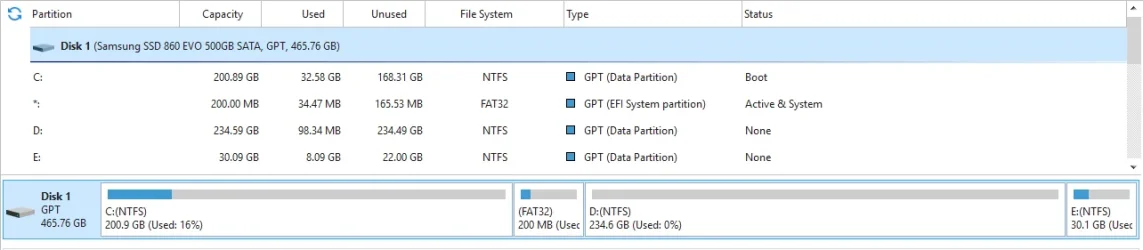
Do you think I need to resize?
Not even half of the space is being used.

Screenshot 2025-11-11 164604.webp
 

My Computer

System One

  • OS
    Windows 11 Pro
Do you think I need to resize?
Not even half of the space is being used.

View attachment 152517
It depends on your PC brand & model. Dell, HP and Lenovo "professional or enterprise" PC's are the big offenders because they bundle management tools that will try to auto-update your BIOS. Some folks have said HP has promised to stop filling up the EFI...

If you built your own system from a motherboard, or have a less known PC/laptop brand, then your vendor is probably not going to copy files into EFI.

100MB will work out reasonably well for you. But you should check the actual volume usage as you've done. (y)
 

My Computer

System One

  • OS
    Windows 7
Back
Top Bottom