- Local time
- 11:14 AM
- Posts
- 51
- OS
- Windows 11 Pro For Workstations 25H2
Hello all,
When I got to Windows Update and into the Insider tab, it says there is a new dev build available for my device, but when I go to the update tab, it doesn't show any available updates. It's been like this for a couple of builds now. Any idea why it is doing this, and what I can do to correct this? I'm currently enrolled in the Dev channel.
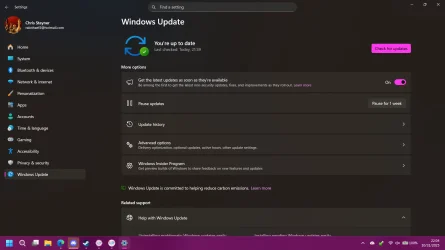
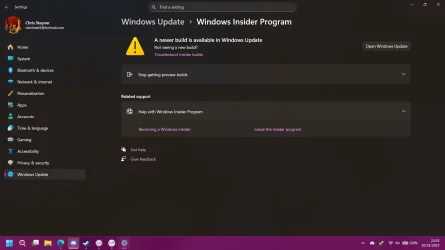
When I got to Windows Update and into the Insider tab, it says there is a new dev build available for my device, but when I go to the update tab, it doesn't show any available updates. It's been like this for a couple of builds now. Any idea why it is doing this, and what I can do to correct this? I'm currently enrolled in the Dev channel.
- Windows Build/Version
- Windows 11 Pro for Workstations 26200.6972
My Computer
At a glance
Windows 11 Pro For Workstations 25H2Intel Xeon W-10855M @ 4.9Ghz32GB OWC ECC DDR4-2666 RAMiGPU: Intel UHD Graphics P630 | Discrete GPU:...
- OS
- Windows 11 Pro For Workstations 25H2
- Computer type
- Laptop
- Manufacturer/Model
- Dell Precision 7550
- CPU
- Intel Xeon W-10855M @ 4.9Ghz
- Memory
- 32GB OWC ECC DDR4-2666 RAM
- Graphics Card(s)
- iGPU: Intel UHD Graphics P630 | Discrete GPU: NVIDIA Quadro RTX 3000 6GB
- Sound Card
- Realtek Audio
- Monitor(s) Displays
- Integrated Ultrasharp
- Screen Resolution
- 1920*1080
- Hard Drives
- OS: Samsung 980 PRO 500GB NVMe
Data: Western Digital Black SN750 1TB
- PSU
- Dell 180W
- Internet Speed
- 1Gbps
- Browser
- Edge Chromium
- Antivirus
- Microsoft Defender
- Other Info
- OpenSUSE Leap 16 VM
Zorin OS 18 VM