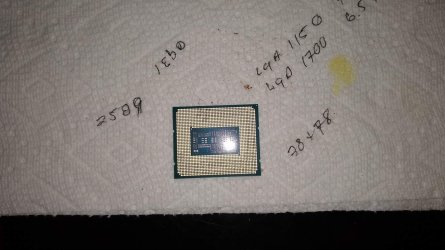
New Intel i9 developed faulty cores, anyone else have this?


Even if you have to pay asus for repairs it is not too bad. Depends on the board if worth it tho. Mine was about $130 with a destroyed socket, and they sent me a new complete kit in return. As for stability some chips are weird. Mine really hates anything other than LLC3.

@PoisenJam. I would definitely start with the bracket if you are using one. Notorious for weird core/mem issues. Gotta go real easy when tightening those down. Barely snug
 

My Computer My Computer

At a glance

11-25h2amd 9850x3d64gb 6000cl26pny 5090 oc
OS
11-25h2
CPU
amd 9850x3d
Motherboard
asus x870e apex
Memory
64gb 6000cl26
Graphics Card(s)
pny 5090 oc
Sound Card
creative x5
Monitor(s) Displays
dell aw3225qf
Hard Drives
4tb samsung 9100 pro
4tb samsung 990 pro
4tb wd black sn850x
2tb samsung 980 pro (usb)
PSU
phanteks 1600w
Case
phanteks nv9 mk2
Cooling
phanteks 420x2
It certainly could be the contact frame. I am using the first gen one with the 0.06Nm torque spec. I actually used a torque wrench too... But that is extremely low torque and could probably loosen from the type of moving and shaking one does when trying to work out all the air pockets in a custom loop! Thankfully, I have the newer TG contact frame now. Seems more fool-proof and much more secure.

Given the uncertainty, just seems sensibler to disable the core and wait until RMA is approved. And if I tear down the loop I may as well upgrade, especially since I can't be without my system during the RMA process. I also wouldn't feel right about selling my used 13900KS if there was a chance it was faulty.
 

My Computer My Computer

At a glance

Windows 11 ProIntel 13900KSGSkill Trident Z5 64GB (2x32GB) RGB DDR5-6000...Asus ROG Strix RTX 3090 OC
OS
Windows 11 Pro
Computer type
PC/Desktop
Manufacturer/Model
Custom Build
CPU
Intel 13900KS
Motherboard
Asus ROG Maximus Z690 Extreme
Memory
GSkill Trident Z5 64GB (2x32GB) RGB DDR5-6000Mhz CL30
Graphics Card(s)
Asus ROG Strix RTX 3090 OC
Sound Card
Focusrite 18i20 3rd Gen
Monitor(s) Displays
Samsung C49RG9x
Screen Resolution
5120x1440
Hard Drives
2 x 1TB WD SN850x
2 x 2TB WD SN850x
2 x 4TB WD Blue SSD
PSU
Asus ROG Thor 1200W
Case
Lian Li O11D XL
Cooling
EK Custom Loop
Keyboard
Asus ROG Strix Flare II Animate
Mouse
Asus ROG Chakram
Internet Speed
2.5GBps
Browser
Chrome
Antivirus
Defender
I have been encountering similar issues, specifically with the NVIDIA installer but also random crashing, blue screens, etc.

I have a Asus ROG Maximus Z690 Hero and Intel Core i9-13900K.

I am going to play around with disabling cores to see if I can get some stability.
 

My Computer My Computer

At a glance

Windows 11Intel Core i9-13900KG.SKILL Trident Z5 DDR5 PC6400MSI GeForce RTX™ 4090 SUPRIM LIQUID X 24G
OS
Windows 11
Computer type
PC/Desktop
CPU
Intel Core i9-13900K
Motherboard
Asus ROG Maximus Z690 Hero
Memory
G.SKILL Trident Z5 DDR5 PC6400
Graphics Card(s)
MSI GeForce RTX™ 4090 SUPRIM LIQUID X 24G
Sound Card
HyperX Cloud Alpha Wireles (USB)
Monitor(s) Displays
Dell
Screen Resolution
2560x1440 (165 Hz)
Hard Drives
3x SK Hynix 2TB M.2 SSD
PSU
Seasonic 1300W
Cooling
GPU Closed Loop, CPU Closed Loop
Internet Speed
1Gb Fiber
I have been encountering similar issues, specifically with the NVIDIA installer but also random crashing, blue screens, etc.

I have a Asus ROG Maximus Z690 Hero and Intel Core i9-13900K.

I am going to play around with disabling cores to see if I can get some stability.

Update:

I configured the BIOS such that only 1 P core and 1 E core were enabled. The GeForce installer immediately worked without any issues.

Is there a diagnostic tool from Intel or any other way to determine which CPU cores might be giving problems or will it be a manual process of elimination (enabling / disabling via BIOS)?

I am so grateful for this post - this issue had been driving me crazy.
 

My Computer My Computer

At a glance

Windows 11Intel Core i9-13900KG.SKILL Trident Z5 DDR5 PC6400MSI GeForce RTX™ 4090 SUPRIM LIQUID X 24G
OS
Windows 11
Computer type
PC/Desktop
CPU
Intel Core i9-13900K
Motherboard
Asus ROG Maximus Z690 Hero
Memory
G.SKILL Trident Z5 DDR5 PC6400
Graphics Card(s)
MSI GeForce RTX™ 4090 SUPRIM LIQUID X 24G
Sound Card
HyperX Cloud Alpha Wireles (USB)
Monitor(s) Displays
Dell
Screen Resolution
2560x1440 (165 Hz)
Hard Drives
3x SK Hynix 2TB M.2 SSD
PSU
Seasonic 1300W
Cooling
GPU Closed Loop, CPU Closed Loop
Internet Speed
1Gb Fiber
About MB pins vs sockets, I had a CPU socket for an AMD chip that was failed.
3 years ago, I bought a used MB from a private Ebay seller.
Board refused to work properly with the AMD cpu.

I got the refund from the seller.
Took CPU socket apart, There is a sliding plastic cover pushed by an arm lever that can be pried loose.
Inside the socket were heat damaged looking connectors. They had lost their spring tension.

I wonder if the PO of that board did something to cause the CPU socket to overheat or if it was just a random failure.

Sockets vs pins, they both fail. I see no advantage of one over the other.
 

My Computer My Computer

At a glance

windows 11old AMD B958gb
OS
windows 11
Computer type
PC/Desktop
Manufacturer/Model
some kind of old ASUS MB
CPU
old AMD B95
Motherboard
ASUS
Memory
8gb
Hard Drives
ssd WD 500 gb
This story reminds me of the time I had one core on a 6850K chip running below standard. It was generating all sorts of errors and for the longest time I couldn't track down the source of the problem. Intel does provide their own diagnostic software and this was how I could validate that the source of the problem was the actual chip itself. I called Intel and let them on my PC remotely and they ran some tests themselves and concluded that it was indeed the CPU. Since I had not overclocked the chip and in fact had turbo boast disabled it was quite evident that something else was amiss. Intel was very good about it and they replaced the CPU themselves.
 

My Computer My Computer

At a glance

WIN 11, WIN 10, WIN 8.1, WIN 7 U, WIN 7 PRO, ...Intel i7 6900K and i9-7960X / AMD 3800X (8 core)128 GB CORSAIR DOMINATOR PLATINUM (B DIE)NVIDIA 1070 and RTX 3070
OS
WIN 11, WIN 10, WIN 8.1, WIN 7 U, WIN 7 PRO, WIN 7 HOME (32 Bit), LINUX MINT
Computer type
PC/Desktop
Manufacturer/Model
DIY, ASUS, and DELL
CPU
Intel i7 6900K and i9-7960X / AMD 3800X (8 core)
Motherboard
ASUS X99E-WS USB 3.1 and ASUS X299 SAGE
Memory
128 GB CORSAIR DOMINATOR PLATINUM (B DIE)
Graphics Card(s)
NVIDIA 1070 and RTX 3070
Sound Card
Crystal Sound (onboard)
Monitor(s) Displays
single Samsung 30" 4K and 8" aux monitor
Screen Resolution
4K and something equally attrocious. I'll be working on this.
Hard Drives
A, B, C, D, E, F, G, H, I, J, K, L, M, N, O, P, Q, R, S, T, U, V, W

Ports X, Y, and Z are reserved for USB access and removable drives.

Drive types consist of the following: Various mechanical hard drives bearing the brand names, Seagate, Toshiba, and Western Digital. Various NVMe drives bearing the brand names Kingston, Intel, Silicon Power, Crucial, Western Digital, and Team Group. Various SATA SSDs bearing various different brand names.

RAID arrays included:

LSI RAID 10 (WD Velociraptors) 1115.72 GB
LSI RAID 10 (WD SSDS) 463.80 GB

INTEL RAID 0 (KINGSTON HYPER X) System 447.14 GB
INTEL RAID 1 TOSHIBA ENTERPRIZE class Data 2794.52 GB
INTEL RAID 1 SEAGATE HYBRID 931.51 GB
PSU
SEVERAL. I prefer my Corsair Platinum HX1000i but I also like EVGA power supplies
Case
ThermalTake Level 10 GT (among others)
Cooling
Noctua is my favorite and I use it in my main. I also own various other coolers.
Keyboard
all kinds.
Mouse
all kinds
Internet Speed
360 mbps - 1 gbps (depending)
Browser
FIREFOX
Antivirus
KASPERSKY (no apologies)
Other Info
Gave Dell touch screen with Windows 11 to daughter and got me an OTVOC. Being a PC builder I own many desktop PCs as well. I am a father of five providing PCs, laptops, and tablets for all my family, most of which I have modified, rebuilt, or simply built from scratch. I do not own a cell phone, never have, never will.
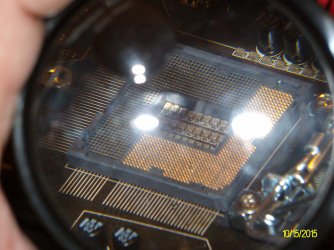
Cause found, it's not the CPU, there are damaged pins on the old motherboard, probably my fault, probably due to coming from Ryzen to Intel and not realising that the pins are on the motherboard and are super fragile rather than them being underneath the CPU...
IKR?

Those microscopic fish scale contacts are extremely easy to damage. Intel has been using them for a long time (Z87 Pictured). I had to replace a mobo for the same reason once and I know for certain I did the damage. I was cleaning up some thermal compound that got in the wrong place and caught them with the TP I was using. Knowing how thorough (sarcasm) most support departments are, I RMA'd it with a simple description of "doesn't work" and they replaced it for free.


SANY2424.JPG

Add to that, the contact pattern on the new cpu's is not entirely uniform. (i9-14900K pictured)

IMG_20240315_175134150.JPG
 
Last edited:

My Computers My Computers

  • At a glance

    Windroid 11 Pro / Win 10 ProIntel Core i9-14900K Raptor Lake Refreshed 6....32GB (2x16) GSKILL Trident Z5 RGB Series (Int...MSI Gaming GeForce RTX 4070 12GB
    OS
    Windroid 11 Pro / Win 10 Pro
    Computer type
    PC/Desktop
    Manufacturer/Model
    MSI
    CPU
    Intel Core i9-14900K Raptor Lake Refreshed 6.0 GHZ
    Motherboard
    MSI MAG Z790 Tomahawk WiFi
    Memory
    32GB (2x16) GSKILL Trident Z5 RGB Series (Intel XMP 3.0) DDR5 RAM 6700MT/s
    Graphics Card(s)
    MSI Gaming GeForce RTX 4070 12GB
    Sound Card
    Onboard Realtek® ALC4080 Codec
    Monitor(s) Displays
    Monitor #1 Samsung Odyssey G50A WQHD G-Sync HDR10 Monitor #2 HP LA1911
    Screen Resolution
    2560x1440 and 1280x1024
    Hard Drives
    Samsung 980 PRO SSD 1TB PCIe 4.0 NVMe Gen 4 Gaming M.2 (145GB Win11/100GB Win10/685GB More Games)
    Crucial CT2000MX500SSD1 2TB (Games)
    Western Digital Blue WD60EZAZ 6TB (Data/Backup)
    Western Digital Blue WD60EZAZ 6TB (Media)
    Western Digital Blue WD80EAAZ 8TB (Storage)
    PSU
    Rosewill Hive-750S
    Case
    Cooler Master Elite 430 Mid Tower
    Cooling
    Cooler Master ML240L V2 Liquid CPU cooler + 3x120mm in + Isolated PSU Standard upward flow
    Keyboard
    Microsoft Natural Elite White PS/2 (with usb adapter)
    Mouse
    Microsoft D67-00001 Trackball Optical Mouse (rebuilt with ceramic bearings)
    Internet Speed
    450Mb/s hard wired
    Browser
    FF, Mullvad, Tor
    Antivirus
    Win Def
    Other Info
    Razer Tartarus V2 Gaming Keypad
    Logitech Z-906 5.1 THX 500w (Original 8" Sub with Polk Audio satellites)
  • At a glance

    Windows 11 ProIntel Core i9-14900K Raptor Lake Refreshed 6....32GB (2x16) GSKILL Trident Z5 RGB Series (Int...MSI Gaming GeForce RTX 3060Ti 8GB
    Operating System
    Windows 11 Pro
    Computer type
    PC/Desktop
    Manufacturer/Model
    MSI
    CPU
    Intel Core i9-14900K Raptor Lake Refreshed 6.0 GHz FCLGA1700 (Gen 14)
    Motherboard
    MSI MAG Z790 Tomahawk WiFi
    Memory
    32GB (2x16) GSKILL Trident Z5 RGB Series (Intel XMP 3.0) DDR5 RAM 6700MT/s
    Graphics card(s)
    MSI Gaming GeForce RTX 3060Ti 8GB
    Sound Card
    Onboard Realtek® ALC4080 Codec
    Monitor(s) Displays
    Monitor #1 Samsung Odyssey G50A WQHD G-Sync HDR10 Monitor #2 Samsung TU7000 55" TV
    Screen Resolution
    2560x1440 and 3840x2160
    Hard Drives
    Samsung 980 PRO SSD 1TB PCIe 4.0 NVMe Gen 4 Gaming M.2 (System)
    Samsung 980 PRO SSD 2TB PCIe 4.0 NVMe Gen 4 Gaming M.2 (Games)
    Crucial CT1000MX500SSD1 1TB (More Games)
    WD Green WD20EZRX 2TB (Data/Backup)
    WD Blue WD60EZAZ 6TB (Media)
    PSU
    Rosewill Hive-750S
    Case
    Cooler Master N400 NSE-400-KKN2 Mid-Tower
    Cooling
    Cooler Master ML240L V2 Liquid CPU cooler + 3x120mm in + 2x120mm + Isolated PSU Reverse flow front exhaust
    Keyboard
    Logitech MK345 Wireless
    Mouse
    MSI G20 Elite and Logitech MK345 Wireless
    Internet Speed
    450Mb/s hard wired
    Browser
    FF
    Antivirus
    Win Def
    Other Info
    Razer Tartarus Gaming Keypad
    MSI GC30 Gaming Controller (Xbox style)
I'm almost glad I still own an older i7 platform for my work station. I still enjoy the benefit of robust architecture and 8 cores @ 16 threads is quite enough for my purposes. I say 'almost' because even though my system has onboard TPM2 my CPU is not Win 11 compatible. I can't blame Intel for this, but I rather wish Windows had been somewhat more flexible in this regard. Not everyone can afford to buy a new PC every 3 to 5 years.
 

My Computer My Computer

At a glance

WIN 11, WIN 10, WIN 8.1, WIN 7 U, WIN 7 PRO, ...Intel i7 6900K and i9-7960X / AMD 3800X (8 core)128 GB CORSAIR DOMINATOR PLATINUM (B DIE)NVIDIA 1070 and RTX 3070
OS
WIN 11, WIN 10, WIN 8.1, WIN 7 U, WIN 7 PRO, WIN 7 HOME (32 Bit), LINUX MINT
Computer type
PC/Desktop
Manufacturer/Model
DIY, ASUS, and DELL
CPU
Intel i7 6900K and i9-7960X / AMD 3800X (8 core)
Motherboard
ASUS X99E-WS USB 3.1 and ASUS X299 SAGE
Memory
128 GB CORSAIR DOMINATOR PLATINUM (B DIE)
Graphics Card(s)
NVIDIA 1070 and RTX 3070
Sound Card
Crystal Sound (onboard)
Monitor(s) Displays
single Samsung 30" 4K and 8" aux monitor
Screen Resolution
4K and something equally attrocious. I'll be working on this.
Hard Drives
A, B, C, D, E, F, G, H, I, J, K, L, M, N, O, P, Q, R, S, T, U, V, W

Ports X, Y, and Z are reserved for USB access and removable drives.

Drive types consist of the following: Various mechanical hard drives bearing the brand names, Seagate, Toshiba, and Western Digital. Various NVMe drives bearing the brand names Kingston, Intel, Silicon Power, Crucial, Western Digital, and Team Group. Various SATA SSDs bearing various different brand names.

RAID arrays included:

LSI RAID 10 (WD Velociraptors) 1115.72 GB
LSI RAID 10 (WD SSDS) 463.80 GB

INTEL RAID 0 (KINGSTON HYPER X) System 447.14 GB
INTEL RAID 1 TOSHIBA ENTERPRIZE class Data 2794.52 GB
INTEL RAID 1 SEAGATE HYBRID 931.51 GB
PSU
SEVERAL. I prefer my Corsair Platinum HX1000i but I also like EVGA power supplies
Case
ThermalTake Level 10 GT (among others)
Cooling
Noctua is my favorite and I use it in my main. I also own various other coolers.
Keyboard
all kinds.
Mouse
all kinds
Internet Speed
360 mbps - 1 gbps (depending)
Browser
FIREFOX
Antivirus
KASPERSKY (no apologies)
Other Info
Gave Dell touch screen with Windows 11 to daughter and got me an OTVOC. Being a PC builder I own many desktop PCs as well. I am a father of five providing PCs, laptops, and tablets for all my family, most of which I have modified, rebuilt, or simply built from scratch. I do not own a cell phone, never have, never will.
Hi there, I just wanted to add to the thread that I was having a similar issues on Windows 11, i9-14900kf, Asus tuf 4090, z790 dark hero, 64gb corsair dominator titanium, corsair mp700 2tb ssd, corsair 1200 W PSU. I experienced frequent BSOD from 'SYSTEM THREAD EXCEPTION NOT HANDLED' to 'PAGE FAULT IN NONPAGED AREA' and many others, CRC errors when installing Nvidia’s latest game ready drivers and access violation when trying to use Edge. Even on a fresh install of Windows 11 i’m experiencing these errors frequently. SFC and DISM rarely work, if at all. Ran Memtest86 on my ram and found no issues and also used Self Test in the ASUS Bios to check my ssd and that passed both tests. Considering RMA because I believe my CPU is what is at fault.
 
Last edited:

My Computer My Computer

At a glance

Windows 11
OS
Windows 11
Computer type
PC/Desktop
Manufacturer/Model
Intel, Nvidia, Asus, Corsair
Hi there, I just wanted to add to the thread that I was having a similar issues on Windows 11, i9-14900kf, Asus tuf 4090, z790 dark hero, 64gb corsair dominator titanium, corsair mp700 2tb ssd, corsair 1200 W PSU. I experienced frequent BSOD from 'SYSTEM THREAD EXCEPTION NOT HANDLED' to 'PAGE FAULT IN NONPAGED AREA' and many others, CRC errors when installing Nvidia’s latest game ready drivers and access violation when trying to use Edge. Even on a fresh install of Windows 11 i’m experiencing these errors frequently. SFC and DISM rarely work, if at all. Ran Memtest86 on my ram and found no issues and also used Self Test in the ASUS Bios to check my ssd and that passed both tests. Considering RMA because I believe my CPU is what is at fault.
Occasionally this sort of thing happens and I am reminded of a video about a year ago from Jay's 2 Cents where he makes mention of this being an issue with ASUS system boards messing up Intel CPUs as a result of bad thermals due to premature over-volting or some such like. Before you do anything drastic I recommend running Intel's software first to check your CPU. Intel® Core™ Ultra 9 Processor 288V (12M Cache, up to 5.10 GHz) Downloads, Drivers and Software | Intel
 

My Computer My Computer

At a glance

WIN 11, WIN 10, WIN 8.1, WIN 7 U, WIN 7 PRO, ...Intel i7 6900K and i9-7960X / AMD 3800X (8 core)128 GB CORSAIR DOMINATOR PLATINUM (B DIE)NVIDIA 1070 and RTX 3070
OS
WIN 11, WIN 10, WIN 8.1, WIN 7 U, WIN 7 PRO, WIN 7 HOME (32 Bit), LINUX MINT
Computer type
PC/Desktop
Manufacturer/Model
DIY, ASUS, and DELL
CPU
Intel i7 6900K and i9-7960X / AMD 3800X (8 core)
Motherboard
ASUS X99E-WS USB 3.1 and ASUS X299 SAGE
Memory
128 GB CORSAIR DOMINATOR PLATINUM (B DIE)
Graphics Card(s)
NVIDIA 1070 and RTX 3070
Sound Card
Crystal Sound (onboard)
Monitor(s) Displays
single Samsung 30" 4K and 8" aux monitor
Screen Resolution
4K and something equally attrocious. I'll be working on this.
Hard Drives
A, B, C, D, E, F, G, H, I, J, K, L, M, N, O, P, Q, R, S, T, U, V, W

Ports X, Y, and Z are reserved for USB access and removable drives.

Drive types consist of the following: Various mechanical hard drives bearing the brand names, Seagate, Toshiba, and Western Digital. Various NVMe drives bearing the brand names Kingston, Intel, Silicon Power, Crucial, Western Digital, and Team Group. Various SATA SSDs bearing various different brand names.

RAID arrays included:

LSI RAID 10 (WD Velociraptors) 1115.72 GB
LSI RAID 10 (WD SSDS) 463.80 GB

INTEL RAID 0 (KINGSTON HYPER X) System 447.14 GB
INTEL RAID 1 TOSHIBA ENTERPRIZE class Data 2794.52 GB
INTEL RAID 1 SEAGATE HYBRID 931.51 GB
PSU
SEVERAL. I prefer my Corsair Platinum HX1000i but I also like EVGA power supplies
Case
ThermalTake Level 10 GT (among others)
Cooling
Noctua is my favorite and I use it in my main. I also own various other coolers.
Keyboard
all kinds.
Mouse
all kinds
Internet Speed
360 mbps - 1 gbps (depending)
Browser
FIREFOX
Antivirus
KASPERSKY (no apologies)
Other Info
Gave Dell touch screen with Windows 11 to daughter and got me an OTVOC. Being a PC builder I own many desktop PCs as well. I am a father of five providing PCs, laptops, and tablets for all my family, most of which I have modified, rebuilt, or simply built from scratch. I do not own a cell phone, never have, never will.

My Computer My Computer

At a glance

Microsoft Windows 11 HomeIntel Core i5-13490F2 x 16 Patriot Memory (PDP Systems) PSD516G56...GIGABYTE GeForce RTX 4070 WINDFORCE OC 12G (G...
OS
Microsoft Windows 11 Home
Computer type
PC/Desktop
Manufacturer/Model
MSI MS-7D98
CPU
Intel Core i5-13490F
Motherboard
MSI B760 GAMING PLUS WIFI
Memory
2 x 16 Patriot Memory (PDP Systems) PSD516G560081 6400MT (32-37-37-74); 1.35V)
Graphics Card(s)
GIGABYTE GeForce RTX 4070 WINDFORCE OC 12G (GV-N4070WF3OC-12GD)
Sound Card
Bluetooth Аудио
Monitor(s) Displays
INNOCN 15K1F
Screen Resolution
1920 x 1080
Hard Drives
WD_BLACK SN770 250GB
KINGSTON SNV2S1000G (ELFK0S.6)
PSU
Thermaltake Toughpower GF3 1000W
Case
CG560 - DeepCool
Cooling
ID-COOLING SE-224-XTS / 2 x 140Mm Fan - rear and top; 3 x 120Mm - front
Keyboard
Corsair K70 RGB TKL
Mouse
Corsair KATAR PRO XT
Internet Speed
100 Mbps
Browser
Firefox
Antivirus
Microsoft Defender Antivirus
Other Info
https://www.userbenchmark.com/UserRun/66553205
By linking to the Intel® Processor Diagnostic Tool it should be possible to download and install the software to test the i9-14900kf chip for any physical flaws in the chip. I've used it a number of times and only once found a bad chip with it which Intel honoured with their warranty. The danger with just putting another chip in the system board is that if there is a problem with the board this method could result in yet another damaged CPU.
 

My Computer My Computer

At a glance

WIN 11, WIN 10, WIN 8.1, WIN 7 U, WIN 7 PRO, ...Intel i7 6900K and i9-7960X / AMD 3800X (8 core)128 GB CORSAIR DOMINATOR PLATINUM (B DIE)NVIDIA 1070 and RTX 3070
OS
WIN 11, WIN 10, WIN 8.1, WIN 7 U, WIN 7 PRO, WIN 7 HOME (32 Bit), LINUX MINT
Computer type
PC/Desktop
Manufacturer/Model
DIY, ASUS, and DELL
CPU
Intel i7 6900K and i9-7960X / AMD 3800X (8 core)
Motherboard
ASUS X99E-WS USB 3.1 and ASUS X299 SAGE
Memory
128 GB CORSAIR DOMINATOR PLATINUM (B DIE)
Graphics Card(s)
NVIDIA 1070 and RTX 3070
Sound Card
Crystal Sound (onboard)
Monitor(s) Displays
single Samsung 30" 4K and 8" aux monitor
Screen Resolution
4K and something equally attrocious. I'll be working on this.
Hard Drives
A, B, C, D, E, F, G, H, I, J, K, L, M, N, O, P, Q, R, S, T, U, V, W

Ports X, Y, and Z are reserved for USB access and removable drives.

Drive types consist of the following: Various mechanical hard drives bearing the brand names, Seagate, Toshiba, and Western Digital. Various NVMe drives bearing the brand names Kingston, Intel, Silicon Power, Crucial, Western Digital, and Team Group. Various SATA SSDs bearing various different brand names.

RAID arrays included:

LSI RAID 10 (WD Velociraptors) 1115.72 GB
LSI RAID 10 (WD SSDS) 463.80 GB

INTEL RAID 0 (KINGSTON HYPER X) System 447.14 GB
INTEL RAID 1 TOSHIBA ENTERPRIZE class Data 2794.52 GB
INTEL RAID 1 SEAGATE HYBRID 931.51 GB
PSU
SEVERAL. I prefer my Corsair Platinum HX1000i but I also like EVGA power supplies
Case
ThermalTake Level 10 GT (among others)
Cooling
Noctua is my favorite and I use it in my main. I also own various other coolers.
Keyboard
all kinds.
Mouse
all kinds
Internet Speed
360 mbps - 1 gbps (depending)
Browser
FIREFOX
Antivirus
KASPERSKY (no apologies)
Other Info
Gave Dell touch screen with Windows 11 to daughter and got me an OTVOC. Being a PC builder I own many desktop PCs as well. I am a father of five providing PCs, laptops, and tablets for all my family, most of which I have modified, rebuilt, or simply built from scratch. I do not own a cell phone, never have, never will.
Hi there, I’m returning to this thread to let y'all know that I went through the RMA process with Intel, and my i9-14900kf was replaced under warranty. The process started on December 4th and I received my replacement CPU on December 18th. I have had zero issues with the new CPU so far.
 

My Computer My Computer

At a glance

Windows 11
OS
Windows 11
Computer type
PC/Desktop
Manufacturer/Model
Intel, Nvidia, Asus, Corsair
Hi there, I’m returning to this thread to let y'all know that I went through the RMA process with Intel, and my i9-14900kf was replaced under warranty. The process started on December 4th and I received my replacement CPU on December 18th. I have had zero issues with the new CPU so far.

Thank you for sharing this development. I'm curious as to whether you used the Processor Diagnostic Tool that I mentioned in my previous post.
 

My Computer My Computer

At a glance

WIN 11, WIN 10, WIN 8.1, WIN 7 U, WIN 7 PRO, ...Intel i7 6900K and i9-7960X / AMD 3800X (8 core)128 GB CORSAIR DOMINATOR PLATINUM (B DIE)NVIDIA 1070 and RTX 3070
OS
WIN 11, WIN 10, WIN 8.1, WIN 7 U, WIN 7 PRO, WIN 7 HOME (32 Bit), LINUX MINT
Computer type
PC/Desktop
Manufacturer/Model
DIY, ASUS, and DELL
CPU
Intel i7 6900K and i9-7960X / AMD 3800X (8 core)
Motherboard
ASUS X99E-WS USB 3.1 and ASUS X299 SAGE
Memory
128 GB CORSAIR DOMINATOR PLATINUM (B DIE)
Graphics Card(s)
NVIDIA 1070 and RTX 3070
Sound Card
Crystal Sound (onboard)
Monitor(s) Displays
single Samsung 30" 4K and 8" aux monitor
Screen Resolution
4K and something equally attrocious. I'll be working on this.
Hard Drives
A, B, C, D, E, F, G, H, I, J, K, L, M, N, O, P, Q, R, S, T, U, V, W

Ports X, Y, and Z are reserved for USB access and removable drives.

Drive types consist of the following: Various mechanical hard drives bearing the brand names, Seagate, Toshiba, and Western Digital. Various NVMe drives bearing the brand names Kingston, Intel, Silicon Power, Crucial, Western Digital, and Team Group. Various SATA SSDs bearing various different brand names.

RAID arrays included:

LSI RAID 10 (WD Velociraptors) 1115.72 GB
LSI RAID 10 (WD SSDS) 463.80 GB

INTEL RAID 0 (KINGSTON HYPER X) System 447.14 GB
INTEL RAID 1 TOSHIBA ENTERPRIZE class Data 2794.52 GB
INTEL RAID 1 SEAGATE HYBRID 931.51 GB
PSU
SEVERAL. I prefer my Corsair Platinum HX1000i but I also like EVGA power supplies
Case
ThermalTake Level 10 GT (among others)
Cooling
Noctua is my favorite and I use it in my main. I also own various other coolers.
Keyboard
all kinds.
Mouse
all kinds
Internet Speed
360 mbps - 1 gbps (depending)
Browser
FIREFOX
Antivirus
KASPERSKY (no apologies)
Other Info
Gave Dell touch screen with Windows 11 to daughter and got me an OTVOC. Being a PC builder I own many desktop PCs as well. I am a father of five providing PCs, laptops, and tablets for all my family, most of which I have modified, rebuilt, or simply built from scratch. I do not own a cell phone, never have, never will.
Hi! I’m returning to this thread once again to first mention that no, I was not able to use the CPU diagnostic tool that you mentioned because, I was not able to login to windows because upon startup my computer would launch into the windows recovery environment no matter what! I also wanted to mention that I am sending out another support ticket to RMA my replacement i9-14900KF because it is also failing. I’m once again experiencing constant BSOD, games crashing, updates failing, and overall instability. About a month ago I turned on my pc and launched to a black screen with a buffering cursor wheel, that was it. Microsoft support suggested reinstalling windows locally which did work but was unfortunately the only option. Tonight while trying to update my pc, my computer restarted and kept BSOD on startup with the errors - kernel security check failure, page fault in non paged area, system services exception. This BSOD loop on startup is what bricked my pc last time. Eventually after so many blue screens it just locked me out of windows and boots to the recovery environment. Luckily it came out of the BSOD loop this time and i’m able to use my pc again but i don’t know how much longer until it bricks again.

Thanks!
 

My Computer My Computer

At a glance

Windows 11
OS
Windows 11
Computer type
PC/Desktop
Manufacturer/Model
Intel, Nvidia, Asus, Corsair
Hi! I’m returning to this thread once again to first mention that no, I was not able to use the CPU diagnostic tool that you mentioned because, I was not able to login to windows because upon startup my computer would launch into the windows recovery environment no matter what! I also wanted to mention that I am sending out another support ticket to RMA my replacement i9-14900KF because it is also failing. I’m once again experiencing constant BSOD, games crashing, updates failing, and overall instability. About a month ago I turned on my pc and launched to a black screen with a buffering cursor wheel, that was it. Microsoft support suggested reinstalling windows locally which did work but was unfortunately the only option. Tonight while trying to update my pc, my computer restarted and kept BSOD on startup with the errors - kernel security check failure, page fault in non paged area, system services exception. This BSOD loop on startup is what bricked my pc last time. Eventually after so many blue screens it just locked me out of windows and boots to the recovery environment. Luckily it came out of the BSOD loop this time and i’m able to use my pc again but i don’t know how much longer until it bricks again.

Thanks!
It very likely is an RMA issue anyway. You are certainly not alone in regards to this issue with the newer i9 Intel chips. The best way to know for sure is if you have another of the same to swap it out with. You could try making error corrections in safe mode but Windows likes to make even this difficult these days. I would try calling Intel for assistance in this case if you can manage to stay online for at least half an hour. I've done this with them before to identify a faulty CPU and had it replaced at Intel's expense once we verified that it was a bad chip in real time via remote access to the PC. The trick is to get the diagnostic software to work because once you do and it identifies the CPU as having an issue the boys @ Intel are more inclined to communicate with you in real time. I'm wishing you the best.
 

My Computer My Computer

At a glance

WIN 11, WIN 10, WIN 8.1, WIN 7 U, WIN 7 PRO, ...Intel i7 6900K and i9-7960X / AMD 3800X (8 core)128 GB CORSAIR DOMINATOR PLATINUM (B DIE)NVIDIA 1070 and RTX 3070
OS
WIN 11, WIN 10, WIN 8.1, WIN 7 U, WIN 7 PRO, WIN 7 HOME (32 Bit), LINUX MINT
Computer type
PC/Desktop
Manufacturer/Model
DIY, ASUS, and DELL
CPU
Intel i7 6900K and i9-7960X / AMD 3800X (8 core)
Motherboard
ASUS X99E-WS USB 3.1 and ASUS X299 SAGE
Memory
128 GB CORSAIR DOMINATOR PLATINUM (B DIE)
Graphics Card(s)
NVIDIA 1070 and RTX 3070
Sound Card
Crystal Sound (onboard)
Monitor(s) Displays
single Samsung 30" 4K and 8" aux monitor
Screen Resolution
4K and something equally attrocious. I'll be working on this.
Hard Drives
A, B, C, D, E, F, G, H, I, J, K, L, M, N, O, P, Q, R, S, T, U, V, W

Ports X, Y, and Z are reserved for USB access and removable drives.

Drive types consist of the following: Various mechanical hard drives bearing the brand names, Seagate, Toshiba, and Western Digital. Various NVMe drives bearing the brand names Kingston, Intel, Silicon Power, Crucial, Western Digital, and Team Group. Various SATA SSDs bearing various different brand names.

RAID arrays included:

LSI RAID 10 (WD Velociraptors) 1115.72 GB
LSI RAID 10 (WD SSDS) 463.80 GB

INTEL RAID 0 (KINGSTON HYPER X) System 447.14 GB
INTEL RAID 1 TOSHIBA ENTERPRIZE class Data 2794.52 GB
INTEL RAID 1 SEAGATE HYBRID 931.51 GB
PSU
SEVERAL. I prefer my Corsair Platinum HX1000i but I also like EVGA power supplies
Case
ThermalTake Level 10 GT (among others)
Cooling
Noctua is my favorite and I use it in my main. I also own various other coolers.
Keyboard
all kinds.
Mouse
all kinds
Internet Speed
360 mbps - 1 gbps (depending)
Browser
FIREFOX
Antivirus
KASPERSKY (no apologies)
Other Info
Gave Dell touch screen with Windows 11 to daughter and got me an OTVOC. Being a PC builder I own many desktop PCs as well. I am a father of five providing PCs, laptops, and tablets for all my family, most of which I have modified, rebuilt, or simply built from scratch. I do not own a cell phone, never have, never will.

Latest Support Threads

Back
Top Bottom