New Laptop. NAS showing in File Explorer, but access denied


BruceMM

Member
Local time
1:03 AM
Posts
2
OS
Windows11
NEWBIE seeking help
I recently purchased a new laptop and during set up stage I answered yes to copy across windows settings from previous PC. All seemed OK , BUT!

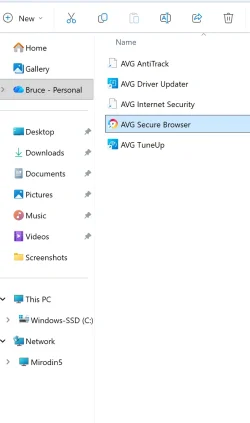
The connection for a NAS (Mirodin5) was copied across. This can be seen in windows file explorer as show in screenshot below.
Screenshot 2025-11-17 222331.webp

The mapping for folders on that NAS were not copied.

When I click on ‘Mirodin5” I get a message that Windows “cannot access \\Mirodin5” Right clicking on Mirodin5 does NOT bring up option to delete the entry
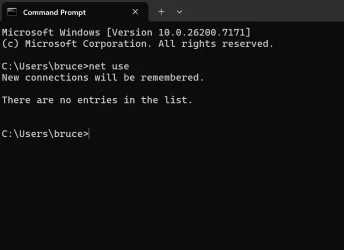
Using CMD and net use brings no help as that (also screen shot below) does not show any network connection for Mirodin5
Screenshot 2025-11-17 192013.webp

I am at a loss on how to resolve this issue. I do want to set up connections to the NAS folders.

Incidentally I did have an issue accessing the NSA drives on the pervious PC. That was resolved by deleting the credentials managers entry for Mirodin5.

There are not any entries in credentials manage on the new laptop.

Kind Regards
Bruce
 

My Computer

System One

  • OS
    Windows11
    Computer type
    Laptop
    Manufacturer/Model
    Lenovo Yoga 9
    CPU
    Intel(R) Core(TM) Ultra 7 258V (2.20 GHz)
    Memory
    32Gb
    Graphics Card(s)
    Intel ARC 140V
    Hard Drives
    SSD 1TB
    Internet Speed
    75 Mb/s download 9 Mbs up
    Antivirus
    AVG

My Computer

System One

  • OS
    Windows 11 Pro 25H2 build 26200.8457
    Computer type
    Laptop
    Manufacturer/Model
    Lenovo ThinkPad Workstation P72
    CPU
    Intel i7 8750H @ 2.2 GHz
    Motherboard
    Lenovo 01YU291
    Memory
    16 GB (all Samsung) DDR4-3200 SODIMM (non-ECC) PCIe 3
    Graphics Card(s)
    Intel UHD Graphics 630 & NVIDIA Quadro P600
    Sound Card
    Realtek ALC3286 & Focusrite Saffire 24 Pro DSP
    Monitor(s) Displays
    17.3"
    Screen Resolution
    3840x2160
    Hard Drives
    1TB SSD Samsung 860 EVO SATA 3
    1TB SSD Samsung 970 EVO M.2 NVMe PCIe 3 x 4
    2TB SSD Samsung 990 PRO M.2 NVMe PCIe 3 x 4
    PSU
    230W
    Cooling
    fan
    Keyboard
    UltraNav
    Mouse
    Kensington wireless Orbit
    Internet Speed
    640Mbps
    Browser
    DuckDuckGo and Firefox
    Antivirus
    Defender
    Other Info
    CM246 Chipset
Here's what I finally ended up doing for all my 24H2 and 25H2 machines so they could see my NAS and the Windows 10 machines.

In Control Panel\All Control Panel Items\Programs and Features\Turn Windows Features on or off.
Check if there are No Ticks are on SMB 1.0/CIFS Client and SMB 1.0/CIFS Server Only a tick on SMB Direct

Make Sure you are on a Private Network NOT Public

Next go into Group Policy (Pro Version Only) gpedit.msc

Computer Configuration, Windows Settings, Security Settings, Local Policies, Security Options
Double click on Microsoft Network Client: Digitally sign communications (always)
Double click on Microsoft Network Client: Digitally sign communications (if server agrees)
Set both of these to "Disabled"
Click on OK.

Computer Configuration, Administrative Templates, Network, Lanman Workstation
Double click on "Enable Insecure Guest Logons"
Set this to "Enabled"
Click on OK.

Reboot
 

My Computers

System One System Two

  • OS
    Win 11 Pro 25H2, Build 26200.8655
    Computer type
    PC/Desktop
    Manufacturer/Model
    Home Brew
    CPU
    Intel Core i5 14500
    Motherboard
    Gigabyte B760M G P WIFI
    Memory
    64GB DDR4
    Graphics Card(s)
    GeForce RTX 4060
    Sound Card
    Chipset Realtek
    Monitor(s) Displays
    LG 45" Ultragear, Acer 24" 1080p
    Screen Resolution
    5120x1440, 1920x1080
    Hard Drives
    Crucial P310 2TB 2280 PCIe Gen4 3D NAND NVMe M.2 SSD (O/S)
    Silicon Power 2TB US75 NVMe PCIe Gen4 M.2 2280 SSD (backup)
    Crucial BX500 2TB 3D NAND (2nd backup)
    Seagate 4TB Ironwolf, rotating HDD archive files
    External off-line backup Drives: 2 NVMe 4TB drives in external enclosures
    PSU
    Thermaltake Toughpower GF3 750W
    Case
    LIAN LI LANCOOL 216 E-ATX PC Case
    Cooling
    Lots of fans!
    Keyboard
    Microsoft Comfort Curve 2000
    Mouse
    Logitech G305
    Internet Speed
    Verizon FiOS 1GB
    Browser
    Firefox
    Antivirus
    Malware Bytes & Windows Defender Security
  • Operating System
    Win 11 Pro 25H2, Build 26200.8524
    Computer type
    PC/Desktop
    Manufacturer/Model
    Home Brew
    CPU
    Intel Core i5 14400
    Motherboard
    Gigabyte B760M DS3H AX
    Memory
    32GB DDR5
    Graphics card(s)
    Intel 700 Embedded GPU
    Sound Card
    Realtek Embedded
    Monitor(s) Displays
    27" HP 1080p
    Screen Resolution
    1920x1080
    Hard Drives
    Crucial P310 2TB 2280 PCIe Gen4 eD NAND PCIe SSD
    Samsung EVO 990 2TB NVMe Gen4 SSD
    Samsung 2TB SATA SSD
    PSU
    Thermaltake Smart BM3 650W
    Case
    Okinos Micro ATX Case
    Cooling
    Fans
    Keyboard
    Microsoft Comfort Curve 2000
    Mouse
    Logitech G305
    Internet Speed
    Verizon FiOS 1GB
    Browser
    Firefox
    Antivirus
    Malware Bytes & Windows Defender Security
Dear tecknot, & gunrunnerjohn,
Thank you for taking the time to reply to me, it is truly appreciated. I learnt a great deal from the feedback from both of you and managed to solve the issue, using the advice in link that tecknot provided.
 

My Computer

System One

  • OS
    Windows11
    Computer type
    Laptop
    Manufacturer/Model
    Lenovo Yoga 9
    CPU
    Intel(R) Core(TM) Ultra 7 258V (2.20 GHz)
    Memory
    32Gb
    Graphics Card(s)
    Intel ARC 140V
    Hard Drives
    SSD 1TB
    Internet Speed
    75 Mb/s download 9 Mbs up
    Antivirus
    AVG
Excellent!

Kind regards,

tecknot
 

My Computer

System One

  • OS
    Windows 11 Pro 25H2 build 26200.8457
    Computer type
    Laptop
    Manufacturer/Model
    Lenovo ThinkPad Workstation P72
    CPU
    Intel i7 8750H @ 2.2 GHz
    Motherboard
    Lenovo 01YU291
    Memory
    16 GB (all Samsung) DDR4-3200 SODIMM (non-ECC) PCIe 3
    Graphics Card(s)
    Intel UHD Graphics 630 & NVIDIA Quadro P600
    Sound Card
    Realtek ALC3286 & Focusrite Saffire 24 Pro DSP
    Monitor(s) Displays
    17.3"
    Screen Resolution
    3840x2160
    Hard Drives
    1TB SSD Samsung 860 EVO SATA 3
    1TB SSD Samsung 970 EVO M.2 NVMe PCIe 3 x 4
    2TB SSD Samsung 990 PRO M.2 NVMe PCIe 3 x 4
    PSU
    230W
    Cooling
    fan
    Keyboard
    UltraNav
    Mouse
    Kensington wireless Orbit
    Internet Speed
    640Mbps
    Browser
    DuckDuckGo and Firefox
    Antivirus
    Defender
    Other Info
    CM246 Chipset

Latest Support Threads

Back
Top Bottom