NEWBIE seeking help
I recently purchased a new laptop and during set up stage I answered yes to copy across windows settings from previous PC. All seemed OK , BUT!
The connection for a NAS (Mirodin5) was copied across. This can be seen in windows file explorer as show in screenshot below.
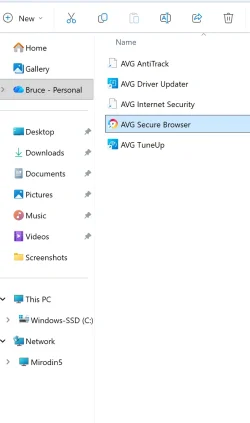
The mapping for folders on that NAS were not copied.
When I click on ‘Mirodin5” I get a message that Windows “cannot access \\Mirodin5” Right clicking on Mirodin5 does NOT bring up option to delete the entry
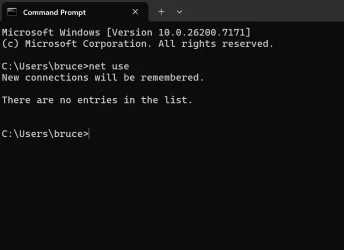
Using CMD and net use brings no help as that (also screen shot below) does not show any network connection for Mirodin5
I am at a loss on how to resolve this issue. I do want to set up connections to the NAS folders.
Incidentally I did have an issue accessing the NSA drives on the pervious PC. That was resolved by deleting the credentials managers entry for Mirodin5.
There are not any entries in credentials manage on the new laptop.
Kind Regards
Bruce
I recently purchased a new laptop and during set up stage I answered yes to copy across windows settings from previous PC. All seemed OK , BUT!
The connection for a NAS (Mirodin5) was copied across. This can be seen in windows file explorer as show in screenshot below.
The mapping for folders on that NAS were not copied.
When I click on ‘Mirodin5” I get a message that Windows “cannot access \\Mirodin5” Right clicking on Mirodin5 does NOT bring up option to delete the entry
Using CMD and net use brings no help as that (also screen shot below) does not show any network connection for Mirodin5
I am at a loss on how to resolve this issue. I do want to set up connections to the NAS folders.
Incidentally I did have an issue accessing the NSA drives on the pervious PC. That was resolved by deleting the credentials managers entry for Mirodin5.
There are not any entries in credentials manage on the new laptop.
Kind Regards
Bruce
My Computer
At a glance
Windows11Intel(R) Core(TM) Ultra 7 258V (2.20 GHz)32GbIntel ARC 140V
- OS
- Windows11
- Computer type
- Laptop
- Manufacturer/Model
- Lenovo Yoga 9
- CPU
- Intel(R) Core(TM) Ultra 7 258V (2.20 GHz)
- Memory
- 32Gb
- Graphics Card(s)
- Intel ARC 140V
- Hard Drives
- SSD 1TB
- Internet Speed
- 75 Mb/s download 9 Mbs up
- Antivirus
- AVG