New Laptop with no Audio Control Panel available.


Mooly

Well-known member
Member
VIP
Local time
8:50 PM
Posts
787
OS
W11 Pro x64 ongoing Canary 29500 latest builds
Although I have basic audio available there is nothing in control panel beyond the 'Sounds' button. I was expecting to see either Dell Audio or Realtek or something along those lines. Typing (searching the PC) for anything Dell Audio/Realtek etc brings nothing up.

All I seem to have appear be default Windows options for audio.

Device Manager does show that a Realtek Driver is in use but perhaps that is a default one and I also notice that 'Programs and Features' has no Realtek application showing.
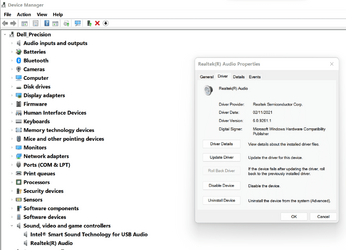
Screenshot 2022-06-06 111135.png

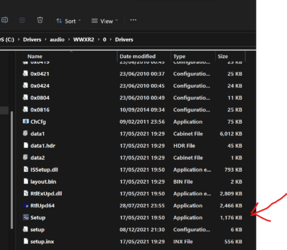
If I look c:\dell drivers I can see an Audio folder and if I drill down far enough there appears to be a Realtek Driver/Application.

Is it possible this needs running to install it and if so why would that not have been done. This is all new out of the box.

Screenshot 2022-06-06 111320.png

Screenshot 2022-06-06 111532.png
 

My Computer My Computer

At a glance

W11 Pro x64 ongoing Canary 29500 latest buildsIntel i58GbIntel HD Graphics
OS
W11 Pro x64 ongoing Canary 29500 latest builds
Computer type
Laptop
Manufacturer/Model
Dell 7760 Mobile Precision 17"
CPU
Intel i5
Motherboard
Unknown
Memory
8Gb
Graphics Card(s)
Intel HD Graphics
Sound Card
Realtek
Monitor(s) Displays
Internal
Hard Drives
2 x 256Gb SSD
PSU
Dell 240 watt
Mouse
Dell Premier Bluetooth
Internet Speed
50Mbps
Browser
Edge
Antivirus
Default Microsoft Security
.....there is nothing in control panel beyond the 'Sounds' button.
Your first port of call these days should be the Settings app rather than Control Panel, but old habit die hard.

The Control Panel is getting smaller as more and more options are being migrated to the Settings app. Look in Settings > System > Sound for controls such as the Volume Mixer. For each setting the > to the right indicates you will be taken to another page in the Settings app when you click on it. The box with a 'link away' arrow in it, such as the one to the right of 'More sound settings' indicates that it will open a control panel applet outside Settings, in this case the one for Sounds.

1654515639519.png

1654516112806.png


If I look c:\dell drivers I can see an Audio folder and if I drill down far enough there appears to be a Realtek Driver/Application.

The app you see there is Setup.exe, all this would do is install the Realtek drivers (which you have said are already installed). You can also find that the Realtek drivers may get updated through Windows Update.

1654516310794.png
 

My Computers My Computers

  • At a glance

    Windows 11 HomeAMD Athlon Silver 3050U8GBRadeon Graphics
    OS
    Windows 11 Home
    Computer type
    Laptop
    Manufacturer/Model
    Acer Aspire 3 A315-23-R9VY
    CPU
    AMD Athlon Silver 3050U
    Memory
    8GB
    Graphics Card(s)
    Radeon Graphics
    Monitor(s) Displays
    laptop screen
    Screen Resolution
    1366x768 native resolution, up to 2560x1440 with Radeon Virtual Super Resolution
    Hard Drives
    1TB Samsung EVO 870 SSD (from April 2026: 250GB EVO 850)
    Internet Speed
    150 Mbps
    Browser
    Edge, Firefox
    Antivirus
    Defender
    Other Info
    UPDATE - 11 April 2026: due to lid hinges starting to break up this laptop has been retired from active duty. The OS with all software and files has been migrated to my System Seven in 'Other systems' to carry on as my general purpose 'main machine'.

    I've now clean installed 25H2 and used Garlin's scripts to update Secure Boot to CA 2023 and revoke the PCA 2011 certificates. It's new role is to test secure boot issues.

    Info for 2021-2026:
    fully 'Windows 11 ready' laptop. Windows 10 C: partition migrated from my old unsupported 'main machine' then upgraded to 11. A test migration ran Insider builds for 2 months. When 11 was released on 5th October 2021 it was re-imaged back to 10 and was offered the upgrade in Windows Update on 20th October. Windows Update offered the 22H2 Feature Update on 20th September 2022. It got the 23H2 Feature Update on 4th November 2023 through Windows Update, 24H2 on 3rd October 2024 through Windows Update by setting the Target Release Version for 24H2, and 25H2 on 30th September 2025 through Windows Update by setting the Target Release Version for 25H2.
  • At a glance

    Windows 11 ProIntel® Core™ i5-520M8GB(integrated graphics) Intel HD Graphics
    Operating System
    Windows 11 Pro
    Computer type
    Laptop
    Manufacturer/Model
    Dell Latitude E4310
    CPU
    Intel® Core™ i5-520M
    Motherboard
    0T6M8G
    Memory
    8GB
    Graphics card(s)
    (integrated graphics) Intel HD Graphics
    Screen Resolution
    1366x768
    Hard Drives
    500GB Crucial MX500 SSD
    Browser
    Firefox, Edge
    Antivirus
    Defender
    Other Info
    unsupported machine: Legacy bios, MBR, TPM 1.2, upgraded from W10 to W11 using W10/W11 hybrid install media workaround.

    In-place upgrade to 22H2 using ISO and a workaround.
    Feature Update to 23H2 by manually installing the Enablement Package.
    In-place upgrade to 24H2 using hybrid 23H2/24H2 install media.
    Upgraded to 25H2 by Enablement Package.

    Also running Insider Experimental 263xx and 29xxx builds and Windows 10 as native boot .vhdx.
  • My SYSTEM THREE is a Dell Latitude 5410, i7-10610U, 32GB RAM, 512GB NVMe ssd, supported device running Windows 11 Pro.

    My SYSTEM FOUR was a 2-in-1 convertible Lenovo Yoga 11e (1st gen) type 20DA, Celeron N2930, 8GB RAM, 256GB ssd. Unsupported device. This has now been sold. It has been replaced by my System Eight.

    My SYSTEM FIVE is a Dell Latitude 3190 2-in-1, Pentium Silver N5030, 8GB RAM, 1TB NVMe ssd, supported device running Windows 11 Pro, plus Insider Beta, Experimental 263xx and 29xxx builds (and a few others) as a native boot .vhdx.

    My SYSTEM SIX is a Dell Latitude 5550, Core Ultra 7 165H, 64GB RAM, 1TB NVMe SSD, supported device, Windows 11 Pro, Hyper-V host machine. Updated to 25H2 on 30th September 2025.

    My SYSTEM SEVEN is a Lenovo Thinkpad T580, 1920x1080 touchscreen, Intel Core i7-8650U, 16GB RAM, 512GB NVMe SSD + 2nd 512GB NVMe SSD, a supported device for Windows 11. This is my current general purpose 'main machine'. The installed Windows 11 Home from my System One has been migrated to this machine. As its new home has an existing digital licence for Pro I've been able to upgrade the migrated OS from Home to Pro.

    My SYSTEM EIGHT is a 2-in-1 convertible Lenovo Yoga 11e (5th gen) type 20LN, Celeron N4120, 8GB RAM, 512GB NVMe ssd, a supported device for Windows 11. Currently running Windows 11 Pro, plus Insider Beta, Experimental 263xx and 29xxx builds as native boot vhdx.
Thanks Bree, those images are much appreciated.

So my 'Sound' Window looks identical to yours, same for 'Volume Mixer'. I have Realtek (R) just as in yours.

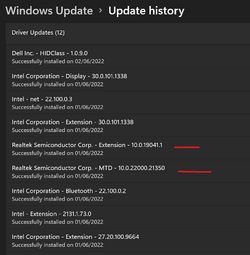
I have a couple of Realtek updates showing.

Screenshot 2022-06-06 143939.png

On my 10 year old Dell when I have clean installed Windows and added the Realtek Driver I have a Dell audio control panel available. It has settings to enhance audio for example (like a 'loudness' feature to boost bass and treble) and lots of other settings for audio. I was expecting to see something similar here tbh.

So would you say what I see here looks correct?
 

My Computer My Computer

At a glance

W11 Pro x64 ongoing Canary 29500 latest buildsIntel i58GbIntel HD Graphics
OS
W11 Pro x64 ongoing Canary 29500 latest builds
Computer type
Laptop
Manufacturer/Model
Dell 7760 Mobile Precision 17"
CPU
Intel i5
Motherboard
Unknown
Memory
8Gb
Graphics Card(s)
Intel HD Graphics
Sound Card
Realtek
Monitor(s) Displays
Internal
Hard Drives
2 x 256Gb SSD
PSU
Dell 240 watt
Mouse
Dell Premier Bluetooth
Internet Speed
50Mbps
Browser
Edge
Antivirus
Default Microsoft Security
Is there nothing showing in the all apps list such as DTS: or B&O for example?
 

My Computers My Computers

  • At a glance

    Win 11 ProAMD Ryzen™ 7 7730U24GB Dual-Channel DDR4 @ 1596MHz (22-22-22-52)512MB ATI AMD Radeon Graphics (ASUStek Comput...
    OS
    Win 11 Pro
    Computer type
    Laptop
    Manufacturer/Model
    ASUS Vivobook
    CPU
    AMD Ryzen™ 7 7730U
    Motherboard
    M1605YA
    Memory
    24GB Dual-Channel DDR4 @ 1596MHz (22-22-22-52)
    Graphics Card(s)
    512MB ATI AMD Radeon Graphics (ASUStek Computer Inc)
    Monitor(s) Displays
    Generic PnP Monitor (1920x1200@60Hz) - P1 PLUS (1920x1080@59Hz)
    Screen Resolution
    1920 X 1200
    Hard Drives
    953GB Western Digital WD
    PSU
    45 Watts
    Mouse
    Lenovo Bluetooth.
    Internet Speed
    500 Mbps
    Browser
    Edge
    Antivirus
    Defender
  • At a glance

    Windows 11AMD Ryzen 7 5800H / 3.2 GHz32 GB DDR4 SDRAM 3200 MHzNVIDIA GeForce RTX 3060 6 GB GDDR6 SDRAM
    Operating System
    Windows 11
    Computer type
    Laptop
    Manufacturer/Model
    ACER NITRO
    CPU
    AMD Ryzen 7 5800H / 3.2 GHz
    Motherboard
    CZ Scala_CAS (FP6)
    Memory
    32 GB DDR4 SDRAM 3200 MHz
    Graphics card(s)
    NVIDIA GeForce RTX 3060 6 GB GDDR6 SDRAM
    Sound Card
    Realtek Audio. NVIDIA High Definition Audio
    Monitor(s) Displays
    15.6" LED backlight 1920 x 1080 (Full HD) 144 Hz
    Screen Resolution
    1920 x 1080 (Full HD)
    Hard Drives
    Samsung 970 Evo Plus 2TB NVMe M.2
    PSU
    180 Watt, 19.5 V
    Mouse
    Lenovo Bluetooth
    Internet Speed
    500 Mbps
    Browser
    Edge
    Antivirus
    Defender
Nope, nothing at like that... but you have given me an idea....

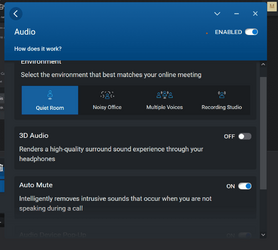
I've just plugged headphones in to see if that triggers anything and it has. Something called Dell Optimizer which has an Audio tab on it. This looks more like it. On my old laptop the driver I think was a Dell tweaked and personalized one adding the sort of things I'm seeing here.

So this could be what I've been looking for, its hiding under a totally different sort of label.


Screenshot 2022-06-06 145924.png

Screenshot 2022-06-06 150423.png
 

My Computer My Computer

At a glance

W11 Pro x64 ongoing Canary 29500 latest buildsIntel i58GbIntel HD Graphics
OS
W11 Pro x64 ongoing Canary 29500 latest builds
Computer type
Laptop
Manufacturer/Model
Dell 7760 Mobile Precision 17"
CPU
Intel i5
Motherboard
Unknown
Memory
8Gb
Graphics Card(s)
Intel HD Graphics
Sound Card
Realtek
Monitor(s) Displays
Internal
Hard Drives
2 x 256Gb SSD
PSU
Dell 240 watt
Mouse
Dell Premier Bluetooth
Internet Speed
50Mbps
Browser
Edge
Antivirus
Default Microsoft Security
On my 10 year old Dell when I have clean installed Windows and added the Realtek Driver I have a Dell audio control panel available. It has settings to enhance audio for example (like a 'loudness' feature to boost bass and treble) and lots of other settings for audio. I was expecting to see something similar here tbh.
According to the spec sheet for the Dell 7760 Mobile Precision 17" in your system specs, it should have been supplied with 'MaxxAudio® Pro by Waves' installed. That should be where you'll find all the audio controls you are looking for.


In fact, I gave my Dell Latitude 5410 a clean install of Windows 11 so by default it had none of the Dell OEM utilities installed. Windows Update shows that there is as optional update from Waves for my machine, I think I may let it install.....

.

1654525119620.png


Edit: no, that wasn't it. Apparently to get MaxxAudio Pro for my Dell I should go to the Store. You shouldn't need to do that, you should already have it.

apps.38941.13516822013134180.f4849af2-cf0f-47d4-b9b7-65a32aa10b08.a36a85b1-3ece-4ecd-a6bc-480d64d9f07e


My Computers My Computers

  • At a glance

    Windows 11 HomeAMD Athlon Silver 3050U8GBRadeon Graphics
    OS
    Windows 11 Home
    Computer type
    Laptop
    Manufacturer/Model
    Acer Aspire 3 A315-23-R9VY
    CPU
    AMD Athlon Silver 3050U
    Memory
    8GB
    Graphics Card(s)
    Radeon Graphics
    Monitor(s) Displays
    laptop screen
    Screen Resolution
    1366x768 native resolution, up to 2560x1440 with Radeon Virtual Super Resolution
    Hard Drives
    1TB Samsung EVO 870 SSD (from April 2026: 250GB EVO 850)
    Internet Speed
    150 Mbps
    Browser
    Edge, Firefox
    Antivirus
    Defender
    Other Info
    UPDATE - 11 April 2026: due to lid hinges starting to break up this laptop has been retired from active duty. The OS with all software and files has been migrated to my System Seven in 'Other systems' to carry on as my general purpose 'main machine'.

    I've now clean installed 25H2 and used Garlin's scripts to update Secure Boot to CA 2023 and revoke the PCA 2011 certificates. It's new role is to test secure boot issues.

    Info for 2021-2026:
    fully 'Windows 11 ready' laptop. Windows 10 C: partition migrated from my old unsupported 'main machine' then upgraded to 11. A test migration ran Insider builds for 2 months. When 11 was released on 5th October 2021 it was re-imaged back to 10 and was offered the upgrade in Windows Update on 20th October. Windows Update offered the 22H2 Feature Update on 20th September 2022. It got the 23H2 Feature Update on 4th November 2023 through Windows Update, 24H2 on 3rd October 2024 through Windows Update by setting the Target Release Version for 24H2, and 25H2 on 30th September 2025 through Windows Update by setting the Target Release Version for 25H2.
  • At a glance

    Windows 11 ProIntel® Core™ i5-520M8GB(integrated graphics) Intel HD Graphics
    Operating System
    Windows 11 Pro
    Computer type
    Laptop
    Manufacturer/Model
    Dell Latitude E4310
    CPU
    Intel® Core™ i5-520M
    Motherboard
    0T6M8G
    Memory
    8GB
    Graphics card(s)
    (integrated graphics) Intel HD Graphics
    Screen Resolution
    1366x768
    Hard Drives
    500GB Crucial MX500 SSD
    Browser
    Firefox, Edge
    Antivirus
    Defender
    Other Info
    unsupported machine: Legacy bios, MBR, TPM 1.2, upgraded from W10 to W11 using W10/W11 hybrid install media workaround.

    In-place upgrade to 22H2 using ISO and a workaround.
    Feature Update to 23H2 by manually installing the Enablement Package.
    In-place upgrade to 24H2 using hybrid 23H2/24H2 install media.
    Upgraded to 25H2 by Enablement Package.

    Also running Insider Experimental 263xx and 29xxx builds and Windows 10 as native boot .vhdx.
  • My SYSTEM THREE is a Dell Latitude 5410, i7-10610U, 32GB RAM, 512GB NVMe ssd, supported device running Windows 11 Pro.

    My SYSTEM FOUR was a 2-in-1 convertible Lenovo Yoga 11e (1st gen) type 20DA, Celeron N2930, 8GB RAM, 256GB ssd. Unsupported device. This has now been sold. It has been replaced by my System Eight.

    My SYSTEM FIVE is a Dell Latitude 3190 2-in-1, Pentium Silver N5030, 8GB RAM, 1TB NVMe ssd, supported device running Windows 11 Pro, plus Insider Beta, Experimental 263xx and 29xxx builds (and a few others) as a native boot .vhdx.

    My SYSTEM SIX is a Dell Latitude 5550, Core Ultra 7 165H, 64GB RAM, 1TB NVMe SSD, supported device, Windows 11 Pro, Hyper-V host machine. Updated to 25H2 on 30th September 2025.

    My SYSTEM SEVEN is a Lenovo Thinkpad T580, 1920x1080 touchscreen, Intel Core i7-8650U, 16GB RAM, 512GB NVMe SSD + 2nd 512GB NVMe SSD, a supported device for Windows 11. This is my current general purpose 'main machine'. The installed Windows 11 Home from my System One has been migrated to this machine. As its new home has an existing digital licence for Pro I've been able to upgrade the migrated OS from Home to Pro.

    My SYSTEM EIGHT is a 2-in-1 convertible Lenovo Yoga 11e (5th gen) type 20LN, Celeron N4120, 8GB RAM, 512GB NVMe ssd, a supported device for Windows 11. Currently running Windows 11 Pro, plus Insider Beta, Experimental 263xx and 29xxx builds as native boot vhdx.
According to the spec sheet for the Dell 7760 Mobile Precision 17" in your system specs, it should have been supplied with 'MaxxAudio® Pro by Waves' installed.

Good detective work (y) You're right, looking at the order confirmation details and it is listed.
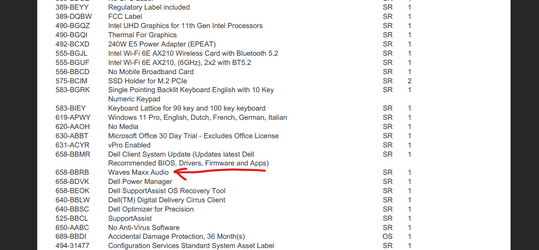
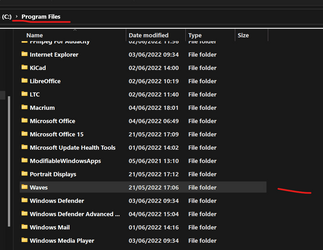
Nothing comes up searching for that on the PC that I can see. I'll have a think, its not mission critical but it would be interesting to know what Dell say. Like you I'll probably clean install at some point.


Screenshot 2022-06-06 181914.png
 

My Computer My Computer

At a glance

W11 Pro x64 ongoing Canary 29500 latest buildsIntel i58GbIntel HD Graphics
OS
W11 Pro x64 ongoing Canary 29500 latest builds
Computer type
Laptop
Manufacturer/Model
Dell 7760 Mobile Precision 17"
CPU
Intel i5
Motherboard
Unknown
Memory
8Gb
Graphics Card(s)
Intel HD Graphics
Sound Card
Realtek
Monitor(s) Displays
Internal
Hard Drives
2 x 256Gb SSD
PSU
Dell 240 watt
Mouse
Dell Premier Bluetooth
Internet Speed
50Mbps
Browser
Edge
Antivirus
Default Microsoft Security
Hmmm. Program Files.

One to investigate tomorrow.

Screenshot 2022-06-06 183358.png
 

My Computer My Computer

At a glance

W11 Pro x64 ongoing Canary 29500 latest buildsIntel i58GbIntel HD Graphics
OS
W11 Pro x64 ongoing Canary 29500 latest builds
Computer type
Laptop
Manufacturer/Model
Dell 7760 Mobile Precision 17"
CPU
Intel i5
Motherboard
Unknown
Memory
8Gb
Graphics Card(s)
Intel HD Graphics
Sound Card
Realtek
Monitor(s) Displays
Internal
Hard Drives
2 x 256Gb SSD
PSU
Dell 240 watt
Mouse
Dell Premier Bluetooth
Internet Speed
50Mbps
Browser
Edge
Antivirus
Default Microsoft Security
Just posting this for interest...

Dell seem to have various reports of 'problems' with Wave audio when I did a bit of research.

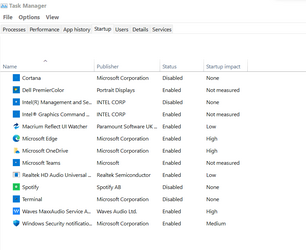
Task Manager shows Waves is enabled.

Waves 1.png

System Configuration shows it up and running.

Waves 2.png

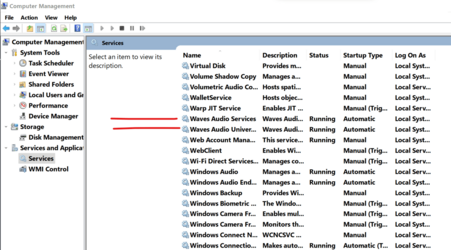
Computer Management shows it up and running.

Waves 3.png

So where is it? That is the big question :confused:

Tbh I'm not to fussed at this point but it is a bit of a puzzle.
 

My Computer My Computer

At a glance

W11 Pro x64 ongoing Canary 29500 latest buildsIntel i58GbIntel HD Graphics
OS
W11 Pro x64 ongoing Canary 29500 latest builds
Computer type
Laptop
Manufacturer/Model
Dell 7760 Mobile Precision 17"
CPU
Intel i5
Motherboard
Unknown
Memory
8Gb
Graphics Card(s)
Intel HD Graphics
Sound Card
Realtek
Monitor(s) Displays
Internal
Hard Drives
2 x 256Gb SSD
PSU
Dell 240 watt
Mouse
Dell Premier Bluetooth
Internet Speed
50Mbps
Browser
Edge
Antivirus
Default Microsoft Security
Just posting this for interest...

Dell seem to have various reports of 'problems' with Wave audio when I did a bit of research.

Task Manager shows Waves is enabled.

View attachment 30900

System Configuration shows it up and running.

View attachment 30901

Computer Management shows it up and running.

View attachment 30902

So where is it? That is the big question :confused:

Tbh I'm not to fussed at this point but it is a bit of a puzzle.
Try a reinstall,


My Computers My Computers

  • At a glance

    Win 11 ProAMD Ryzen™ 7 7730U24GB Dual-Channel DDR4 @ 1596MHz (22-22-22-52)512MB ATI AMD Radeon Graphics (ASUStek Comput...
    OS
    Win 11 Pro
    Computer type
    Laptop
    Manufacturer/Model
    ASUS Vivobook
    CPU
    AMD Ryzen™ 7 7730U
    Motherboard
    M1605YA
    Memory
    24GB Dual-Channel DDR4 @ 1596MHz (22-22-22-52)
    Graphics Card(s)
    512MB ATI AMD Radeon Graphics (ASUStek Computer Inc)
    Monitor(s) Displays
    Generic PnP Monitor (1920x1200@60Hz) - P1 PLUS (1920x1080@59Hz)
    Screen Resolution
    1920 X 1200
    Hard Drives
    953GB Western Digital WD
    PSU
    45 Watts
    Mouse
    Lenovo Bluetooth.
    Internet Speed
    500 Mbps
    Browser
    Edge
    Antivirus
    Defender
  • At a glance

    Windows 11AMD Ryzen 7 5800H / 3.2 GHz32 GB DDR4 SDRAM 3200 MHzNVIDIA GeForce RTX 3060 6 GB GDDR6 SDRAM
    Operating System
    Windows 11
    Computer type
    Laptop
    Manufacturer/Model
    ACER NITRO
    CPU
    AMD Ryzen 7 5800H / 3.2 GHz
    Motherboard
    CZ Scala_CAS (FP6)
    Memory
    32 GB DDR4 SDRAM 3200 MHz
    Graphics card(s)
    NVIDIA GeForce RTX 3060 6 GB GDDR6 SDRAM
    Sound Card
    Realtek Audio. NVIDIA High Definition Audio
    Monitor(s) Displays
    15.6" LED backlight 1920 x 1080 (Full HD) 144 Hz
    Screen Resolution
    1920 x 1080 (Full HD)
    Hard Drives
    Samsung 970 Evo Plus 2TB NVMe M.2
    PSU
    180 Watt, 19.5 V
    Mouse
    Lenovo Bluetooth
    Internet Speed
    500 Mbps
    Browser
    Edge
    Antivirus
    Defender
Try a reinstall,

That is always an option. At this present moment I'll do a bit more digging, perhaps even asking Dell to see what they might say seeing as this is effectively in an 'out of the box' condition.
 

My Computer My Computer

At a glance

W11 Pro x64 ongoing Canary 29500 latest buildsIntel i58GbIntel HD Graphics
OS
W11 Pro x64 ongoing Canary 29500 latest builds
Computer type
Laptop
Manufacturer/Model
Dell 7760 Mobile Precision 17"
CPU
Intel i5
Motherboard
Unknown
Memory
8Gb
Graphics Card(s)
Intel HD Graphics
Sound Card
Realtek
Monitor(s) Displays
Internal
Hard Drives
2 x 256Gb SSD
PSU
Dell 240 watt
Mouse
Dell Premier Bluetooth
Internet Speed
50Mbps
Browser
Edge
Antivirus
Default Microsoft Security
Back
Top Bottom