New Layout Options for OneNote on Windows are coming soon


The #1 request we’ve heard from educators and schools looking to move to the OneNote on Windows (Desktop) version is an option to allow the user interface to look similar to the OneNote for Windows 10 version of OneNote, with pages, sections and notebooks aligned on the left-hand side, and the horizontal tabs to disappear. We’ve heard that many students also prefer this layout option to help simplify navigation, while making OneNote “look the same” on multiple platforms like OneNote web, Mac and iPad. We always prioritize educator feedback, and so we’re excited to announce a new way to navigate your notebooks, sections, and pages in OneNote on Windows is coming in early 2023 🥳
large


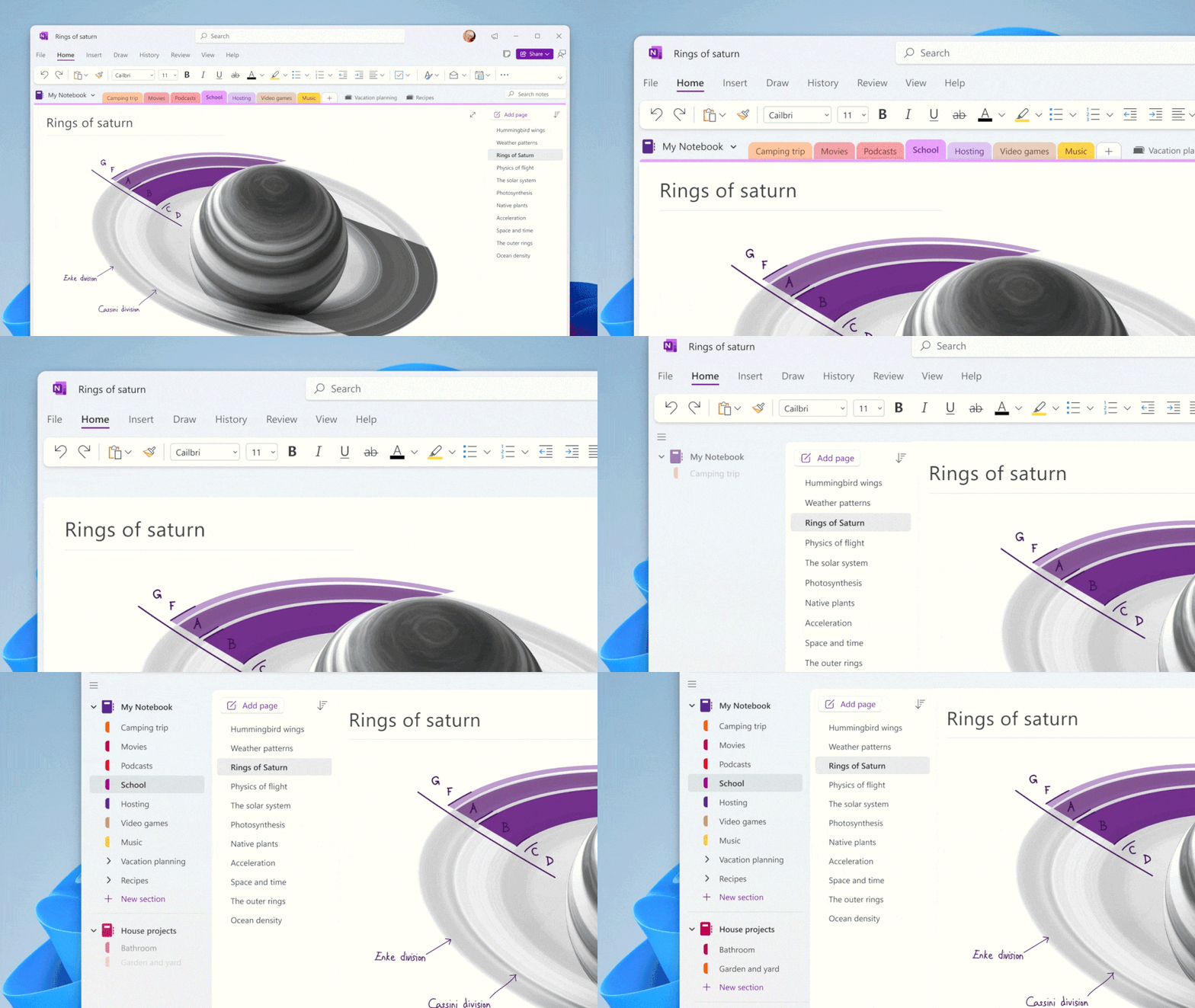
Using the forthcoming new Vertical Tabs layout option, you will be able to change your OneNote on Windows experience to the same left-sided layout on OneNote for Windows 10, Web, Mac, and iPad.

The OneNote team is putting the finishing touches on this experience before we roll it out to the general public in early 2023, but keep an eye on our official Twitter and Tech Community blog for more information.

When this new experience rolls out, switching to vertical tabs in OneNote on Windows will be easy as 1, 2, 3.
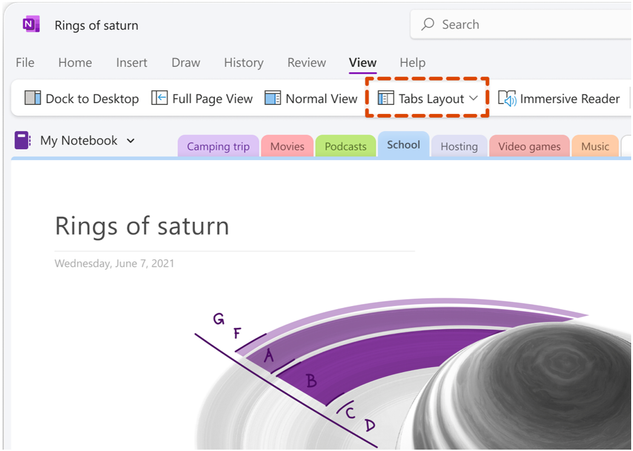
  1. Click the View Tab -> Tabs Layout

    634x451

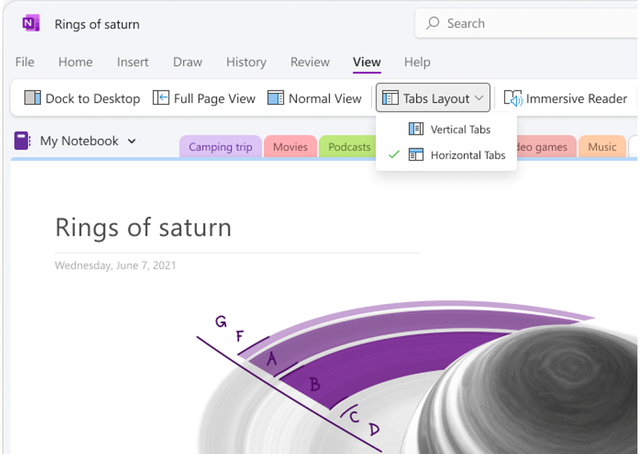
  2. Select Vertical Tabs

    640x454

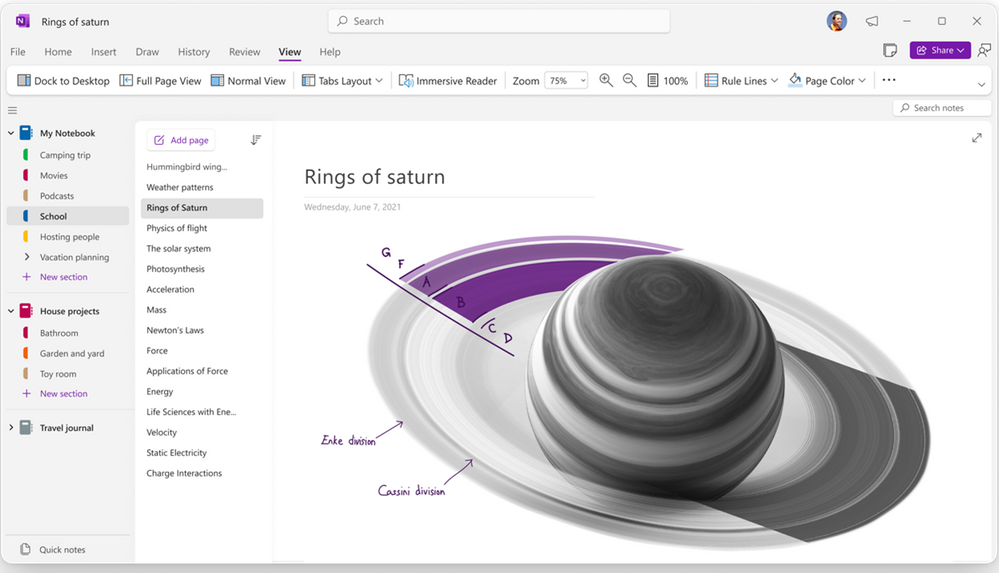
  3. Your Notebooks and pages will now appear on the left.
    large
If you prefer having the section tabs at the top of the canvas, you will easily be able to switch back by selecting Horizontal Tabs

Requirements​

This feature will only available for OneNote on Windows. It is not available for OneNote for Windows 10.

How do I get the OneNote on Windows app?​

The OneNote app can be downloaded on the Microsoft Store or via onenote.com/download.

Availability​

This feature will be rolling out soon to Insiders running OneNote on Windows. NOTE: If you’re not an Office Insider yet, click here to learn how to join.

Mike Tholfsen
Group Product Manager
Microsoft Education

Source:
 
The only use I have for OneNote is to make notes in my OneDrive folder (I use OneDrive only as a USB stick in the cloud) ...

... and the only reason I use OneNote is that it is readily available in the OneDrive folder ...

... in other words, OneNote is of very limited use for me ...

I wonder what others use OneNote for ...
 

My Computer My Computer

At a glance

Windows 10 Pro
OS
Windows 10 Pro
I have OneNote for Windows 10 and OneNote that's part of Office 2021 so the "one" in OneNote is lost on me. :-)
 

My Computer My Computer

At a glance

Windows 11 Professional 25H2Intel Core i9 11900K64GBNVIDIA GeForce GTX 1650
OS
Windows 11 Professional 25H2
Computer type
PC/Desktop
Manufacturer/Model
Digital Storm VELOX
CPU
Intel Core i9 11900K
Motherboard
ASUS PRIME Z590-P
Memory
64GB
Graphics Card(s)
NVIDIA GeForce GTX 1650
Sound Card
Realtek onboard
Monitor(s) Displays
Acer R221Q 21.5"
Screen Resolution
1920 x 1080
Hard Drives
2 x Samsung SSD 990 EVO Plus (1 TB)
2 x Seagate ST4000NE001 (4 TB)
PSU
None
Case
VELOX
Cooling
Cooler Master
Keyboard
Logitech
Mouse
Kensington trackball
Browser
Firefox, Chrome
Antivirus
Windows Defender, Malwarebytes
Hi,
Notebook ? I use this for nothing what's the point of it seeing it's an office crapapp word is more likely to fit the bill.
As far as the "note" part I use a mobile app for things I want to remember to do oops isn't that todo app another I don't use ms apps for

Notepad mainly for stripping formatting from urls/ website sludge.
 

My Computer My Computer

At a glance

Win-7-10-11Pro's10900k & 9940x & 5930kTrident-Z Royal 4000c16 2x16gb & Trident-Z 36...Titan Xp & 1080ti FTW3 & evga 980ti gaming
OS
Win-7-10-11Pro's
Computer type
PC/Desktop
Manufacturer/Model
Acer 17" Nitro 7840sn/ 2x16gb 5600c40/ 4060/ stock 1tb-os/ 4tb sn850x
CPU
10900k & 9940x & 5930k
Motherboard
z490-Apex & x299-Apex & x99-Sabertooth
Memory
Trident-Z Royal 4000c16 2x16gb & Trident-Z 3600c16 4x8gb & 3200c14 4x8gb
Graphics Card(s)
Titan Xp & 1080ti FTW3 & evga 980ti gaming
Sound Card
Onboard Realtek x3
Monitor(s) Displays
1-AOC G2460PG 24"G-Sync 144Hz/ 2nd 1-ASUS VG248QE 24"/ 3rd LG 43" series
Screen Resolution
1920-1080 not sure what the t.v is besides 43" class scales from 1920-1080 perfectly
Hard Drives
2-WD-sn850x 4tb/ 970evo+500gb/ 980 pro 2tb.
PSU
1000p2 & 1200p2 & 850p2
Case
D450 x2 & 1 Test bench in cherry Entertainment center
Cooling
Custom water loops x3 with 2x mora 360mm rads only 980ti gaming air cooled
Keyboard
G710+x3
Mouse
Redragon x3
Internet Speed
xfinity gigabyte
Browser
Firefox
Antivirus
mbam pro
I have OneNote for Windows 10 and OneNote that's part of Office 2021 so the "one" in OneNote is lost on me. :-)
This post made me use my 'OneNote for Windows 10' for the first time ever > created a test entry > but ...

... where is the data file?

Edit: Oops, found it, it's in the hidden AppData folder, who would have thunk it
 
Last edited:

My Computer My Computer

At a glance

Windows 10 Pro
OS
Windows 10 Pro
Microsoft OneNote is one of my most used apps. With my computers and my smartphone I've essentially gone paperless.

Before computers and in the days of yellow sticky notes, I would make notes of things I wanted to remember and then promptly lose them. I might remember that I wrote it down somewhere, but where was it now?

Whenever I would have written something on a sticky note, I now put it in OneNote. Over the years I've accumulated notes on thousands of things I wanted to remember. The beauty of OneNote is that it is completely searchable and I always have it with me. I can instantly find anything I made a note about over the years. For example I was at Lowe's the other day and needed the measurements of my back door. I had made a note about that some years ago and with a quick search on OneNote on my phone, there it was.

I've got searchable notes on thousands of things about my computers, about software, about things that I use and need every day that are always with me wherever I go.

OneNote is an incredibly useful and ingrained part of my life that I would not want to be without.
 

My Computers My Computers

  • At a glance

    Windows 11 ProIntel Series 3 Core Ultra X9 388H64GB LPDDR5x 9600 MT/sIntel Arc graphics B390 Panther Lake
    OS
    Windows 11 Pro
    Computer type
    Laptop
    Manufacturer/Model
    Dell XPS 16 DA16260
    CPU
    Intel Series 3 Core Ultra X9 388H
    Memory
    64GB LPDDR5x 9600 MT/s
    Graphics Card(s)
    Intel Arc graphics B390 Panther Lake
    Monitor(s) Displays
    16" 3.2K Tandem OLED Infinity Edge
    Screen Resolution
    3200 x 2000 16:10 236 PPI
    Hard Drives
    1 Terabyte M.2 PCIe NVMe SSD
    Case
    Black Anodized Aluminum
    Cooling
    Vapor Chamber Cooling
    Mouse
    None
    Internet Speed
    942 Mbps Netgear Mesh + 2 Satellites
    Browser
    Microsoft Edge (Chromium)
    Antivirus
    Windows Security (Defender)
    Other Info
    NPU delivering 67 TOPS
    Microsoft 365 subscription
    Microsoft Office 365
    Microsoft OneDrive 1TB Cloud
    Microsoft Visual Studio
    Microsoft Visual Studio Code
    Microsoft Sysinternals Suite
    Microsoft BitLocker
    Microsoft Copilot
    Dell Support Assist
    Dell Command | Update
    Macrium Reflect X subscription
    1Password Password Manager
    Amazon Kindle for PC
    Lightroom/Photoshop subscription
    Interactive Brokers Trader Workstation
  • At a glance

    Windows 11 ProSnapdragon® X Elite (12 Core) with Hexagon NP...32GB LPDDR5x 8448 MT/sIntegrated Adreno GPU
    Operating System
    Windows 11 Pro
    Computer type
    Laptop
    Manufacturer/Model
    Microsoft Surface Laptop 7
    CPU
    Snapdragon® X Elite (12 Core) with Hexagon NPU delivering 45 TOPS
    Memory
    32GB LPDDR5x 8448 MT/s
    Graphics card(s)
    Integrated Adreno GPU
    Sound Card
    Omnisonic speakers with Dolby Atmos spatial sound
    Monitor(s) Displays
    13.8″ PixelSense Flow touchscreen 120 Hz 600 NIT
    Screen Resolution
    2304 × 1536 (201 PPI), 3:2 aspect ratio
    Hard Drives
    1 TB PCIe NVMe Gen 4 SSD
    Case
    Black Anodized Aluminum
    Cooling
    Vapor Chamber Cooling
    Mouse
    None
    Internet Speed
    942 Mbps Netgear Mesh + 2 Satellites
    Browser
    Microsoft Edge (Chromium)
    Antivirus
    Windows Security (Defender)
    Other Info
    Microsoft 365 subscription (Office)
    Microsoft Office 365
    Microsoft OneDrive 1TB Cloud
    Microsoft Visual Studio 2026
    Microsoft Visual Studio Code
    Interactive Brokers Trader Workstation
    Lightroom/Photoshop subscription
    1Password Password Manager
    Microsoft Sysinternals
    Amazon Kindle for PC
    Microsoft BitLocker
    Microsoft Copilot
@TraderGary
Couldn't have said it better myself.
One Note is an indispensable part of my daily computing life.
 

My Computer My Computer

At a glance

Windows 11 RPAMD Ryzen 5 Pro 3400GE @3.30 GHz (4.0 GHz Turbo)20 GB DDR4 2666 (1x16GB + 1x4GB)AMD Radeon Vega 11
OS
Windows 11 RP
Computer type
PC/Desktop
Manufacturer/Model
Lenovo ThinkCentre M75Q-1
CPU
AMD Ryzen 5 Pro 3400GE @3.30 GHz (4.0 GHz Turbo)
Motherboard
Lenovo 3151
Memory
20 GB DDR4 2666 (1x16GB + 1x4GB)
Graphics Card(s)
AMD Radeon Vega 11
Sound Card
Integrated
Monitor(s) Displays
AOC 2369
Screen Resolution
1920 x 1080
Hard Drives
WD 512 GB NVME + SPCC 240GB SATA SSD
PSU
External 65W
Case
Mini (1L)
Microsoft OneNote is one of my most used apps. With my computers and my smartphone I've essentially gone paperless.

Before computers and in the days of yellow sticky notes, I would make notes of things I wanted to remember and then promptly lose them. I might remember that I wrote it down somewhere, but where was it now?

Whenever I would have written something on a sticky note, I now put it in OneNote. Over the years I've accumulated notes on thousands of things I wanted to remember. The beauty of OneNote is that it is completely searchable and I always have it with me. I can instantly find anything I made a note about over the years. For example I was at Lowe's the other day and needed the measurements of my back door. I had made a note about that some years ago and with a quick search on OneNote on my phone, there it was.

I've got searchable notes on thousands of things about my computers, about software, about things that I use and need every day that are always with me wherever I go.

OneNote is an incredibly useful and ingrained part of my life that I would not want to be without.
I'm with you, I dearly love this wonderful program. Granted, it could some improvements (tables more like Word), and much easier interface. As I surf the web, I am always finding tips and hints on just about everything. I just copy and paste into a notebook. I save links in there too, websites that I want to come back to. The search is dynamite, works really well.

The only problem I am having, I can't seem to have my cake (vertical tabs) and eat it too (pages on the right). I like the pages opening up in the center of the screen. Doesn't matter if I have both vertical and horizontal tabs at the same time, in fact that would be good. To go through the process of the vertical tabs on the left and pages on the right, the vertical tabs show only if the pages are on the left too. Any ideas?

I have version 2021
 

My Computer My Computer

At a glance

Windows 10 physical Windows 11 virtual12128Nvidia
OS
Windows 10 physical Windows 11 virtual
Computer type
PC/Desktop
Manufacturer/Model
Custom Built
CPU
12
Motherboard
Asus
Memory
128
Graphics Card(s)
Nvidia
Screen Resolution
1360x768
Hard Drives
2
PSU
850
Case
Cooler Master
Cooling
fans
Keyboard
ergonomic
Mouse
wired
Browser
several
Antivirus
abast
Back
Top Bottom