UPDATE 9/13:

 www.elevenforum.com
Source:
 www.elevenforum.com
New Office Insider Beta Channel v2210 build 15709.20000 - Sept. 13
New Office Insider Beta Channel version 2210 build 15709.20000 has been released. Release notes will be posted when made available by Microsoft. Source: Release Notes for Beta Channel - Office release notes Update History for Office Beta Channel - Office release notes Office Insiders...
www.elevenforum.com
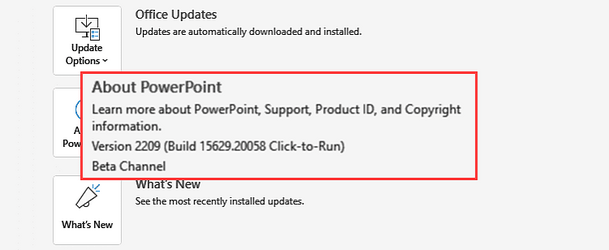
Version 2209 (Build 15629.20058)
Feature updates
Excel
- Prevent data leaks more easily with the new Sensitivity toolbar Sensitivity labels powered by Microsoft Purview Information Protection are now displayed alongside the filename in the app's title bar, allowing you to easily recognize and adhere to your organization's policies. The sensitivity toolbar is also available while saving new documents or renaming existing ones, helping you keep information security at your fingertips.
- Excel PivotTable version compatibility user messaging: Excel now gives alerts about PivotTable compatibility issues and provides informative documentation and workarounds. When your version of Excel is unable to read data in a workbook, we present users with documentation that provides options to proactively troubleshoot and resolve the issue. In addition, we also allow users to upload their Excel document to OneDrive so they can seamlessly open the file in Excel for the web.
Outlook
- We added a registry key that hides the “Try the new Outlook” toggle.
Registry Key:
To learn more about the new Outlook for Windows, please click here. For additional information on managing mailbox access to the new Outlook for Windows, please click here.HKEY_CURRENT_USER\Software\Microsoft\Office\16.0\Outlook\Options\General
“HideNewOutlookToggle”
0 (default) - “Try the new Outlook” toggle, if available in selected update channel, is displayed to users.
1 - “Try the new Outlook” toggle is hidden.PowerPoint
- Prevent data leaks more easily with the new Sensitivity toolbar Sensitivity labels powered by Microsoft Purview Information Protection are now displayed alongside the filename in the app's title bar, allowing you to easily recognize and adhere to your organization's policies. The sensitivity toolbar is also available while saving new documents or renaming existing ones, helping you keep information security at your fingertips.
Word
- Prevent data leaks more easily with the new Sensitivity toolbar Sensitivity labels powered by Microsoft Purview Information Protection are now displayed alongside the filename in the app's title bar, allowing you to easily recognize and adhere to your organization's policies. The sensitivity toolbar is also available while saving new documents or renaming existing ones, helping you keep information security at your fingertips.
Resolved issues
Excel
- We fixed an issue where the app closed unexpectedly when accessing files containing rich entities.
- We fixed an issue where Excel could close unexpectedly when using Office Scripts to manipulate PivotTable fields.
- We fixed an issue where an Excel file could become corrupt after setting formatting (such as fill color) on some cells in a PivotTable on the row or column axis and then moving those fields to the Filter area of the PivotTable.
- We fixed an issue with the sheet navigation buttons, which were flipped when using a sheet in right-to-left orientation.
- We fixed an issue where the app would close unexpectedly when selecting error #FIELD! cell in sheet and then opening Error checking OOUI field option for Field errors.
Outlook
- We fixed an issue that caused the Customization Quick Access Toolbar file (.exportedUI) to fail to import when the simplified ribbon was in use.
- We fixed an issue that caused users to be unable to see the Due Date on search results in Outlook Desktop.
Word
- We fixed an issue where the user could not click on a hyperlink in track changes.
- We fixed an issue where comments might not load.
- We fixed an issue where Word may not show the right file when all open file windows have been minimized.
Source:
- Release Notes for Beta Channel - Office release notes
- Update History for Office Beta Channel - Office release notes
- Office Insiders
Latest Office and Microsoft 365 Updates for Windows
https://www.elevenforum.com/t/office-2016-and-office-2019-have-reached-end-of-support.40888/ https://www.elevenforum.com/t/office-ltsc-2021-end-of-support-on-october-13-2026.46145/...
www.elevenforum.com
Last edited: