

- Local time
- 8:50 PM
- Posts
- 6,031
- Location
- Hafnarfjörður IS
- OS
- Windows XP,11 Linux Fedora Rawhide pre-release 46
I've never been able to make this wretched thing work same with vivetool.
Maybe it's just me - but I've found by far the best way to have a decent all purpose tool for repairing, diagnosing or otherwise tweaking Windows systems is to have a full blown Windows running system that boots and runs from an external disk -- formerly known as Windows2Go type stuff. It's really easy and even if you use it un-activated on different hardware Windows doesn't reboot until around after 2 hrs which should be enough time to analyse / fix the problems. You can even have VM's on this and the Linux subsystem if you so wish to make it a 99% really useful tool -- especially if it's stored on one of those SSD type NVME devices in an enclosure not much bigger than the width of 2 standard size cigars.
To create a Win2GO from a running system simply clone your current windows to an external device, install the boot loader on the external device and then boot it.
After booting the external device set the Portable OS flag in the registry to '0' so you can apply updates.
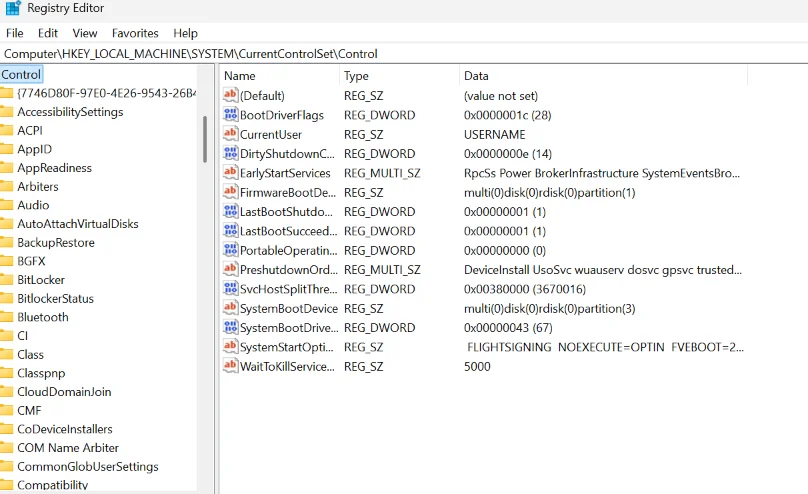
Don't pay or use complex methods for this -- it's simple. If you want a clean base system with just the standard components - easy too -- simply run dism /Apply-Image to the device using whatever Windows install version you want as a base and install the boot loader (bcdboot) -- reset the portable OS flag though after ist boot. !!
Cheers
jimbo
Maybe it's just me - but I've found by far the best way to have a decent all purpose tool for repairing, diagnosing or otherwise tweaking Windows systems is to have a full blown Windows running system that boots and runs from an external disk -- formerly known as Windows2Go type stuff. It's really easy and even if you use it un-activated on different hardware Windows doesn't reboot until around after 2 hrs which should be enough time to analyse / fix the problems. You can even have VM's on this and the Linux subsystem if you so wish to make it a 99% really useful tool -- especially if it's stored on one of those SSD type NVME devices in an enclosure not much bigger than the width of 2 standard size cigars.
To create a Win2GO from a running system simply clone your current windows to an external device, install the boot loader on the external device and then boot it.
After booting the external device set the Portable OS flag in the registry to '0' so you can apply updates.
Don't pay or use complex methods for this -- it's simple. If you want a clean base system with just the standard components - easy too -- simply run dism /Apply-Image to the device using whatever Windows install version you want as a base and install the boot loader (bcdboot) -- reset the portable OS flag though after ist boot. !!
Cheers
jimbo
My Computer
At a glance
Windows XP,11 Linux Fedora Rawhide pre-releas...2 X Intel i7
- OS
- Windows XP,11 Linux Fedora Rawhide pre-release 46
- Computer type
- PC/Desktop
- CPU
- 2 X Intel i7
- Screen Resolution
- 4KUHD X 2






