No Bootable Devices Found


TheWeav

New member
Local time
6:44 PM
Posts
2
OS
Windows 11 Pro
Dell Optiplex model 3060 Pro
The pc had been turned off the night before . The next morning I noticed it had a white screen which said the clock was wrong and to restore the bios. I pushed the Restore Bios button and the pc booted up just fine. This same thing the next day and it rebooted but none of the programs would launch. The third time it said No Bootable Devices Found. I went into the bios, and found tha6 there no devices listed. I tried the built-in Dell bios repair but when the pc booted it had the same no Bootable devices found message. I ran a complete diagnostics and it found no problems. Thanks for taking the time to read this. Any help would be appreciated.
 

My Computer My Computer

At a glance

Windows 11 Pro
OS
Windows 11 Pro
Computer type
PC/Desktop
Manufacturer/Model
Dell 3060
Dell Optiplex model 3060 Pro
The pc had been turned off the night before . The next morning I noticed it had a white screen which said the clock was wrong and to restore the bios. I pushed the Restore Bios button and the pc booted up just fine. This same thing the next day and it rebooted but none of the programs would launch. The third time it said No Bootable Devices Found. I went into the bios, and found tha6 there no devices listed. I tried the built-in Dell bios repair but when the pc booted it had the same no Bootable devices found message. I ran a complete diagnostics and it found no problems. Thanks for taking the time to read this. Any help would be appreciated.


Hello and welcome to ElevenForum. :-)


When the BIOS keeps forgetting stuff, it means the CMOS battery is dead or almost dead.
The CMOS battery is located on the motherboard and is about the size of a nickle.

They cost about $6 and you can get them anywhere.
Places like drug stores, Walmarts, jewelry stores, Home Depot... etc.

The battery is a CR 2032 battery.


Here's some things that you may find useful... when driving Windows 11...


My Computers My Computers

  • At a glance

    Win 11 Home ♦♦♦26200.8875 ♦♦♦♦♦♦♦25H2AMD Ryzen 7 3700XG.Skill (F4-3200C14D-16GTZKW)EVGA RTX 2070 (08G-P4-2171-KR)
    OS
    Win 11 Home ♦♦♦26200.8875 ♦♦♦♦♦♦♦25H2
    Computer type
    PC/Desktop
    Manufacturer/Model
    Built by Ghot® [May 2020]
    CPU
    AMD Ryzen 7 3700X
    Motherboard
    Asus Pro WS X570-ACE (BIOS 5302)
    Memory
    G.Skill (F4-3200C14D-16GTZKW)
    Graphics Card(s)
    EVGA RTX 2070 (08G-P4-2171-KR)
    Sound Card
    Realtek ALC1220P / ALC S1220A
    Monitor(s) Displays
    Dell U3011 30"
    Screen Resolution
    2560 x 1600
    Hard Drives
    2x Samsung 860 EVO 500GB,
    WD 4TB Black FZBX - SATA III,
    WD 8TB Black FZBX - SATA III,
    DRW-24B1ST CD/DVD Burner
    PSU
    PC Power & Cooling 750W Quad EPS12V
    Case
    Cooler Master ATCS 840 Tower
    Cooling
    CM Hyper 212 EVO (push/pull)
    Keyboard
    Ducky DK9008 Shine II Blue LED
    Mouse
    Logitech Optical M-100
    Internet Speed
    300/300
    Browser
    Firefox (latest)
    Antivirus
    Bitdefender Total Security
    Other Info
    Speakers: Klipsch Pro Media 2.1
  • At a glance

    Windows XP Pro 32bit w/SP3AMD Athlon 64 X2 5000+ (OC'd @ 3.2Ghz)TWIN2X2048-6400C4DHX (2 x 1GB, DDR2 800)EVGA 256-P2-N758-TR GeForce 8600GT SSC
    Operating System
    Windows XP Pro 32bit w/SP3
    Computer type
    PC/Desktop
    Manufacturer/Model
    Built by Ghot® (not in use)
    CPU
    AMD Athlon 64 X2 5000+ (OC'd @ 3.2Ghz)
    Motherboard
    ASUS M2N32-SLI Deluxe Wireless Edition
    Memory
    TWIN2X2048-6400C4DHX (2 x 1GB, DDR2 800)
    Graphics card(s)
    EVGA 256-P2-N758-TR GeForce 8600GT SSC
    Sound Card
    Onboard
    Monitor(s) Displays
    ViewSonic G90FB Black 19" Professional (CRT)
    Screen Resolution
    up to 2048 x 1536
    Hard Drives
    WD 36GB 10,000rpm Raptor SATA
    Seagate 80GB 7200rpm SATA
    Lite-On LTR-52246S CD/RW
    Lite-On LH-18A1P CD/DVD Burner
    PSU
    PC Power & Cooling Silencer 750 Quad EPS12V
    Case
    Generic Beige case, 80mm fans
    Cooling
    ZALMAN 9500A 92mm CPU Cooler
    Keyboard
    Logitech Classic Keybooard 200
    Mouse
    Logitech Optical M-BT96a
    Internet Speed
    300/300
    Browser
    Firefox 3.x ??
    Antivirus
    Symantec (Norton)
    Other Info
    Still assembled, still runs. Haven't turned it on for 15 years?
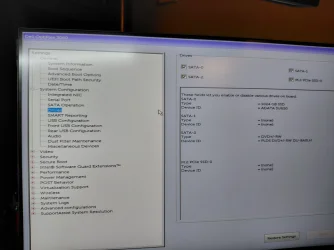
INSTALLED NEW BATTERY, NO HELP. IN THE BIOS SETTINGS UNDER SYSTEM CONFIGURATION, DRIVES, IT SHOWS THE M.2 PCLE SSD-0 =(NONE). COULD THIS BE A DEFECTIVE DRIVE?
 

Attachments

  • 20260609_212901.webp
    20260609_212901.webp
    478.8 KB · Views: 2

My Computer My Computer

At a glance

Windows 11 Pro
OS
Windows 11 Pro
Computer type
PC/Desktop
Manufacturer/Model
Dell 3060
Take it to your computer repair shop and let them look at it. If its hardware failure, you will probably need to replace the drive.
 

My Computers My Computers

  • At a glance

    Windows 11 Education For 25H2Intel® Core i7 5500u8 GBIntel HD Family Graphics 5500 AMD Firepro 4150M
    OS
    Windows 11 Education For 25H2
    Computer type
    Laptop
    Manufacturer/Model
    HP ZBook G2
    CPU
    Intel® Core i7 5500u
    Motherboard
    HP
    Memory
    8 GB
    Graphics Card(s)
    Intel HD Family Graphics 5500 AMD Firepro 4150M
    Sound Card
    Realtek High Audio
    Hard Drives
    1 TB SSD
    Mouse
    HP USB Mouse
    Antivirus
    Windows Defender
  • At a glance

    Windows 11 Pro For Workstations 25H2Xeon 1535m v632 GBAMD Quadro Pro 4100
    Operating System
    Windows 11 Pro For Workstations 25H2
    Computer type
    Laptop
    Manufacturer/Model
    HP Zbook G4
    CPU
    Xeon 1535m v6
    Motherboard
    HP
    Memory
    32 GB
    Graphics card(s)
    AMD Quadro Pro 4100
    Sound Card
    Bang and Olufson Audio
    Hard Drives
    1TB SSD
    Mouse
    HP USB Mouse
    Antivirus
    Windows Defender
Back
Top Bottom