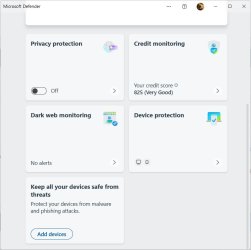
No checkmark next to windows defender


oshea1987

Member
Local time
9:29 AM
Posts
53
OS
Windows 11
Hi. the other day i posted about my laptop began taking a lot longer to boot up than it used to. So i'm still trying to figure that out but also tonight I noticed that with the microsoft defender icon in my taskbar it no longer shows the green check mark like it used to. I dont know why?
 

My Computer My Computer

At a glance

Windows 11
OS
Windows 11
Computer type
Laptop
Manufacturer/Model
Lenovo Ideapad 1
If you mouse-hover on the icon, it will give a short status. What does yours say? Mine (normal, checked) says: Windows security - No actions needed.
 

My Computer My Computer

At a glance

Windows 11 Pro 25H2
OS
Windows 11 Pro 25H2
Computer type
PC/Desktop
mine just says, microsoft defender.
 

My Computer My Computer

At a glance

Windows 11
OS
Windows 11
Computer type
Laptop
Manufacturer/Model
Lenovo Ideapad 1
If I click on the icon, "Security at a glance" panel shows up. Does yours show anything suspicious? Mine show, including:
  • Virus & Threat protection: ✅, No action needed.
  • Account protection: ✅, No action needed.
  • Firewall & Network protection: ✅, No action needed.
  • App & Browser control: ✅, No action needed.
  • Device security: ✅, No action needed.
  • Device performance & Heath: no check mark, No action needed
  • The other two items don't show the above statuses
On the other hand, your "problem" might go away by itself. Try rebooting?
* Windows Defender Taskbar Icon - Windows 10 Help Forums
 

My Computer My Computer

At a glance

Windows 11 Pro 25H2
OS
Windows 11 Pro 25H2
Computer type
PC/Desktop
of course i've tried rebooting about a million times, other current issue is that my laptop takes way longer to boot up than it used to. it used to go from the lenovo screen to the lock screen instantly and now, after the lenovo screen, it has a black screen for a solid minute before it goes to the lock screen, and i'm talking about the microsoft defender shield icon in the system tray, it usually has a green checkmark next to it. when i open windows security however it shows the usual stuff you mentioned.
 

My Computer My Computer

At a glance

Windows 11
OS
Windows 11
Computer type
Laptop
Manufacturer/Model
Lenovo Ideapad 1
of course i've tried rebooting about a million times
People are trying to help, but with limited information and lack of pictures showing what the issue is.

You mean it looks like this.

This is what mine currently looks like.

defender.png
 

My Computer My Computer

At a glance

Windows 11 Pro 25H2 Build 26200.7623AMD Ryzen 5 1600 Six-Core Processorx2 Capacity: 4 GB Type: DDR4-2933 PC4-23466 S...NVIDIA GeForce GTX 980 VRAM: 3.99 GB
OS
Windows 11 Pro 25H2 Build 26200.7623
Computer type
PC/Desktop
Manufacturer/Model
Custom
CPU
AMD Ryzen 5 1600 Six-Core Processor
Motherboard
MSI B350M MORTAR ARCTIC (MS-7A37) 2.0
Memory
x2 Capacity: 4 GB Type: DDR4-2933 PC4-23466 Speed: 2800MT/s Model: TEAMGROUP-UD4-3000
Graphics Card(s)
NVIDIA GeForce GTX 980 VRAM: 3.99 GB
Sound Card
Realtek High Definition Audio
Monitor(s) Displays
Samsung 75 inch QLED 4K
Screen Resolution
3840x2160
Hard Drives
PC601 NVMe SK hynix 256GB Size: 256GB Partitions: 4 (Windows Installed)
ST4000VN000-1H4168 Size: 4TB Partitions: 1
WDC WD40EFRX-68WT0N0 Size: 4TB Partitions: 1
ST8000AS0002-1NA17Z Size: 8TB Partitions: 2
WDC WD40EFRX-68WT0N0 Size: 4TB Partitions: 1
WDC WD30EZRX-00MMMB0 Size: 3TB Partitions: 1
TOSHIBA DT01ACA300 Size: 3TB Partitions: 1
ST2000DM001-1ER164 Size: 2TB Partitions: 1
ST3000DM001-1CH166 Size: 3TB Partitions: 2
PSU
Corsair 850W RM850x 80+ Gold Fully Modular ATX
Case
N/A
Cooling
N/A
Keyboard
N/A
Mouse
N/A
Internet Speed
800mbps Down, 40mbps up, HFC Cable
Browser
Chrome / Firefox / Edge(not used, installed only)
Antivirus
Defender
Other Info
This machine is used as a media pc for watching tv shows and movies.

Kodi is installed and used for media.

This windows install is completely stock, not running any start menu or any other type of program to modify windows explorer or start menus. Only uninstalled pre installed apps.
If you mouse-hover on the icon, it will give a short status. What does yours say? Mine (normal, checked) says: Windows security - No actions needed.
The question is not about Windows Security, he's asking about Windows Defender.
 

My Computer My Computer

At a glance

Windows 11 ProfessionalIntel Core i5-940032GBIntegrated Intel UHD Graphics 630
OS
Windows 11 Professional
Computer type
PC/Desktop
Manufacturer/Model
Microcenter B677
CPU
Intel Core i5-9400
Motherboard
ASRock H310CM-HDV/M.2
Memory
32GB
Graphics Card(s)
Integrated Intel UHD Graphics 630
Sound Card
Intel Kaby Lake - High Definition Audio / cAVS (Audio, Voice, Speech) [A0]
Monitor(s) Displays
LG Model: GSM59F1
Screen Resolution
2560x1080
Case
Lian Li 205M
Antivirus
Kaspersky AV
You can try to update your Microsoft defender.
 

My Computer My Computer

At a glance

Windows, Mac
OS
Windows, Mac
Hi. the other day i posted about my laptop began taking a lot longer to boot up than it used to. So i'm still trying to figure that out but also tonight I noticed that with the microsoft defender icon in my taskbar it no longer shows the green check mark like it used to. I dont know why?
I have never had the green check mark on my Windows Defender icon. I always click on it to get the status and nothing I have being monitored shows as needing attention. See screenshot. The Windows Security icon does show the green check mark.
 

Attachments

  • 2024-10-29_04-27-17.jpg
    2024-10-29_04-27-17.jpg
    31.9 KB · Views: 1

My Computer My Computer

At a glance

Windows 11 ProfessionalIntel Core i5-940032GBIntegrated Intel UHD Graphics 630
OS
Windows 11 Professional
Computer type
PC/Desktop
Manufacturer/Model
Microcenter B677
CPU
Intel Core i5-9400
Motherboard
ASRock H310CM-HDV/M.2
Memory
32GB
Graphics Card(s)
Integrated Intel UHD Graphics 630
Sound Card
Intel Kaby Lake - High Definition Audio / cAVS (Audio, Voice, Speech) [A0]
Monitor(s) Displays
LG Model: GSM59F1
Screen Resolution
2560x1080
Case
Lian Li 205M
Antivirus
Kaspersky AV
After doing a search for windows defender, all my system comes up with is windows defender firewall.

Everything else is covered under windows security.
 

My Computer My Computer

At a glance

Windows 11 Pro 25H2 Build 26200.7623AMD Ryzen 5 1600 Six-Core Processorx2 Capacity: 4 GB Type: DDR4-2933 PC4-23466 S...NVIDIA GeForce GTX 980 VRAM: 3.99 GB
OS
Windows 11 Pro 25H2 Build 26200.7623
Computer type
PC/Desktop
Manufacturer/Model
Custom
CPU
AMD Ryzen 5 1600 Six-Core Processor
Motherboard
MSI B350M MORTAR ARCTIC (MS-7A37) 2.0
Memory
x2 Capacity: 4 GB Type: DDR4-2933 PC4-23466 Speed: 2800MT/s Model: TEAMGROUP-UD4-3000
Graphics Card(s)
NVIDIA GeForce GTX 980 VRAM: 3.99 GB
Sound Card
Realtek High Definition Audio
Monitor(s) Displays
Samsung 75 inch QLED 4K
Screen Resolution
3840x2160
Hard Drives
PC601 NVMe SK hynix 256GB Size: 256GB Partitions: 4 (Windows Installed)
ST4000VN000-1H4168 Size: 4TB Partitions: 1
WDC WD40EFRX-68WT0N0 Size: 4TB Partitions: 1
ST8000AS0002-1NA17Z Size: 8TB Partitions: 2
WDC WD40EFRX-68WT0N0 Size: 4TB Partitions: 1
WDC WD30EZRX-00MMMB0 Size: 3TB Partitions: 1
TOSHIBA DT01ACA300 Size: 3TB Partitions: 1
ST2000DM001-1ER164 Size: 2TB Partitions: 1
ST3000DM001-1CH166 Size: 3TB Partitions: 2
PSU
Corsair 850W RM850x 80+ Gold Fully Modular ATX
Case
N/A
Cooling
N/A
Keyboard
N/A
Mouse
N/A
Internet Speed
800mbps Down, 40mbps up, HFC Cable
Browser
Chrome / Firefox / Edge(not used, installed only)
Antivirus
Defender
Other Info
This machine is used as a media pc for watching tv shows and movies.

Kodi is installed and used for media.

This windows install is completely stock, not running any start menu or any other type of program to modify windows explorer or start menus. Only uninstalled pre installed apps.

Latest Support Threads

Back
Top Bottom