Solved Windows Defender not functioning correctly


Interestingly, a full scan using Defender detected a single Trojan which I immediately eliminated. Last night, I discovered how to run a deep scan with MB and let it run overnight. It found 23 infections which I quarantined.
What were the threats? If you can list them here or export your list.

The HTML redirector that defender found could be a firefox addon. These are dangerous because you cannot trust that the websites you are going to are the actual website as well as the fact that some webpages will load new tabs without your consent.

But at this point, I would do the following:

1.) Remove all addons in firefox. Maybe post a list of them here as well so we can see what you have installed.

2.) Back up any critical personal files to a cloud service like google drive or onedrive, which can identify and remove malware.

3.) Then, Wipe your system, flash your bios to the latest version if able, and then reinstall windows 11. Then restore your data.
 

My Computers My Computers

  • At a glance

    Windows 11 ProRyzen 7 5700 X3D64 GB DDR4 3600mhz Gskill Ripjaws VRTX 4070 Super , 12GB VRAM Asus EVO Overclock
    OS
    Windows 11 Pro
    Computer type
    PC/Desktop
    Manufacturer/Model
    Custom Built
    CPU
    Ryzen 7 5700 X3D
    Motherboard
    MSI MPG B550 GAMING PLUS
    Memory
    64 GB DDR4 3600mhz Gskill Ripjaws V
    Graphics Card(s)
    RTX 4070 Super , 12GB VRAM Asus EVO Overclock
    Monitor(s) Displays
    Gigabyte M27Q (rev. 2.0) 2560 x 1440 @ 170hz HDR
    Hard Drives
    2TB Samsung nvme ssd
    4TB Western Digital nvme ssd
    PSU
    CORSAIR RMx SHIFT Series™ RM750x 80 PLUS Gold Fully Modular ATX Power Supply
    Case
    CORSAIR 3500X ARGB Mid-Tower ATX PC Case – Black
    Cooling
    ID-COOLING FROSTFLOW X 240 CPU Water Cooler
    Keyboard
    Logitech G213
    Mouse
    Logitech G203
    Internet Speed
    1.2gbps Fiber 😎
  • At a glance

    Chrome OSIntel Pentium Quad Core4GB LPDDR4
    Operating System
    Chrome OS
    Computer type
    Laptop
    Manufacturer/Model
    HP Chromebook
    CPU
    Intel Pentium Quad Core
    Memory
    4GB LPDDR4
    Monitor(s) Displays
    14 Inch HD SVA anti glare micro edge display
    Hard Drives
    64 GB emmc
I can't remember the last time Defender encountered an actual virus, but it has gotten very efficient at breaking perfectly legitimate applications from sources Microsoft doesn't approve of.
 

My Computer My Computer

At a glance

Windows 11 22H2 Pro (X-lite Micro 11 version)i7 13850HX (20 cores, 28 threads)32GB DDR5Intel UHD/ RTX 1000 ADA
OS
Windows 11 22H2 Pro (X-lite Micro 11 version)
Computer type
Laptop
Manufacturer/Model
Dell/ Precision 7680
CPU
i7 13850HX (20 cores, 28 threads)
Motherboard
Dell
Memory
32GB DDR5
Graphics Card(s)
Intel UHD/ RTX 1000 ADA
Sound Card
Realtek
Monitor(s) Displays
4K UHD Touchscreen
Screen Resolution
3840 x 2400
Hard Drives
Samsung 512GB system drive
WD Blue 1TB game drive
PSU
240W AC adapter, 1800W when docked
Internet Speed
1 gigabit symmetrical
Browser
Firefox, Librewolf
Antivirus
None. Manully configured so nobody except me can change any critical system files. (Don't ask how, it's probably against some rule somewhere)
Try Microsoft Safety Scanner
You may see notifications of infected files during the scan and then a report after the scan has finished of No Infected files.
This is normal behaviour I assume it flags suspicious file signatures and then further investigates during the scan.
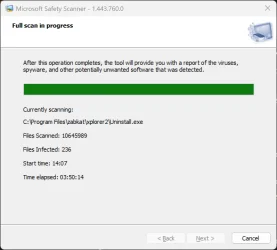
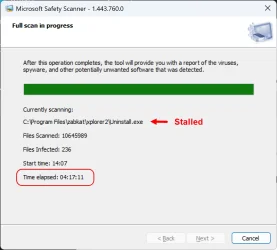
I have been running this since this morning. It is currently showing 236 infections, but seems to have stalled at the uninstaller for Xplorer2. Obviously I will wait to see if that changes. If it hasn't continued after another 30 mins, I will have no choice but to cancel it.

From what I have understood, it only provides a list of infected files found. It doesn't delete or quarantine them?
 

My Computer My Computer

At a glance

Windows 11Intel(R) Core(TM) i9-10900K CPU @ 3.70GHz32,0 GBNvidia GeForce RTX2080 Super
OS
Windows 11
Computer type
Laptop
Manufacturer/Model
Alienware A51M R2
CPU
Intel(R) Core(TM) i9-10900K CPU @ 3.70GHz
Memory
32,0 GB
Graphics Card(s)
Nvidia GeForce RTX2080 Super
Sound Card
Realtek
Screen Resolution
4K
Hard Drives
2TB (2x 1TB PCle M.2 SSD) RAID 0 [Boot] + 2TB (2x 1TB
PCle M.2 SSD) Non-Raid [Storage]
What were the threats? If you can list them here or export your list.

The HTML redirector that defender found could be a firefox addon. These are dangerous because you cannot trust that the websites you are going to are the actual website as well as the fact that some webpages will load new tabs without your consent.

But at this point, I would do the following:

1.) Remove all addons in firefox. Maybe post a list of them here as well so we can see what you have installed.

2.) Back up any critical personal files to a cloud service like google drive or onedrive, which can identify and remove malware.

3.) Then, Wipe your system, flash your bios to the latest version if able, and then reinstall windows 11. Then restore your data.
Other than the trojan I already posted, I can see no way to export the list. In fact, the detection history is showing as empty.

1) No, I need them. Those I rarely use can be removed but most are used daily. Is there a way to export a list of installed addons?

2) Too much on the PC. Most of my critical files are already backed-up on external drives. Otherwise I prefer using MB and Defender.

3) No. Sorry but I am not prepared to do that at this stage. A new BIOS has just been notified, so I will do that as soon as the MSRT scan is completed or abandoned.
 

My Computer My Computer

At a glance

Windows 11Intel(R) Core(TM) i9-10900K CPU @ 3.70GHz32,0 GBNvidia GeForce RTX2080 Super
OS
Windows 11
Computer type
Laptop
Manufacturer/Model
Alienware A51M R2
CPU
Intel(R) Core(TM) i9-10900K CPU @ 3.70GHz
Memory
32,0 GB
Graphics Card(s)
Nvidia GeForce RTX2080 Super
Sound Card
Realtek
Screen Resolution
4K
Hard Drives
2TB (2x 1TB PCle M.2 SSD) RAID 0 [Boot] + 2TB (2x 1TB
PCle M.2 SSD) Non-Raid [Storage]

My Computers My Computers

  • At a glance

    Windows 11 ProRyzen 7 5700 X3D64 GB DDR4 3600mhz Gskill Ripjaws VRTX 4070 Super , 12GB VRAM Asus EVO Overclock
    OS
    Windows 11 Pro
    Computer type
    PC/Desktop
    Manufacturer/Model
    Custom Built
    CPU
    Ryzen 7 5700 X3D
    Motherboard
    MSI MPG B550 GAMING PLUS
    Memory
    64 GB DDR4 3600mhz Gskill Ripjaws V
    Graphics Card(s)
    RTX 4070 Super , 12GB VRAM Asus EVO Overclock
    Monitor(s) Displays
    Gigabyte M27Q (rev. 2.0) 2560 x 1440 @ 170hz HDR
    Hard Drives
    2TB Samsung nvme ssd
    4TB Western Digital nvme ssd
    PSU
    CORSAIR RMx SHIFT Series™ RM750x 80 PLUS Gold Fully Modular ATX Power Supply
    Case
    CORSAIR 3500X ARGB Mid-Tower ATX PC Case – Black
    Cooling
    ID-COOLING FROSTFLOW X 240 CPU Water Cooler
    Keyboard
    Logitech G213
    Mouse
    Logitech G203
    Internet Speed
    1.2gbps Fiber 😎
  • At a glance

    Chrome OSIntel Pentium Quad Core4GB LPDDR4
    Operating System
    Chrome OS
    Computer type
    Laptop
    Manufacturer/Model
    HP Chromebook
    CPU
    Intel Pentium Quad Core
    Memory
    4GB LPDDR4
    Monitor(s) Displays
    14 Inch HD SVA anti glare micro edge display
    Hard Drives
    64 GB emmc
Is there a way to export a list of installed addons?

You can find the list of add-ons you have installed by typing about:support in the address bar then press enter.

Scroll down the page and there will be a listing and names of add-ons you have installed.
 

My Computer My Computer

At a glance

Windows 11 Pro
OS
Windows 11 Pro
1) ... Is there a way to export a list of installed addons?

Or if you have to, then go into Tools - Extensions and themes - and use the Snipping Tool to takes pictures of them. If there many, you may need to take more snips/pictures of them as you scroll down until you get to the end.

Then upload the picture(s) here.

It's a little cumbersome but I've had to do it that way before.
 

My Computers My Computers

  • At a glance

    Windows 11 Pro 25H2 build: (26200.7623)32GB
    OS
    Windows 11 Pro 25H2 build: (26200.7623)
    Computer type
    Laptop
    Manufacturer/Model
    Microsoft Surface Pro
    Memory
    32GB
  • At a glance

    Microsoft 25H2 ProIntel Core Ultra 764GBIntel Integrated Graphics
    Operating System
    Microsoft 25H2 Pro
    Computer type
    Laptop
    Manufacturer/Model
    Dell Pro 14 - PC14250
    CPU
    Intel Core Ultra 7
    Memory
    64GB
    Graphics card(s)
    Intel Integrated Graphics
    Hard Drives
    Micron 1TB SSD
With that many infections I think you need to reconsider.

Good luck to you.
As XRB2E6 said, "You may see notifications of infected files during the scan and then a report after the scan has finished of No Infected files."

MSERT never completed its scan. I waited a long time before cancelling, and of course, it left no log of all it had done.

MSRT-1.webpMSRT-1a.webp

The thing I am most curious about is how an MB deep scan found and quarantined only 2 infections but MSERT claims to have found well over 200. I really need MSERT to complete its scan in order to know if those detected infections are genuine or not, and this is why I wanted to find some way of scanning offline (below Windows).

There is another site I visit regularly to watch streaming content. I know it is peppered with malware and popups, but MB always blocks them, or so it claims. I suppose it is possible that some may have bypassed MB.
 

My Computer My Computer

At a glance

Windows 11Intel(R) Core(TM) i9-10900K CPU @ 3.70GHz32,0 GBNvidia GeForce RTX2080 Super
OS
Windows 11
Computer type
Laptop
Manufacturer/Model
Alienware A51M R2
CPU
Intel(R) Core(TM) i9-10900K CPU @ 3.70GHz
Memory
32,0 GB
Graphics Card(s)
Nvidia GeForce RTX2080 Super
Sound Card
Realtek
Screen Resolution
4K
Hard Drives
2TB (2x 1TB PCle M.2 SSD) RAID 0 [Boot] + 2TB (2x 1TB
PCle M.2 SSD) Non-Raid [Storage]
You can find the list of add-ons you have installed by typing about:support in the address bar then press enter.

Scroll down the page and there will be a listing and names of add-ons you have installed.
Adblock Plus - free ad blocker
Add Search
Add-ons Search Detection
Cisco Webex Extension
ColorZilla
Cookie-Editor
Data Leak Blocker
Default Zoom
Don't track me Google
Download Manager (S3)
DownThemAll!
DuckDuckGo Privacy Essentials
Enhancer for YouTube™
Facebook Container
Form Autofill
FVD Speed Dial
Google search link fix
HTTPS Everywhere
I don't care about cookies
Imagus
IPP Activator
Malwarebytes Browser Guard
MyJDownloader Browser Extension
New Tab
NoScript
Picture-In-Picture
Privacy Badger
Reverse Image Search
RoboForm Password Manager
Search by Image
Silk - Privacy Pass Client
Stylish - Custom themes for any website
Swisscows
Tab Session Manager
Take Webpage Screenshots Entirely - FireShot
To Google Translate
Transparent Standalone Images
Video DownloadHelper
Viewhance
Web Compatibility Interventions
YouTube High Definition
Zoom Extension
Antidote Connector
Don't foodle With Paste
Flag Cookies
Ghostery Tracker & Ad Blocker - Privacy AdBlock
IronVest
Session Boss
 

My Computer My Computer

At a glance

Windows 11Intel(R) Core(TM) i9-10900K CPU @ 3.70GHz32,0 GBNvidia GeForce RTX2080 Super
OS
Windows 11
Computer type
Laptop
Manufacturer/Model
Alienware A51M R2
CPU
Intel(R) Core(TM) i9-10900K CPU @ 3.70GHz
Memory
32,0 GB
Graphics Card(s)
Nvidia GeForce RTX2080 Super
Sound Card
Realtek
Screen Resolution
4K
Hard Drives
2TB (2x 1TB PCle M.2 SSD) RAID 0 [Boot] + 2TB (2x 1TB
PCle M.2 SSD) Non-Raid [Storage]
I suppose I thought you were on the way to a resolution, but you're still finding things that need cleaning up.
I'm just giving the safety scanner a go on this machine to see if it freezes anywhere...
 

My Computer My Computer

At a glance

Win11Pro 24H2 (26100.7462)i7-12700f32gb ddr4nvidia rtx3060ti
OS
Win11Pro 24H2 (26100.7462)
Computer type
PC/Desktop
Manufacturer/Model
self-built
CPU
i7-12700f
Motherboard
gigabyte auros b660
Memory
32gb ddr4
Graphics Card(s)
nvidia rtx3060ti
Sound Card
onboard realtek
Monitor(s) Displays
1 x benq, 2 x lg
Screen Resolution
1 at 2560x1080, 2 at 1920x1080
Hard Drives
nvme 1tb crucial ssd
sata 1tb samsung ssd
1tb HDD, 3tb HDD
PSU
corsair rm750
Case
NZXT H710
Cooling
BeQuiet Dark Rock
Keyboard
steelseries apex 3
Mouse
generic usb
Internet Speed
500 down 20 up
Browser
librewolf
Antivirus
eset nod32
Adblock Plus - free ad blocker
Add Search
Add-ons Search Detection
Cisco Webex Extension
ColorZilla
Cookie-Editor
Data Leak Blocker
Default Zoom
Don't track me Google
Download Manager (S3)
DownThemAll!
DuckDuckGo Privacy Essentials
Enhancer for YouTube™
Facebook Container
Form Autofill
FVD Speed Dial
Google search link fix
HTTPS Everywhere
I don't care about cookies
Imagus
IPP Activator
Malwarebytes Browser Guard
MyJDownloader Browser Extension
New Tab
NoScript
Picture-In-Picture
Privacy Badger
Reverse Image Search
RoboForm Password Manager
Search by Image
Silk - Privacy Pass Client
Stylish - Custom themes for any website
Swisscows
Tab Session Manager
Take Webpage Screenshots Entirely - FireShot
To Google Translate
Transparent Standalone Images
Video DownloadHelper
Viewhance
Web Compatibility Interventions
YouTube High Definition
Zoom Extension
Antidote Connector
Don't foodle With Paste
Flag Cookies
Ghostery Tracker & Ad Blocker - Privacy AdBlock
IronVest
Session Boss

Thanks for listing them. Some of them I'm familiar with, others not.

Yeah, some of those I use, but...

Ghostery is pointless, especially when uBlock Origin covers everything they have and then a lot more.

And Adblock Plus allows "acceptable ads" which is unacceptable to me. :mad:

And isn't Translations built into Firefox now?

Why do you need to Flag Cookies when you have I don't care about cookies installed?

Privacy Badger is also redundant, also covered in uBlock Origin. I haven't used it in years. Outdated

HTTPS Everywhere is forced through all modern browsers now. No need to have an outdated add-on.

Don't Track Me Google hasn't been updated in 3 years. :(

~

And those are just a few I see, off-hand. If I had more time I could look into the others further. And as @andrew129260 pointed out, they could very well be a source of the problem. Even reimaging your machine and then you reinstalling all those add-ons probably won't help. Not if the origin of the problem is the same. You could go into circles doing that.

The thing is you have a lot of add-ons in there, so my suggestion would be to to reevaluate each one and see if you are duplicating and using things that are now redundant. Browsers have changed and have gotten more modern and have many of these things are built into them now. Or you may even run into safer alternatives now.
 
Last edited:

My Computers My Computers

  • At a glance

    Windows 11 Pro 25H2 build: (26200.7623)32GB
    OS
    Windows 11 Pro 25H2 build: (26200.7623)
    Computer type
    Laptop
    Manufacturer/Model
    Microsoft Surface Pro
    Memory
    32GB
  • At a glance

    Microsoft 25H2 ProIntel Core Ultra 764GBIntel Integrated Graphics
    Operating System
    Microsoft 25H2 Pro
    Computer type
    Laptop
    Manufacturer/Model
    Dell Pro 14 - PC14250
    CPU
    Intel Core Ultra 7
    Memory
    64GB
    Graphics card(s)
    Intel Integrated Graphics
    Hard Drives
    Micron 1TB SSD
I suppose I thought you were on the way to a resolution, but you're still finding things that need cleaning up.
I'm just giving the safety scanner a go on this machine to see if it freezes anywhere...
Having cleaned a lot of stuff during the day yesterday, I decided to run MESRT overnight to see if it would complete this time. It did, and it removed one trojan and 4 hack tools. There are 4 cracked programs on my machine. Today, I will uninstall them and then run the ESET online scanner to see if that finds any more nasties.
 

My Computer My Computer

At a glance

Windows 11Intel(R) Core(TM) i9-10900K CPU @ 3.70GHz32,0 GBNvidia GeForce RTX2080 Super
OS
Windows 11
Computer type
Laptop
Manufacturer/Model
Alienware A51M R2
CPU
Intel(R) Core(TM) i9-10900K CPU @ 3.70GHz
Memory
32,0 GB
Graphics Card(s)
Nvidia GeForce RTX2080 Super
Sound Card
Realtek
Screen Resolution
4K
Hard Drives
2TB (2x 1TB PCle M.2 SSD) RAID 0 [Boot] + 2TB (2x 1TB
PCle M.2 SSD) Non-Raid [Storage]
Thanks for listing them. Some of them I'm familiar with, others not.

Yeah, some of those I use, but...

Ghostery is pointless, especially when uBlock Origin covers everything they have and then a lot more.

And Adblock Plus allows "acceptable ads" which is unacceptable to me. :mad:

And isn't Translations built into Firefox now?

Why do you need to Flag Cookies when you have I don't care about cookies installed?

Privacy Badger is also redundant, also covered in uBlock Origin. I haven't used it in years. Outdated

HTTPS Everywhere is forced through all modern browsers now. No need to have an outdated add-on.

Don't Track Me Google hasn't been updated in 3 years. :(

~

And those are just a few I see, off-hand. If I had more time I could look into the others further. And as @andrew129260 pointed out, they could very well be a source of the problem. Even reimaging your machine and then you reinstalling all those add-ons probably won't help. Not if the origin of the problem is the same. You could go into circles doing that.

The thing is you have a lot of add-ons in there, so my suggestion would be to to reevaluate each one and see if you are duplicating and using things that are now redundant. Browsers have changed and have gotten more modern and have many of these things are built into them now. Or you may even run into safer alternatives now.
Thank you very much for these insights. I will uninstall the obsolete addons today and install uBlock Origin.
 

My Computer My Computer

At a glance

Windows 11Intel(R) Core(TM) i9-10900K CPU @ 3.70GHz32,0 GBNvidia GeForce RTX2080 Super
OS
Windows 11
Computer type
Laptop
Manufacturer/Model
Alienware A51M R2
CPU
Intel(R) Core(TM) i9-10900K CPU @ 3.70GHz
Memory
32,0 GB
Graphics Card(s)
Nvidia GeForce RTX2080 Super
Sound Card
Realtek
Screen Resolution
4K
Hard Drives
2TB (2x 1TB PCle M.2 SSD) RAID 0 [Boot] + 2TB (2x 1TB
PCle M.2 SSD) Non-Raid [Storage]
I use MSERT as a backup to Webroot Secure Anywhere.
I have tried the online scanners of a few apps, they install on the computer and you get nags to buy their software.
 

My Computer My Computer

At a glance

Windows 11AMD Ryzen 8700G64 GBOnboard
OS
Windows 11
Computer type
PC/Desktop
Manufacturer/Model
Generic
CPU
AMD Ryzen 8700G
Motherboard
Gigabyte B650 UD AC
Memory
64 GB
Graphics Card(s)
Onboard
Sound Card
Onboard
Monitor(s) Displays
Del U2723QE
Screen Resolution
3840 x 2160
Hard Drives
Corsiar MP600 1TB
PSU
Silverstone 750 GOLD
Case
Silverstone FARA 513
Ghostery is pointless, especially when uBlock Origin covers everything they have and then a lot more.

And Adblock Plus allows "acceptable ads" which is unacceptable to me. :mad:

And isn't Translations built into Firefox now?

Why do you need to Flag Cookies when you have I don't care about cookies installed?

Privacy Badger is also redundant, also covered in uBlock Origin. I haven't used it in years. Outdated

HTTPS Everywhere is forced through all modern browsers now. No need to have an outdated add-on.

Don't Track Me Google hasn't been updated in 3 years. :(
While removing those you flagged, I discovered most had already been automatically disabled by Firefox anyway. The Google translation addon I use daily. I would love to replace it with something similar from DeepL because Google's translations are generally poor. I will look into that possibility later today.

After installing uBlock, its icon is pinned to the end of the taskbar. I would like it to sit next to the NoScript icon. Do you know if there is any way to do that, please?
 

My Computer My Computer

At a glance

Windows 11Intel(R) Core(TM) i9-10900K CPU @ 3.70GHz32,0 GBNvidia GeForce RTX2080 Super
OS
Windows 11
Computer type
Laptop
Manufacturer/Model
Alienware A51M R2
CPU
Intel(R) Core(TM) i9-10900K CPU @ 3.70GHz
Memory
32,0 GB
Graphics Card(s)
Nvidia GeForce RTX2080 Super
Sound Card
Realtek
Screen Resolution
4K
Hard Drives
2TB (2x 1TB PCle M.2 SSD) RAID 0 [Boot] + 2TB (2x 1TB
PCle M.2 SSD) Non-Raid [Storage]
I use MSERT as a backup to Webroot Secure Anywhere.
I have tried the online scanners of a few apps, they install on the computer and you get nags to buy their software.
That's quite understandable. MB support told me to use ESET's version though. You were correct about MSERT showing tons of infections whilst scanning but only showing a tiny handful on completion. When it stalled, it was up to 239 infections, but last night's completed scan ended with only 5.

One thing I find quite astonishing is how an MB deep scan was unable to detect the items MSERT did. Even a full scan with Defender found a trojan that MB missed. In all fairness to MB, the items that MSERT found and deleted date back to 2017. They were copied over from my previous laptop's Downloads folder.
 

My Computer My Computer

At a glance

Windows 11Intel(R) Core(TM) i9-10900K CPU @ 3.70GHz32,0 GBNvidia GeForce RTX2080 Super
OS
Windows 11
Computer type
Laptop
Manufacturer/Model
Alienware A51M R2
CPU
Intel(R) Core(TM) i9-10900K CPU @ 3.70GHz
Memory
32,0 GB
Graphics Card(s)
Nvidia GeForce RTX2080 Super
Sound Card
Realtek
Screen Resolution
4K
Hard Drives
2TB (2x 1TB PCle M.2 SSD) RAID 0 [Boot] + 2TB (2x 1TB
PCle M.2 SSD) Non-Raid [Storage]
While removing those you flagged, I discovered most had already been automatically disabled by Firefox anyway. The Google translation addon I use daily. I would love to replace it with something similar from DeepL because Google's translations are generally poor. I will look into that possibility later today.

Yeah, you'll have to look around for that.

Some add-ons are malicious so you'll have to do some research on them. Looks like there's plenty more you'll have to look at and decide if they're necessary or not. I know having too many add-ons can be a bad thing.

After installing uBlock, its icon is pinned to the end of the taskbar. I would like it to sit next to the NoScript icon. Do you know if there is any way to do that, please?

Right-mouse click the titlebar at the top of your Firefox window and select "Customize Toolbar". Then drag and drop the icon wherever you want to on the taskbar or even hide it or remove it if you want to. Then when you're done, click the "Done" button down on your lower right and it will take you out of customization mode.

I always show the uBlock Origin icon on my browser taskbar because I sometimes add lists or delete lists or modify it's settings.


My Computers My Computers

  • At a glance

    Windows 11 Pro 25H2 build: (26200.7623)32GB
    OS
    Windows 11 Pro 25H2 build: (26200.7623)
    Computer type
    Laptop
    Manufacturer/Model
    Microsoft Surface Pro
    Memory
    32GB
  • At a glance

    Microsoft 25H2 ProIntel Core Ultra 764GBIntel Integrated Graphics
    Operating System
    Microsoft 25H2 Pro
    Computer type
    Laptop
    Manufacturer/Model
    Dell Pro 14 - PC14250
    CPU
    Intel Core Ultra 7
    Memory
    64GB
    Graphics card(s)
    Intel Integrated Graphics
    Hard Drives
    Micron 1TB SSD
Yeah, you'll have to look around for that.

Some add-ons are malicious so you'll have to do some research on them. Looks like there's plenty more you'll have to look at and decide if they're necessary or not. I know having too many add-ons can be a bad thing.


Right-mouse click the titlebar at the top of your Firefox window and select "Customize Toolbar". Then drag and drop the icon wherever you want to on the taskbar or even hide it or remove it if you want to. Then when you're done, click the "Done" button down on your lower right and it will take you out of customization mode.

I always show the uBlock Origin icon on my browser taskbar because I sometimes add lists or delete lists or modify it's settings.

The DeepL addon has some bad feedback, so I will stick with Google's for now.
All the disabled addons have been removed. I have also removed those I rarely used.
Thanks for the tip on moving the icon. I have left uBlock in default mode. Is that good enough, or would you recommend any setting changes?
 

My Computer My Computer

At a glance

Windows 11Intel(R) Core(TM) i9-10900K CPU @ 3.70GHz32,0 GBNvidia GeForce RTX2080 Super
OS
Windows 11
Computer type
Laptop
Manufacturer/Model
Alienware A51M R2
CPU
Intel(R) Core(TM) i9-10900K CPU @ 3.70GHz
Memory
32,0 GB
Graphics Card(s)
Nvidia GeForce RTX2080 Super
Sound Card
Realtek
Screen Resolution
4K
Hard Drives
2TB (2x 1TB PCle M.2 SSD) RAID 0 [Boot] + 2TB (2x 1TB
PCle M.2 SSD) Non-Raid [Storage]
That's quite understandable. MB support told me to use ESET's version though. You were correct about MSERT showing tons of infections whilst scanning but only showing a tiny handful on completion. When it stalled, it was up to 239 infections, but last night's completed scan ended with only 5.

One thing I find quite astonishing is how an MB deep scan was unable to detect the items MSERT did. Even a full scan with Defender found a trojan that MB missed. In all fairness to MB, the items that MSERT found and deleted date back to 2017. They were copied over from my previous laptop's Downloads folder.
MSERT is updated regularly.
 

My Computer My Computer

At a glance

Windows 11AMD Ryzen 8700G64 GBOnboard
OS
Windows 11
Computer type
PC/Desktop
Manufacturer/Model
Generic
CPU
AMD Ryzen 8700G
Motherboard
Gigabyte B650 UD AC
Memory
64 GB
Graphics Card(s)
Onboard
Sound Card
Onboard
Monitor(s) Displays
Del U2723QE
Screen Resolution
3840 x 2160
Hard Drives
Corsiar MP600 1TB
PSU
Silverstone 750 GOLD
Case
Silverstone FARA 513
The DeepL addon has some bad feedback, so I will stick with Google's for now.

Or you can try


Which was updated last year. Recommended.

All the disabled addons have been removed. I have also removed those I rarely used.

Yup, that'll reduce your browser footprint.

Thanks for the tip on moving the icon. I have left uBlock in default mode. Is that good enough, or would you recommend any setting changes?

Should be fine. The default lists included should be enough.


But don't use too many additional lists or custom lists since lists can conflict with one another and break things.
 

My Computers My Computers

  • At a glance

    Windows 11 Pro 25H2 build: (26200.7623)32GB
    OS
    Windows 11 Pro 25H2 build: (26200.7623)
    Computer type
    Laptop
    Manufacturer/Model
    Microsoft Surface Pro
    Memory
    32GB
  • At a glance

    Microsoft 25H2 ProIntel Core Ultra 764GBIntel Integrated Graphics
    Operating System
    Microsoft 25H2 Pro
    Computer type
    Laptop
    Manufacturer/Model
    Dell Pro 14 - PC14250
    CPU
    Intel Core Ultra 7
    Memory
    64GB
    Graphics card(s)
    Intel Integrated Graphics
    Hard Drives
    Micron 1TB SSD
Back
Top Bottom