NUM LOCK issue


ICIT2LOL

Well-known member
Member
VIP
Local time
4:08 PM
Posts
2,208
Location
Central West NSW Australia
OS
Windows 11 Pro 25H2 (OS Build 26200.9168)
I have a brand new Asus Vivobook and I just cannot get it to leave the NUM LOCK function as set to ON permanently. I have tried in the registry, but there is a very long string of numbers instead of the usual one-digit change. Looking through the BIOS there is no option to change the NUM LOCK function to what I would like, and frankly I cannot understand why whoever set this machine's functions up made it so difficult, to impossible, to change my own paid-for computer to what I want it to do and this is so frustrating.
So any thoughts will be appreciated.
I am going offline right now as it's late and will pick up again tomorrow in case anyone replies and does not get a reply back immediately.
Just for anyone's information, this machine has a 25H2 (OS Build 26200.9168), which I have never had before, and I am wondering if this has something to do with this issue?
 
Windows Build/Version
25H2 (OS Build 26200.9168)

My Computers My Computers

  • At a glance

    Windows 11 Pro 25H2 (OS Build 26200.9168)i7 -10510U / Intel i5 3750KSamsung 16GB DDR4 2666 MHz & G-Skill 16GB DDR...On board Intel CPU graphics & Nvidia GeForce ...
    OS
    Windows 11 Pro 25H2 (OS Build 26200.9168)
    Computer type
    Laptop
    Manufacturer/Model
    Asus Vivo notebook X712FA or Desktop Ivy Bridge build
    CPU
    i7 -10510U / Intel i5 3750K
    Motherboard
    Asus generic & Asus P8Z77-V
    Memory
    Samsung 16GB DDR4 2666 MHz & G-Skill 16GB DDR3 2134MHz
    Graphics Card(s)
    On board Intel CPU graphics & Nvidia GeForce GTX 1050Ti
    Sound Card
    Laptop onboard & Xonar DSX Card
    Monitor(s) Displays
    Generic & Samsung 27" SAM0C4C
    Hard Drives
    Samsung 970 Pro NMe & Samsung 870 EVO 500GB
    PSU
    N/A
    Case
    N/A
    Cooling
    Asus in built
    Keyboard
    Generic
    Mouse
    TP_Link AX55 Wireless
    Internet Speed
    50Mbs max allowance - occasionally up to 75Mbs
    Browser
    Chrome
    Antivirus
    ESET Ultimate Security on both
    Other Info
    Desktop running Windows11 Pro with unsupported hardware fix
  • At a glance

    Windows 11 Pro OS build 22000.376i53750K16GB DDR3 @ 2133MHzAsus GTX 650TI
    Operating System
    Windows 11 Pro OS build 22000.376
    Computer type
    PC/Desktop
    Manufacturer/Model
    Home build
    CPU
    i53750K
    Motherboard
    Asus P8Z77-V
    Memory
    16GB DDR3 @ 2133MHz
    Graphics card(s)
    Asus GTX 650TI
    Sound Card
    Asus Xonar DSX
    Monitor(s) Displays
    Samsung 4K
    Screen Resolution
    3840x2160
    Hard Drives
    Samsung EVO 970
    PSU
    Corsair HX1100
    Case
    Coolermaster HAF -M
    Cooling
    Liquid
    Keyboard
    Microsoft Sidewinder 6
    Mouse
    Logitec
    Internet Speed
    50Mbs
    Browser
    Edge
    Antivirus
    Only Windows at the moment
Got the same problem, Does seem to enable NumLock during boot, But then goes off again in the login screen.

Enable NumLock:

HKEY_CURRENT_USER\Control Panel\Keyboard

InitialKeyboardIndicators

0 = NumLock is turned OFF after the logon.
1 = Disable NumLock.
2 = Numlock is turned ON after the logon.
 

My Computers My Computers

  • At a glance

    Windows 11 Proi7 14700KF32Gb DDR58GB Nvidia Geforce RTX 3050
    OS
    Windows 11 Pro
    Computer type
    PC/Desktop
    Manufacturer/Model
    Asus ROG Strix
    CPU
    i7 14700KF
    Motherboard
    Asus Rog Strix Z790
    Memory
    32Gb DDR5
    Graphics Card(s)
    8GB Nvidia Geforce RTX 3050
    Sound Card
    Creative Soundblaster Audigy RX
    Monitor(s) Displays
    Asus VA24EHF
    Screen Resolution
    1080
    Hard Drives
    500Gb Samsung 980
    2TB Seagate Barracuda SATA 3
    PSU
    Corsair 650 CX
    Cooling
    PCS FrostFlow 200 Series High Performance CPU Cooler
    Keyboard
    Logitech
  • At a glance

    Windows 11 x64i7 14700kf32GB Corsair Vengence DDR5 5200MHzASUS 6GB Dual Geforce RTX 3050 OC
    Operating System
    Windows 11 x64
    Computer type
    PC/Desktop
    Manufacturer/Model
    PCSpecialist
    CPU
    i7 14700kf
    Motherboard
    ASUS TUF Gaming Z790 Plus WIFI
    Memory
    32GB Corsair Vengence DDR5 5200MHz
    Graphics card(s)
    ASUS 6GB Dual Geforce RTX 3050 OC
    Sound Card
    Creative Sound Blaster Audigy FX V2
    Monitor(s) Displays
    Asus VA24EHF
    Screen Resolution
    1920 x 1080
    Hard Drives
    512 GB Crucial P310 m.2 PCIe 4.0 NVMe
    2TB Seagate Barracuda SATA 3
    PSU
    Corsair 650W CX-650
    Case
    Fractal Pop Silent Solid
    Cooling
    PCS FrostFlow 200
    Keyboard
    Logitech
    Mouse
    Logitech
    Internet Speed
    150
    Browser
    Firefox/Brave
    Antivirus
    Kaspersky Plus
Got the same problem, Does seem to enable NumLock during boot, But then goes off again in the login screen.

Enable NumLock:

HKEY_CURRENT_USER\Control Panel\Keyboard

InitialKeyboardIndicators

0 = NumLock is turned OFF after the logon.
1 = Disable NumLock.
2 = Numlock is turned ON after the logon.
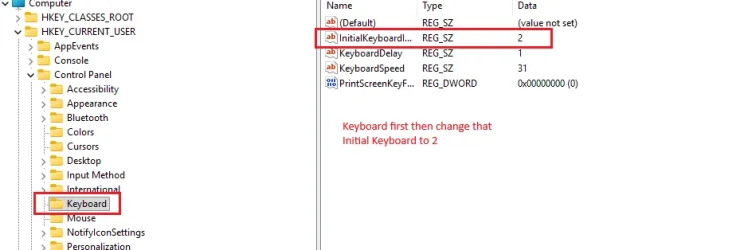
Ok mate, now this is exactly what I am getting and that HKEY you quote for me just pulls up as I said a long string of numbers, which gives me zero options to change the setting. I did follow an AI site's info and changed that last digit in that string, but it made zero difference again.
Having said that I have checked the HKEY line today and it is now showing a single-digit option so I have no idea on what is going on. Add to that, I am finding that version 25H2 is a bit of a handful compared to the 24H2 version and I again have no idea why!
However, I did check with that AI site again on seeing this sudden change and have set that option to (2) and it is now working as I want it to, but am not sure how long this change will work, seeing that Windows have done this change while I have been offline and maybe you could try gain using the HKEY InitialKeyboardIndicators REG_SZ 0 just change that to 2 and see if it works for you.
See my pic.
 

Attachments

  • HKEY.webp
    HKEY.webp
    16 KB · Views: 1

My Computers My Computers

  • At a glance

    Windows 11 Pro 25H2 (OS Build 26200.9168)i7 -10510U / Intel i5 3750KSamsung 16GB DDR4 2666 MHz & G-Skill 16GB DDR...On board Intel CPU graphics & Nvidia GeForce ...
    OS
    Windows 11 Pro 25H2 (OS Build 26200.9168)
    Computer type
    Laptop
    Manufacturer/Model
    Asus Vivo notebook X712FA or Desktop Ivy Bridge build
    CPU
    i7 -10510U / Intel i5 3750K
    Motherboard
    Asus generic & Asus P8Z77-V
    Memory
    Samsung 16GB DDR4 2666 MHz & G-Skill 16GB DDR3 2134MHz
    Graphics Card(s)
    On board Intel CPU graphics & Nvidia GeForce GTX 1050Ti
    Sound Card
    Laptop onboard & Xonar DSX Card
    Monitor(s) Displays
    Generic & Samsung 27" SAM0C4C
    Hard Drives
    Samsung 970 Pro NMe & Samsung 870 EVO 500GB
    PSU
    N/A
    Case
    N/A
    Cooling
    Asus in built
    Keyboard
    Generic
    Mouse
    TP_Link AX55 Wireless
    Internet Speed
    50Mbs max allowance - occasionally up to 75Mbs
    Browser
    Chrome
    Antivirus
    ESET Ultimate Security on both
    Other Info
    Desktop running Windows11 Pro with unsupported hardware fix
  • At a glance

    Windows 11 Pro OS build 22000.376i53750K16GB DDR3 @ 2133MHzAsus GTX 650TI
    Operating System
    Windows 11 Pro OS build 22000.376
    Computer type
    PC/Desktop
    Manufacturer/Model
    Home build
    CPU
    i53750K
    Motherboard
    Asus P8Z77-V
    Memory
    16GB DDR3 @ 2133MHz
    Graphics card(s)
    Asus GTX 650TI
    Sound Card
    Asus Xonar DSX
    Monitor(s) Displays
    Samsung 4K
    Screen Resolution
    3840x2160
    Hard Drives
    Samsung EVO 970
    PSU
    Corsair HX1100
    Case
    Coolermaster HAF -M
    Cooling
    Liquid
    Keyboard
    Microsoft Sidewinder 6
    Mouse
    Logitec
    Internet Speed
    50Mbs
    Browser
    Edge
    Antivirus
    Only Windows at the moment
Sorry Pabble mate, I saw I had not sent the right pic so here is it.
 

Attachments

  • HKEY 2.webp
    HKEY 2.webp
    26.4 KB · Views: 1

My Computers My Computers

  • At a glance

    Windows 11 Pro 25H2 (OS Build 26200.9168)i7 -10510U / Intel i5 3750KSamsung 16GB DDR4 2666 MHz & G-Skill 16GB DDR...On board Intel CPU graphics & Nvidia GeForce ...
    OS
    Windows 11 Pro 25H2 (OS Build 26200.9168)
    Computer type
    Laptop
    Manufacturer/Model
    Asus Vivo notebook X712FA or Desktop Ivy Bridge build
    CPU
    i7 -10510U / Intel i5 3750K
    Motherboard
    Asus generic & Asus P8Z77-V
    Memory
    Samsung 16GB DDR4 2666 MHz & G-Skill 16GB DDR3 2134MHz
    Graphics Card(s)
    On board Intel CPU graphics & Nvidia GeForce GTX 1050Ti
    Sound Card
    Laptop onboard & Xonar DSX Card
    Monitor(s) Displays
    Generic & Samsung 27" SAM0C4C
    Hard Drives
    Samsung 970 Pro NMe & Samsung 870 EVO 500GB
    PSU
    N/A
    Case
    N/A
    Cooling
    Asus in built
    Keyboard
    Generic
    Mouse
    TP_Link AX55 Wireless
    Internet Speed
    50Mbs max allowance - occasionally up to 75Mbs
    Browser
    Chrome
    Antivirus
    ESET Ultimate Security on both
    Other Info
    Desktop running Windows11 Pro with unsupported hardware fix
  • At a glance

    Windows 11 Pro OS build 22000.376i53750K16GB DDR3 @ 2133MHzAsus GTX 650TI
    Operating System
    Windows 11 Pro OS build 22000.376
    Computer type
    PC/Desktop
    Manufacturer/Model
    Home build
    CPU
    i53750K
    Motherboard
    Asus P8Z77-V
    Memory
    16GB DDR3 @ 2133MHz
    Graphics card(s)
    Asus GTX 650TI
    Sound Card
    Asus Xonar DSX
    Monitor(s) Displays
    Samsung 4K
    Screen Resolution
    3840x2160
    Hard Drives
    Samsung EVO 970
    PSU
    Corsair HX1100
    Case
    Coolermaster HAF -M
    Cooling
    Liquid
    Keyboard
    Microsoft Sidewinder 6
    Mouse
    Logitec
    Internet Speed
    50Mbs
    Browser
    Edge
    Antivirus
    Only Windows at the moment
I had had the same issue with my Dell PC - here are their Tech Support recommendations' -

NUM LOCK issue .webp

Option 2 worked for me
 

My Computer My Computer

At a glance

Windows 11 Pro 25H2 (Build 26300.9278)Intel Core Ultra 9 285 5.6 GHz32.00 GBIntel Integrated Graphics (128 MB)
OS
Windows 11 Pro 25H2 (Build 26300.9278)
Computer type
PC/Desktop
Manufacturer/Model
Dell Pro Max Tower T2 FCT2250
CPU
Intel Core Ultra 9 285 5.6 GHz
Motherboard
64-bit operating system, x64-based processor
Memory
32.00 GB
Graphics Card(s)
Intel Integrated Graphics (128 MB)
Sound Card
Realtek Audio
Monitor(s) Displays
Dell P2714H Monitor
Screen Resolution
1920 x 1080
Hard Drives
1 x 512GB M.2 XG10d SED KIOXIA PCIe solid state drive (Internal)
1 x 2TB Seagate ST2000DM008-2UB102 HDD (Internal)
1 x 4TB Seagate STGX4000400 External HDD
1 x 6TB WD Elements AE 2689 External HDD
PSU
500 Watts
Cooling
Air
Keyboard
Microsoft Wired Keyboard 600
Mouse
Microsoft USB Basic Optical Mouse v2.0
Browser
Firefox
Antivirus
Windows Defender + Malwarebytes Premium
Other Info
BaseBoard Manufacturer Dell Inc.
BaseBoard Product 022RY57
BaseBoard Version A01
I changed InitialKeyboardIndicators value to 2 months ago and the Numlock light comes on during posting then off again before login.
Asus took out the option for Numlock on my mobo. Posted the reg hack so you or others may find a solution.
 

My Computers My Computers

  • At a glance

    Windows 11 Proi7 14700KF32Gb DDR58GB Nvidia Geforce RTX 3050
    OS
    Windows 11 Pro
    Computer type
    PC/Desktop
    Manufacturer/Model
    Asus ROG Strix
    CPU
    i7 14700KF
    Motherboard
    Asus Rog Strix Z790
    Memory
    32Gb DDR5
    Graphics Card(s)
    8GB Nvidia Geforce RTX 3050
    Sound Card
    Creative Soundblaster Audigy RX
    Monitor(s) Displays
    Asus VA24EHF
    Screen Resolution
    1080
    Hard Drives
    500Gb Samsung 980
    2TB Seagate Barracuda SATA 3
    PSU
    Corsair 650 CX
    Cooling
    PCS FrostFlow 200 Series High Performance CPU Cooler
    Keyboard
    Logitech
  • At a glance

    Windows 11 x64i7 14700kf32GB Corsair Vengence DDR5 5200MHzASUS 6GB Dual Geforce RTX 3050 OC
    Operating System
    Windows 11 x64
    Computer type
    PC/Desktop
    Manufacturer/Model
    PCSpecialist
    CPU
    i7 14700kf
    Motherboard
    ASUS TUF Gaming Z790 Plus WIFI
    Memory
    32GB Corsair Vengence DDR5 5200MHz
    Graphics card(s)
    ASUS 6GB Dual Geforce RTX 3050 OC
    Sound Card
    Creative Sound Blaster Audigy FX V2
    Monitor(s) Displays
    Asus VA24EHF
    Screen Resolution
    1920 x 1080
    Hard Drives
    512 GB Crucial P310 m.2 PCIe 4.0 NVMe
    2TB Seagate Barracuda SATA 3
    PSU
    Corsair 650W CX-650
    Case
    Fractal Pop Silent Solid
    Cooling
    PCS FrostFlow 200
    Keyboard
    Logitech
    Mouse
    Logitech
    Internet Speed
    150
    Browser
    Firefox/Brave
    Antivirus
    Kaspersky Plus
Just tried option 2, Numlock stays on until i enter the password, Then goes off and stays off, Found it easier to
hit Numlock to change to password screen where it then stays on after login.
 

My Computers My Computers

  • At a glance

    Windows 11 Proi7 14700KF32Gb DDR58GB Nvidia Geforce RTX 3050
    OS
    Windows 11 Pro
    Computer type
    PC/Desktop
    Manufacturer/Model
    Asus ROG Strix
    CPU
    i7 14700KF
    Motherboard
    Asus Rog Strix Z790
    Memory
    32Gb DDR5
    Graphics Card(s)
    8GB Nvidia Geforce RTX 3050
    Sound Card
    Creative Soundblaster Audigy RX
    Monitor(s) Displays
    Asus VA24EHF
    Screen Resolution
    1080
    Hard Drives
    500Gb Samsung 980
    2TB Seagate Barracuda SATA 3
    PSU
    Corsair 650 CX
    Cooling
    PCS FrostFlow 200 Series High Performance CPU Cooler
    Keyboard
    Logitech
  • At a glance

    Windows 11 x64i7 14700kf32GB Corsair Vengence DDR5 5200MHzASUS 6GB Dual Geforce RTX 3050 OC
    Operating System
    Windows 11 x64
    Computer type
    PC/Desktop
    Manufacturer/Model
    PCSpecialist
    CPU
    i7 14700kf
    Motherboard
    ASUS TUF Gaming Z790 Plus WIFI
    Memory
    32GB Corsair Vengence DDR5 5200MHz
    Graphics card(s)
    ASUS 6GB Dual Geforce RTX 3050 OC
    Sound Card
    Creative Sound Blaster Audigy FX V2
    Monitor(s) Displays
    Asus VA24EHF
    Screen Resolution
    1920 x 1080
    Hard Drives
    512 GB Crucial P310 m.2 PCIe 4.0 NVMe
    2TB Seagate Barracuda SATA 3
    PSU
    Corsair 650W CX-650
    Case
    Fractal Pop Silent Solid
    Cooling
    PCS FrostFlow 200
    Keyboard
    Logitech
    Mouse
    Logitech
    Internet Speed
    150
    Browser
    Firefox/Brave
    Antivirus
    Kaspersky Plus
Hmm Pebble mate what Asus machine have you got? Mine is an ASUS Vivobook 17 X1704VAPBF_X1704VA and the previous one was an Asus Vivobook X715FA. The current one runs 25H2 the other ran 24H2 and there is a noticeable difference between those versions unless I am being a little cautious, but I have found the 25H2 is slightly more finicky than the 24H2.
I don't know, but I never had this issue with the old laptop and only after fiddling around through the endless hoops did I get the issue fixed on this new machine.
I did check the Asus app that came with the new machine and I found that updating the BIOS put a whole new life back into it. So I'm wondering if you have the latest BIOS? Maybe it could help your problem? I don't see why it could do any harm but that's your decision.
 

My Computers My Computers

  • At a glance

    Windows 11 Pro 25H2 (OS Build 26200.9168)i7 -10510U / Intel i5 3750KSamsung 16GB DDR4 2666 MHz & G-Skill 16GB DDR...On board Intel CPU graphics & Nvidia GeForce ...
    OS
    Windows 11 Pro 25H2 (OS Build 26200.9168)
    Computer type
    Laptop
    Manufacturer/Model
    Asus Vivo notebook X712FA or Desktop Ivy Bridge build
    CPU
    i7 -10510U / Intel i5 3750K
    Motherboard
    Asus generic & Asus P8Z77-V
    Memory
    Samsung 16GB DDR4 2666 MHz & G-Skill 16GB DDR3 2134MHz
    Graphics Card(s)
    On board Intel CPU graphics & Nvidia GeForce GTX 1050Ti
    Sound Card
    Laptop onboard & Xonar DSX Card
    Monitor(s) Displays
    Generic & Samsung 27" SAM0C4C
    Hard Drives
    Samsung 970 Pro NMe & Samsung 870 EVO 500GB
    PSU
    N/A
    Case
    N/A
    Cooling
    Asus in built
    Keyboard
    Generic
    Mouse
    TP_Link AX55 Wireless
    Internet Speed
    50Mbs max allowance - occasionally up to 75Mbs
    Browser
    Chrome
    Antivirus
    ESET Ultimate Security on both
    Other Info
    Desktop running Windows11 Pro with unsupported hardware fix
  • At a glance

    Windows 11 Pro OS build 22000.376i53750K16GB DDR3 @ 2133MHzAsus GTX 650TI
    Operating System
    Windows 11 Pro OS build 22000.376
    Computer type
    PC/Desktop
    Manufacturer/Model
    Home build
    CPU
    i53750K
    Motherboard
    Asus P8Z77-V
    Memory
    16GB DDR3 @ 2133MHz
    Graphics card(s)
    Asus GTX 650TI
    Sound Card
    Asus Xonar DSX
    Monitor(s) Displays
    Samsung 4K
    Screen Resolution
    3840x2160
    Hard Drives
    Samsung EVO 970
    PSU
    Corsair HX1100
    Case
    Coolermaster HAF -M
    Cooling
    Liquid
    Keyboard
    Microsoft Sidewinder 6
    Mouse
    Logitec
    Internet Speed
    50Mbs
    Browser
    Edge
    Antivirus
    Only Windows at the moment
Mobo: ASUS TUF GAMING Z790 PLUS WIFI
Running 11 Pro 25H2
BIOS up to date.
 

My Computers My Computers

  • At a glance

    Windows 11 Proi7 14700KF32Gb DDR58GB Nvidia Geforce RTX 3050
    OS
    Windows 11 Pro
    Computer type
    PC/Desktop
    Manufacturer/Model
    Asus ROG Strix
    CPU
    i7 14700KF
    Motherboard
    Asus Rog Strix Z790
    Memory
    32Gb DDR5
    Graphics Card(s)
    8GB Nvidia Geforce RTX 3050
    Sound Card
    Creative Soundblaster Audigy RX
    Monitor(s) Displays
    Asus VA24EHF
    Screen Resolution
    1080
    Hard Drives
    500Gb Samsung 980
    2TB Seagate Barracuda SATA 3
    PSU
    Corsair 650 CX
    Cooling
    PCS FrostFlow 200 Series High Performance CPU Cooler
    Keyboard
    Logitech
  • At a glance

    Windows 11 x64i7 14700kf32GB Corsair Vengence DDR5 5200MHzASUS 6GB Dual Geforce RTX 3050 OC
    Operating System
    Windows 11 x64
    Computer type
    PC/Desktop
    Manufacturer/Model
    PCSpecialist
    CPU
    i7 14700kf
    Motherboard
    ASUS TUF Gaming Z790 Plus WIFI
    Memory
    32GB Corsair Vengence DDR5 5200MHz
    Graphics card(s)
    ASUS 6GB Dual Geforce RTX 3050 OC
    Sound Card
    Creative Sound Blaster Audigy FX V2
    Monitor(s) Displays
    Asus VA24EHF
    Screen Resolution
    1920 x 1080
    Hard Drives
    512 GB Crucial P310 m.2 PCIe 4.0 NVMe
    2TB Seagate Barracuda SATA 3
    PSU
    Corsair 650W CX-650
    Case
    Fractal Pop Silent Solid
    Cooling
    PCS FrostFlow 200
    Keyboard
    Logitech
    Mouse
    Logitech
    Internet Speed
    150
    Browser
    Firefox/Brave
    Antivirus
    Kaspersky Plus
As @ICIT2LOL says, there is commonly a BIOS/UEFI setting that turns num lock on or off. Copilot doesn't think your model has such a toggle, but if it were in there, it would probably show up under Advanced Mode (F7) > Boot tab. Worth a check. Sorry for your trouble.
--Ed--
 

My Computers My Computers

  • At a glance

    Windows 11i7-8650U (8th Gen/Kaby Lake)16 GBIntel UHD Graphics 620
    OS
    Windows 11
    Computer type
    Laptop
    Manufacturer/Model
    Lenovo X380 Yoga
    CPU
    i7-8650U (8th Gen/Kaby Lake)
    Motherboard
    20LH000MUS (U3E1)
    Memory
    16 GB
    Graphics Card(s)
    Intel UHD Graphics 620
    Sound Card
    Integrated Conexant SmartAudio HD
    Monitor(s) Displays
    FlexView Display
    Screen Resolution
    1920x1080
    Hard Drives
    Toshiba 1 TB PCIe x3 NVMe SSD
    external 5TB Seagate USB-C attached HDD
    PSU
    Lenovo integrated 65W power brick
    Case
    Laptop
    Cooling
    Laptop
    Keyboard
    Integrated Lenovo ThinkPad keyboard
    Mouse
    touchscreen, touchpad
    Internet Speed
    GbE (Spectrum/Charter)
    Browser
    all of em
    Antivirus
    Defender
    Other Info
    Purchased early 2019 as Windows Insider test PC
  • At a glance

    Windows 11Ryzen 5800X128 GB (4x32 DDR5-5600)NVIDIA 3070Ti
    Operating System
    Windows 11
    Computer type
    PC/Desktop
    Manufacturer/Model
    DIY
    CPU
    Ryzen 5800X
    Motherboard
    Asrock B550 Extreme4
    Memory
    128 GB (4x32 DDR5-5600)
    Graphics card(s)
    NVIDIA 3070Ti
    Sound Card
    built-in
    Monitor(s) Displays
    2xDell 2707
    Screen Resolution
    1980x1200
    Hard Drives
    2XNVMe, multiple HDDs from 3 to 12 TB
    PSU
    Seasonic 650
    Case
    NZXT Flo 6
    Cooling
    dual-fan air cooler
    Keyboard
    Logitech Wave
    Mouse
    Logitech Logi
    Internet Speed
    GbE
    Browser
    all of 'em
    Antivirus
    Defender
    Other Info
    temperamental UEFI
As @ICIT2LOL says, there is commonly a BIOS/UEFI setting that turns num lock on or off. Copilot doesn't think your model has such a toggle, but if it were in there, it would probably show up under Advanced Mode (F7) > Boot tab. Worth a check. Sorry for your trouble.
--Ed--
Ok Ed mate youur;e right there sgould be an option in thr BIOS but it isn't there on my new Asus Vivobook and there is no way that it will keep that HKEY entry in "ON " for the NUM LOCK as I tried that and it worked for a day and then reverted back to this nonsense where NUM LOCK is switched off and I am assuming that it is going to a default setting.
I also thought it might be an Asus update, but am not sure because the Asus app does let one know it is updating, and for example that happened last year on the old Vivobook, not anything to do with the NUM LOCK.
But it certainly screwed the system up badly with whatever updates they had installed on the machine without my knowledge nd that cost me quite a few dollars having a techie in town do some investigating, and that is what he found.
Frankly I think that we could all be jumping through hoops until the cows come home, and it is probably futile trying to get what one wants on a machine they have paid good dollars for and that my friend is pretty damn annoying, to say the very least.
 

My Computers My Computers

  • At a glance

    Windows 11 Pro 25H2 (OS Build 26200.9168)i7 -10510U / Intel i5 3750KSamsung 16GB DDR4 2666 MHz & G-Skill 16GB DDR...On board Intel CPU graphics & Nvidia GeForce ...
    OS
    Windows 11 Pro 25H2 (OS Build 26200.9168)
    Computer type
    Laptop
    Manufacturer/Model
    Asus Vivo notebook X712FA or Desktop Ivy Bridge build
    CPU
    i7 -10510U / Intel i5 3750K
    Motherboard
    Asus generic & Asus P8Z77-V
    Memory
    Samsung 16GB DDR4 2666 MHz & G-Skill 16GB DDR3 2134MHz
    Graphics Card(s)
    On board Intel CPU graphics & Nvidia GeForce GTX 1050Ti
    Sound Card
    Laptop onboard & Xonar DSX Card
    Monitor(s) Displays
    Generic & Samsung 27" SAM0C4C
    Hard Drives
    Samsung 970 Pro NMe & Samsung 870 EVO 500GB
    PSU
    N/A
    Case
    N/A
    Cooling
    Asus in built
    Keyboard
    Generic
    Mouse
    TP_Link AX55 Wireless
    Internet Speed
    50Mbs max allowance - occasionally up to 75Mbs
    Browser
    Chrome
    Antivirus
    ESET Ultimate Security on both
    Other Info
    Desktop running Windows11 Pro with unsupported hardware fix
  • At a glance

    Windows 11 Pro OS build 22000.376i53750K16GB DDR3 @ 2133MHzAsus GTX 650TI
    Operating System
    Windows 11 Pro OS build 22000.376
    Computer type
    PC/Desktop
    Manufacturer/Model
    Home build
    CPU
    i53750K
    Motherboard
    Asus P8Z77-V
    Memory
    16GB DDR3 @ 2133MHz
    Graphics card(s)
    Asus GTX 650TI
    Sound Card
    Asus Xonar DSX
    Monitor(s) Displays
    Samsung 4K
    Screen Resolution
    3840x2160
    Hard Drives
    Samsung EVO 970
    PSU
    Corsair HX1100
    Case
    Coolermaster HAF -M
    Cooling
    Liquid
    Keyboard
    Microsoft Sidewinder 6
    Mouse
    Logitec
    Internet Speed
    50Mbs
    Browser
    Edge
    Antivirus
    Only Windows at the moment

Latest Support Threads

Back
Top Bottom