Numerous BSODs with different causes.


My Computer My Computer

At a glance

Windows 10Intel(R) Core(TM) i7-4800MQ CPU @ 2.70GHz16 GB Total: Manufacturer : Samsung MemoryTyp...NVIDIA Quadro K3100M; Intel(R) HD Graphics 4600
OS
Windows 10
Computer type
Laptop
Manufacturer/Model
HP
CPU
Intel(R) Core(TM) i7-4800MQ CPU @ 2.70GHz
Motherboard
Product : 190A Version : KBC Version 94.56
Memory
16 GB Total: Manufacturer : Samsung MemoryType : DDR3 FormFactor : SODIMM Capacity : 8GB Speed : 1600
Graphics Card(s)
NVIDIA Quadro K3100M; Intel(R) HD Graphics 4600
Sound Card
IDT High Definition Audio CODEC; PNP Device ID HDAUDIO\FUNC_01&VEN_111D&DEV_76E0
Hard Drives
Model Hitachi HTS727575A9E364
Antivirus
Microsoft Defender
Other Info
Mobile Workstation


it wont even crash gracefully anymore, i just get stuck on the bsod screen at 100% completion.
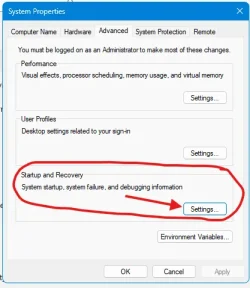
Perhaps you inadvertently changed this setting. Open Settings and place a checkmark in "Automatically restart" in the System Failure section. Personally, I prefer unchecking this so I can see what the error is during a BSOD. With automatic restart, if you are away from your computer, you won't know what happened unless you start digging.

1733147778126.webp
 

My Computer My Computer

At a glance

Windows 11, 24H2Intel(R) Core(TM) i9-14900K 3.20 GHzCorsair Vengeance RGB DDR5, 128GB (4x32GB)ASUS ProArt GeForce RTX 4060 Ti, PCIe 4.0, 16GB
OS
Windows 11, 24H2
Computer type
PC/Desktop
Manufacturer/Model
My Build
CPU
Intel(R) Core(TM) i9-14900K 3.20 GHz
Motherboard
ASUS ROG Maximus Z790 Hero
Memory
Corsair Vengeance RGB DDR5, 128GB (4x32GB)
Graphics Card(s)
ASUS ProArt GeForce RTX 4060 Ti, PCIe 4.0, 16GB
Sound Card
Integrated
Monitor(s) Displays
DELL P2719HC, QTY 3
Screen Resolution
1920 x 1080
Hard Drives
Inland 2TB SSD Gaming Performance Plus, M2 Mount, QTY 2
PSU
ROG Thor 1200W Platinum II, Fully Modular
Case
Thermaltake MK-1
Cooling
Thermalright PS120SE CPU Air Cooler
Keyboard
Logitech MK850 Wireless Keyboard & Mouse
Mouse
Logitech MK850 Wireless Keyboard & Mouse
Antivirus
Norton 360
Run Memtest86+ for 8 or more passes > take pictures > post images or share links

Memtest86+ | The Open-Source Memory Testing Tool

Just 1 error is a test fail and testing can be aborted.

The more the passes the better the testing conditions.

It sometimes takes passes into the 20's to detect malfunctioning RAM.

The RAM can be tested all at one time or one at a time in the same DIMM.

Memtest86+ | The Open-Source Memory Testing Tool

MemTest86+ - Test RAM
9 passes so far without any errors. should i wait until pass 20?
 

My Computer My Computer

At a glance

Windows 11i5-13600KFG.SKILL Ripjaws M5 RGB Series (Intel XMP 3.0)...Nvidia GeForce RTX 3070
OS
Windows 11
Computer type
PC/Desktop
CPU
i5-13600KF
Motherboard
MSI Pro z790-s wifi
Memory
G.SKILL Ripjaws M5 RGB Series (Intel XMP 3.0) DDR5 RAM 32GB (2x16GB) 6400MT/s CL36-48-48-102 1.35V
Graphics Card(s)
Nvidia GeForce RTX 3070
Monitor(s) Displays
Acer monitor
Screen Resolution
2K
Hard Drives
C windows drive: SAMSUNG 980 SSD 250GB
D: SAMSUNG 980 SSD 1TB
PSU
MSI MPG A850G PCIE 5 & ATX 3.0
Case
Zalman S2 TG
Cooling
Thermalright Peerless Assassin 120 SE
Keyboard
Akko acr pro 68
Mouse
Hyperx
Browser
Chrome

My Computers My Computers

  • At a glance

    All Branches but ReleaseAMD Ryzen 7 7735HS 3200-4500 Mhz 8 cores x 232 GB DDR5Radeon Graphic / NVIDIA GeForce RTX 4060 8 GB...
    OS
    All Branches but Release
    Computer type
    Laptop
    Manufacturer/Model
    Acer Nitro ANV15-51
    CPU
    AMD Ryzen 7 7735HS 3200-4500 Mhz 8 cores x 2
    Motherboard
    Sportage_RBH
    Memory
    32 GB DDR5
    Graphics Card(s)
    Radeon Graphic / NVIDIA GeForce RTX 4060 8 GB GDDR6
    Sound Card
    AMD/Realtek(R) Audio
    Monitor(s) Displays
    Integrated Monitor (15.3"vis)
    Screen Resolution
    FHD 1920X1080 16:9 144Hz
    Hard Drives
    KINGSTON OM8SEP4512Q-AA 1TB
    Western Digital 256GB
    PSU
    19V DC 6.32 A 120 W
    Cooling
    Dual Fans
    Mouse
    MS Bluetooth
    Internet Speed
    Fiber 1GB Cox -us & 1GB Orange-fr
    Browser
    Edge Canary- Firefox Nightly-Chrome Dev-Chrome Dev
    Antivirus
    Windows Defender
  • At a glance

    Windows 11 BetaAMD A9-94208 GB of DDR4AMD Radeon R5
    Operating System
    Windows 11 Beta
    Computer type
    Laptop
    Manufacturer/Model
    Asus X751BP
    CPU
    AMD A9-9420
    Memory
    8 GB of DDR4
    Graphics card(s)
    AMD Radeon R5
    Screen Resolution
    1600x900
    Hard Drives
    Seagate 1 TB

My Computer My Computer

At a glance

Windows 10Intel(R) Core(TM) i7-4800MQ CPU @ 2.70GHz16 GB Total: Manufacturer : Samsung MemoryTyp...NVIDIA Quadro K3100M; Intel(R) HD Graphics 4600
OS
Windows 10
Computer type
Laptop
Manufacturer/Model
HP
CPU
Intel(R) Core(TM) i7-4800MQ CPU @ 2.70GHz
Motherboard
Product : 190A Version : KBC Version 94.56
Memory
16 GB Total: Manufacturer : Samsung MemoryType : DDR3 FormFactor : SODIMM Capacity : 8GB Speed : 1600
Graphics Card(s)
NVIDIA Quadro K3100M; Intel(R) HD Graphics 4600
Sound Card
IDT High Definition Audio CODEC; PNP Device ID HDAUDIO\FUNC_01&VEN_111D&DEV_76E0
Hard Drives
Model Hitachi HTS727575A9E364
Antivirus
Microsoft Defender
Other Info
Mobile Workstation

My Computer My Computer

At a glance

Windows 11i5-13600KFG.SKILL Ripjaws M5 RGB Series (Intel XMP 3.0)...Nvidia GeForce RTX 3070
OS
Windows 11
Computer type
PC/Desktop
CPU
i5-13600KF
Motherboard
MSI Pro z790-s wifi
Memory
G.SKILL Ripjaws M5 RGB Series (Intel XMP 3.0) DDR5 RAM 32GB (2x16GB) 6400MT/s CL36-48-48-102 1.35V
Graphics Card(s)
Nvidia GeForce RTX 3070
Monitor(s) Displays
Acer monitor
Screen Resolution
2K
Hard Drives
C windows drive: SAMSUNG 980 SSD 250GB
D: SAMSUNG 980 SSD 1TB
PSU
MSI MPG A850G PCIE 5 & ATX 3.0
Case
Zalman S2 TG
Cooling
Thermalright Peerless Assassin 120 SE
Keyboard
Akko acr pro 68
Mouse
Hyperx
Browser
Chrome
Reinstalling Windows either Windows 11 or 10 will allow further testing and fixing the earlier restorehealth error (post #9).
 

My Computer My Computer

At a glance

Windows 10Intel(R) Core(TM) i7-4800MQ CPU @ 2.70GHz16 GB Total: Manufacturer : Samsung MemoryTyp...NVIDIA Quadro K3100M; Intel(R) HD Graphics 4600
OS
Windows 10
Computer type
Laptop
Manufacturer/Model
HP
CPU
Intel(R) Core(TM) i7-4800MQ CPU @ 2.70GHz
Motherboard
Product : 190A Version : KBC Version 94.56
Memory
16 GB Total: Manufacturer : Samsung MemoryType : DDR3 FormFactor : SODIMM Capacity : 8GB Speed : 1600
Graphics Card(s)
NVIDIA Quadro K3100M; Intel(R) HD Graphics 4600
Sound Card
IDT High Definition Audio CODEC; PNP Device ID HDAUDIO\FUNC_01&VEN_111D&DEV_76E0
Hard Drives
Model Hitachi HTS727575A9E364
Antivirus
Microsoft Defender
Other Info
Mobile Workstation
Reinstalling Windows either Windows 11 or 10 will allow further testing and fixing the earlier restorehealth error (post #9).
it did 32 passes without any errors. i also did a clean install of windows and it still crashed, probably means that it's 99% a hardware error right? is RAM swapping the next step i should try?
 

My Computer My Computer

At a glance

Windows 11i5-13600KFG.SKILL Ripjaws M5 RGB Series (Intel XMP 3.0)...Nvidia GeForce RTX 3070
OS
Windows 11
Computer type
PC/Desktop
CPU
i5-13600KF
Motherboard
MSI Pro z790-s wifi
Memory
G.SKILL Ripjaws M5 RGB Series (Intel XMP 3.0) DDR5 RAM 32GB (2x16GB) 6400MT/s CL36-48-48-102 1.35V
Graphics Card(s)
Nvidia GeForce RTX 3070
Monitor(s) Displays
Acer monitor
Screen Resolution
2K
Hard Drives
C windows drive: SAMSUNG 980 SSD 250GB
D: SAMSUNG 980 SSD 1TB
PSU
MSI MPG A850G PCIE 5 & ATX 3.0
Case
Zalman S2 TG
Cooling
Thermalright Peerless Assassin 120 SE
Keyboard
Akko acr pro 68
Mouse
Hyperx
Browser
Chrome
@zbook is leading you in the right direction, but I was just wondering if you crash when in safe boot as well as in clean boot. IMO both are valuable initial troubleshooting steps.
It seems you jumped off into making a lot of changes during your initial troubleshooting and ended up compounding your issues before eliminating what the initial problem WASN'T.
 

My Computers My Computers

  • At a glance

    Windows 11 Pro 25H2 26200.8875i9-10900 10 core 20 threads32 gbnone-Intel UHD Graphics 630
    OS
    Windows 11 Pro 25H2 26200.8875
    Computer type
    PC/Desktop
    Manufacturer/Model
    Dell Optiplex 7080
    CPU
    i9-10900 10 core 20 threads
    Motherboard
    DELL 0J37VM
    Memory
    32 gb
    Graphics Card(s)
    none-Intel UHD Graphics 630
    Sound Card
    Integrated Realtek
    Monitor(s) Displays
    Benq 27
    Screen Resolution
    2560x1440
    Hard Drives
    2x1tb Solidigm m.2 nvme /External drives 512gb Samsung m.2 sata+2tb Kingston m2.nvme
    PSU
    500w
    Case
    MT
    Cooling
    Dell Premium
    Keyboard
    Logitech wired
    Mouse
    Logitech wireless
    Internet Speed
    so slow I'm too embarrassed to tell
    Browser
    #1 Edge #2 Firefox
    Antivirus
    Defender+MWB Premium
  • At a glance

    Windows 11 Pro 24H2 26200.8875AMD Ryzen 7 6800U32 gbintegrated
    Operating System
    Windows 11 Pro 24H2 26200.8875
    Computer type
    PC/Desktop
    Manufacturer/Model
    Beelink Mini PC SER5
    CPU
    AMD Ryzen 7 6800U
    Memory
    32 gb
    Graphics card(s)
    integrated
    Sound Card
    integrated
    Monitor(s) Displays
    Benq 27
    Screen Resolution
    2560x1440
    Hard Drives
    1TB Crucial nvme
    Keyboard
    Logitech wired
    Mouse
    Logitech wireless
    Internet Speed
    still too embarrassed to tell
    Browser
    Firefox
    Antivirus
    Defender
    Other Info
    System 3 is non compliant Dell 9020 i7-4770/24gb ram Win11 PRO 26200.8875
@zbook is leading you in the right direction, but I was just wondering if you crash when in safe boot as well as in clean boot. IMO both are valuable initial troubleshooting steps.
It seems you jumped off into making a lot of changes during your initial troubleshooting and ended up compounding your issues before eliminating what the initial problem WASN'T.
yes, i agree i tried too many different things initially, when i first encountered the problem like 2 months ago, i seemingly solved it by disabling this hypervisor thing that is present in every bsod that happens, but after installing a windows update the problems came back and when i saw hypervisor in the errors again i tried to do every solution to disable it :D. now i have a fresh windows installation though so those things i did initially should not be a problem.


do i safe boot with networking or without? i would just put on a YT video in the background with networking to try to crash it.

oh one more piece of info, while i was trying to install windows again today it gave me an internet connection error a couple of times. it's possible the errors start as soon as i install windows i guess?
 

My Computer My Computer

At a glance

Windows 11i5-13600KFG.SKILL Ripjaws M5 RGB Series (Intel XMP 3.0)...Nvidia GeForce RTX 3070
OS
Windows 11
Computer type
PC/Desktop
CPU
i5-13600KF
Motherboard
MSI Pro z790-s wifi
Memory
G.SKILL Ripjaws M5 RGB Series (Intel XMP 3.0) DDR5 RAM 32GB (2x16GB) 6400MT/s CL36-48-48-102 1.35V
Graphics Card(s)
Nvidia GeForce RTX 3070
Monitor(s) Displays
Acer monitor
Screen Resolution
2K
Hard Drives
C windows drive: SAMSUNG 980 SSD 250GB
D: SAMSUNG 980 SSD 1TB
PSU
MSI MPG A850G PCIE 5 & ATX 3.0
Case
Zalman S2 TG
Cooling
Thermalright Peerless Assassin 120 SE
Keyboard
Akko acr pro 68
Mouse
Hyperx
Browser
Chrome
do i safe boot with networking or without?
With networking if possible. But it's not possible with all systems. I know none of my systems can load safe boot with networking because they are all wireless.
Wireless drivers do not load in safe mode.
while i was trying to install windows again today it gave me an internet connection error a couple of times
That indicates to me you installed windows while connected to the internet which is what most people do. Did you allow Windows Update to install your drivers? It may or may not have anything to do with your issues as I can not say.

I never do that for 2 reasons. (1) I always install with a local account so internet has to be off to do that and (2) I do not want windows update to control my drivers. Disabling driver updates thru WU is one of the first things I do before I connect to the internet after a clean install. I manage my own drivers. I'm in no way advising you to do the same as with newer versions of windows it is considered the norm for WU to handle it. I'm just old school in my thinking about it and confidant that I can manage them. But you have a custom machine so if I were in your case, I would use either of MSI's updating apps or manuually update them myself directly from MSI.
https://www.msi.com/support/technical_details/MB_Driver_Update

I did not mean to intervene into @zbook directions. It was just an observation on my part that the whole troubleshooting process might have gone off the rails. Since you installed Windows again today, you're virgin so it's a good place to start without a lot of changes confusing the issue. Back to you @zbook.
 

My Computers My Computers

  • At a glance

    Windows 11 Pro 25H2 26200.8875i9-10900 10 core 20 threads32 gbnone-Intel UHD Graphics 630
    OS
    Windows 11 Pro 25H2 26200.8875
    Computer type
    PC/Desktop
    Manufacturer/Model
    Dell Optiplex 7080
    CPU
    i9-10900 10 core 20 threads
    Motherboard
    DELL 0J37VM
    Memory
    32 gb
    Graphics Card(s)
    none-Intel UHD Graphics 630
    Sound Card
    Integrated Realtek
    Monitor(s) Displays
    Benq 27
    Screen Resolution
    2560x1440
    Hard Drives
    2x1tb Solidigm m.2 nvme /External drives 512gb Samsung m.2 sata+2tb Kingston m2.nvme
    PSU
    500w
    Case
    MT
    Cooling
    Dell Premium
    Keyboard
    Logitech wired
    Mouse
    Logitech wireless
    Internet Speed
    so slow I'm too embarrassed to tell
    Browser
    #1 Edge #2 Firefox
    Antivirus
    Defender+MWB Premium
  • At a glance

    Windows 11 Pro 24H2 26200.8875AMD Ryzen 7 6800U32 gbintegrated
    Operating System
    Windows 11 Pro 24H2 26200.8875
    Computer type
    PC/Desktop
    Manufacturer/Model
    Beelink Mini PC SER5
    CPU
    AMD Ryzen 7 6800U
    Memory
    32 gb
    Graphics card(s)
    integrated
    Sound Card
    integrated
    Monitor(s) Displays
    Benq 27
    Screen Resolution
    2560x1440
    Hard Drives
    1TB Crucial nvme
    Keyboard
    Logitech wired
    Mouse
    Logitech wireless
    Internet Speed
    still too embarrassed to tell
    Browser
    Firefox
    Antivirus
    Defender
    Other Info
    System 3 is non compliant Dell 9020 i7-4770/24gb ram Win11 PRO 26200.8875

Attachments

My Computer My Computer

At a glance

Windows 11i5-13600KFG.SKILL Ripjaws M5 RGB Series (Intel XMP 3.0)...Nvidia GeForce RTX 3070
OS
Windows 11
Computer type
PC/Desktop
CPU
i5-13600KF
Motherboard
MSI Pro z790-s wifi
Memory
G.SKILL Ripjaws M5 RGB Series (Intel XMP 3.0) DDR5 RAM 32GB (2x16GB) 6400MT/s CL36-48-48-102 1.35V
Graphics Card(s)
Nvidia GeForce RTX 3070
Monitor(s) Displays
Acer monitor
Screen Resolution
2K
Hard Drives
C windows drive: SAMSUNG 980 SSD 250GB
D: SAMSUNG 980 SSD 1TB
PSU
MSI MPG A850G PCIE 5 & ATX 3.0
Case
Zalman S2 TG
Cooling
Thermalright Peerless Assassin 120 SE
Keyboard
Akko acr pro 68
Mouse
Hyperx
Browser
Chrome
With networking if possible. But it's not possible with all systems. I know none of my systems can load safe boot with networking because they are all wireless.
Wireless drivers do not load in safe mode.

That indicates to me you installed windows while connected to the internet which is what most people do. Did you allow Windows Update to install your drivers? It may or may not have anything to do with your issues as I can not say.

I never do that for 2 reasons. (1) I always install with a local account so internet has to be off to do that and (2) I do not want windows update to control my drivers. Disabling driver updates thru WU is one of the first things I do before I connect to the internet after a clean install. I manage my own drivers. I'm in no way advising you to do the same as with newer versions of windows it is considered the norm for WU to handle it. I'm just old school in my thinking about it and confidant that I can manage them. But you have a custom machine so if I were in your case, I would use either of MSI's updating apps or manuually update them myself directly from MSI.
https://www.msi.com/support/technical_details/MB_Driver_Update

I did not mean to intervene into @zbook directions. It was just an observation on my part that the whole troubleshooting process might have gone off the rails. Since you installed Windows again today, you're virgin so it's a good place to start without a lot of changes confusing the issue. Back to you @zbook.
not sure it just started downloading updates without asking me, but i downloaded wifi driver from msi website during windows installation to let it to connect to wifi.
 

My Computer My Computer

At a glance

Windows 11i5-13600KFG.SKILL Ripjaws M5 RGB Series (Intel XMP 3.0)...Nvidia GeForce RTX 3070
OS
Windows 11
Computer type
PC/Desktop
CPU
i5-13600KF
Motherboard
MSI Pro z790-s wifi
Memory
G.SKILL Ripjaws M5 RGB Series (Intel XMP 3.0) DDR5 RAM 32GB (2x16GB) 6400MT/s CL36-48-48-102 1.35V
Graphics Card(s)
Nvidia GeForce RTX 3070
Monitor(s) Displays
Acer monitor
Screen Resolution
2K
Hard Drives
C windows drive: SAMSUNG 980 SSD 250GB
D: SAMSUNG 980 SSD 1TB
PSU
MSI MPG A850G PCIE 5 & ATX 3.0
Case
Zalman S2 TG
Cooling
Thermalright Peerless Assassin 120 SE
Keyboard
Akko acr pro 68
Mouse
Hyperx
Browser
Chrome
There were 5 new BSOD since the new clean install.

Microsoft Windows 11 Home
BuildNumber : 26100


Please swap test the RAM so that tested RAM is displayed on the QVL.


Code:
Event[2016]
  Log Name: System
  Source: Microsoft-Windows-WER-SystemErrorReporting
  Date: 2024-12-03T16:08:24.8770000Z
  Event ID: 1001
  Task: N/A
  Level: Error
  Opcode: Info 
  Keyword: N/A
  User: S-1-5-18
  User Name: NT AUTHORITY\SYSTEM
  Computer: DESKTOP-2U76O59
  Description:
The computer has rebooted from a bugcheck.  The bugcheck was: 0x00000034 (0x000000000005155f, 0xfffff10a02e78088, 0xffff830159da08d0, 0xfffff80478ce91f6). A dump was saved in: C:\WINDOWS\Minidump\120324-7562-01.dmp. Report Id: 68456e60-8577-44fc-ad6f-6c5ce99d72bf.


Code:
Event[3459]
  Log Name: System
  Source: Microsoft-Windows-WER-SystemErrorReporting
  Date: 2024-12-03T17:49:39.3980000Z
  Event ID: 1001
  Task: N/A
  Level: Error
  Opcode: Info 
  Keyword: N/A
  User: S-1-5-18
  User Name: NT AUTHORITY\SYSTEM
  Computer: DESKTOP-2U76O59
  Description:
The computer has rebooted from a bugcheck.  The bugcheck was: 0x000000d1 (0x0000000100000008, 0x0000000000000002, 0x0000000000000000, 0xfffff805347fd20c). A dump was saved in: C:\WINDOWS\Minidump\120324-5078-01.dmp. Report Id: a53c8c0e-d7aa-49ff-8c05-ea1eb36a1d82.


Code:
Event[4333]
  Log Name: System
  Source: Microsoft-Windows-WER-SystemErrorReporting
  Date: 2024-12-03T19:01:49.7440000Z
  Event ID: 1001
  Task: N/A
  Level: Error
  Opcode: Info 
  Keyword: N/A
  User: S-1-5-18
  User Name: NT AUTHORITY\SYSTEM
  Computer: DESKTOP-2U76O59
  Description:
The computer has rebooted from a bugcheck.  The bugcheck was: 0x0000003b (0x00000000c000001d, 0xfffff80648aaa1f8, 0xffffd200193a08d0, 0x0000000000000000). A dump was saved in: C:\WINDOWS\Minidump\120324-7437-01.dmp. Report Id: f9b100b3-9a50-4ae5-a98a-a634d8f314e5.


Code:
Event[4533]
  Log Name: System
  Source: Microsoft-Windows-WER-SystemErrorReporting
  Date: 2024-12-03T19:16:33.7350000Z
  Event ID: 1001
  Task: N/A
  Level: Error
  Opcode: Info 
  Keyword: N/A
  User: S-1-5-18
  User Name: NT AUTHORITY\SYSTEM
  Computer: DESKTOP-2U76O59
  Description:
The computer has rebooted from a bugcheck.  The bugcheck was: 0x0000003b (0x00000000c0000005, 0xfffff80098fc91f8, 0xffff8707dfdc63a0, 0x0000000000000000). A dump was saved in: C:\WINDOWS\Minidump\120324-7421-01.dmp. Report Id: 410aa5d6-882f-48e9-a5ad-0c2b4c91a864.


Code:
Event[4745]
  Log Name: System
  Source: Microsoft-Windows-WER-SystemErrorReporting
  Date: 2024-12-03T19:20:25.8160000Z
  Event ID: 1001
  Task: N/A
  Level: Error
  Opcode: Info 
  Keyword: N/A
  User: S-1-5-18
  User Name: NT AUTHORITY\SYSTEM
  Computer: DESKTOP-2U76O59
  Description:
The computer has rebooted from a bugcheck.  The bugcheck was: 0x0000003b (0x00000000c000001d, 0xfffff801976e91f6, 0xffffd80106cad8d0, 0x0000000000000000). A dump was saved in: C:\WINDOWS\Minidump\120324-7500-01.dmp. Report Id: f28eab98-c3f5-47bd-ab4f-800f95d89e53.
 

My Computer My Computer

At a glance

Windows 10Intel(R) Core(TM) i7-4800MQ CPU @ 2.70GHz16 GB Total: Manufacturer : Samsung MemoryTyp...NVIDIA Quadro K3100M; Intel(R) HD Graphics 4600
OS
Windows 10
Computer type
Laptop
Manufacturer/Model
HP
CPU
Intel(R) Core(TM) i7-4800MQ CPU @ 2.70GHz
Motherboard
Product : 190A Version : KBC Version 94.56
Memory
16 GB Total: Manufacturer : Samsung MemoryType : DDR3 FormFactor : SODIMM Capacity : 8GB Speed : 1600
Graphics Card(s)
NVIDIA Quadro K3100M; Intel(R) HD Graphics 4600
Sound Card
IDT High Definition Audio CODEC; PNP Device ID HDAUDIO\FUNC_01&VEN_111D&DEV_76E0
Hard Drives
Model Hitachi HTS727575A9E364
Antivirus
Microsoft Defender
Other Info
Mobile Workstation
There were 5 new BSOD since the new clean install.

Microsoft Windows 11 Home
BuildNumber : 26100


Please swap test the RAM so that tested RAM is displayed on the QVL.


Code:
Event[2016]
  Log Name: System
  Source: Microsoft-Windows-WER-SystemErrorReporting
  Date: 2024-12-03T16:08:24.8770000Z
  Event ID: 1001
  Task: N/A
  Level: Error
  Opcode: Info
  Keyword: N/A
  User: S-1-5-18
  User Name: NT AUTHORITY\SYSTEM
  Computer: DESKTOP-2U76O59
  Description:
The computer has rebooted from a bugcheck.  The bugcheck was: 0x00000034 (0x000000000005155f, 0xfffff10a02e78088, 0xffff830159da08d0, 0xfffff80478ce91f6). A dump was saved in: C:\WINDOWS\Minidump\120324-7562-01.dmp. Report Id: 68456e60-8577-44fc-ad6f-6c5ce99d72bf.


Code:
Event[3459]
  Log Name: System
  Source: Microsoft-Windows-WER-SystemErrorReporting
  Date: 2024-12-03T17:49:39.3980000Z
  Event ID: 1001
  Task: N/A
  Level: Error
  Opcode: Info
  Keyword: N/A
  User: S-1-5-18
  User Name: NT AUTHORITY\SYSTEM
  Computer: DESKTOP-2U76O59
  Description:
The computer has rebooted from a bugcheck.  The bugcheck was: 0x000000d1 (0x0000000100000008, 0x0000000000000002, 0x0000000000000000, 0xfffff805347fd20c). A dump was saved in: C:\WINDOWS\Minidump\120324-5078-01.dmp. Report Id: a53c8c0e-d7aa-49ff-8c05-ea1eb36a1d82.


Code:
Event[4333]
  Log Name: System
  Source: Microsoft-Windows-WER-SystemErrorReporting
  Date: 2024-12-03T19:01:49.7440000Z
  Event ID: 1001
  Task: N/A
  Level: Error
  Opcode: Info
  Keyword: N/A
  User: S-1-5-18
  User Name: NT AUTHORITY\SYSTEM
  Computer: DESKTOP-2U76O59
  Description:
The computer has rebooted from a bugcheck.  The bugcheck was: 0x0000003b (0x00000000c000001d, 0xfffff80648aaa1f8, 0xffffd200193a08d0, 0x0000000000000000). A dump was saved in: C:\WINDOWS\Minidump\120324-7437-01.dmp. Report Id: f9b100b3-9a50-4ae5-a98a-a634d8f314e5.


Code:
Event[4533]
  Log Name: System
  Source: Microsoft-Windows-WER-SystemErrorReporting
  Date: 2024-12-03T19:16:33.7350000Z
  Event ID: 1001
  Task: N/A
  Level: Error
  Opcode: Info
  Keyword: N/A
  User: S-1-5-18
  User Name: NT AUTHORITY\SYSTEM
  Computer: DESKTOP-2U76O59
  Description:
The computer has rebooted from a bugcheck.  The bugcheck was: 0x0000003b (0x00000000c0000005, 0xfffff80098fc91f8, 0xffff8707dfdc63a0, 0x0000000000000000). A dump was saved in: C:\WINDOWS\Minidump\120324-7421-01.dmp. Report Id: 410aa5d6-882f-48e9-a5ad-0c2b4c91a864.


Code:
Event[4745]
  Log Name: System
  Source: Microsoft-Windows-WER-SystemErrorReporting
  Date: 2024-12-03T19:20:25.8160000Z
  Event ID: 1001
  Task: N/A
  Level: Error
  Opcode: Info
  Keyword: N/A
  User: S-1-5-18
  User Name: NT AUTHORITY\SYSTEM
  Computer: DESKTOP-2U76O59
  Description:
The computer has rebooted from a bugcheck.  The bugcheck was: 0x0000003b (0x00000000c000001d, 0xfffff801976e91f6, 0xffffd80106cad8d0, 0x0000000000000000). A dump was saved in: C:\WINDOWS\Minidump\120324-7500-01.dmp. Report Id: f28eab98-c3f5-47bd-ab4f-800f95d89e53.
haven't been able to get my hands on a new ram yet, but i actually checked on the G.Skill website which states that my ram is compatible with msi pro z790-s wifi(my motherboard), would this mean that the ram is compatible, but perhaps faulty?

should be able to swap test soon, just wanted to update on a new info i discovered.
 

My Computer My Computer

At a glance

Windows 11i5-13600KFG.SKILL Ripjaws M5 RGB Series (Intel XMP 3.0)...Nvidia GeForce RTX 3070
OS
Windows 11
Computer type
PC/Desktop
CPU
i5-13600KF
Motherboard
MSI Pro z790-s wifi
Memory
G.SKILL Ripjaws M5 RGB Series (Intel XMP 3.0) DDR5 RAM 32GB (2x16GB) 6400MT/s CL36-48-48-102 1.35V
Graphics Card(s)
Nvidia GeForce RTX 3070
Monitor(s) Displays
Acer monitor
Screen Resolution
2K
Hard Drives
C windows drive: SAMSUNG 980 SSD 250GB
D: SAMSUNG 980 SSD 1TB
PSU
MSI MPG A850G PCIE 5 & ATX 3.0
Case
Zalman S2 TG
Cooling
Thermalright Peerless Assassin 120 SE
Keyboard
Akko acr pro 68
Mouse
Hyperx
Browser
Chrome
If there are continued BSOD and you cannot yet locate QVL RAM for testing a clean install can be performed using only Microsoft default drivers.

Plan one or two weeks of test monitoring.
 

My Computer My Computer

At a glance

Windows 10Intel(R) Core(TM) i7-4800MQ CPU @ 2.70GHz16 GB Total: Manufacturer : Samsung MemoryTyp...NVIDIA Quadro K3100M; Intel(R) HD Graphics 4600
OS
Windows 10
Computer type
Laptop
Manufacturer/Model
HP
CPU
Intel(R) Core(TM) i7-4800MQ CPU @ 2.70GHz
Motherboard
Product : 190A Version : KBC Version 94.56
Memory
16 GB Total: Manufacturer : Samsung MemoryType : DDR3 FormFactor : SODIMM Capacity : 8GB Speed : 1600
Graphics Card(s)
NVIDIA Quadro K3100M; Intel(R) HD Graphics 4600
Sound Card
IDT High Definition Audio CODEC; PNP Device ID HDAUDIO\FUNC_01&VEN_111D&DEV_76E0
Hard Drives
Model Hitachi HTS727575A9E364
Antivirus
Microsoft Defender
Other Info
Mobile Workstation

Latest Support Threads

Back
Top Bottom