I have no problem accessing 2FA enabled web sites from my "production" PC but I just tried it from a laptop and got a very intrusive popup.
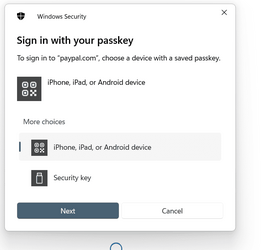
I know without Windows telling me; the web site - PayPal, in this case - tells me, and tells me what method it expects me to use. Picking "Security key" and clicking "Next" just adds unneeded steps. Picking the wrong option or clicking "Cancel" prevents the security key from being detected. The popup identifies itself as "Windows Security" but there's nothing in the Windows Security settings that seem related to this. I use BitDefender as my security package, but I see nothing it it related to this. (Anyway, BitDefender loves to brag about all the good work it does. It would certainly put its name all over the popup if it were involved.)
I haven't tried this on all the computers in the household, but it's not a problem on 2 of them. They happen to be Ethernet-attached to the LAN rather than wireless. I just tried Ethernet-ataching the laptop but the popup still appears.
What can I do to get rid of this popup?
I know without Windows telling me; the web site - PayPal, in this case - tells me, and tells me what method it expects me to use. Picking "Security key" and clicking "Next" just adds unneeded steps. Picking the wrong option or clicking "Cancel" prevents the security key from being detected. The popup identifies itself as "Windows Security" but there's nothing in the Windows Security settings that seem related to this. I use BitDefender as my security package, but I see nothing it it related to this. (Anyway, BitDefender loves to brag about all the good work it does. It would certainly put its name all over the popup if it were involved.)
I haven't tried this on all the computers in the household, but it's not a problem on 2 of them. They happen to be Ethernet-attached to the LAN rather than wireless. I just tried Ethernet-ataching the laptop but the popup still appears.
What can I do to get rid of this popup?
My Computers
-
At a glance
Windows 11Intel Core i5-840016GBIntel UHD Graphics 630- OS
- Windows 11
- Computer type
- PC/Desktop
- Manufacturer/Model
- Microsoft
- CPU
- Intel Core i5-8400
- Motherboard
- ASUS PRIME H370-PLUS
- Memory
- 16GB
- Graphics Card(s)
- Intel UHD Graphics 630
- Sound Card
- On board
- Monitor(s) Displays
- Samsung SyncMaster 2043BWX
- Screen Resolution
- 1680 x 1050
- Hard Drives
- Samsung SSD 850 256GB
WDC 1TB NVMe
WD 3TB external USB drive
- PSU
- I don't remember
- Case
- Corsair something-or-other
- Cooling
- Air CPU + 2 case fans
- Keyboard
- DAS S Pro (Cherry Brown)
- Mouse
- Logitech USB of some sort
-
At a glance
Windows 10 21H1i5-840016GBon board- Operating System
- Windows 10 21H1
- Computer type
- PC/Desktop
- Manufacturer/Model
- Homegrown
- CPU
- i5-8400
- Motherboard
- ASUS PRIME H370-PLUS
- Memory
- 16GB
- Graphics card(s)
- on board
- Sound Card
- on board
- Monitor(s) Displays
- Samsung SyncMaster 2043 BWX
- Screen Resolution
- 1280 x 1024
- Hard Drives
- Samsung SSD 850 EVO 250GB, WDS100T3X0C-00SJG0
- PSU
- don't remember
- Case
- Corsair Carbide 100r
- Cooling
- stock
- Keyboard
- DAC something or other
- Mouse
- Logitech M-U-0007
- Internet Speed
- 80/6 Mbs
- Browser
- FireFox
- Antivirus
- Kaspersky Internet security