Odd 2FA security popup


pokeefe0001

Well-known member
Member
VIP
Local time
9:14 PM
Posts
299
Location
Pacific Northwest USA
OS
Windows 11
I have no problem accessing 2FA enabled web sites from my "production" PC but I just tried it from a laptop and got a very intrusive popup.
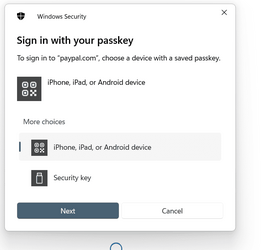
Security popup.png
I know without Windows telling me; the web site - PayPal, in this case - tells me, and tells me what method it expects me to use. Picking "Security key" and clicking "Next" just adds unneeded steps. Picking the wrong option or clicking "Cancel" prevents the security key from being detected. The popup identifies itself as "Windows Security" but there's nothing in the Windows Security settings that seem related to this. I use BitDefender as my security package, but I see nothing it it related to this. (Anyway, BitDefender loves to brag about all the good work it does. It would certainly put its name all over the popup if it were involved.)

I haven't tried this on all the computers in the household, but it's not a problem on 2 of them. They happen to be Ethernet-attached to the LAN rather than wireless. I just tried Ethernet-ataching the laptop but the popup still appears.

What can I do to get rid of this popup?
 

My Computers My Computers

  • At a glance

    Windows 11Intel Core i5-840016GBIntel UHD Graphics 630
    OS
    Windows 11
    Computer type
    PC/Desktop
    Manufacturer/Model
    Microsoft
    CPU
    Intel Core i5-8400
    Motherboard
    ASUS PRIME H370-PLUS
    Memory
    16GB
    Graphics Card(s)
    Intel UHD Graphics 630
    Sound Card
    On board
    Monitor(s) Displays
    Samsung SyncMaster 2043BWX
    Screen Resolution
    1680 x 1050
    Hard Drives
    Samsung SSD 850 256GB
    WDC 1TB NVMe
    WD 3TB external USB drive
    PSU
    I don't remember
    Case
    Corsair something-or-other
    Cooling
    Air CPU + 2 case fans
    Keyboard
    DAS S Pro (Cherry Brown)
    Mouse
    Logitech USB of some sort
  • At a glance

    Windows 10 21H1i5-840016GBon board
    Operating System
    Windows 10 21H1
    Computer type
    PC/Desktop
    Manufacturer/Model
    Homegrown
    CPU
    i5-8400
    Motherboard
    ASUS PRIME H370-PLUS
    Memory
    16GB
    Graphics card(s)
    on board
    Sound Card
    on board
    Monitor(s) Displays
    Samsung SyncMaster 2043 BWX
    Screen Resolution
    1280 x 1024
    Hard Drives
    Samsung SSD 850 EVO 250GB, WDS100T3X0C-00SJG0
    PSU
    don't remember
    Case
    Corsair Carbide 100r
    Cooling
    stock
    Keyboard
    DAC something or other
    Mouse
    Logitech M-U-0007
    Internet Speed
    80/6 Mbs
    Browser
    FireFox
    Antivirus
    Kaspersky Internet security

Scam. Con. The use of " marks around "paypal.com" rings alarm bells loud and clear.

As a start, run Malwarebytes

Picking the wrong option or clicking "Cancel" prevents the security key from being detected.
Don't click anything!! The whole image (and that's all it is, an image) is designed to trap the user. Clicking anywhere - over Next, Cancel or any other place on the popup - may activate malware. How to test : no clicking, just move your mouse pointer anywhere over the image. The cursor will not change.
 

My Computers My Computers

  • At a glance

    Windows 11 2xH2 (latest update ... forever anal)Intel i5-124008GBNVIDIA GeForce GT730
    OS
    Windows 11 2xH2 (latest update ... forever anal)
    Computer type
    PC/Desktop
    Manufacturer/Model
    HP Slim S01
    CPU
    Intel i5-12400
    Memory
    8GB
    Graphics Card(s)
    NVIDIA GeForce GT730
    Sound Card
    OOBE
    Monitor(s) Displays
    Acer 32"
    Screen Resolution
    1920x1080
    Hard Drives
    512GB KIOXIA NVMe
    1TB SATA SSD
    PSU
    OOBE
    Case
    OOBE
    Cooling
    OOBE
    Keyboard
    BT
    Mouse
    BT
    Browser
    Brave FFox Chrome Opera
    Antivirus
    KIS
  • At a glance

    Windows 11 Pro 2xH2 (latest update ... 4ever ...i7-1165G7 @ 2.80GHzIntel Iris Xe Graphics
    Operating System
    Windows 11 Pro 2xH2 (latest update ... 4ever anal)
    Computer type
    Laptop
    Manufacturer/Model
    HP Pavillion 15
    CPU
    i7-1165G7 @ 2.80GHz
    Graphics card(s)
    Intel Iris Xe Graphics
    Hard Drives
    Samsung NVMe 512GB
    + numerous/multiple SSD Type C USB enclosures
    Internet Speed
    NBN FTTN 50
    Browser
    Brave
    Antivirus
    KIS
I'm with @idgat here, that popup looks very suspicious.

You mentioned BitDefender, I would do a full scan immediately.
 

My Computer My Computer

At a glance

Windows 11 ProRyzen 9 3900XG-Skill RipjawsV F4-3600C18 (16GB x 2)Gigabyte RX 5700 XT Gaming OC
OS
Windows 11 Pro
Computer type
PC/Desktop
CPU
Ryzen 9 3900X
Motherboard
ASUS ROG Strix X570-E Gaming
Memory
G-Skill RipjawsV F4-3600C18 (16GB x 2)
Graphics Card(s)
Gigabyte RX 5700 XT Gaming OC
Sound Card
Realtek ALC1220P
Monitor(s) Displays
ASUS VE278 (x 2)
Screen Resolution
1920x1080
Hard Drives
Samsung 850 Pro 256GB
Samsung 970 Pro NVMe 512GB (x 2)
ST10000VN0004 10TB (x 2)
ST10000VN0008 10TB (x 2)
ST4000VN000 4TB (x 2)
PSU
Corsair HX1000
Case
Corsair Carbide 400R
Cooling
AMD Wraith Prism (Stock)
Keyboard
Logitech G213
Mouse
Logitech G502
Internet Speed
100Mbps down / 40Mbps up
Browser
Firefox - Chrome - Edge
Antivirus
Windows Defender - Clamwin
Windows has changed how it detects a security key in November updates, and this is now the commonly reported workflow, annoying quite a few people because of the extra "security key" click. Currently, there is no way to get around this new workflow, but people who have been using security keys are complaining. It's unclear why only some of your machines (all Windows 11?) are affected.

The FIDO2 key is practically unphishable. Maybe malware can lift your session token, but trying to phish you is pretty useless.
 

My Computer My Computer

At a glance

Windows 11 Pro 25H2
OS
Windows 11 Pro 25H2
Computer type
PC/Desktop
Scam. Con. The use of " marks around "paypal.com" rings alarm bells loud and clear.
I'm not sure whether you are saying that the web site is a scam or the popup is from malware. I know the web site is really PayPal and I get the same popup when I go to GoDaddy.com. (I have GoDaddy set up as a test of 2FA because it's easy to switch between using a primary and backup 2FA schemes, and because I don't really need the account.)

I'm less certain about the popup being from malware.

As a start, run Malwarebytes
I use Bitdefender. It's real-time antivirus checking is pretty good and it has found nothing, butt just in case I installed MalwareBytes and ran a scan. It found some PUPs: some pieces left over from when I had LDPlayer 9 (an Android emulator) installed, and a registry record left over from when I foolishly tried Quick Driver Updater.

...The whole image (and that's all it is, an image) is designed to trap the user. Clicking anywhere - over Next, Cancel or any other place on the popup - may activate malware. How to test : no clicking, just move your mouse pointer anywhere over the image. The cursor will not change.
Not true. The cursor does not change but the background highlighting of the selectable fields changes for the field hovered over. Also, the security key can be used if it is selected and Next is clicked. The security key cannot be used if "iPhone, iPad, or Android device" is selected. Whether or not malware is behind this popup, the popup is an actual selection panel.

BTW, I tried this on my wife's laptop. I was presented with a similar, but slightly different popup that said "Making sure it's you", and told me to use my security key - not unneeded choices, but still an extra step. I also tried on a PC I access via Remote Desktop - same message as on my wife's laptop except presented by mstsc.exe. (Pretty cool - it worked to insert the security key on the local PC.)

And I just tried it on a Surface 8 tablet. It acts like my laptop - the more disruptive popup.

I don't know why I don't get any such popup on my PC, but I appreciate it. All are Win 11 22H2, various builds between 22621.2428 and 22621.2715. The tablet is the oldest; my "production" PC is in the middle; the "test" PC (the one I access via Remote Desktop) and my laptop (the one where I first noticed this) are the most current. I'm not why the popups would appear on the most and least current but not in between.
 

My Computers My Computers

  • At a glance

    Windows 11Intel Core i5-840016GBIntel UHD Graphics 630
    OS
    Windows 11
    Computer type
    PC/Desktop
    Manufacturer/Model
    Microsoft
    CPU
    Intel Core i5-8400
    Motherboard
    ASUS PRIME H370-PLUS
    Memory
    16GB
    Graphics Card(s)
    Intel UHD Graphics 630
    Sound Card
    On board
    Monitor(s) Displays
    Samsung SyncMaster 2043BWX
    Screen Resolution
    1680 x 1050
    Hard Drives
    Samsung SSD 850 256GB
    WDC 1TB NVMe
    WD 3TB external USB drive
    PSU
    I don't remember
    Case
    Corsair something-or-other
    Cooling
    Air CPU + 2 case fans
    Keyboard
    DAS S Pro (Cherry Brown)
    Mouse
    Logitech USB of some sort
  • At a glance

    Windows 10 21H1i5-840016GBon board
    Operating System
    Windows 10 21H1
    Computer type
    PC/Desktop
    Manufacturer/Model
    Homegrown
    CPU
    i5-8400
    Motherboard
    ASUS PRIME H370-PLUS
    Memory
    16GB
    Graphics card(s)
    on board
    Sound Card
    on board
    Monitor(s) Displays
    Samsung SyncMaster 2043 BWX
    Screen Resolution
    1280 x 1024
    Hard Drives
    Samsung SSD 850 EVO 250GB, WDS100T3X0C-00SJG0
    PSU
    don't remember
    Case
    Corsair Carbide 100r
    Cooling
    stock
    Keyboard
    DAC something or other
    Mouse
    Logitech M-U-0007
    Internet Speed
    80/6 Mbs
    Browser
    FireFox
    Antivirus
    Kaspersky Internet security

I don't know why I don't get any such popup on my PC, but I appreciate it. All are Win 11 22H2, various builds between 22621.2428 and 22621.2715. The tablet is the oldest; my "production" PC is in the middle; the "test" PC (the one I access via Remote Desktop) and my laptop (the one where I first noticed this) are the most current. I'm not why the popups would appear on the most and least current but not in between.

As part of the November passkey update, your "Setting->Accounts" screen may now have a passkey management screen. Do the machines that get affected/not affected also have this screen? Just curious; not that I know.
 

My Computer My Computer

At a glance

Windows 11 Pro 25H2
OS
Windows 11 Pro 25H2
Computer type
PC/Desktop
As part of the November passkey update, your "Setting->Accounts" screen may now have a passkey management screen. Do the machines that get affected/not affected also have this screen? Just curious; not that I know.
All of the computers I have access to at the moment - 4 or the 5 - have passkey management. However, I don't have any passkeys so there's nothing to manage. (I'm not even sure what a passkey is.)

While checking that, though, I noticed that on my "production" PC I was set up to use the MS account rather than a local account (even though I always log on with my local userid and password). I switched to local account and I now get the "Making sure it's you" popup. However, it was just an info popup; it's only option was "Cancel", and it did not get in the way of my using the security key for logging onto PayPal. That's sort of an irritating and needless popup, but it does no harm. The popup on my laptop actually gets in the way. I'll have to see if it shows up on my PC when I install the latest maintenance.
 

My Computers My Computers

  • At a glance

    Windows 11Intel Core i5-840016GBIntel UHD Graphics 630
    OS
    Windows 11
    Computer type
    PC/Desktop
    Manufacturer/Model
    Microsoft
    CPU
    Intel Core i5-8400
    Motherboard
    ASUS PRIME H370-PLUS
    Memory
    16GB
    Graphics Card(s)
    Intel UHD Graphics 630
    Sound Card
    On board
    Monitor(s) Displays
    Samsung SyncMaster 2043BWX
    Screen Resolution
    1680 x 1050
    Hard Drives
    Samsung SSD 850 256GB
    WDC 1TB NVMe
    WD 3TB external USB drive
    PSU
    I don't remember
    Case
    Corsair something-or-other
    Cooling
    Air CPU + 2 case fans
    Keyboard
    DAS S Pro (Cherry Brown)
    Mouse
    Logitech USB of some sort
  • At a glance

    Windows 10 21H1i5-840016GBon board
    Operating System
    Windows 10 21H1
    Computer type
    PC/Desktop
    Manufacturer/Model
    Homegrown
    CPU
    i5-8400
    Motherboard
    ASUS PRIME H370-PLUS
    Memory
    16GB
    Graphics card(s)
    on board
    Sound Card
    on board
    Monitor(s) Displays
    Samsung SyncMaster 2043 BWX
    Screen Resolution
    1280 x 1024
    Hard Drives
    Samsung SSD 850 EVO 250GB, WDS100T3X0C-00SJG0
    PSU
    don't remember
    Case
    Corsair Carbide 100r
    Cooling
    stock
    Keyboard
    DAC something or other
    Mouse
    Logitech M-U-0007
    Internet Speed
    80/6 Mbs
    Browser
    FireFox
    Antivirus
    Kaspersky Internet security
Back
Top Bottom