Solved Odd message when burning a Bootable USB drive with Rufus (v 4.0.2035)


IanMosley

Windows Insider
Power User
VIP
Local time
10:00 PM
Posts
1,225
Location
UK
OS
Windows 11 Pro 25H2 (Build 26200.8728)
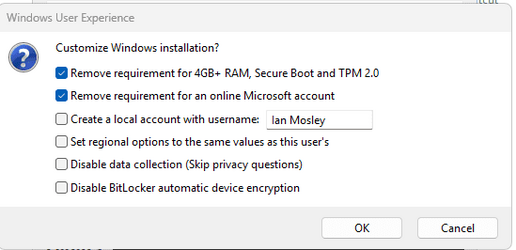
I was running Rufus to create a bootable MS Installion USB from a standard Windows 11 .ISO (Windows 10.0.22621.525.iso) and before starting the burn, I got the following pop-up window (from the .iso?) -
1.png

I've never seen this before; has anyone else?
 

My Computer

System One

  • OS
    Windows 11 Pro 25H2 (Build 26200.8728)
    Computer type
    PC/Desktop
    Manufacturer/Model
    Dell Pro Max Tower T2 FCT2250
    CPU
    Intel Core Ultra 9 285 5.6 GHz
    Motherboard
    64-bit operating system, x64-based processor
    Memory
    32.00 GB
    Graphics Card(s)
    Intel Integrated Graphics (128 MB)
    Sound Card
    Realtek Audio
    Monitor(s) Displays
    Dell P2714H Monitor
    Screen Resolution
    1920 x 1080
    Hard Drives
    1 x 512GB M.2 XG10d SED KIOXIA PCIe solid state drive (Internal)
    1 x 2TB Seagate ST2000DM008-2UB102 HDD (Internal)
    1 x 1TB Seagate STGX4000400 External HDD
    1 x 4TB Seagate STGX4000400 External HDD
    1 x 6TB WD Elements AE 2689 External HDD
    PSU
    500 Watts
    Cooling
    Air
    Keyboard
    Microsoft Wired Keyboard 600
    Mouse
    Microsoft USB Basic Optical Mouse v2.0
    Browser
    Firefox
    Antivirus
    Windows Defender + Malwarebytes Premium
    Other Info
    BaseBoard Manufacturer Dell Inc.
    BaseBoard Product 022RY57
    BaseBoard Version A01
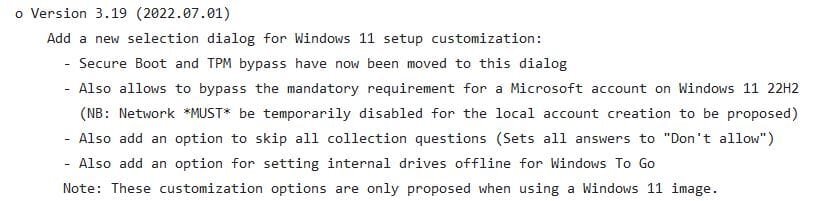
Windows 11 has certain hardware requirement that it enforces by preventing someone from installing it if their computer does not have these. Rufus has added a new popup dialog that allows workarounds for these requirements to be installed on the Windows 11 setup flash drive. With these workarounds installed someone can easily install Windows 11 on a computer that doesn't technically meet all the hardware requirements.

You can see that this dialog was added to Rufus in version 3.19 by the screenshot of its change log below. Note this popup dialog is only relevant to Windows 11 so you won't see it for older versions of Windows.

2023-05-13 15_36_42-rufus_ChangeLog.txt at master · pbatard_rufus · GitHub — Mozilla Firefox.jpg
 

My Computers

System One System Two

  • OS
    Windows 11 Pro 25H2 (26200.6901)
    Computer type
    Laptop
    Manufacturer/Model
    ASUS TUF Gaming A15 (2022)
    CPU
    AMD Ryzen 7 6800H with Radeon 680M GPU (486MB RAM)
    Memory
    Crucial DDR5-4800 (2400MHz) 32GB (2 x 16GB)
    Graphics Card(s)
    NVIDIA RTX 3060 Laptop (6GB RAM)
    Sound Card
    n/a
    Monitor(s) Displays
    15.6-inch
    Screen Resolution
    1920x1080 300Hz
    Hard Drives
    2 x Samsung 990 Evo Plus (2TB M.2 NVME SSD)
    PSU
    n/a
    Mouse
    Wireless Mouse M510
    Internet Speed
    2100Mbps/300Mbps
    Browser
    Firefox
    Antivirus
    Malwarebytes
  • Operating System
    Windows 11 Pro 25H2 (26200.8246)
    Computer type
    PC/Desktop
    Manufacturer/Model
    Custom build
    CPU
    AMD Ryzen 7 5700X3D
    Motherboard
    ASUS ROG Strix B550-F Gaming WiFi II
    Memory
    G.SKILL Flare X 32GB (2x16GB) DDR4
    Graphics card(s)
    ASUS ROG-STRIX-RTX3060TI-08G-V2-GAMING (RTX 3060-Ti, 8GB RAM)
    Monitor(s) Displays
    Samsung G50D IPS 27"
    Screen Resolution
    1440p/180Hz
    Hard Drives
    SAMSUNG 990 EVO Plus (2TB] M.2 NVME SSD
    SAMSUNG 990 EVO Plus (4TB) M.2 NVME SSD
    PSU
    Corsair RM750x (750 watts)
    Case
    Cooler Master MasterCase 5
    Cooling
    Scythe Mugen 6
    Keyboard
    Logitech K520 (MK540 keyboard/mouse combo)
    Mouse
    Logitech M310 (MK540 keyboard/mouse combo)
    Internet Speed
    2100 Mbps down / 300 Mbps up
    Browser
    Firefox, Edge, Chrome
    Antivirus
    Malwarebytes (Premium)
    Other Info
    ASUS Blu-ray Burner BW-16D1HT (SATA) || Western Digital Easystore 20TB USB 3.0 external hard drive used with Acronis True Image 2025 backup software || HP OfficeJet Pro 6975 Printer/Scanner
Windows 11 has certain hardware requirement that it enforces by preventing someone from installing it if their computer does not have these. Rufus has added a new popup dialog that allows workarounds for these requirements to be installed on the Windows 11 setup flash drive. With these workarounds installed someone can easily install Windows 11 on a computer that doesn't technically meet all the hardware requirements.

You can see that this dialog was added to Rufus in version 3.19 by the screenshot of its change log below. Note this popup dialog is only relevant to Windows 11 so you won't see it for older versions of Windows.

View attachment 60076
Are they any issues that would make me think twice about installing Win-11 on my MB that does not support it?
Gigabyte GA-Z77-HD3
 

My Computers

System One System Two

  • OS
    Windows 11 (up to date)
    Computer type
    PC/Desktop
    Manufacturer/Model
    Custom
    CPU
    Intel i5 12400
    Motherboard
    Gigabyte Z690 UA
    Memory
    Corsair Vengeance LPX 16GB
    Graphics Card(s)
    On Board the Z690
    Sound Card
    On Board
    Monitor(s) Displays
    43" Samsung tu7000
    Screen Resolution
    2560 x 1440
    Hard Drives
    SAMSUNG SSD 1TB NVMe M.2
    PSU
    Thermaltake smart 500w 80+
    Case
    LIAN LANCOOL_205M
    Cooling
    Bunch of fans . . . :o) (lights dont work)
    Keyboard
    Unicomp: Ultra Classic White Buckling Spring USB
    Mouse
    M510
    Internet Speed
    50mbps on Ethernet
    Browser
    Fire Fox
    Antivirus
    Windows
    Other Info
    Love this computer but I still prefer Win-7 like I love my old Lazy Boy Recliner . . . it just feels better.
  • Operating System
    WIN-7-64BIT and Win-11 pro for testing on unsupported hardware
    Computer type
    PC/Desktop
    Manufacturer/Model
    Home built
    CPU
    i5-3570K CPU @ 3.40GHz, 3801 Mhz, 4 Core(s), 4 Logical Processor(s)
    Motherboard
    GA-Z77-HD3
    Memory
    16 GB - Crucial Ballistick 4GB PC3-14900 DDR3-1333 MHz
    Graphics card(s)
    NVIDIA GeForce GTX 1050
    Sound Card
    On Board
    Monitor(s) Displays
    ASUS VP278
    Screen Resolution
    1920 x 1080
    Hard Drives
    4 - internal Samsung 2.5" SSD, 1 WD HDD 7200 and some external drives
    PSU
    EVGA 550w
    Case
    Old Gygabyte Tower
    Cooling
    Yes
    Keyboard
    Unicomp - UNIOP4A USB (like the old IBM Model H that I started with)
    Mouse
    M510
    Internet Speed
    50mbps
    Browser
    Firefox
    Antivirus
    Windows
    Other Info
    The only thing it lack is USB-3.2 on the front face but it has 3.0 on the back
Are they any issues that would make me think twice about installing Win-11 on my MB that does not support it?
Gigabyte GA-Z77-HD3
I'm currently running Win11 on two PCs that do not support it -- a desktop and a laptop -- and on both, I have yet to run into any performance, feature, or stability issues.

The BIG question to me is how much long MS will allow this -- and no one knows the answer to that. If MS knows that, they are not releasing that information. I am very surprised that have let this go on so long. I would have expected them to push out an Update, or to change Win11 in some way, to disable these workarounds long ago. But then, they could do this with the next Patch Tuesday or with any out-of-band Update along the way.

So, if the issue of continuing to use Win11 on unsupported hardware for years to come is important, then the only reliable thing to do is NOT run Win11 on unsupported hardware -- as MS could disable this any time they want.

I keep Win10 on other SSDs for both of these PCs and continue to update that every month, so if either gets disabled, I have a fairly current Win10 install I can swap into the PC in its place. That way, if MS disables, this, I am not left with a nonworking PC.
 

My Computer

System One

  • OS
    Windows 11
    Computer type
    PC/Desktop
    Manufacturer/Model
    Custom built
    CPU
    Ryzen 5600X
    Motherboard
    ASRock Steel Legend
    Memory
    16GB
    Graphics Card(s)
    EVGA GT 710
    Sound Card
    None
    Monitor(s) Displays
    23",24", 19" - flat panels
    Screen Resolution
    1920x1200
    Hard Drives
    None - only M.2 SATA and NVMe drives
    PSU
    750W
    Case
    Antec
    Cooling
    stock Wraith cooler
    Keyboard
    Corsair gaming
    Mouse
    Logitech M720
    Internet Speed
    1Gb
When y'all see that Rufus popup, just check every box, and put in the user name you can live with.
Then the resulting USB will install Windows 11 on just about anything, but the kitchen stove.
(and, any 32 bit machines)
It takes the big question about compatibility right out of the conversation.

I've done it umpteen times now, and it just WORKS!

Then, to avoid the possibility of an MS update upsetting your apple cart, turn OFF all MS Updates, with something like "Stopupdates10Setup.exe". It will let you turn updates back on, any time you want.

I run all my Windows versions with MS Updates turned OFF, with narry a problem.
 
Last edited:

My Computer

I don't know why the Rufus programme stirs such opposition. I don't care of course, since using it is completely voluntary, but I've noticed flashes of anti-Rufus ire across a number of websites. To be truthful, this is just a little amusing.

The "popup" multiple choice screen shown at the opening post [IanMosely above] has a most useful choice apart from the inadequate hardware issue - that of being able to choose a local account for whichever name you decide to play by as against being forced into using an MS account. From my viewpoint, reducing the opportunities for MS to indulge its' nosiness is a good thing (same for Google and others). That other people may not agree with that is naturally entirely up to them.

There is a post somewhere on this site I remember reading, wherein the author listed the likely sequence of commands that Rufus uses to accomplish this. So there is a list here for the applicable snakes and ladders for this ... but Rufus is so much simpler and just as costless.
 

My Computer

System One

  • OS
    Windows 11
    Computer type
    Laptop
    Manufacturer/Model
    HP 15s_du1xxx
    CPU
    Intel i5 10210U
    Motherboard
    85F1
    Memory
    16Gb
    Graphics Card(s)
    Intel UHD
    Sound Card
    Realtek
    Screen Resolution
    1920 x 1080
The "popup" multiple choice screen shown at the opening post [IanMosely above] has a most useful choice apart from the inadequate hardware issue - that of being able to choose a local account for whichever name you decide to play by as against being forced into using an MS account. From my viewpoint, reducing the opportunities for MS to indulge its' nosiness is a good thing (same for Google and others). That other people may not agree with that is naturally entirely up to them.
Actually it is easy to bypass the requirement for a MS account if you know how. I have installed Windows 11 (both Home and Pro) several times the last few months and installed local accounts on all of them.

I always leave the Internet connected because that is better anyways. During setup when it asks me to log into my Microsoft account I use the following login information:

Sign in: username
Enter password: password

The response is, Oops, something went wrong

It then allows me to create a local account.
 

My Computers

System One System Two

  • OS
    Windows 11 Pro 25H2 (26200.6901)
    Computer type
    Laptop
    Manufacturer/Model
    ASUS TUF Gaming A15 (2022)
    CPU
    AMD Ryzen 7 6800H with Radeon 680M GPU (486MB RAM)
    Memory
    Crucial DDR5-4800 (2400MHz) 32GB (2 x 16GB)
    Graphics Card(s)
    NVIDIA RTX 3060 Laptop (6GB RAM)
    Sound Card
    n/a
    Monitor(s) Displays
    15.6-inch
    Screen Resolution
    1920x1080 300Hz
    Hard Drives
    2 x Samsung 990 Evo Plus (2TB M.2 NVME SSD)
    PSU
    n/a
    Mouse
    Wireless Mouse M510
    Internet Speed
    2100Mbps/300Mbps
    Browser
    Firefox
    Antivirus
    Malwarebytes
  • Operating System
    Windows 11 Pro 25H2 (26200.8246)
    Computer type
    PC/Desktop
    Manufacturer/Model
    Custom build
    CPU
    AMD Ryzen 7 5700X3D
    Motherboard
    ASUS ROG Strix B550-F Gaming WiFi II
    Memory
    G.SKILL Flare X 32GB (2x16GB) DDR4
    Graphics card(s)
    ASUS ROG-STRIX-RTX3060TI-08G-V2-GAMING (RTX 3060-Ti, 8GB RAM)
    Monitor(s) Displays
    Samsung G50D IPS 27"
    Screen Resolution
    1440p/180Hz
    Hard Drives
    SAMSUNG 990 EVO Plus (2TB] M.2 NVME SSD
    SAMSUNG 990 EVO Plus (4TB) M.2 NVME SSD
    PSU
    Corsair RM750x (750 watts)
    Case
    Cooler Master MasterCase 5
    Cooling
    Scythe Mugen 6
    Keyboard
    Logitech K520 (MK540 keyboard/mouse combo)
    Mouse
    Logitech M310 (MK540 keyboard/mouse combo)
    Internet Speed
    2100 Mbps down / 300 Mbps up
    Browser
    Firefox, Edge, Chrome
    Antivirus
    Malwarebytes (Premium)
    Other Info
    ASUS Blu-ray Burner BW-16D1HT (SATA) || Western Digital Easystore 20TB USB 3.0 external hard drive used with Acronis True Image 2025 backup software || HP OfficeJet Pro 6975 Printer/Scanner
Actually it is easy to bypass the requirement for a MS account if you know how. I have installed Windows 11 (both Home and Pro) several times the last few months and installed local accounts on all of them.

I always leave the Internet connected because that is better anyways. During setup when it asks me to log into my Microsoft account I use the following login information:

Sign in: username
Enter password: password

The response is, Oops, something went wrong

It then allows me to create a local account.
What exactly is an "account"? I did not set up a Microsoft or local account for windows 11 that I know of unless it's the same as the profile at C:\Users\John. There's nothing in Start/Settings/Accounts. I did create a Microsoft account three years ago the first time I installed Windows 10. At least I think that's when I did it because I have a username and password but I cannot login to it. I may have deleted it.
 

My Computers

System One System Two

  • OS
    Windows 11 (up to date)
    Computer type
    PC/Desktop
    Manufacturer/Model
    Custom
    CPU
    Intel i5 12400
    Motherboard
    Gigabyte Z690 UA
    Memory
    Corsair Vengeance LPX 16GB
    Graphics Card(s)
    On Board the Z690
    Sound Card
    On Board
    Monitor(s) Displays
    43" Samsung tu7000
    Screen Resolution
    2560 x 1440
    Hard Drives
    SAMSUNG SSD 1TB NVMe M.2
    PSU
    Thermaltake smart 500w 80+
    Case
    LIAN LANCOOL_205M
    Cooling
    Bunch of fans . . . :o) (lights dont work)
    Keyboard
    Unicomp: Ultra Classic White Buckling Spring USB
    Mouse
    M510
    Internet Speed
    50mbps on Ethernet
    Browser
    Fire Fox
    Antivirus
    Windows
    Other Info
    Love this computer but I still prefer Win-7 like I love my old Lazy Boy Recliner . . . it just feels better.
  • Operating System
    WIN-7-64BIT and Win-11 pro for testing on unsupported hardware
    Computer type
    PC/Desktop
    Manufacturer/Model
    Home built
    CPU
    i5-3570K CPU @ 3.40GHz, 3801 Mhz, 4 Core(s), 4 Logical Processor(s)
    Motherboard
    GA-Z77-HD3
    Memory
    16 GB - Crucial Ballistick 4GB PC3-14900 DDR3-1333 MHz
    Graphics card(s)
    NVIDIA GeForce GTX 1050
    Sound Card
    On Board
    Monitor(s) Displays
    ASUS VP278
    Screen Resolution
    1920 x 1080
    Hard Drives
    4 - internal Samsung 2.5" SSD, 1 WD HDD 7200 and some external drives
    PSU
    EVGA 550w
    Case
    Old Gygabyte Tower
    Cooling
    Yes
    Keyboard
    Unicomp - UNIOP4A USB (like the old IBM Model H that I started with)
    Mouse
    M510
    Internet Speed
    50mbps
    Browser
    Firefox
    Antivirus
    Windows
    Other Info
    The only thing it lack is USB-3.2 on the front face but it has 3.0 on the back
I fully understand, that some of the MS fan boys, will see Rufus as a Hack Tool or Warez.
Oh, I know them so well! I've met a bunch of them over the past 40+ years that I've been involved in this PC stuff.
But even for those who want to pay full retail price for Windows xx and just love having a MS Account, Rufus can still make putting an ISO on a Flash Drive a whole lot easier, options not withstanding.
And of course, it's the users choice to take just one option, all options, (like me) or no option at all, and go right to the final burn process.

And, like so many other Great programs today, Rufus is absolutely 100%, FREE!

I hope y'all are having a very nice Mother's Day
TM :cool:
 

My Computer

What exactly is an "account"? I did not set up a Microsoft or local account for windows 11 that I know of unless it's the same as the profile at C:\Users\John. There's nothing in Start/Settings/Accounts. I did create a Microsoft account three years ago the first time I installed Windows 10. At least I think that's when I did it because I have a username and password but I cannot login to it. I may have deleted it.
You can't install Windows without creating at least one account. The first user will be of type Administrator. Any additional accounts can be either type Administrator or Standard User. All users will have a folder in C:\Users with the same name as their user. Obviously your user name is John because their is a folder called C:\Users\John.

Note every installation of Windows comes with a built-in user named Administrator. It is also of user type Administrator. It is hidden by default but can be "un-hidden" at any time.

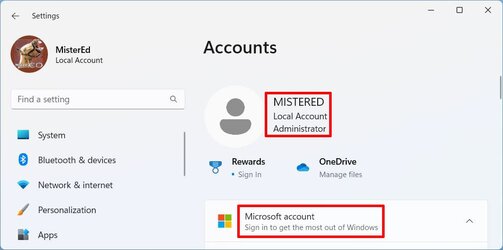
To see what your account user name is, you go into settings and select Accounts. In the example below you see the account user name is MisterEd. The account is a Local Account, and user type is Administrator. The local account can be changed to a Microsoft account by selecting Microsoft Account and following the directions. In same manner if the account is already a Microsoft account it can be changed to a Local account.

user1.jpg

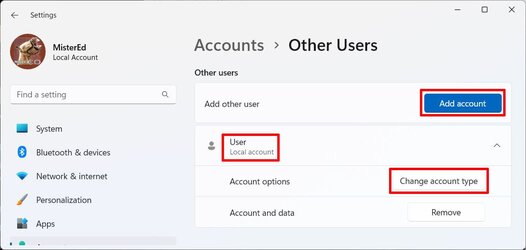
To see what other users there are scroll down and select Other Users. In the example below there is a second account whose user name is User. It is a Local account. Select Change account type to see or changes the user type. Select Add account to add another account. That new account can be either a Local account or Microsoft account. It can also be either of type Administrator or Standard User.

user2.jpg

The user named User has a user type of Standard User. Any user of type Administrator can change the user type of another user.

user3.jpg
 

My Computers

System One System Two

  • OS
    Windows 11 Pro 25H2 (26200.6901)
    Computer type
    Laptop
    Manufacturer/Model
    ASUS TUF Gaming A15 (2022)
    CPU
    AMD Ryzen 7 6800H with Radeon 680M GPU (486MB RAM)
    Memory
    Crucial DDR5-4800 (2400MHz) 32GB (2 x 16GB)
    Graphics Card(s)
    NVIDIA RTX 3060 Laptop (6GB RAM)
    Sound Card
    n/a
    Monitor(s) Displays
    15.6-inch
    Screen Resolution
    1920x1080 300Hz
    Hard Drives
    2 x Samsung 990 Evo Plus (2TB M.2 NVME SSD)
    PSU
    n/a
    Mouse
    Wireless Mouse M510
    Internet Speed
    2100Mbps/300Mbps
    Browser
    Firefox
    Antivirus
    Malwarebytes
  • Operating System
    Windows 11 Pro 25H2 (26200.8246)
    Computer type
    PC/Desktop
    Manufacturer/Model
    Custom build
    CPU
    AMD Ryzen 7 5700X3D
    Motherboard
    ASUS ROG Strix B550-F Gaming WiFi II
    Memory
    G.SKILL Flare X 32GB (2x16GB) DDR4
    Graphics card(s)
    ASUS ROG-STRIX-RTX3060TI-08G-V2-GAMING (RTX 3060-Ti, 8GB RAM)
    Monitor(s) Displays
    Samsung G50D IPS 27"
    Screen Resolution
    1440p/180Hz
    Hard Drives
    SAMSUNG 990 EVO Plus (2TB] M.2 NVME SSD
    SAMSUNG 990 EVO Plus (4TB) M.2 NVME SSD
    PSU
    Corsair RM750x (750 watts)
    Case
    Cooler Master MasterCase 5
    Cooling
    Scythe Mugen 6
    Keyboard
    Logitech K520 (MK540 keyboard/mouse combo)
    Mouse
    Logitech M310 (MK540 keyboard/mouse combo)
    Internet Speed
    2100 Mbps down / 300 Mbps up
    Browser
    Firefox, Edge, Chrome
    Antivirus
    Malwarebytes (Premium)
    Other Info
    ASUS Blu-ray Burner BW-16D1HT (SATA) || Western Digital Easystore 20TB USB 3.0 external hard drive used with Acronis True Image 2025 backup software || HP OfficeJet Pro 6975 Printer/Scanner
You can't install Windows without creating at least one account. The first user will be of type Administrator. Any additional accounts can be either type Administrator or Standard User.
Thanks MisterEd, that was thorough
 

My Computers

System One System Two

  • OS
    Windows 11 (up to date)
    Computer type
    PC/Desktop
    Manufacturer/Model
    Custom
    CPU
    Intel i5 12400
    Motherboard
    Gigabyte Z690 UA
    Memory
    Corsair Vengeance LPX 16GB
    Graphics Card(s)
    On Board the Z690
    Sound Card
    On Board
    Monitor(s) Displays
    43" Samsung tu7000
    Screen Resolution
    2560 x 1440
    Hard Drives
    SAMSUNG SSD 1TB NVMe M.2
    PSU
    Thermaltake smart 500w 80+
    Case
    LIAN LANCOOL_205M
    Cooling
    Bunch of fans . . . :o) (lights dont work)
    Keyboard
    Unicomp: Ultra Classic White Buckling Spring USB
    Mouse
    M510
    Internet Speed
    50mbps on Ethernet
    Browser
    Fire Fox
    Antivirus
    Windows
    Other Info
    Love this computer but I still prefer Win-7 like I love my old Lazy Boy Recliner . . . it just feels better.
  • Operating System
    WIN-7-64BIT and Win-11 pro for testing on unsupported hardware
    Computer type
    PC/Desktop
    Manufacturer/Model
    Home built
    CPU
    i5-3570K CPU @ 3.40GHz, 3801 Mhz, 4 Core(s), 4 Logical Processor(s)
    Motherboard
    GA-Z77-HD3
    Memory
    16 GB - Crucial Ballistick 4GB PC3-14900 DDR3-1333 MHz
    Graphics card(s)
    NVIDIA GeForce GTX 1050
    Sound Card
    On Board
    Monitor(s) Displays
    ASUS VP278
    Screen Resolution
    1920 x 1080
    Hard Drives
    4 - internal Samsung 2.5" SSD, 1 WD HDD 7200 and some external drives
    PSU
    EVGA 550w
    Case
    Old Gygabyte Tower
    Cooling
    Yes
    Keyboard
    Unicomp - UNIOP4A USB (like the old IBM Model H that I started with)
    Mouse
    M510
    Internet Speed
    50mbps
    Browser
    Firefox
    Antivirus
    Windows
    Other Info
    The only thing it lack is USB-3.2 on the front face but it has 3.0 on the back
I fully understand, that some of the MS fan boys, will see Rufus as a Hack Tool or Warez.
Oh, I know them so well! I've met a bunch of them over the past 40+ years that I've been involved in this PC stuff.
But even for those who want to pay full retail price for Windows xx and just love having a MS Account, Rufus can still make putting an ISO on a Flash Drive a whole lot easier, options not withstanding.
And of course, it's the users choice to take just one option, all options, (like me) or no option at all, and go right to the final burn process.

And, like so many other Great programs today, Rufus is absolutely 100%, FREE!

I hope y'all are having a very nice Mother's Day
TM :cool:
There have many tools such as nLite (Win XP), vLite (Win Vista), and NTLite (Win 7,8,10) used over the years. These tools were used to modify the normal installation or create an attended installation of Windows. Rufus is no different than these tools. It is just more limited and provides the average user a simple way to do this. BTW, these other tools were used by many thousands of people and were well accepted in the user communities and online forums.
 

My Computers

System One System Two

  • OS
    Windows 11 Pro 25H2 (26200.6901)
    Computer type
    Laptop
    Manufacturer/Model
    ASUS TUF Gaming A15 (2022)
    CPU
    AMD Ryzen 7 6800H with Radeon 680M GPU (486MB RAM)
    Memory
    Crucial DDR5-4800 (2400MHz) 32GB (2 x 16GB)
    Graphics Card(s)
    NVIDIA RTX 3060 Laptop (6GB RAM)
    Sound Card
    n/a
    Monitor(s) Displays
    15.6-inch
    Screen Resolution
    1920x1080 300Hz
    Hard Drives
    2 x Samsung 990 Evo Plus (2TB M.2 NVME SSD)
    PSU
    n/a
    Mouse
    Wireless Mouse M510
    Internet Speed
    2100Mbps/300Mbps
    Browser
    Firefox
    Antivirus
    Malwarebytes
  • Operating System
    Windows 11 Pro 25H2 (26200.8246)
    Computer type
    PC/Desktop
    Manufacturer/Model
    Custom build
    CPU
    AMD Ryzen 7 5700X3D
    Motherboard
    ASUS ROG Strix B550-F Gaming WiFi II
    Memory
    G.SKILL Flare X 32GB (2x16GB) DDR4
    Graphics card(s)
    ASUS ROG-STRIX-RTX3060TI-08G-V2-GAMING (RTX 3060-Ti, 8GB RAM)
    Monitor(s) Displays
    Samsung G50D IPS 27"
    Screen Resolution
    1440p/180Hz
    Hard Drives
    SAMSUNG 990 EVO Plus (2TB] M.2 NVME SSD
    SAMSUNG 990 EVO Plus (4TB) M.2 NVME SSD
    PSU
    Corsair RM750x (750 watts)
    Case
    Cooler Master MasterCase 5
    Cooling
    Scythe Mugen 6
    Keyboard
    Logitech K520 (MK540 keyboard/mouse combo)
    Mouse
    Logitech M310 (MK540 keyboard/mouse combo)
    Internet Speed
    2100 Mbps down / 300 Mbps up
    Browser
    Firefox, Edge, Chrome
    Antivirus
    Malwarebytes (Premium)
    Other Info
    ASUS Blu-ray Burner BW-16D1HT (SATA) || Western Digital Easystore 20TB USB 3.0 external hard drive used with Acronis True Image 2025 backup software || HP OfficeJet Pro 6975 Printer/Scanner
Back
Top Bottom