Solved Office 2021 - More Colors... bug


secondsight

Well-known member
Member
Local time
3:51 AM
Posts
74
OS
Windows 11 Enterprise
Could some of you try this if you have Office 2021 (or even 2019) please? Open a blank document in Word (or PowerPoint) and choose the dropdown next to Font Color icon on the toolbar. From there choose More Colors.....(just above Gradient).

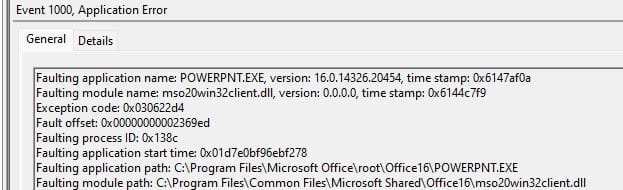
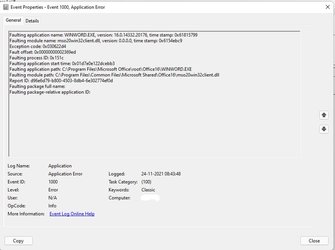
What does yours do? Here on two seperate machines it crashes Word (or PowerPoint) and a Error ID 1000 is generated in Event Viewer.

2021-11-23_235658.jpg

Or...

2021-11-23_235524.jpg

:)
 

My Computer My Computer

At a glance

Windows 11 Enterprise

OS
Windows 11 Enterprise

Opens the color palette normally here. Office 2019.
 

My Computers My Computers

  • At a glance

    Windows 11 Pro
    OS
    Windows 11 Pro
    Computer type
    PC/Desktop
    Manufacturer/Model
    ASUS ROG Strix
  • At a glance

    Windows 11 Pro
    Operating System
    Windows 11 Pro
    Computer type
    Laptop
    Manufacturer/Model
    ASUS VivoBook
  • ASUS VivoBook 'Lite' ~ Windows 11 Home
Opens the color palette normally here. Office 2019.
Thank you for trying.....maybe its just 2021. Hopefully someone will try that.

:)
 

My Computer My Computer

At a glance

Windows 11 Enterprise

OS
Windows 11 Enterprise

I have Office 2021 and there is no problem; just get this diamond shape to pick any colour at all !
Windows 11 pro wit office 2021
 

My Computer My Computer

At a glance

Windows 11
OS
Windows 11
I have Office 2021 and there is no problem; just get this diamond shape to pick any colour at all !
Windows 11 pro wit office 2021
It crashes for me with all Office 2021 Pro Plus Apps. However, Visio 2021 Pro and Project 2021 Pro work. It is all very strange.
 

My Computer My Computer

At a glance

Windows 11 Enterprise
OS
Windows 11 Enterprise
same thing happens for me too on windows 11, office 2021.

Untitled-1.jpg
 

My Computer My Computer

At a glance

windows11AMD Ryzen5 36002x16 Gb Corsair Vengeance Lpx DDR4 3200MHzZotac GTX 1660 super
OS
windows11
Computer type
PC/Desktop
Manufacturer/Model
Self Built
CPU
AMD Ryzen5 3600
Motherboard
Asus tuf gaming x570-plus
Memory
2x16 Gb Corsair Vengeance Lpx DDR4 3200MHz
Graphics Card(s)
Zotac GTX 1660 super
Sound Card
built-in
Monitor(s) Displays
Benq GW2780
Screen Resolution
1080p
Hard Drives
250 GB Silicon power PCIe Gen3x4
2x 4TB Toshiba HDD
PSU
Antec EA750G pro 750 Watt Semi- Modular
Case
NZXT H Series H510 Matte Black Tempered Glass ATX
Cooling
Deepcool Gammaxx GT RGB
Keyboard
Logitech G213 Prodigy
Mouse
Logitech G402
Internet Speed
100 Mbps
Browser
Chrome
Antivirus
Comodo Firewall & windows defender ( hardened with DefenderUI)
same thing happens for me too on windows 11, office 2021.

View attachment 14418
Aha......so I'm not going mad (yet) :)

Interestingly the mso20win32client.dll file referred to in the message we both have does not exist in that folder.
I got myself a copy and put it in the folder but still get the same problem.
No attempt to do a Quick Repair or Online Repair will correct it.
In fact Online Repair is also bust in the current updated version of Office 2021 (error 30015-45) but does work if have done a Quick Repair first (because presumably it downgrades the updated Office 2021 to the initial version).

Then to add insult to injury the Online Repair "repairs" a Office 2021 to Office 2019. No joke....
Had to do a System Restore and reactivate Office to correct it.
 

My Computer My Computer

At a glance

Windows 11 Enterprise
OS
Windows 11 Enterprise
For what it's worth I've had a thread closely connected to windows 11 installation on unsupported hardware and in fact I am using an old Lenovo Thinkpad T450 for this post and it uses windows 11 pro and office 2021Professiona Plus. But, isn't there always, since windows 11 was officially released I have installed from an ISO at least 6 times and each time with the OS and Office has performed differently for absolutely no reason at all.
I have a back up of the drivers and so each initial install is a vanilla one but each time something untoward occurs.
So there you are .....
 

My Computer My Computer

At a glance

Windows 11
OS
Windows 11
For what it's worth I've had a thread closely connected to windows 11 installation on unsupported hardware and in fact I am using an old Lenovo Thinkpad T450 for this post and it uses windows 11 pro and office 2021Professiona Plus. But, isn't there always, since windows 11 was officially released I have installed from an ISO at least 6 times and each time with the OS and Office has performed differently for absolutely no reason at all.
I have a back up of the drivers and so each initial install is a vanilla one but each time something untoward occurs.
So there you are .....
I had the bug confirmed today by Microsoft Support. I shared my screen to them and they watched Word crash for themselves. It seems that installation via iso is not putting required files where they should be. In fact, I cannot find some of the files on the iso at all.

I am intrigued to find out what is in the following folder..... "C:\Program Files\Common Files\Microsoft Shared\Office16\" ......for those (including you) that say it works fine for them so I can know exactly what is missing.
 

My Computer My Computer

At a glance

Windows 11 Enterprise
OS
Windows 11 Enterprise
Normal in 2021
 

My Computer My Computer

At a glance

windows 11 64i7-12700T32 GBNvidia GeForce 1650 / Intel 770
OS
windows 11 64
Computer type
PC/Desktop
Manufacturer/Model
HP
CPU
i7-12700T
Memory
32 GB
Graphics Card(s)
Nvidia GeForce 1650 / Intel 770
Screen Resolution
1920 / 1080
Hard Drives
Samsung 990 Pro 1TB
Case
All in One
Keyboard
USB
Mouse
USB
Internet Speed
600 MBS
Browser
Chrome
Antivirus
MS
I had the bug confirmed today by Microsoft Support. I shared my screen to them and they watched Word crash for themselves. It seems that installation via iso is not putting required files where they should be. In fact, I cannot find some of the files on the iso at all.

I am intrigued to find out what is in the following folder..... "C:\Program Files\Common Files\Microsoft Shared\Office16\" ......for those (including you) that say it works fine for them so I can know exactly what is missing.
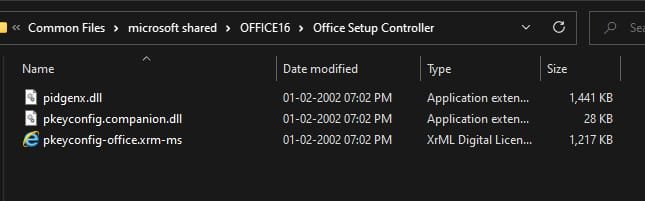
Well I have the following...even though it does not work for me.
Untitled-1.jpg
Untitled-2.jpg
 

My Computer My Computer

At a glance

windows11AMD Ryzen5 36002x16 Gb Corsair Vengeance Lpx DDR4 3200MHzZotac GTX 1660 super
OS
windows11
Computer type
PC/Desktop
Manufacturer/Model
Self Built
CPU
AMD Ryzen5 3600
Motherboard
Asus tuf gaming x570-plus
Memory
2x16 Gb Corsair Vengeance Lpx DDR4 3200MHz
Graphics Card(s)
Zotac GTX 1660 super
Sound Card
built-in
Monitor(s) Displays
Benq GW2780
Screen Resolution
1080p
Hard Drives
250 GB Silicon power PCIe Gen3x4
2x 4TB Toshiba HDD
PSU
Antec EA750G pro 750 Watt Semi- Modular
Case
NZXT H Series H510 Matte Black Tempered Glass ATX
Cooling
Deepcool Gammaxx GT RGB
Keyboard
Logitech G213 Prodigy
Mouse
Logitech G402
Internet Speed
100 Mbps
Browser
Chrome
Antivirus
Comodo Firewall & windows defender ( hardened with DefenderUI)
@secondsight

@JoyousBudweiser

(Not sure I agree with your taste in "Beer" !!!!)

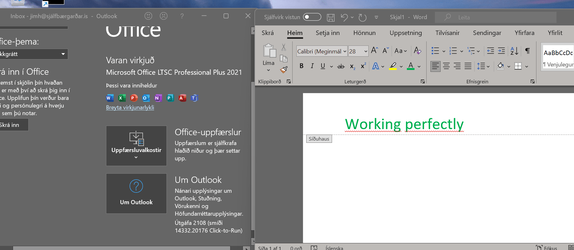
I'm using Office 2021 LTSC version and it's Skjámynd 2021-11-25 091338.pngworking perfectly.

Cheers
jimbo
 

My Computer My Computer

At a glance

Windows XP,11 Linux Fedora Rawhide pre-releas...2 X Intel i7
OS
Windows XP,11 Linux Fedora Rawhide pre-release 46
Computer type
PC/Desktop
CPU
2 X Intel i7
Screen Resolution
4KUHD X 2
@secondsight

@JoyousBudweiser

(Not sure I agree with your taste in "Beer" !!!!)

I'm using Office 2021 LTSC version and it's View attachment 14475working perfectly.

Cheers
jimbo
Thank you for that. This leads me to one other idea. Are your installations upgrades of Office 2019 or were they clean installations as I have?
(In fact mine were clean Windows 11 AND clean Office 2021 Pro.)
 

My Computer My Computer

At a glance

Windows 11 Enterprise
OS
Windows 11 Enterprise

My Computer My Computer

At a glance

Windows 11 Enterprise
OS
Windows 11 Enterprise
Hi folks
My install wasn't from an ISO but a Network install from Client's central server. The Enterprise Office 2021 LTSC I have may be different also from the Retail version(s) out there as it's the business version -- also has PROJECT 2021 and VISIO 2021 included. Possibly any defects were already fixed by the client.

Cheers
jimbo
 

My Computer My Computer

At a glance

Windows XP,11 Linux Fedora Rawhide pre-releas...2 X Intel i7
OS
Windows XP,11 Linux Fedora Rawhide pre-release 46
Computer type
PC/Desktop
CPU
2 X Intel i7
Screen Resolution
4KUHD X 2
Hi folks
My install wasn't from an ISO but a Network install from Client's central server. The Enterprise Office 2021 LTSC I have may be different also from the Retail version(s) out there as it's the business version -- also has PROJECT 2021 and VISIO 2021 included. Possibly any defects were already fixed by the client.

Cheers
jimbo
It is starting to make me think that the problem is the iso (the GB one in my case). Project 2021 and Visio 2021 which have their own separate iso's are working.

:think:
 

My Computer My Computer

At a glance

Windows 11 Enterprise
OS
Windows 11 Enterprise
I just bought Office HS, I'll let ya know if there's issues!
 

My Computers My Computers

  • At a glance

    Windows 11 Pro
    OS
    Windows 11 Pro
    Computer type
    PC/Desktop
    Manufacturer/Model
    ASUS ROG Strix
  • At a glance

    Windows 11 Pro
    Operating System
    Windows 11 Pro
    Computer type
    Laptop
    Manufacturer/Model
    ASUS VivoBook
  • ASUS VivoBook 'Lite' ~ Windows 11 Home

My Computers My Computers

  • At a glance

    Windows 11 Pro
    OS
    Windows 11 Pro
    Computer type
    PC/Desktop
    Manufacturer/Model
    ASUS ROG Strix
  • At a glance

    Windows 11 Pro
    Operating System
    Windows 11 Pro
    Computer type
    Laptop
    Manufacturer/Model
    ASUS VivoBook
  • ASUS VivoBook 'Lite' ~ Windows 11 Home
Can you show us what is in the folder "C:\Program Files\Common Files\Microsoft Shared\Office16\" please?
Exactly the same as post #11
 

My Computers My Computers

  • At a glance

    Windows 11 Pro
    OS
    Windows 11 Pro
    Computer type
    PC/Desktop
    Manufacturer/Model
    ASUS ROG Strix
  • At a glance

    Windows 11 Pro
    Operating System
    Windows 11 Pro
    Computer type
    Laptop
    Manufacturer/Model
    ASUS VivoBook
  • ASUS VivoBook 'Lite' ~ Windows 11 Home

Latest Support Threads

Back
Top Bottom