Old Windows 10 Taskbar


catweazel

Well-known member
Member
VIP
Local time
10:39 AM
Posts
155
Location
Germany
OS
Windows 11
Hallo,
i dont find it here, my System Windows 11 22000.176, here you can get the old Win10 Taskbar, without any Problems, it is working fine for me. ;)
below info and download.

For
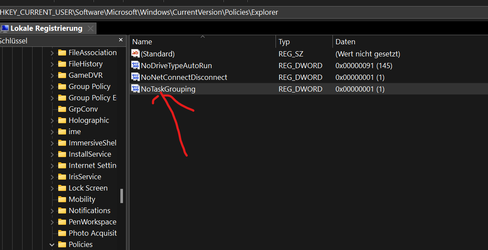
Disable taskbar buttons grouping

[HKEY_CURRENT_USER\SOFTWARE\Microsoft\Windows\CurrentVersion\Policies\Explorer]
"NoTaskGrouping"=dword:00000001

EDIT:
now i am waiting for Windows Update,
Moderator moinmoin writes, that after Windows Update and restart, you have to reactivate the icons, with him it was only the clock.
%windir%\explorer.exe shell:::{05d7b0f4-2121-4eff-bf6b-ed3f69b894d9}\SystemIcons

It is fine, you have the old Desktop Contextmenu too, after this Patch.
 

Attachments

  • oldtaskbar.png
    oldtaskbar.png
    10.1 KB · Views: 21
  • no groups.png
    no groups.png
    18.1 KB · Views: 20
Last edited:

My Computer My Computer

At a glance

Windows 11Intel I7 6820 HQ QuadCore16 gbIntel HD 530, Nvidia Qudro M1000M
OS
Windows 11
Computer type
Laptop
Manufacturer/Model
Lenovo P50
CPU
Intel I7 6820 HQ QuadCore
Memory
16 gb
Graphics Card(s)
Intel HD 530, Nvidia Qudro M1000M
Sound Card
Realtek High Definition Audio
Monitor(s) Displays
1920x1080
Screen Resolution
Wide viewing angle & High density FlexView Display 1920x1080
Hard Drives
SSD
With this patcher, I wonder if you can still do the old trick of moving the main Taskbar to a secondary monitor while keeping the former monitor as Main?
 

My Computers My Computers

  • At a glance

    Windows 11 Pro
    OS
    Windows 11 Pro
    Computer type
    PC/Desktop
    Manufacturer/Model
    ASUS ROG Strix
  • At a glance

    Windows 11 Pro
    Operating System
    Windows 11 Pro
    Computer type
    Laptop
    Manufacturer/Model
    ASUS VivoBook
  • ASUS VivoBook 'Lite' ~ Windows 11 Home
With this patcher, can we move the Taskbar to any position like in Windows 10 ?
Thanks and Regards
 

My Computer My Computer

At a glance

Windows 11 23H2Intel i7-7700k16 GBIntel 630 onboard
OS
Windows 11 23H2
Computer type
PC/Desktop
Manufacturer/Model
Assembled
CPU
Intel i7-7700k
Motherboard
Asrock Z270 Taichi
Memory
16 GB
Graphics Card(s)
Intel 630 onboard
Sound Card
Onboard
Monitor(s) Displays
Benq 1080p
Screen Resolution
1920*1080
Hard Drives
NVMe, SSD and HDD
Case
Cooler Master
Keyboard
Asus wireless
Mouse
Asus Wireless
Internet Speed
75 Mbps
Browser
Chrome, Edge, Arc
Antivirus
Windows Defender

My Computer My Computer

At a glance

Windows 11Intel I7 6820 HQ QuadCore16 gbIntel HD 530, Nvidia Qudro M1000M
OS
Windows 11
Computer type
Laptop
Manufacturer/Model
Lenovo P50
CPU
Intel I7 6820 HQ QuadCore
Memory
16 gb
Graphics Card(s)
Intel HD 530, Nvidia Qudro M1000M
Sound Card
Realtek High Definition Audio
Monitor(s) Displays
1920x1080
Screen Resolution
Wide viewing angle & High density FlexView Display 1920x1080
Hard Drives
SSD

My Computer My Computer

At a glance

Windows 11Intel I7 6820 HQ QuadCore16 gbIntel HD 530, Nvidia Qudro M1000M
OS
Windows 11
Computer type
Laptop
Manufacturer/Model
Lenovo P50
CPU
Intel I7 6820 HQ QuadCore
Memory
16 gb
Graphics Card(s)
Intel HD 530, Nvidia Qudro M1000M
Sound Card
Realtek High Definition Audio
Monitor(s) Displays
1920x1080
Screen Resolution
Wide viewing angle & High density FlexView Display 1920x1080
Hard Drives
SSD
With this patcher, can we move the Taskbar to any position like in Windows 10 ?
While I haven't tested this, the "classic" Taskbar restored by "UndockingDisabled" Registry modification can be moved around the desktop the same way as in any previous Windows versions.
 

My Computer My Computer

At a glance

Windows 11 Pro 25H2AMD Rysen 5 4600H32 GB (2 x 16 GB Samsung SO-DIMM DDR4-3200)GeForce GTX 1650 Ti, 4 GB GDDR6
OS
Windows 11 Pro 25H2
Computer type
Laptop
Manufacturer/Model
Lenovo Legion 5-15ARH05
CPU
AMD Rysen 5 4600H
Memory
32 GB (2 x 16 GB Samsung SO-DIMM DDR4-3200)
Graphics Card(s)
GeForce GTX 1650 Ti, 4 GB GDDR6
Screen Resolution
1920x1080
Hard Drives
SSD M.2 512 GB SAMSUNG MZALQ512; SSD M.2 1 TB Seagate FireCuda 530
Mouse
Logitech M650L in Bluetooth mode
deskmodder write:
i have translate it in german:
Little craft fun at the beginning of the week. Valinet (Valentin) started and continued to develop the ExplorerPatcher for Windows 11 a month ago. With it you can activate the old taskbar of Windows 10 with the functions under Windows 11.

And this without the "UndockingDisabled" effect if you use another trick. Because here you only need the dxgi.dll, no old explorer.exe from Windows 10. Before you start, backup is mandatory. But I don't need to tell you, do I? Then let's get started.
 

My Computer My Computer

At a glance

Windows 11Intel I7 6820 HQ QuadCore16 gbIntel HD 530, Nvidia Qudro M1000M
OS
Windows 11
Computer type
Laptop
Manufacturer/Model
Lenovo P50
CPU
Intel I7 6820 HQ QuadCore
Memory
16 gb
Graphics Card(s)
Intel HD 530, Nvidia Qudro M1000M
Sound Card
Realtek High Definition Audio
Monitor(s) Displays
1920x1080
Screen Resolution
Wide viewing angle & High density FlexView Display 1920x1080
Hard Drives
SSD
Hallo,
meanwhile I really like win11, runs on SSD, and have uninstalled it on " normal " , so the Explorer Patcher, wants Win11 , as it is, to Win8 I also had to get used to, does not like any additional tools. :)
Win11 22000.184.
 

My Computer My Computer

At a glance

Windows 11Intel I7 6820 HQ QuadCore16 gbIntel HD 530, Nvidia Qudro M1000M
OS
Windows 11
Computer type
Laptop
Manufacturer/Model
Lenovo P50
CPU
Intel I7 6820 HQ QuadCore
Memory
16 gb
Graphics Card(s)
Intel HD 530, Nvidia Qudro M1000M
Sound Card
Realtek High Definition Audio
Monitor(s) Displays
1920x1080
Screen Resolution
Wide viewing angle & High density FlexView Display 1920x1080
Hard Drives
SSD

Latest Support Threads

Back
Top Bottom